

- Top Pick: Packard Bell airFrame Dual Monitor Workstation – Two 21.5" Full HD Screens, VESA Mount, 1920×1080, 75Hz, Tilt Adjustable, HDMI/VGA, Slim Bezel – Ideal for Home, Office, Productivity & Light Gaming
- Best Value: Philips 24 Inch Computer Monitor FHD 100Hz VA VESA Flicker-Free, 241V8LB
- Premium Choice: Samsung 27" Essential S3 (S36GD) Series FHD 1800R Curved Computer Monitor
A workstation monitor has a different job from a gaming or general display: it has to render color accurately, give you enough resolution and screen space to work efficiently, and sit at an ergonomic position you can stare at all day without strain. Whether you are editing photos, laying out documents, building spreadsheets or coding, the three pillars are color fidelity, resolution and screen real estate, and ergonomics. This guide rounds up the best workstation monitors in 2026 across those needs — and is honest where a product is really an accessory or a crossover panel rather than a dedicated pro display.
- Best Workstation Monitors at a Glance
- 1. Sceptre Curved 27-inch Prime Monitor up to 100Hz, 99% sRGB
- 2. Sceptre Curved 24-inch Gaming Monitor 1080p, 98% sRGB
- 3. HUANUO FlowLift Dual Monitor Stand, Fully Adjustable Desk Mount
- 4. KOORUI 24-inch Computer Monitor FHD 100Hz VA, 4000:1 Contrast
- 5. SANSUI 32-inch Curved 240Hz Gaming Monitor, FHD 1080P
- 6. MNN 15.6-inch Portable Monitor FHD 1080P USB-C/HDMI, Ultra-Slim IPS
- How to Choose a Workstation Monitor
- Frequently Asked Questions
- Related Guides
- Related Articles
Our picks were chosen on what genuinely matters for professional work: sRGB color coverage for accurate output, resolution and panel size for productivity, and the ergonomics that keep you comfortable over long days. We have included a color-accurate desktop panel, a dual-monitor ergonomic stand, portable and budget options, and a large multitasking screen, with prices from around $50 up to around $180. Some are crossover or gaming-first panels and one is a monitor mount rather than a display — we say so plainly and explain how each fits a workstation. Below is an at-a-glance comparison, then a closer look at each and a buyer’s guide built around color, resolution and ergonomics.
As an Amazon Associate we earn from qualifying purchases at no extra cost to you.





🛒 Best Price Today on Amazon
Prime members get fast, free shipping on everything above, plus member-only deals. New members get a 30-day free trial — cancel anytime.
Best Workstation Monitors at a Glance
| Product | Best For | Standout Spec | Approx Price |
|---|---|---|---|
| Sceptre Curved 27-inch 99% sRGB | Color-accurate main display | 99% sRGB, 27-inch, up to 100Hz | around $98 |
| Sceptre Curved 24-inch 98% sRGB | Compact color-accurate panel | 98% sRGB, curved 1080p | around $80 |
| HUANUO FlowLift Dual Monitor Stand | Ergonomic dual-screen mount | Fully adjustable dual mount | around $60 |
| KOORUI 24-inch 100Hz VA Display | High-contrast everyday work | VA panel, 4000:1 contrast | around $80 |
| SANSUI 32-inch Curved FHD | Large multitasking canvas | 32-inch, curved, FHD | around $180 |
| MNN 15.6-inch Portable USB-C | Portable second screen | Ultra-slim IPS, USB-C/HDMI | around $50 |
1. Sceptre Curved 27-inch Prime Monitor up to 100Hz, 99% sRGB
The Sceptre Curved 27-inch is our lead workstation pick because it nails the single most important quality for professional work: color accuracy. It reproduces 99% of the sRGB color space — genuinely strong, and the gamut most web, photo and design work targets — on a roomy 27-inch curved panel with dual HDMI and VGA inputs and an up-to-100Hz refresh. At around $98 it is exceptional value for a color-capable main display.
This is the monitor to choose as the centrepiece of a color-conscious workstation on a sensible budget. The 99% sRGB coverage means the colors you edit closely match what clients and audiences see on standard screens, the 27-inch size gives ample room for toolbars, timelines and documents, and the gentle curve keeps the edges comfortably in view for long sessions. It is a 1080p panel, so pixel density is modest at this size, but for accurate color and a generous canvas at well under $100, it leads this list.
Pros: Excellent 99% sRGB coverage, roomy 27-inch canvas, dual HDMI plus VGA, strong value.
Cons: 1080p on 27 inches means modest sharpness; basic ergonomic stand.
2. Sceptre Curved 24-inch Gaming Monitor 1080p, 98% sRGB

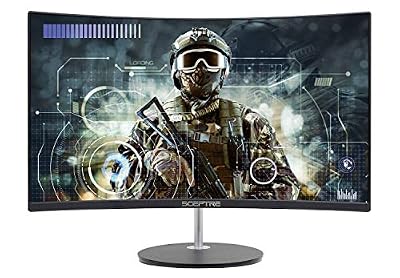
Sceptre Curved 24-inch Gaming Monitor 1080p R1500 98% sRGB HDMI x2 VGA Build-in Speakers, VESA Wall Mount Machine Black (C248W-1920RN Series)



As an Amazon Associate we earn from qualifying purchases. Product prices and availability are accurate as of the date/time indicated.
The Sceptre Curved 24-inch is the compact color-accurate pick. It pairs a strong 98% sRGB coverage figure with a curved 1080p panel, dual HDMI and VGA inputs and a built-in speaker, in a smaller 24-inch footprint. Marketed as a gaming monitor, its real workstation value is that high sRGB number at a low around-$80 price — making accurate color affordable for a small desk.
This is the monitor for a color-aware workstation where space is tight or you want a matched secondary panel. The 98% sRGB coverage keeps edits faithful to standard displays, the 24-inch size suits compact desks and dual-monitor setups, and the curve adds a little comfort. As with its larger sibling it is a 1080p, gaming-first panel rather than a dedicated pro display, so be honest about its limits — but for affordable color accuracy in a small footprint, it is a smart, low-cost workstation choice.
Pros: Strong 98% sRGB coverage, compact 24-inch size, affordable, dual HDMI plus VGA.
Cons: Gaming-first 1080p panel; 24 inches is small for heavy multitasking.
3. HUANUO FlowLift Dual Monitor Stand, Fully Adjustable Desk Mount

HUANUO FlowLift™ Dual Monitor Stand, Fully Adjustable Gaming Monitor Desk Mount for 13–32″ Computer Screens, Full Motion VESA 75x75/100x100 with C-Clamp & Grommet Base, Each Arm Holds 4.4 to 19.8 lbs


As an Amazon Associate we earn from qualifying purchases. Product prices and availability are accurate as of the date/time indicated.
In the interest of honesty, the HUANUO FlowLift is not a monitor at all — it is a fully adjustable dual-monitor desk mount, and it earns its place because ergonomics are a genuine pillar of a good workstation. It holds two displays on adjustable arms, letting you set height, tilt, swivel and rotation to bring both screens to a comfortable, eye-level position. At around $60 it is an ergonomic upgrade rather than a display purchase.
This is the pick for the professional building a serious dual-screen setup who wants correct posture and a tidy desk. Raising monitors to eye level reduces neck and back strain over long days, the adjustable arms let you angle each panel exactly where you want it, and floating the displays frees the desk surface beneath them. Pair it with one or two of the panels on this list — the Sceptre 24-inch makes an ideal partner — to turn a flat, fatiguing setup into an ergonomic workstation. Just remember you supply the monitors yourself.
Pros: Fully adjustable dual mount, height/tilt/swivel/rotate, frees desk space, real ergonomic gain.
Cons: Not a monitor — it is a stand; you must add your own displays.
4. KOORUI 24-inch Computer Monitor FHD 100Hz VA, 4000:1 Contrast

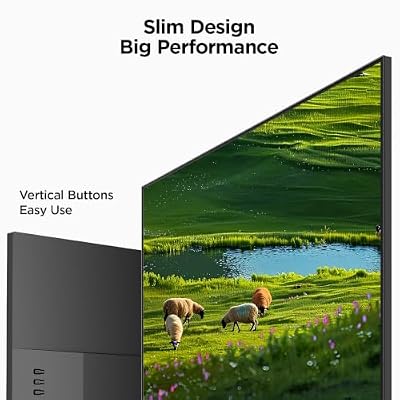
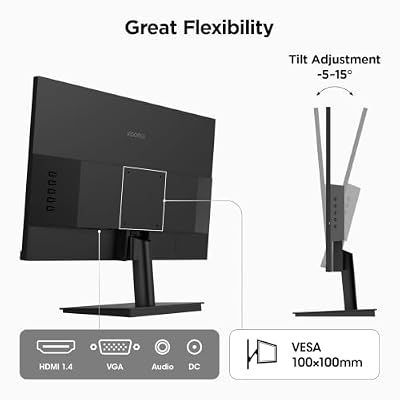
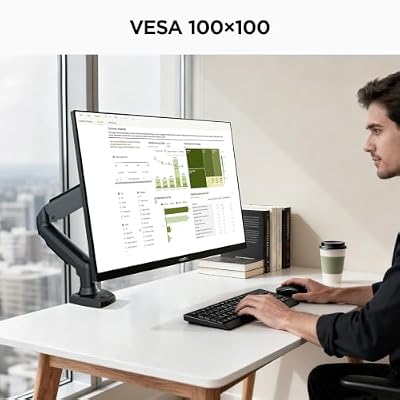
KOORUI 24-inch Computer Monitor FHD 100Hz VA HDMI/VGA, Audio Out | 4000:1 Contrast Ratio, TÜV Eye Care, Easy-Setup, VESA mount & tilt, Ultra-Slim Display for Home Office, Study and Daily Use




As an Amazon Associate we earn from qualifying purchases. Product prices and availability are accurate as of the date/time indicated.
The KOORUI 24-inch is the high-contrast everyday-work pick. It is a 24-inch Full HD VA panel with a 100Hz refresh and a strong 4000:1 contrast ratio — VA technology’s deep blacks and high contrast make text and interfaces look crisp and easy on the eyes for general productivity. At around $80 it is a well-rounded, affordable workstation display for office tasks.
This is the monitor for the worker whose day is documents, spreadsheets, email, code and browsing rather than color-critical editing. The high 4000:1 contrast gives punchy, legible text and comfortable viewing, the 100Hz refresh keeps scrolling and window movement smooth, and the 24-inch FHD panel is a sensible, no-fuss size for a single-screen desk. VA panels do not match IPS for off-angle color consistency, so for serious color work the Sceptre sRGB panels are better — but for sharp, high-contrast everyday productivity, the KOORUI is a solid value.
Pros: High 4000:1 VA contrast, crisp text, 100Hz, 24-inch FHD, good everyday value.
Cons: VA color shifts off-angle; sRGB coverage not specified for color work.
5. SANSUI 32-inch Curved 240Hz Gaming Monitor, FHD 1080P

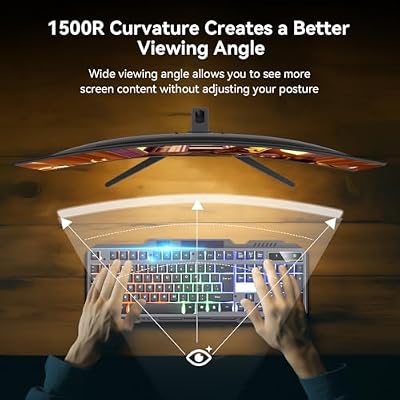
SANSUI 32 Inch Curved 240Hz Gaming Monitor High Refresh Rate, FHD 1080P | Gaming PC Monitor HDMI DP1.4, 1500R Curvature, 1Ms MPRT, HDR,Metal Stand,VESA Compatible(DP Cable Incl.)




As an Amazon Associate we earn from qualifying purchases. Product prices and availability are accurate as of the date/time indicated.
The SANSUI 32-inch is the large multitasking-canvas pick — and, to be candid, a gaming-first panel that earns its workstation place on sheer screen real estate. It is a big 32-inch curved Full HD display whose headline 240Hz refresh is aimed at gamers, but for a workstation the value is the generous space for multiple windows, documents and reference material side by side. At around $180 it is the premium option here.
This is the monitor for the professional who multitasks heavily and wants one large screen instead of two smaller ones. The 32-inch size lets you tile several windows comfortably, the curve keeps the wide panel’s edges in view, and the high refresh rate is a bonus if you also game after hours. Be realistic about the trade-offs: 1080p stretched across 32 inches looks soft for detailed work, and sRGB color accuracy is not its stated strength. For roomy multitasking and crossover use, though, it delivers a lot of screen for the money.
Pros: Large 32-inch curved canvas, plenty of multitasking space, high refresh for crossover gaming.
Cons: 1080p across 32 inches is soft; gaming-first, not color-accurate.
6. MNN 15.6-inch Portable Monitor FHD 1080P USB-C/HDMI, Ultra-Slim IPS

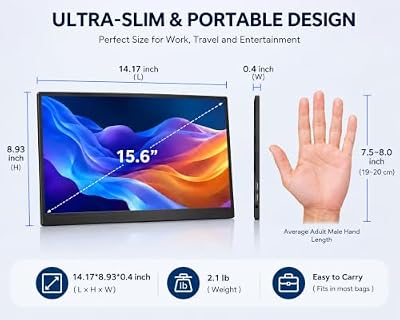
MNN 15.6" FHD 60Hz Portable Monitor USB-C HDMI IPS HDR Gaming Laptop | 15.6" FHD IPS HDR, USB-C one-cable, PC/Mac/Phone/Switch, Smart Case,Laptop , low blue, work&game


As an Amazon Associate we earn from qualifying purchases. Product prices and availability are accurate as of the date/time indicated.
Rounding out the list is the MNN 15.6-inch portable, the pick for a portable second screen. It is an ultra-slim IPS panel at 1080p FHD with USB-C and HDMI inputs, drawing video and power down a single USB-C cable from a compatible laptop. At around $50 it is the cheapest item here and a flexible way to extend a mobile workstation wherever you happen to be working.
This is the display for the professional who works from a laptop and needs more screen on the move — a second panel for reference, palettes, email or a secondary document while travelling or hot-desking. The IPS panel offers wide viewing angles and reasonable color for portable work, single-cable USB-C keeps the setup tidy, and the ultra-slim build slips into a laptop bag. It is small and relies on host power, so it complements rather than replaces a desktop workstation monitor — but as portable extra space, it is a practical, low-cost addition.
Pros: Single-cable USB-C, ultra-slim IPS, wide viewing angles, portable extra workspace, low cost.
Cons: Only 15.6 inches and relies on host power; a companion, not a main display.
How to Choose a Workstation Monitor
For a workstation, color accuracy is the first thing to assess if your work involves any visual output. The key figure is sRGB coverage — the percentage of the standard sRGB color space the panel reproduces — and the closer to 100%, the more faithfully your edits match what others see. The Sceptre panels here, at 99% and 98% sRGB, lead on this metric and are the right starting point for photo, design, web and document work where color matters. If your day is purely text and numbers, color coverage is less critical and contrast and comfort take priority instead.
Resolution and screen real estate determine how much you can see and how efficiently you work. A larger panel like a 27 or 32-inch fits more windows, documents and toolbars at once, but pixel density matters too — 1080p stretched across a big screen, as on the SANSUI 32-inch, looks softer than the same resolution on a smaller panel, which can tire the eyes during detailed work. Balance the productivity of extra space against the sharpness you need, and consider whether one large screen or a dual-monitor setup suits your workflow better.
Ergonomics are the pillar people most often overlook, and they decide whether you can work comfortably all day. A monitor sitting too low forces you to hunch, straining your neck and back over time. A fully adjustable stand or arm like the HUANUO FlowLift — which, remember, is a mount rather than a monitor — lets you set height, tilt and angle so the top of the screen is around eye level, and frees desk space beneath. If your panel’s own stand is basic, as several here are, an aftermarket arm is one of the best workstation investments you can make.
Finally, be honest about what each product really is and match it to your work. Some panels here are gaming-first or crossover displays — the SANSUI and the Sceptre monitors are marketed for gaming — and the MNN is a small portable companion rather than a main screen, while the HUANUO is an ergonomic accessory. That does not disqualify them: a high-sRGB ‘gaming’ panel makes a fine color-accurate workstation display, and a portable adds genuine flexibility. Identify your priority — color, resolution, multitasking space or ergonomics — choose the product on this list that serves it for what it actually is, and build the rest of the workstation around it.
Frequently Asked Questions
What is the most important feature in a workstation monitor?
It depends on your work, but for any visual task, color accuracy comes first — look for high sRGB coverage, like the 99% and 98% on the Sceptre panels here, so your output matches what others see. For text-and-numbers work, contrast and comfortable ergonomics matter more than color. Across the board, resolution, screen size and the ability to position the display at eye level are the qualities that make a monitor genuinely productive.
Can a gaming monitor work as a workstation display?
Yes, often very well — just judge it on workstation criteria. Several panels here, including the Sceptre monitors and the SANSUI 32-inch, are marketed for gaming but serve professional use through strong sRGB coverage or generous screen space. Check the color accuracy if your work is color-critical, and remember that a high refresh rate, while great for gaming, adds little to most office tasks. A gaming-first panel with the right specs makes a fine workstation screen.
Do I need a monitor arm or stand for a workstation?
It is one of the best ergonomic upgrades you can make. Many monitors, including several here, ship with basic stands that sit too low, encouraging you to hunch. A fully adjustable mount like the HUANUO FlowLift dual stand lets you raise screens to eye level and angle them precisely, reducing neck and back strain over long days and freeing desk space. Note it is a mount only — you supply the monitors — but the comfort gain is substantial.
Is a single large monitor or dual monitors better for work?
Both work well; it comes down to workflow. A single large screen like the SANSUI 32-inch lets you tile several windows on one continuous canvas with no bezel in the middle, ideal for spreading out documents and references. A dual-monitor setup — for instance two Sceptre panels on the HUANUO stand — keeps tasks physically separated and is easy to expand. Choose based on whether you prefer one uninterrupted canvas or distinct, dedicated screens.
Related Guides
- Best Monitors
- Best Monitors for Content Creation
- Best 4K Monitors
- Best Monitor Arms for Your Desk
- Best Portable Monitors
- Best Office Chairs for Working From Home
Affiliate Disclosure: As an Amazon Associate, we earn from qualifying purchases. If you click a link and make a purchase, we may earn a small commission at no extra cost to you. Prices and availability are accurate as of publication and may change.


