

- Top Pick: Sceptre Curved 24-inch Gaming Monitor 1080p R1500 98% sRGB HDMI x2 VGA Build-in Speakers, VESA Wall Mount Machine Black (C248W-1920RN Series)
- Best Value: New! Sceptre Curved 24-inch Gaming Monitor 1ms 100Hz 1500R DisplayPort HDMI X2 Eye Care 100% sRGB Build-in Speakers, Machine Black 2026 (C248W-FW100T Series)
- Premium Choice: New! Sceptre Curved 24-inch Prime Gaming Monitor 1080p 1500R 1ms up to 180Hz DisplayPort x2 HDMI x2 Build-in Speakers, Machine Black 2027 (C248B-FW180T Series)
The Sceptre Curved 24-inch Gaming Monitor is one of the most familiar names in entry-level displays, and for good reason. It pairs a gently curved 1500R VA panel with a Full HD resolution, a 75Hz refresh rate and Adaptive Sync support, all for around $80. With more than 22,600 buyer reviews behind it, this is a display that has been tested by an enormous number of owners. This Sceptre Curved 24-inch review covers the panel, motion handling, gaming experience and whether this ultra-budget monitor still earns a place on a desk in 2026.
- Sceptre Curved 24-inch at a Glance
- Image Quality: Panel, Resolution and Colour
- Refresh Rate and Motion Performance
- Gaming Experience: Adaptive Sync and HDR
- Design, Connectivity and Ergonomics
- Who Is the Sceptre Curved 24-inch For?
- Pros and Cons
- Is the Sceptre Curved 24-inch Worth It?
- Frequently Asked Questions
- More Gaming Monitor Reviews
- Related Articles
- Related Articles
- Related Guides

Sceptre Curved 24-inch Gaming Monitor 1080p R1500 98% sRGB HDMI x2 VGA Build-in Speakers, VESA Wall Mount Machine Black (C248W-1920RN Series)


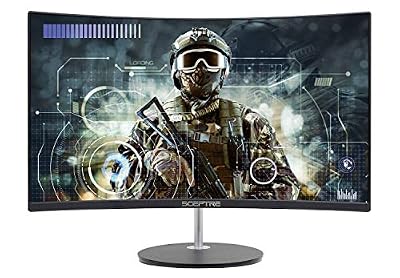

As an Amazon Associate we earn from qualifying purchases. Product prices and availability are accurate as of the date/time indicated.
🛒 Best Price Today on Amazon
Prime members get fast, free shipping on everything above, plus member-only deals. New members get a 30-day free trial — cancel anytime.
As an Amazon Associate we earn from qualifying purchases.






Sceptre Curved 24-inch at a Glance
| Component | Specification |
|---|---|
| Screen size & type | 24″ curved (1500R) VA |
| Resolution | Full HD 1920×1080 |
| Panel technology | VA |
| Refresh rate | 75Hz |
| Response time | VA-class |
| Adaptive sync | Adaptive Sync |
| HDR & brightness | 250 nits, 98% sRGB, 3000:1 contrast |
| Ports | 2x HDMI, VGA, built-in speakers |
| Price | Around $80 |
Image Quality: Panel, Resolution and Colour
The Sceptre uses a VA panel, and that choice shapes the experience. VA technology is known for strong contrast, and the quoted 3000:1 ratio reflects that — blacks look genuinely dark rather than the washed-out grey common on cheaper IPS or TN panels. For watching films or playing atmospheric single-player games in a dim room, that deep contrast makes a real difference. Colour coverage is rated at 98% sRGB, which is respectable for the price and means everyday content and games look accurate enough for casual use.
The Full HD 1920×1080 resolution is sensible for a 24-inch screen. At this size, 1080p produces a reasonably sharp image without demanding a powerful graphics card, which keeps the whole setup affordable. The gentle 1500R curve wraps the picture slightly towards the viewer, and at 24 inches that adds a subtle sense of immersion without distorting the image. Brightness of 250 nits is modest but adequate for a typical room; this is not a panel for a sun-filled space, but in normal indoor lighting it is perfectly usable.
Refresh Rate and Motion Performance
The Sceptre runs at 75Hz, a modest step above the standard 60Hz of an office monitor. That extra 15Hz is genuinely noticeable: scrolling looks a little smoother, and motion in games feels slightly cleaner than on a basic 60Hz display. It is an honest, incremental improvement rather than a transformative one, and it suits the casual audience this monitor is built for.
It is important to be clear about what 75Hz is not. Competitive players who chase every advantage in fast shooters will want a 144Hz or higher panel, where the motion clarity and reduced input feel make a tangible difference. The Sceptre is not built for that. As a VA panel it can also show a little smearing in very dark, fast-moving scenes, a known characteristic of the technology. For single-player adventures, strategy titles and relaxed evening gaming, however, the 75Hz refresh is comfortably smooth enough.
Gaming Experience: Adaptive Sync and HDR
The Sceptre includes Adaptive Sync, which is a welcome feature at this price. Adaptive Sync allows the monitor to align its refresh rate with the frame rate coming from the graphics card, which reduces screen tearing — the distracting horizontal split that appears when frames and refreshes fall out of step. On a budget machine that may not hold a perfectly steady frame rate, this helps keep the picture looking tidy and consistent.
There is no HDR support here, and at this price that is entirely expected. Genuine HDR needs high brightness and local dimming that an $80 monitor simply cannot provide. What the Sceptre offers instead is a clean, tear-reduced standard-dynamic-range image with strong native contrast. For casual and single-player gaming that is a perfectly enjoyable experience, and the deep VA blacks arguably do more for atmosphere than a token HDR badge would.
Design, Connectivity and Ergonomics
The Sceptre keeps its design plain and unfussy, with slim bezels on the top and sides that help the screen look tidier than its price suggests. Connectivity covers two HDMI inputs plus a legacy VGA port, which is enough to connect a PC and a console at the same time. Built-in speakers are included; they are basic and best treated as a convenience for system sounds rather than a real audio solution, but having them avoids needing separate speakers from day one.
Ergonomics are where the budget shows. The stand offers little adjustment, so most owners will set the tilt and leave it. The panel does include VESA mounting support, however, which is a genuinely useful inclusion — it means you can fit the Sceptre to a monitor arm or wall mount and gain full height and position adjustment that way. For a display at this price, the presence of VESA compatibility is a thoughtful touch.
Who Is the Sceptre Curved 24-inch For?
The Sceptre is for the buyer who wants a capable, no-drama monitor for the least money possible. If you are building a first gaming PC on a tight budget, setting up a console for a child or a guest room, or simply need a second screen that can also handle casual gaming, this monitor fits the role well. Its enormous base of more than 22,600 buyer reviews is itself reassuring — this is a thoroughly proven product, not an unknown quantity.
It is not the monitor for a competitive player. Anyone serious about fast-paced shooters will find the 75Hz refresh limiting and should look to a 144Hz or higher panel. Equally, buyers who want a large, sharp, high-resolution display for detailed work will want to spend more. But for casual gaming, single-player titles and everyday use, the Sceptre delivers exactly what it promises at a price that is hard to argue with.
Pros and Cons
Pros: Very low price; strong VA contrast at 3000:1 for deep blacks; gentle 1500R curve adds subtle immersion; Adaptive Sync reduces tearing; dual HDMI plus VGA; VESA mount support; an enormous, reassuring base of buyer reviews.
Cons: 75Hz refresh is not suited to competitive gaming; modest 250-nit brightness; no HDR; limited stand adjustment; VA panels can show slight smearing in dark, fast motion; basic built-in speakers.
Is the Sceptre Curved 24-inch Worth It?
At around $80 the Sceptre Curved 24-inch Gaming Monitor is a sensible, honest budget buy. It does not try to be a high-refresh esports display, and it should not be judged as one. What it offers instead is a curved VA panel with genuinely strong contrast, a mild refresh-rate uplift over a basic office screen, Adaptive Sync to keep the picture clean, and the long-term reassurance of a vast review base. For casual and single-player gaming on a strict budget, it is easy to recommend. Buyers who want higher refresh rates for competitive play should plan to spend more and look at a faster panel.
Frequently Asked Questions
Is the Sceptre Curved 24-inch good for competitive gaming?
Not really. Its 75Hz refresh rate is a small step above 60Hz and suits casual and single-player gaming. Competitive players in fast shooters should choose a 144Hz or higher monitor for clearer motion.
Does the Sceptre Curved 24-inch have good contrast?
Yes. It uses a VA panel with a quoted 3000:1 contrast ratio, so blacks look genuinely deep — a real strength for films and atmospheric single-player games in a dim room.
Can the Sceptre Curved 24-inch be wall mounted?
Yes. Despite its low price, the monitor includes VESA mounting support, so you can fit it to a monitor arm or wall mount and gain the height adjustment the basic stand lacks.
Does the Sceptre Curved 24-inch have built-in speakers?
Yes, it includes basic built-in speakers. They are fine for system sounds and casual use, but most owners will prefer separate speakers or a headset for proper audio.
More Gaming Monitor Reviews
- SANSUI 24-inch 180Hz Gaming Monitor Review (ES-G24F4)
- Acer Nitro KG241Y Gaming Monitor Review: 165Hz FHD VA
- Dell 24 240Hz Gaming Monitor Review (SE2426HG)
- SANSUI 27-inch Curved 240Hz Gaming Monitor Review
- AOC 27-inch QHD 240Hz Gaming Monitor Review
- Acer Nitro 27-inch QHD 180Hz Gaming Monitor Review
- Samsung Odyssey G5 (G51F) Gaming Monitor Review: 27-inch QHD
- ASUS TUF Gaming VG27AQM5A Review: 27-inch 300Hz QHD
Affiliate Disclosure: As an Amazon Associate, we earn from qualifying purchases. If you click a link and make a purchase, we may earn a small commission at no extra cost to you. Prices and availability are accurate as of publication and may change.
Related Articles
Looking for more on this topic? Browse the hand-picked guides below — each one applies the same scoring rubric used in this review.










