

The M.2 SSD is the modern default for fast storage: a slim, gum-stick-shaped drive that slots directly into a motherboard M.2 socket with no cables, running over the high-speed PCIe NVMe interface rather than the older SATA standard. Every drive in this guide is a genuine M.2 2280 NVMe SSD — the most common size — so they all install the same clean way and deliver speeds far beyond any 2.5-inch SATA drive. This guide rounds up the best M.2 SSDs in 2026 across PCIe generations, capacities, and price points, for builders who want the speed and tidiness only the M.2 form factor provides.
- Best M.2 SSDs at a Glance
- 1. WD_BLACK SN850X 2TB NVMe SSD, M.2 2280, Up to 7,300 MB/s
- 2. Samsung 990 PRO SSD 1TB PCIe 4.0 M.2 2280 Internal SSD
- 3. Samsung 980 PRO SSD 2TB PCIe NVMe Gen 4 Gaming M.2 Internal SSD
- 4. WD_BLACK SN850X 2TB NVMe SSD with Heatsink, M.2 2280
- 5. SAMSUNG 970 EVO Plus 2TB NVMe M.2 Internal SSD with V-NAND
- 6. SAMSUNG 970 EVO 500GB M.2 NVMe Internal SSD
- How to Choose an M.2 SSD
- Frequently Asked Questions
- Related Guides
- Related Articles
Our picks were chosen on what defines a great M.2 drive: real NVMe speed and the PCIe generation behind it, capacity, thermal design including optional heatsinks, and value. We have focused exclusively on M.2 drives — there are no 2.5-inch or external drives masquerading here — and span trusted Gen 3 performers up to flagship Gen 4 gaming drives, with prices from around $250 to around $482. Below is an at-a-glance comparison of all six, then a closer look at each and a buyer’s guide built around PCIe generations, capacity, cooling, and the M.2 slot itself — the things that genuinely matter when you buy in this form factor.
As an Amazon Associate we earn from qualifying purchases at no extra cost to you.


🛒 Best Price Today on Amazon
Prime members get fast, free shipping on everything above, plus member-only deals. New members get a 30-day free trial — cancel anytime.
Best M.2 SSDs at a Glance
| M.2 Drive | Best For | Standout Spec | Approx Price |
|---|---|---|---|
| WD_BLACK SN850X 2TB NVMe M.2 | Best Gen 4 gaming drive | 2TB, up to 7,300MB/s, M.2 2280 | around $350 |
| Samsung 990 PRO 1TB PCIe 4.0 M.2 | Flagship efficiency, 1TB | 1TB Gen 4 M.2 2280 | around $250 |
| Samsung 980 PRO 2TB PCIe Gen 4 M.2 | High-capacity Gen 4 | 2TB Gen 4 M.2 gaming | around $482 |
| WD_BLACK SN850X 2TB with Heatsink | Gen 4 with cooling | 2TB, heatsink, M.2 2280 | around $400 |
| Samsung 970 EVO Plus 2TB NVMe M.2 | Value 2TB Gen 3 | 2TB Gen 3 M.2, V-NAND | around $365 |
| Samsung 970 EVO 500GB NVMe M.2 | Trusted Gen 3 boot drive | 500GB M.2 NVMe | around $279 |
1. WD_BLACK SN850X 2TB NVMe SSD, M.2 2280, Up to 7,300 MB/s

WD_BLACK SN850X 2TB NVMe SSD with Heatsink - M.2 2280, Up to 7,300 MB/s Read speeds, Up to 6,300 MB/s write speeds, Gaming Expansion, High Performance Internal Solid State Drive - WDS200T2XHE


As an Amazon Associate we earn from qualifying purchases. Product prices and availability are accurate as of the date/time indicated.
The WD_BLACK SN850X 2TB is the M.2 drive to lead with — a flagship PCIe Gen 4 NVMe SSD built specifically for gaming, in the standard M.2 2280 size. Rated for sequential reads up to 7,300MB/s and writes up to 6,300MB/s, it sits near the top of what Gen 4 offers, and at around $350 for 2TB it pairs that speed with genuinely useful capacity. It is the all-round high-performance pick.
This is the drive for the gamer or power user who wants a fast, roomy primary M.2 SSD that does everything brilliantly. The Gen 4 speeds make for swift boots, near-instant application launches and rapid game loads, the 2TB capacity holds a large library without compromise, and WD’s Game Mode firmware is tuned for sustained gaming workloads. As a bare M.2 2280 drive it slots into a motherboard M.2 socket with no cables; on boards with built-in M.2 cooling no add-on heatsink is needed. For the best balance of M.2 speed and capacity, the SN850X is the standout.
Pros: Top-tier Gen 4 speeds, roomy 2TB capacity, gaming-tuned firmware, clean cableless M.2 2280 install.
Cons: Gen 4 speeds need a Gen 4 M.2 slot; bare drive benefits from board-level cooling.
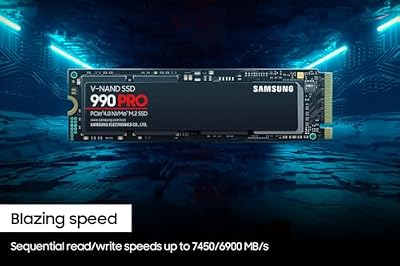
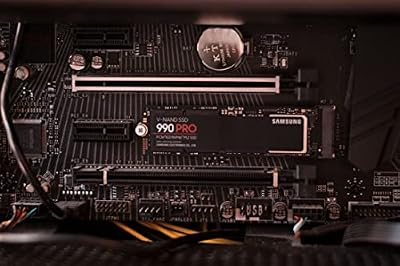
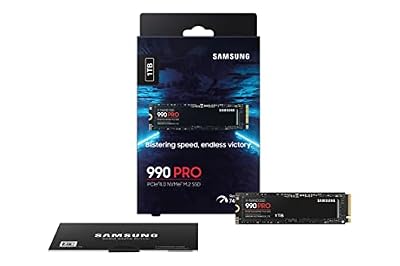
2. Samsung 990 PRO SSD 1TB PCIe 4.0 M.2 2280 Internal SSD

Samsung SSD 990 PRO 1TB, PCIe 4.0 M.2 2280, Up to 7,450 MB/s | NVMe Internal Solid State Hard Drive for High End Computing, Gaming, and Heavy Duty Workstations (MZ-V9P1T0B/AM)





As an Amazon Associate we earn from qualifying purchases. Product prices and availability are accurate as of the date/time indicated.
The Samsung 990 PRO 1TB is the flagship-efficiency M.2 pick. As Samsung’s top-tier PCIe 4.0 drive in the M.2 2280 form factor, it pushes Gen 4 close to its limits while being notably power-efficient and thermally well-behaved. At around $250 for 1TB it is the most affordable entry on this list and a showcase of how polished a modern flagship M.2 drive can be.
This is the drive for the builder who wants Samsung’s best M.2 engineering and a fast, efficient 1TB system drive. The 990 PRO delivers blistering Gen 4 speeds for boots, loads and creative work, its efficiency keeps temperatures in check in compact or laptop builds, and Samsung Magician adds polished management. As an M.2 2280 drive it installs directly into a motherboard socket. 1TB suits a fast primary drive; step up in capacity if you need a single drive for a huge library. For flagship M.2 quality at a sensible price, the 990 PRO 1TB is an excellent choice.
Pros: Flagship Gen 4 performance, power-efficient and cool-running, polished Samsung software, great M.2 value.
Cons: 1TB rather than 2TB; full Gen 4 speed needs a Gen 4 M.2 slot.
3. Samsung 980 PRO SSD 2TB PCIe NVMe Gen 4 Gaming M.2 Internal SSD

Samsung 980 PRO SSD 2TB PCIe NVMe Gen 4 Gaming M.2 Internal Solid State Drive Memory Card, Maximum Speed, Thermal Control MZ-V8P2T0B/AM


As an Amazon Associate we earn from qualifying purchases. Product prices and availability are accurate as of the date/time indicated.
The Samsung 980 PRO 2TB is the high-capacity Gen 4 pick. A previous-generation Samsung flagship in the M.2 2280 form factor, it pairs PCIe 4.0 NVMe speed with a large 2TB capacity aimed squarely at gaming and demanding workloads. At around $482 it is the most expensive drive here, reflecting both its capacity and Samsung’s flagship pedigree.
This is the drive for someone who wants a large, fast Samsung M.2 SSD and trusts the 980 PRO’s well-established reputation. The Gen 4 speeds keep boots, loads and transfers swift, the 2TB capacity comfortably holds a big game library and project files, and Samsung Magician rounds out the package. As an M.2 2280 drive it slots straight into a motherboard socket with no cables. Pricing aside, it is a proven high-capacity flagship; on boards with M.2 cooling it runs comfortably. For a large-capacity Gen 4 Samsung M.2 drive, the 980 PRO 2TB delivers.
Pros: Large 2TB Gen 4 capacity, proven Samsung flagship performance, gaming-focused, clean M.2 2280 install.
Cons: Most expensive pick here; needs a Gen 4 M.2 slot for full speed.
4. WD_BLACK SN850X 2TB NVMe SSD with Heatsink, M.2 2280
WD_BLACK SN850X 2TB NVMe SSD with Heatsink - M.2 2280, Up to 7,300 MB/s Read speeds, Up to 6,300 MB/s write speeds, Gaming Expansion, High Performance Internal Solid State Drive - WDS200T2XHE
As an Amazon Associate we earn from qualifying purchases. Product prices and availability are accurate as of the date/time indicated.
This WD_BLACK SN850X 2TB with Heatsink is the Gen 4 pick for builds that want cooling included. It is the same flagship M.2 2280 NVMe drive as the bare SN850X — up to 7,300MB/s reads, 2TB capacity, gaming-tuned firmware — but ships with a low-profile heatsink pre-attached. At around $400 the heatsink version carries a small premium over the bare drive for the added thermal headroom.
This is the drive to choose when your motherboard lacks its own M.2 cooling, or for desktop builds where you want sustained Gen 4 performance without sourcing a separate heatsink. The integrated cooler helps the drive maintain its high speeds under prolonged load, the 2TB capacity and Gen 4 speeds match the bare model, and it still installs into a standard M.2 2280 socket. Note the heatsink can interfere with clearance in some compact cases or under certain coolers, so check fitment. For Gen 4 M.2 speed with cooling handled, this is the convenient pick.
Pros: Top Gen 4 speeds with pre-fitted heatsink, sustained performance, roomy 2TB, no separate cooler needed.
Cons: Premium over bare drive; heatsink can complicate clearance in tight cases.
5. SAMSUNG 970 EVO Plus 2TB NVMe M.2 Internal SSD with V-NAND

SAMSUNG (MZ-V7E500BW) 970 EVO SSD 500GB - M.2 NVMe Interface Internal Solid State Drive with V-NAND Technology, Black/Red


As an Amazon Associate we earn from qualifying purchases. Product prices and availability are accurate as of the date/time indicated.
The Samsung 970 EVO Plus 2TB is the value high-capacity Gen 3 pick. A PCIe Gen 3 NVMe drive in the M.2 2280 form factor, it is built on Samsung’s acclaimed V-NAND and remains one of the most respected M.2 drives ever made. At around $365 for 2TB it offers serious capacity and proven reliability for buyers who do not need the absolute peak speeds of Gen 4.
This is the drive for the builder who wants a large, dependable M.2 SSD and whose motherboard is Gen 3, or who simply values the 970 EVO Plus’s track record over chasing Gen 4 numbers. Its NVMe speeds are still several times faster than any SATA drive, the 2TB capacity holds a big library, and the V-NAND build is famously reliable. As an M.2 2280 drive it slots straight into a motherboard socket. On Gen 4 boards it runs at Gen 3 speeds, which remain excellent for most users. For a roomy, trusted Gen 3 M.2 drive, the 970 EVO Plus 2TB is a smart choice.
Pros: Roomy 2TB Gen 3 NVMe, acclaimed Samsung V-NAND reliability, cableless M.2 install, strong value.
Cons: Gen 3 speeds, slower than Gen 4 picks; not the fastest at this price.
6. SAMSUNG 970 EVO 500GB M.2 NVMe Internal SSD
SAMSUNG (MZ-V7E500BW) 970 EVO SSD 500GB - M.2 NVMe Interface Internal Solid State Drive with V-NAND Technology, Black/Red
As an Amazon Associate we earn from qualifying purchases. Product prices and availability are accurate as of the date/time indicated.
Rounding out the list is the Samsung 970 EVO 500GB, the trusted Gen 3 boot-drive pick. A PCIe Gen 3 NVMe drive in the M.2 2280 form factor on Samsung’s mature V-NAND, it is a smaller-capacity version of one of the most reliable M.2 lines ever produced. At around $279 it is sized as a fast, dependable system drive rather than bulk storage.
This is the drive to choose when you want a proven Samsung M.2 SSD for your operating system and core applications, with a larger drive handling games and files. The NVMe speeds make boots and launches swift, the 500GB capacity suits a system disk, and the 970 EVO’s reliability record is excellent. As an M.2 2280 drive it installs directly into a motherboard socket with no cables. Pair it with a roomier M.2 or SATA drive for storage. For a trusted, fast Gen 3 M.2 boot drive, the 970 EVO 500GB rounds out the list as a dependable, well-regarded option.
Pros: Trusted Gen 3 NVMe speed, reliable Samsung V-NAND, cableless M.2 install, ideal fast boot drive.
Cons: Only 500GB; Gen 3 speeds and a higher price per gigabyte than larger drives.
How to Choose an M.2 SSD
The first thing to understand about M.2 SSDs is that the name describes the form factor, not the speed — and every drive in this guide is a genuine M.2 2280 NVMe drive, the slim gum-stick design that slots directly into a motherboard M.2 socket. What varies is the PCIe generation behind the interface. Gen 4 drives like the WD_BLACK SN850X, Samsung 990 PRO and 980 PRO deliver the highest speeds, while Gen 3 drives like the 970 EVO Plus and 970 EVO are still far faster than any SATA SSD. Match the generation to your motherboard and your needs.
Capacity is the next decision, and M.2 drives span a wide range. A 500GB drive like the 970 EVO suits a fast boot disk, 1TB like the 990 PRO is a versatile single drive, and 2TB options like the SN850X and 970 EVO Plus hold large game libraries and project files without compromise. Decide whether this M.2 drive is your only storage — in which case lean toward 2TB — or a fast system drive paired with bulk storage elsewhere, where a smaller, cheaper capacity makes sense.
Cooling matters for sustained Gen 4 performance, which is why heatsinks enter the conversation. Fast Gen 4 drives can warm up under prolonged heavy load and throttle to protect themselves. Many modern motherboards include their own M.2 heatsinks, in which case a bare drive like the standard SN850X is ideal. If your board lacks cooling, a model with an integrated heatsink — such as the SN850X Heatsink edition — handles it for you, though you should check the heatsink clears your case and cooler, as it can complicate fitment in compact builds.
Finally, confirm the M.2 slot and weigh value. Check that your motherboard has a free M.2 socket and which PCIe generation it supports — a Gen 4 drive works in a Gen 3 slot but only at Gen 3 speeds, so there is little point paying the Gen 4 premium if your board cannot use it. Then compare price per gigabyte: the 990 PRO 1TB is the value entry point, the SN850X 2TB balances speed and capacity, and the 970 EVO Plus 2TB offers roomy Gen 3 storage. Decide on your generation, capacity and cooling needs, confirm the slot fits, and pick the M.2 drive on this list that matches your build. That is how you choose in this form factor with confidence.
Frequently Asked Questions
What is the difference between an M.2 SSD and a SATA SSD?
M.2 describes the slim form factor that plugs straight into a motherboard socket with no cables, and the M.2 drives in this guide all use the fast PCIe NVMe interface. A SATA SSD is the older 2.5-inch type that connects with power and data cables and tops out around 560MB/s. Every drive here is an M.2 NVMe drive, which is several times faster than SATA and far tidier to install.
Do all the drives here fit a standard M.2 slot?
Yes. Every pick is an M.2 2280 NVMe drive — the most common length, 22mm wide and 80mm long — so they fit the standard M.2 sockets on the vast majority of modern motherboards. There are no 2.5-inch or external drives in this guide. Just confirm your board has a free M.2 slot and check whether it supports PCIe Gen 3 or Gen 4 to match the drive you choose.
Do I need a Gen 4 M.2 SSD, or is Gen 3 enough?
It depends on your motherboard and workload. Gen 4 drives like the WD_BLACK SN850X and Samsung 990 PRO offer the highest speeds, but they only reach them in a Gen 4 M.2 slot. Gen 3 drives such as the 970 EVO Plus and 970 EVO are still far faster than SATA and excellent for most gaming and everyday use. If your board is Gen 3, save money with a Gen 3 drive; if it is Gen 4 and you want peak speed, choose Gen 4.
Does an M.2 SSD need a heatsink?
Often not, but it helps for fast Gen 4 drives under sustained load. Many modern motherboards include built-in M.2 heatsinks, which are enough for a bare drive like the standard SN850X. If your board has no M.2 cooling, a model with an integrated heatsink such as the SN850X Heatsink edition prevents thermal throttling — just check it clears your case and CPU cooler, since heatsinks can complicate clearance in tight builds.
Related Guides
- Best NVMe SSDs
- Best SSDs Under $500
- Best SSDs Under $400
- Best Motherboards for Your Build
- Best Gaming PCs
- Best CPU Coolers
Affiliate Disclosure: As an Amazon Associate, we earn from qualifying purchases. If you click a link and make a purchase, we may earn a small commission at no extra cost to you. Prices and availability are accurate as of publication and may change.










