

- Top Pick: GIGABYTE B550 Eagle WIFI6 AMD AM4 ATX Motherboard, Supports Ryzen 5000/4000/3000 Processors, DDR4, 10+3 Power Phase, 2X M.2, PCIe 4.0, USB-C, WIFI6, GbE LAN, PCIe EZ-Latch, EZ-Latch, RGB Fusion
- Best Value: GIGABYTE B550M K AMD AM4 Micro-ATX Motherboard, Supports Ryzen 5000/4000/3000 Series Processors, DDR4, 3+3 Power Phase, 2X M.2, PCIe 4.0, USB 3.2 Gen 1, GbE LAN, Q-Flash
- Premium Choice: GIGABYTE B650 AORUS Elite AX AMD AM5 ATX Motherboard, Support Ryzen 9000/8000/7000 Series, DDR5, 14+2+1 Power Phase, PCIe 5.0 M.2, USB-C 3.2 Gen 2, WIFI6E, 2.5GbE, EZ-Latch, Q-Flash, RGB Fusion
The motherboard is the foundation every other component plugs into, and on a budget it is where smart buyers refuse to overspend. Under $150 you do not get flagship features, but you do get everything a sensible gaming or productivity build actually needs: a solid chipset, dependable power delivery, an M.2 slot for a fast NVMe SSD, and enough expansion for a graphics card and memory. The trick is spending only where it counts and pocketing the rest for a better GPU or more RAM. This guide rounds up the best motherboards under $150 in 2026, leaning on proven, value-focused AMD AM4 boards that have anchored affordable builds for years.
- Best Motherboards under $150 at a Glance
- 1. GIGABYTE B550 AORUS Elite AX V2 AMD AM4 ATX Motherboard, Ryzen 5000/4000
- 2. Gigabyte B550 Gaming X V2 Motherboard (AM4/4xDDR4/HDMI/DVI-D/USB 3.2/M.2)
- 3. MSI MPG AMD B550 Gaming Plus Socket AM4 ATX DDR4-SDRAM Motherboard
- 4. Gigabyte A520M K V2 Motherboard (AM4/2xDDR4/HDMI/D-Sub/M.2/USB 3.2)
- 5. MSI MAG B650 Tomahawk WiFi Gaming Motherboard (AMD Ryzen 9000/8000/7000)
- 6. MSI Intel Z97 LGA 1150 DDR3 USB 3.1 ATX Motherboard (Z97 PC Mate)
- How to Choose a Motherboard under $150
- Frequently Asked Questions
- Related Guides
- Related Articles
Our picks were chosen on what defines a great budget board: a capable chipset for the platform, reliable VRMs and build quality, useful connectivity like M.2 and USB 3.2, and overall value. We have ordered them to lead with the boards that hit the budget-ceiling sweet spot first, with prices from around $64 up toward the $150 mark. A note on honesty up front: most of this list is genuine value AM4, but a couple of entries sit at the edges — one capable AM5 board nudges just past $150, and one older Intel board is included for legacy upgrades — and we flag those clearly. Below is an at-a-glance comparison, then a closer look at each board and a buyer’s guide to chipsets, VRMs and budget motherboard value.
As an Amazon Associate we earn from qualifying purchases at no extra cost to you.


🛒 Best Price Today on Amazon
Prime members get fast, free shipping on everything above, plus member-only deals. New members get a 30-day free trial — cancel anytime.
Best Motherboards under $150 at a Glance
| Motherboard | Best For | Standout Spec | Approx Price |
|---|---|---|---|
| GIGABYTE B550 AORUS Elite AX V2 | Best near-$150 AM4 value | B550, WiFi (AX), strong VRMs | around $140 |
| Gigabyte B550 Gaming X V2 | Mid-budget B550 build | B550, PCIe 4.0, M.2 | around $103 |
| MSI MPG B550 Gaming Plus | Reliable B550 all-rounder | B550 ATX, DDR4, M.2 | around $100 |
| Gigabyte A520M K V2 | Cheapest AM4 board here | A520 micro-ATX, M.2 | around $64 |
| MSI MAG B650 Tomahawk WiFi | AM5 future-proofing (over budget) | B650, DDR5, WiFi — ~$160 | around $160 |
| MSI Z97 PC Mate (LGA 1150) | Legacy Intel upgrades only | Z97, DDR3, older platform | varies |
1. GIGABYTE B550 AORUS Elite AX V2 AMD AM4 ATX Motherboard, Ryzen 5000/4000
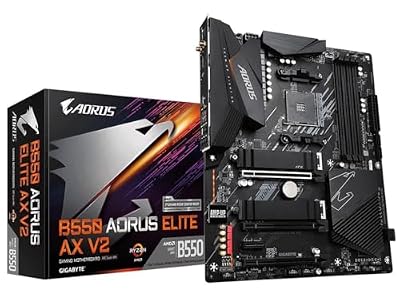
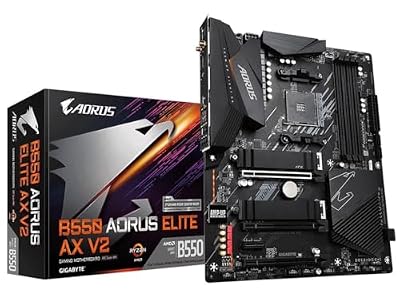
GIGABYTE B550 AORUS Elite AX V2 AMD AM4 ATX Motherboard, Supports Ryzen 5000/4000/3000 Processors, DDR4, 12+2 Power Phase, 2X M.2, PCIe 4.0, Front USB-C, WIFI6, 2.5 GbE LAN, Q-Flash Plus, RGB Fusion
As an Amazon Associate we earn from qualifying purchases. Product prices and availability are accurate as of the date/time indicated.
The GIGABYTE B550 AORUS Elite AX V2 leads this list as the best near-$150 AM4 value. It is a full ATX B550 board that supports Ryzen 5000 and 4000 series CPUs, pairs strong VRMs with PCIe 4.0 support, and notably includes built-in WiFi (the ‘AX’) — a feature many budget boards omit. At around $140 it packs in the most complete feature set on this list while staying under the $150 ceiling.
This is the board to choose when you want the most capability your budget allows without crossing $150. The robust power delivery comfortably handles capable Ryzen CPUs for gaming and productivity, PCIe 4.0 unlocks the fastest NVMe SSDs and modern graphics cards, and the integrated WiFi saves buying a separate adapter. For a builder who wants a well-rounded, near-top-of-budget AM4 board that does not cut the features that matter, the AORUS Elite AX V2 is the standout pick.
Pros: Feature-rich B550 with built-in WiFi, strong VRMs, PCIe 4.0, full ATX — best value near the budget ceiling.
Cons: Closest to the $150 limit; AM4 is a mature platform rather than the newest socket.
2. Gigabyte B550 Gaming X V2 Motherboard (AM4/4xDDR4/HDMI/DVI-D/USB 3.2/M.2)

Gigabyte B550 Gaming X V2 Motherboard (AM4/4xDDR4/HDMI/DVI-D/USB 3.2/M.2)


As an Amazon Associate we earn from qualifying purchases. Product prices and availability are accurate as of the date/time indicated.
The Gigabyte B550 Gaming X V2 is the mid-budget B550 pick. It is a B550 board for AM4 Ryzen CPUs with four DDR4 slots, PCIe 4.0 support, an M.2 slot for fast NVMe storage, USB 3.2 connectivity, and HDMI plus DVI-D outputs. At around $103 it sits comfortably in the middle of the budget range and covers the essentials of a modern AM4 build without frills.
This is the board to choose when you want B550 features — chiefly PCIe 4.0 and a clean upgrade path on AM4 — at a sensible mid-budget price. The four DDR4 slots leave room to expand memory later, the M.2 slot pairs with a fast NVMe drive for quick boots and loads, and USB 3.2 keeps peripherals and external storage speedy. For a dependable, no-nonsense B550 board that spends your money where it matters, the Gaming X V2 is a solid mid-range choice.
Pros: B550 with PCIe 4.0, four DDR4 slots, M.2 and USB 3.2, sensible mid-budget pricing.
Cons: Plain feature set with no built-in WiFi; basic VRMs versus higher-tier B550 boards.
3. MSI MPG AMD B550 Gaming Plus Socket AM4 ATX DDR4-SDRAM Motherboard


As an Amazon Associate we earn from qualifying purchases. Product prices and availability are accurate as of the date/time indicated.
The MSI MPG B550 Gaming Plus is the reliable B550 all-rounder. It is a well-regarded ATX B550 board for AM4 Ryzen CPUs with DDR4 support, PCIe 4.0, and MSI’s solid build quality and BIOS. At around $100 it hits the value sweet spot for a dependable mainstream board that has earned a strong reputation in budget gaming builds.
This is the board to choose when you want a trusted, balanced B550 foundation around the $100 mark. The B550 chipset brings PCIe 4.0 for fast SSDs and GPUs, the power delivery is dependable for capable Ryzen processors, and MSI’s Gaming Plus line is known for stability and a friendly BIOS that makes setup and any memory tuning straightforward. For a no-drama, well-rounded AM4 board from a major brand at a fair price, the MPG B550 Gaming Plus is an easy recommendation.
Pros: Trusted B550 ATX board, PCIe 4.0, dependable VRMs, friendly MSI BIOS, great value around $100.
Cons: DDR4 platform; lacks built-in WiFi and the extras of pricier boards.
4. Gigabyte A520M K V2 Motherboard (AM4/2xDDR4/HDMI/D-Sub/M.2/USB 3.2)


As an Amazon Associate we earn from qualifying purchases. Product prices and availability are accurate as of the date/time indicated.
The Gigabyte A520M K V2 is the cheapest board on this list and the entry-level AM4 pick. It is a compact micro-ATX A520 board for AM4 Ryzen CPUs with two DDR4 slots, an M.2 slot, USB 3.2, and HDMI plus D-Sub outputs. At around $64 it is the budget foundation for an affordable build where keeping the motherboard cost minimal frees money for other components.
This is the board to choose for the tightest budgets or a compact build, with one honest caveat: the A520 chipset does not support PCIe 4.0 or CPU overclocking, so it is best paired with a non-overclocked Ryzen chip and a PCIe 3.0 SSD. Within those limits it does its job well — the M.2 slot and USB 3.2 cover modern essentials, the micro-ATX size suits small cases, and the low price is its whole appeal. For a basic, reliable, genuinely cheap AM4 board, the A520M K V2 delivers.
Pros: Lowest price here, compact micro-ATX, M.2 and USB 3.2, ideal cost-saving foundation.
Cons: A520 chipset: no PCIe 4.0 and no overclocking; only two DDR4 slots.
5. MSI MAG B650 Tomahawk WiFi Gaming Motherboard (AMD Ryzen 9000/8000/7000)

MSI MAG B650 Tomahawk WiFi Gaming Motherboard (AMD Ryzen 9000/8000/7000 Series Processors, AM5, DDR5, PCIe 4.0, M.2, SATA 6Gb/s, USB 3.2 Gen 2, HDMI/DP, Wi-Fi 6E, Bluetooth 5.3, 2.5Gbps LAN, ATX)


As an Amazon Associate we earn from qualifying purchases. Product prices and availability are accurate as of the date/time indicated.
The MSI MAG B650 Tomahawk WiFi is included with an honest disclaimer: at around $160 it sits just over the $150 budget, but it earns a mention as the future-proofing pick. It is a modern AM5 board supporting Ryzen 9000, 8000 and 7000 CPUs with DDR5 memory, PCIe expansion and built-in WiFi — a genuinely current platform rather than the mature AM4 boards that fill most of this list. If you can stretch slightly past budget, it buys you the newest socket.
This is the board to consider when value matters but you also want longevity, and you are willing to nudge a little over $150 to get it. AM5 with DDR5 is the current AMD platform, so it offers a longer upgrade runway than AM4, the Tomahawk line is well regarded for strong VRMs and features, and integrated WiFi rounds it out. The trade-off is plain: it breaks the strict under-$150 rule, and an AM5 build also requires pricier DDR5 memory. If future-proofing outweighs hitting the exact budget, the B650 Tomahawk is the standout step-up.
Pros: Modern AM5 platform, DDR5 support, built-in WiFi, strong Tomahawk VRMs, long upgrade runway.
Cons: Sits over the $150 budget at about $160; AM5 also needs more expensive DDR5 memory.
6. MSI Intel Z97 LGA 1150 DDR3 USB 3.1 ATX Motherboard (Z97 PC Mate)
Rounding out the list is the MSI Z97 PC Mate, included strictly as a legacy upgrade option, and honesty is essential here: this is an older Intel LGA 1150 board for DDR3 memory and previous-generation Core CPUs, not a board for a new 2026 build. Its price varies with availability rather than sitting at a fixed value. It makes the list only because it can be the right answer for a very specific job: reviving or upgrading an existing older Intel system.
This is the board to choose only if you already own an LGA 1150 Intel CPU and DDR3 memory and need a compatible replacement or upgrade motherboard — for example to repair an aging machine or repurpose old parts cheaply. The Z97 chipset, DDR3 support and USB 3.1 suit that legacy context. For anyone building a current PC, every AM4 or AM5 board above is a vastly better foundation; this entry exists purely to serve owners of older Intel hardware, and we would not recommend it for a fresh build.
Pros: Compatible foundation for legacy LGA 1150 Intel CPUs and DDR3 memory; USB 3.1.
Cons: Obsolete platform for new builds — old socket, DDR3 only; included solely for legacy upgrades.
How to Choose a Motherboard under $150
Start with the chipset, because it defines the platform and most of what the board can do. On AMD’s mature AM4 socket — which anchors this list — the B550 chipset (the AORUS Elite AX V2, Gaming X V2 and MPG Gaming Plus here) is the budget sweet spot, adding PCIe 4.0 and a clean upgrade path, while the cheaper A520 (the A520M K V2) drops PCIe 4.0 and overclocking to hit the lowest price. AMD’s current AM5 platform with DDR5, represented by the B650 Tomahawk, offers the longest future runway but tends to push past a strict $150 budget once you add DDR5 memory. Pick the chipset that matches the CPU and longevity you want.
Power delivery — the VRMs — is the spec budget buyers most often overlook, and it matters. The VRMs feed clean power to the CPU, and stronger ones (as on the AORUS Elite AX V2 and Tomahawk) let capable processors run reliably under sustained load. You do not need flagship VRMs for a mainstream CPU, but avoid the very weakest boards if you plan to run a higher-core-count chip hard. For most budget gaming builds, the mid-to-upper B550 boards here strike the right balance of cost and dependable power.
Then check connectivity and expansion against your actual parts. An M.2 slot for a fast NVMe SSD is essential and present on every modern board here; confirm whether it supports PCIe 4.0 (B550) or only 3.0 (A520) to match your drive. Count the DDR4 slots — four (as on the Gaming X V2) leaves room to add memory later, while two (on the A520M K V2) is more limiting — and look for USB 3.2 and the display outputs you need. Built-in WiFi, found on the AORUS Elite AX V2 and Tomahawk, is a genuine convenience that saves buying an adapter if you cannot run Ethernet.
Finally, spend only where it counts and be honest about the budget line. The whole point of a sub-$150 motherboard is to put a solid, reliable foundation under your build while saving money for the components that move performance more — the GPU, CPU and RAM. Two entries here intentionally sit at the edges: the B650 Tomahawk slips just over $150 to offer modern AM5, and the Z97 PC Mate is a legacy-only board for older Intel systems, not a new build. For a current, value-focused PC, match a B550 or A520 board to your CPU and SSD, confirm the VRMs suit your chip, and pick the motherboard on this list that covers your needs without paying for features you will not use.
Frequently Asked Questions
Is a B550 or A520 motherboard better for a budget build?
For most budget AM4 builds, B550 is the better choice — boards like the AORUS Elite AX V2, Gaming X V2 and MPG B550 Gaming Plus add PCIe 4.0 for the fastest SSDs and GPUs plus support for CPU overclocking. A520, as on the A520M K V2, is cheaper but drops PCIe 4.0 and overclocking, making it best for the tightest budgets with a non-overclocked CPU and a PCIe 3.0 drive.
Can I get a good gaming motherboard for under $150?
Absolutely. Under $150 you can get a capable B550 board with PCIe 4.0, an M.2 slot, dependable VRMs and even built-in WiFi — the GIGABYTE B550 AORUS Elite AX V2 at around $140 is a good example. A budget board will not have flagship extras, but it gives a solid, reliable foundation and lets you spend more of your money on the GPU, CPU and RAM that affect gaming performance most.
Why is the B650 Tomahawk on a list of boards under $150?
It is included honestly as a future-proofing step-up that sits just over budget, at around $160. It earns a mention because it uses AMD’s current AM5 platform with DDR5, offering a longer upgrade runway than the AM4 boards that make up most of this list. If you can stretch slightly past $150 and want the newest socket, it is the standout option — but remember AM5 also requires pricier DDR5 memory.
Do budget motherboards support fast NVMe SSDs?
Yes — every modern board here includes an M.2 slot for an NVMe SSD. The key detail is the PCIe generation: B550 boards support PCIe 4.0 for the fastest drives, while the A520M K V2 supports PCIe 3.0, which is still very quick for everyday use. Match your SSD to the slot — a PCIe 4.0 board to get full speed from a Gen4 drive, or a Gen3 drive on the A520 to keep costs down.
Related Guides
- Best Motherboards
- Best AM4 Motherboards
- Best Budget CPUs
- Best NVMe SSDs
- Best RAM for Gaming
- Best Budget Gaming Setup
Affiliate Disclosure: As an Amazon Associate, we earn from qualifying purchases. If you click a link and make a purchase, we may earn a small commission at no extra cost to you. Prices and availability are accurate as of publication and may change.










