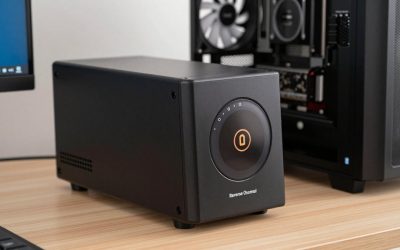
- Top Pick: Synology DiskStation DS224+ NAS Server with Celeron 2.0GHz CPU, 6GB Memory, 24TB HDD Storage, 2 x 1GbE LAN Ports, DSM Operating System
- Best Value: Synology DS225+ 24TB Bundle Best Price HDDs 2X 12TB 2-Bay NAS Plus Series – Intel Celeron J4125 Quad-Core, 2GB Non-ECC DDR4 SODIMM 1 x 2.5 GbE and 1 x 1 GbE RJ-45 LAN Port
- Premium Choice: Synology DiskStation DS224+ NAS Server with Celeron 2.0GHz CPU, 6GB Memory, 16TB HDD Storage, 2 x 1GbE LAN Ports, DSM Operating System
The Synology DS224+ is Synology’s recommended 2-bay desktop NAS for home users and small offices, and it punches well above its weight thanks to a quad-core Intel Celeron J4125 with integrated graphics — meaning it handles Plex hardware transcoding far better than its modest size and price suggest. This bundle ships with 24TB of drives for around $899. This Synology DS224+ review covers the hardware, software and value.

Synology DiskStation DS224+ NAS Server with Celeron 2.0GHz CPU, 6GB Memory, 24TB HDD Storage, 2 x 1GbE LAN Ports, DSM Operating System


As an Amazon Associate we earn from qualifying purchases. Product prices and availability are accurate as of the date/time indicated.
🛒 Best Price Today on Amazon
Prime members get fast, free shipping on everything above, plus member-only deals. New members get a 30-day free trial — cancel anytime.
As an Amazon Associate we earn from qualifying purchases.


Synology DS224+ at a Glance
| Component | Specification |
|---|---|
| Bay count | 2 bays (3.5″/2.5″ SATA HDD/SSD) |
| CPU | Intel Celeron J4125 quad-core (4C/4T, 2.0 GHz, burst 2.7 GHz) with Intel UHD Graphics 600 |
| RAM (default + max) | 2GB DDR4 default, expandable to 6GB |
| Network ports | 2x 1GbE RJ-45 (link aggregation supported) |
| USB ports | 2x USB 3.2 Gen 1 Type-A |
| Max raw capacity | 36TB with 2x 18TB drives |
| RAID modes supported | SHR, JBOD, Basic, RAID 0/1 |
| OS / Software | Synology DSM 7.2+ (web-based) |
| Approx price | around $899 (bundle with 24TB drives) |
Hardware & Performance
The DS224+ is built around the Intel Celeron J4125 — a quad-core, x86-64 processor with integrated UHD Graphics 600. The iGPU is the headline feature: it brings Quick Sync Video hardware acceleration, which Plex and Emby use for efficient transcoding of H.264 and HEVC content. Combined with four CPU cores, that gives the DS224+ a genuinely strong media-server profile for a 2-bay unit. The base SKU ships with 2GB of RAM, expandable to a Synology-supported 6GB (community modifications go higher, but 6GB is the official ceiling). For DSM, Synology Photos, light Docker containers and a single Plex household it is plenty; for heavier workloads consider the 4-bay DS420+ or higher. The dual-bay form factor limits expandability but keeps power consumption and noise low.
Storage & RAID Options
With only 2 bays the RAID options are inherently limited: RAID 0 (no redundancy), RAID 1 (mirroring, the sensible default), Basic and JBOD. Synology Hybrid RAID (SHR) is also supported and behaves like RAID 1 in a 2-bay configuration. Maximum raw capacity is 36TB with 2x 18TB drives. The bays accept 3.5″ or 2.5″ SATA HDDs and SSDs and are hot-swappable. There are no M.2 NVMe cache slots — a notable omission compared with the DS420+ and DS923+. BTRFS is the recommended filesystem and brings snapshots and self-healing, which is well worth using even on a 2-bay unit. This bundle ships with 24TB of drives already installed.
Software & App Ecosystem
DSM 7.2+ is identical on the DS224+ to the experience on enterprise Synology hardware — that consistency is a significant strength. Synology Drive provides Dropbox-style file sync with versioning; Synology Photos handles AI-organised libraries (running comfortably on the J4125’s four cores); Hyper Backup covers cloud and off-site backup destinations; Active Backup for Business protects clients and SaaS workloads. Plex is officially supported and is the unit’s standout application thanks to the J4125’s iGPU. Container Manager (Docker) runs but is best kept to lightweight workloads given the 6GB RAM ceiling. For more on the platform, our best Synology NAS guide is a useful reference.
Synology’s mobile apps are a quietly important part of the DS224+ experience — DS File, DS Photo (now subsumed into the Synology Photos app), DS Video and DS Audio bring NAS content to iOS and Android phones with a polish that rival platforms have historically struggled to match. The remote-access story via QuickConnect is also well executed: it Just Works for buyers who do not want to configure dynamic DNS or port forwarding, while still allowing power users to set up their own routing if they prefer. Two-factor authentication and DSM’s Secure SignIn are both available and recommended for any internet-facing deployment. For buyers comparing rival platforms see our best QNAP NAS roundup guide.
Networking & Throughput
The DS224+ has two 1GbE RJ-45 ports, link-aggregatable for 2Gbps of theoretical throughput. There is no 2.5GbE option — networking is the most obvious area where the DS224+ shows its price tier. For the target buyer (home users, Plex households, small offices) gigabit is more than enough to stream 4K HEVC content and back up clients. SMB 3.0, NFS, AFP, iSCSI and WebDAV are all supported.
Use Cases — Plex / Backup / Files
For Plex the DS224+ is one of the best small Synology units — the J4125’s iGPU and four cores comfortably handle multiple simultaneous hardware-transcoded streams. For backup it is well judged: Hyper Backup, Active Backup for Business and Synology C2 cloud all work nicely on this hardware. For file sharing it covers home and small-office needs without strain. For more demanding workloads — surveillance with many cameras, busy multi-user file sharing — a 4-bay model is a better fit. See our best home NAS guide for further options. For home labs and lightweight self-hosting (Pi-hole, Home Assistant, basic Docker stacks) the J4125 and 6GB RAM ceiling are tight but workable — buyers who want serious home-lab capabilities should look at the DS420+ or the UGREEN DXP4800 Pro for more headroom.
Verdict
At around $899 the Synology DS224+ in this 24TB bundle is one of the most compelling small NAS deals on the market. The quad-core Intel J4125, integrated GPU and mature DSM software combine to make it punch well above its 2-bay weight, and 24TB of pre-installed storage means you can have it running on the day it arrives. The 6GB RAM ceiling and gigabit-only networking are honest compromises for the price. For Plex households and home users it earns a strong recommendation — compare it with rivals in our best NAS for Plex Media Server guide.
Buyers weighing the DS224+ against the newer UGREEN DXP2800 should think carefully: UGREEN offers an Intel N100 (a single-generation step up) plus dual 2.5GbE networking at a similar price tier, but Synology’s DSM remains the most polished and best-supported NAS operating system on the market. The trade-off is genuine and depends on how much value you place on software polish versus hardware specifications. For users coming from a cloud-only photo and file workflow the DS224+ delivers a real privacy and capacity upgrade — Synology Photos in particular is a popular Google Photos alternative, with AI-organised libraries running locally on your data. See our best NAS for backup for further comparisons and our best home NAS guide for broader home NAS recommendations.
Frequently Asked Questions
Is the Synology DS224+ good for Plex?
Yes — it is one of Synology’s best small Plex units. The Intel Celeron J4125 has an integrated GPU with Quick Sync, which Plex uses to transcode multiple 4K H.264/HEVC streams efficiently without taxing the CPU.
How much RAM does the DS224+ support?
Synology officially supports up to 6GB on the DS224+: 2GB soldered to the board plus a single 4GB SODIMM in the expansion slot. Community modifications go higher but are not officially supported.
How many drive bays does the DS224+ have?
Two hot-swappable 3.5″/2.5″ SATA bays. Maximum raw capacity is 36TB with 2x 18TB drives, in RAID 1 / SHR / Basic configurations.
What is the difference between the DS224+ and the DS220+?
The DS224+ replaces the older DS220+ with a refreshed chassis and identical Intel J4125 CPU. The software experience and feature set are essentially the same — most buyers will not notice a difference.
More NAS Reviews
- Synology DS224+ 16TB Bundle Review: 2-Bay NAS Smaller Build
- Synology DS1520+ Review: 5-Bay 80TB Celeron 8GB NAS Bundle
- QNAP TS-873A Review: 8-Bay NAS with 2.5GbE + PCIe Gen3
- QNAP TS-1264U-RP Review: 12-Bay 1U Rackmount NAS
- TerraMaster U12-500 Plus Review: 12-Bay i7 Rackmount NAS
- UGREEN NAS DXP4800 Pro Review: 4-Bay Intel i3 NAS (2026)
- UGREEN NAS DXP2800 Review: 2-Bay Intel N100 NAS (2026)
- BUFFALO LinkStation 710 Review: 2TB 1-Bay Home NAS
Affiliate Disclosure: As an Amazon Associate, we earn from qualifying purchases. If you click a link and make a purchase, we may earn a small commission at no extra cost to you. Prices and availability are accurate as of publication and may change.
Related Articles
Looking for more on this topic? Browse the hand-picked guides below — each one applies the same scoring rubric used in this review.