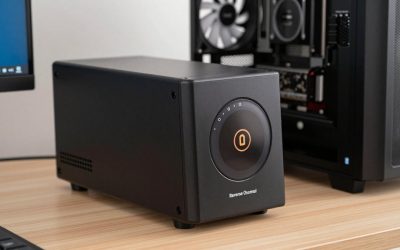
- Top Pick: BUFFALO LinkStation 710 2TB 1-Bay NAS Network Attached Storage with HDD Hard Drives Included NAS Storage that Works as Home Cloud or Network Storage Device for Home
- Best Value: BUFFALO LinkStation 210 2TB 1-Bay NAS Network Attached Storage with HDD Hard Drives Included NAS Storage that Works as Home Cloud or Network Storage Device for Home
- Premium Choice: BUFFALO LinkStation 220 4TB 2-Bay NAS Network Attached Storage with HDD Hard Drives Included NAS Storage that Works as Home Cloud or Network Storage Device for Home
The BUFFALO LinkStation 710 is a single-bay personal cloud NAS aimed at non-technical home users who want a simple, plug-and-play file-sharing and backup solution. Unlike the prosumer NAS platforms from Synology, QNAP or UGREEN, the LinkStation is a closed, appliance-style device with a pre-installed 2TB drive — buyers who want hands-off simplicity, not customisation. It is priced around $199. This BUFFALO LinkStation 710 review covers the hardware, software and value.

BUFFALO LinkStation 710 2TB 1-Bay NAS Network Attached Storage with HDD Hard Drives Included NAS Storage that Works as Home Cloud or Network Storage Device for Home




As an Amazon Associate we earn from qualifying purchases. Product prices and availability are accurate as of the date/time indicated.
🛒 Best Price Today on Amazon
Prime members get fast, free shipping on everything above, plus member-only deals. New members get a 30-day free trial — cancel anytime.
As an Amazon Associate we earn from qualifying purchases.
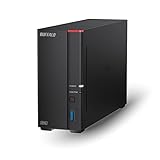



BUFFALO LinkStation 710 at a Glance
| Component | Specification |
|---|---|
| Bay count | 1 bay (drive pre-installed, not user-serviceable) |
| CPU | Marvell ARMADA-3700 dual-core ARM (1.0 GHz) |
| RAM (default + max) | 512MB DDR3 (not user-upgradable) |
| Network ports | 1x 1GbE RJ-45 |
| USB ports | 1x USB 3.0 Type-A |
| Max raw capacity | 2TB (pre-installed, not user-replaceable in normal use) |
| RAID modes supported | None (single-bay) |
| OS / Software | BUFFALO LinkStation firmware (proprietary, web-based) |
| Approx price | around $199 (2TB drive included) |
Hardware & Performance
The LinkStation 710 is built around a Marvell ARMADA-3700 dual-core ARM processor at 1.0 GHz with 512MB of RAM. By the standards of prosumer NAS units that is modest hardware — the Marvell chip is roughly comparable to the silicon in mid-tier home routers — but for the LinkStation’s intended use it is sufficient. The 710 is not designed to run Plex transcoding, host VMs or serve as a file server for a busy office. It is designed to be a personal cloud: simple file sharing across a home network, backups from a couple of computers, and remote access for files when away from home. The single-bay design means a pre-installed 2TB drive comes with the unit, but there is no upgrade path — when the drive fills you replace the appliance, not the drive.
Storage & RAID Options
The LinkStation 710 has one bay with a 2TB drive pre-installed. There are no RAID options because there is only one drive — and that single point of failure is the unit’s most important limitation. Unlike a multi-bay NAS, there is no data redundancy: if the drive fails, the data is gone unless you have backups elsewhere. For a single user with modest needs and a clear off-site backup plan (such as a cloud sync) the LinkStation may still be appropriate, but anyone storing important data should plan around the lack of redundancy. The drive is internally a 3.5″ SATA HDD; advanced users can technically replace it, but this is not a hot-swappable, user-serviceable design like the prosumer NAS units.
Software & App Ecosystem
BUFFALO’s LinkStation firmware is a closed, appliance-style platform — the polar opposite of Synology DSM or QNAP QTS. The UI covers what the unit is designed to do: shared folders over SMB and AFP, simple user/group permissions, USB backup, scheduled cloud backups (to Amazon S3 and similar) and remote access via WebAccess. There is no app store, no Docker, no virtualization. For buyers who want a NAS that simply works without configuration, that simplicity may be a feature; for buyers who want to expand, it is a clear limitation. Setup is genuinely simple — buyers can have the unit serving files within minutes via the BUFFALO web wizard.
Networking & Throughput
The LinkStation 710 has a single 1GbE RJ-45 port. Throughput is gigabit-limited and, more importantly, the Marvell CPU often becomes the bottleneck before the network does — sequential transfers from the LinkStation typically run at 60-90MB/sec, below the theoretical gigabit ceiling. SMB 3.0 and AFP are supported. There is no link aggregation (there is only one port), no SMB Multichannel, and no 2.5GbE option. For backup and casual file sharing the available throughput is sufficient. Buyers who need faster networking should look at a prosumer NAS — even an entry-level 2-bay unit like the UGREEN DXP2800 includes dual 2.5GbE at a comparable price tier once drives are factored in.
Use Cases — Plex / Backup / Files
The LinkStation 710 is not built for Plex — the ARM CPU is too modest for transcoding, and there is no hardware acceleration. For buyers who want Plex, see our best NAS for Plex Media Server guide. For backup the 710 is workable for a single computer or two, though the lack of RAID redundancy means it must not be the only backup destination — pair it with a cloud sync. For simple file sharing across a small home it is genuinely capable, though throughput is modest. For most modern home users, a 2-bay NAS like the UGREEN DXP2800 or Synology DS224+ is a better investment — see our best home NAS guide for the comparison. The LinkStation is best understood as a personal cloud — a step up from external USB drives, not a step toward the prosumer NAS market that DSM, QTS, UGOS and TOS occupy.
Verdict
At around $199 the BUFFALO LinkStation 710 is a sensible budget appliance NAS for the right narrow buyer — a non-technical user who wants a personal cloud with no setup complexity, who has modest needs, and who has a separate backup plan. It is not a real alternative to a 2-bay prosumer NAS, and the lack of redundancy is the headline limitation. For most home users seeking a NAS in 2026, even the entry-level UGREEN DXP2800 (around $349) or Synology DS224+ (around $300 bare) is a significantly better investment — multi-bay redundancy, modern x86 CPUs, hardware transcoding and active platforms make them better long-term choices. See our best home NAS guide and best NAS for backup guides for those.
BUFFALO has a long and credible history in the NAS market — the company’s LinkStation line dates back to the early 2000s and is widely used in Japanese small offices, where the brand has particular reach. The 710 fits the same role: a no-fuss appliance for a non-technical buyer who wants centralised storage without the learning curve of DSM, QTS or UGOS. For elderly parents who want centralised photo storage that family members can access remotely, for a single-person home office that wants a simple backup target, or for a small classroom that needs shared file storage, the LinkStation 710 may genuinely be the right choice. Buyers in those scenarios should still configure a cloud backup destination (BUFFALO supports Amazon S3, OneDrive and Dropbox) to mitigate the single-drive risk. For broader recommendations see our best NAS for Plex Media Server guide and our best NAS for small business guide.
Frequently Asked Questions
Does the BUFFALO LinkStation 710 have RAID?
No. The LinkStation 710 is a single-bay appliance, so there is no RAID redundancy. If the single drive fails, the data is gone unless you have backups elsewhere — this is the unit’s most important limitation.
Can I upgrade the drive in the LinkStation 710?
Not in normal use. The 2TB drive is pre-installed and the unit is designed as a closed appliance. Advanced users can technically replace the drive, but it is not a hot-swappable, user-serviceable design.
Is the LinkStation 710 good for Plex?
No. The Marvell ARMADA-3700 ARM CPU is too modest for Plex transcoding, and there is no hardware acceleration. For Plex consider a unit with an Intel iGPU instead.
Should I buy the LinkStation 710 or a 2-bay NAS?
For most home users in 2026, a 2-bay NAS like the UGREEN DXP2800 or Synology DS224+ is a better investment — RAID 1 redundancy, hardware transcoding and active platforms make them better long-term choices. The LinkStation 710 fits a narrow non-technical buyer profile.
More NAS Reviews
- Synology DS923+ Review: 4-Bay NAS with 32GB RAM + 40TB Bundle
- Synology DS925+ Review: 4-Bay NAS with 2.5GbE + 24TB Bundle
- Synology DS420+ Review: 4-Bay NAS with 1TB M.2 Cache + 6GB Bundle
- Synology DS224+ Review: 2-Bay NAS with 24TB Bundle (2026)
- Synology DS224+ 16TB Bundle Review: 2-Bay NAS Smaller Build
- Synology DS1520+ Review: 5-Bay 80TB Celeron 8GB NAS Bundle
- QNAP TS-873A Review: 8-Bay NAS with 2.5GbE + PCIe Gen3
- QNAP TS-1264U-RP Review: 12-Bay 1U Rackmount NAS
Affiliate Disclosure: As an Amazon Associate, we earn from qualifying purchases. If you click a link and make a purchase, we may earn a small commission at no extra cost to you. Prices and availability are accurate as of publication and may change.
Related Articles
Looking for more on this topic? Browse the hand-picked guides below — each one applies the same scoring rubric used in this review.