

- Top Pick: ODK 53" L Shaped Gaming Desk with Shelves, LED & Outlets, Black
- Best Value: ODK 53 Inch L Shaped Gaming Desk with Hutch & Headphone Hook
- Premium Choice: Samsung 32-Inch M5 (M50F) Series FHD Smart Monitor with Streaming TV, Speakers, HDR10, Gaming Hub, Multiple Ports, Workout Tracker, Vision Accessibility Tools, Black, LS32FM502ENXZA
A ‘workstation gaming TV’ is a deliberately specific idea: a large 4K screen that you sit close to and use as your primary desktop display, sized to give you sprawling room for windows, code, timelines and reference material, while still being responsive enough to game on after hours. The appeal is simple — for the price of a mid-size monitor you can get a 50 to 65-inch 4K panel that swallows multitasking whole. The catch, which we will be honest about throughout, is that a TV is engineered for a sofa, not a desk, so text sharpness and input lag deserve real scrutiny before you commit.
- Best Workstation Gaming TVs at a Glance
- 1. VIZIO 50-inch Quantum Pro 4K 120Hz QLED HDR10+ Smart TV with Dolby Vision
- 2. Hisense 65″ U7 Mini-LED ULED 4K UHD Gaming Google Smart TV (65U75QG)
- 3. TCL Amazon Exclusive 55-Inch Class T7 Series 4K QLED HDR Lag-Free Smart Google TV
- 4. MSI MPG 321URX QD-OLED 32-inch 4K UHD Quantum Dot OLED Gaming Monitor
- 5. LG 34GX90SA-W 34-inch UltraGear WQHD OLED Curved Gaming Monitor 240Hz
- 6. SAMSUNG 27-Inch M5 (M50D) Series FHD Smart Monitor with Streaming TV and Speakers
- How to Choose a Workstation Gaming TV
- Frequently Asked Questions
- Related Guides
- Related Articles
This guide rounds up screens that work as a big-screen desktop workstation and a gaming display, and it mixes two genuinely different device classes on purpose. Several picks are true 4K smart TVs; two — clearly flagged below — are large gaming monitors that are arguably the better choice for desk use because they are built for it. We have included a wide price spread, from around $258 to around $869, and chosen on what matters here: resolution and size for a workstation, low-lag gaming readiness, panel quality, and honest fitness for sitting an arm’s length away. Below is an at-a-glance comparison of all six, then a closer look at each and a buyer’s guide for using a big screen as a workstation.
As an Amazon Associate we earn from qualifying purchases at no extra cost to you.


🛒 Best Price Today on Amazon
Prime members get fast, free shipping on everything above, plus member-only deals. New members get a 30-day free trial — cancel anytime.
Best Workstation Gaming TVs at a Glance
| Screen | Best For | Standout Spec | Approx Price |
|---|---|---|---|
| VIZIO 50″ Quantum Pro 4K 120Hz QLED | All-round 4K workstation TV | 50″ QLED, 4K, 120Hz, Dolby Vision | around $630 |
| Hisense 65″ U7 Mini-LED 4K | Largest bright workspace | 65″ Mini-LED, 4K, premium gaming | around $697 |
| TCL 55″ T7 4K QLED (Google TV) | Value big-screen desktop | 55″ QLED, 4K, lag-free mode | around $400 |
| MSI MPG 321URX QD-OLED 32″ 4K | Sharp desk-first workstation | 32″ 4K QD-OLED monitor | around $869 |
| LG 34GX90SA UltraGear 34″ OLED | Ultrawide multitask + game | 34″ WQHD curved OLED monitor | around $850 |
| SAMSUNG 27″ M5 (M50D) Smart Monitor | Compact TV-style all-in-one | 27″ FHD smart monitor + apps | around $259 |
1. VIZIO 50-inch Quantum Pro 4K 120Hz QLED HDR10+ Smart TV with Dolby Vision

VIZIO 50-inch Quantum Pro 4K 120Hz QLED HDR10+ Smart TV with Dolby Vision, Active Full Array, 240Hz @ 1080p PC Gaming, WiFi 6E, Apple AirPlay, Chromecast Built-in, M50QXM-K01, 2023 Model


As an Amazon Associate we earn from qualifying purchases. Product prices and availability are accurate as of the date/time indicated.
The VIZIO 50-inch Quantum Pro is the all-round pick for a workstation gaming TV, and the most natural size for desk use on this list. Fifty inches is large enough to give you a genuinely expansive 4K workspace yet small enough to take in from a normal seating distance, and the QLED panel adds 120Hz support plus Dolby Vision and HDR10+ for vivid gaming and video. At around $630 it lands in a sensible spot for a do-everything screen.
For a workstation it offers the headline benefit people want from a TV at a desk: enormous 4K real estate for tiling windows, code editors and reference panels side by side. The 120Hz refresh and low-lag gaming mode mean it stays responsive when you switch from work to play. Be realistic about distance — at 50 inches you will want to sit back a little and may notice TV-style text rendering up close — but as a single big-screen panel that does both jobs well, the VIZIO Quantum Pro is the balanced choice to start with.
Pros: Practical 50″ 4K size for a desk, 120Hz, QLED with Dolby Vision and HDR10+, fair price.
Cons: Still a TV up close — text is softer than a monitor; sit back a little.
2. Hisense 65″ U7 Mini-LED ULED 4K UHD Gaming Google Smart TV (65U75QG)
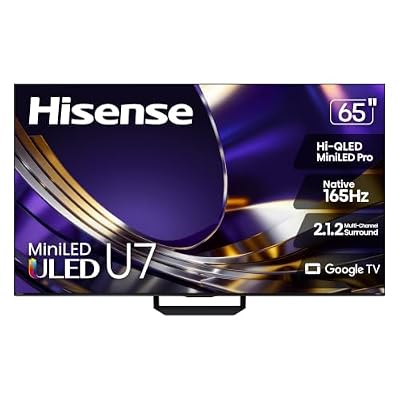
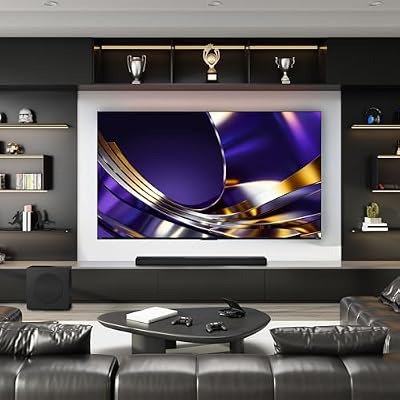
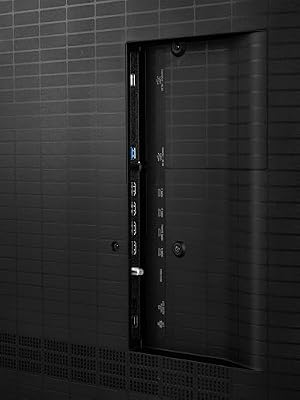
Hisense 65" U7 Mini-LED ULED 4K UHD Best Premium Gaming HDR Smart Google TV (65U7SG, 2026 NEW) - Hi-QLED, Native 165Hz, VRR 330, HDR10+, Dolby Vision IQ·Atmos, IMAX Enhanced, Anti-Reflection, 2.1.2 Ch







As an Amazon Associate we earn from qualifying purchases. Product prices and availability are accurate as of the date/time indicated.
The Hisense 65-inch U7 is the pick when you want the largest, brightest workspace on the list. Its Mini-LED ULED backlight delivers high brightness and strong contrast, the 4K panel gives you an immense canvas, and Hisense markets the U7 explicitly as a premium gaming TV with the low-lag and high-refresh features that suit fast play. At around $697 it is a lot of screen and capability for the money.
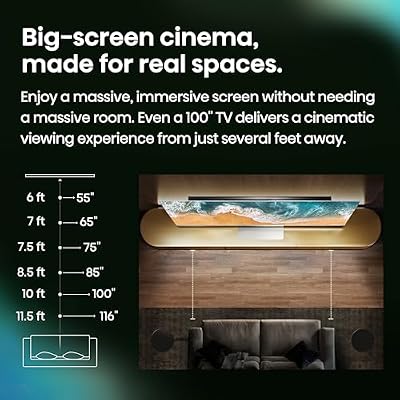
As a workstation this is the maximalist option: 65 inches of 4K real estate is almost a wall of desktop, ideal if you want to spread huge spreadsheets, video timelines and multiple full-size windows at once. The Mini-LED brightness keeps it usable in a well-lit room, and the gaming features carry over for evening sessions. The honest caveat is desk distance — 65 inches really wants to be a few feet away, so this suits a deep desk or a wall mount rather than a screen pushed right up against your keyboard.
Pros: Huge 65″ 4K canvas, bright Mini-LED ULED, premium gaming features, strong value for size.
Cons: 65″ is large for a desk — needs distance or a wall mount; not a sharp-text monitor.
3. TCL Amazon Exclusive 55-Inch Class T7 Series 4K QLED HDR Lag-Free Smart Google TV

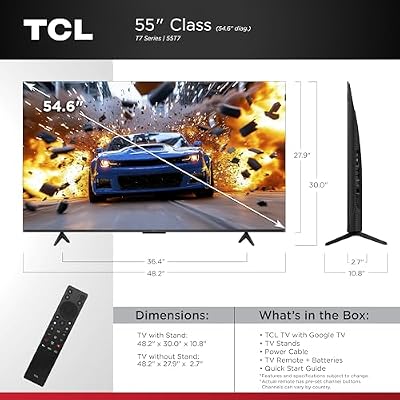
TCL 55 Inch T7 Series 4K 120Hz QLED Smart Google TV, 55T7 (Latest Model) | Dolby Vision HDR and Atmos, HDR10+, Game Accelerator 240 and VRR for Sports and Gaming, Alexa+, Native 120Hz Refresh Rate



As an Amazon Associate we earn from qualifying purchases. Product prices and availability are accurate as of the date/time indicated.
The TCL 55-inch T7 is the value big-screen workstation pick. It pairs a 55-inch 4K QLED panel with HDR and an explicitly lag-free gaming mode on Google TV, delivering a large, colorful, responsive screen at a price that undercuts almost everything else its size. At around $400 it is the budget-friendly way to put a big 4K canvas on or near your desk.
For a workstation, the T7’s draw is obvious: a generous 55-inch 4K layout for multitasking at a genuinely affordable price, with QLED color that makes it pleasant for media and gaming alike. The lag-free mode keeps it honest for play, and Google TV covers streaming when you step away from work. As with any TV used at a desk, expect softer text than a dedicated monitor and plan your seating distance, but if you want maximum 4K real estate per dollar, the TCL T7 is the standout value here.
Pros: Affordable 55″ 4K QLED, lag-free gaming mode, big workspace for the money, Google TV.
Cons: Budget TV panel; text clarity at desk range trails a true monitor.
4. MSI MPG 321URX QD-OLED 32-inch 4K UHD Quantum Dot OLED Gaming Monitor

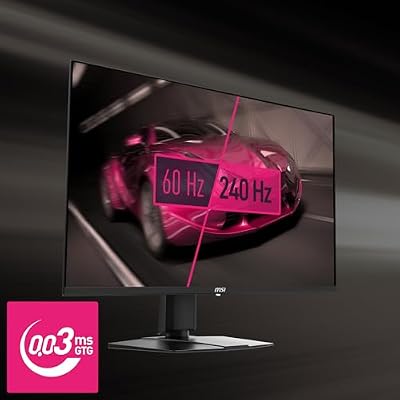
msi MPG 321URX QD-OLED, 32" 4K UHD Quantum Dot OLED Gaming Monitor, 3840 x 2160, 0.03ms, 240Hz, True Black HDR 400, 90W USB Type C, HDMI, DP Port




As an Amazon Associate we earn from qualifying purchases. Product prices and availability are accurate as of the date/time indicated.
The MSI MPG 321URX is, honestly, a 32-inch gaming monitor rather than a TV — and that is exactly why it earns a place here as the sharp, desk-first workstation choice. It is a 3840×2160 4K QD-OLED panel, so you get true monitor-grade pixel density and text clarity at desk distance, with the perfect blacks, vivid color and fast response QD-OLED is known for. At around $869 it is the premium pick on the list.
If your priority is using the screen primarily as a workstation — long hours of crisp text, code and detailed creative work — this is the option built for the job. At 32 inches and 4K it offers a big-but-sensible desktop you can sit close to without softness, and the QD-OLED panel doubles as an outstanding gaming display. It is smaller than the TVs here and costs more per inch, but for desk-centric users who only occasionally need a wall-sized canvas, the clarity and quality make it the most genuinely usable workstation screen.
Pros: True monitor-grade 4K text clarity, stunning QD-OLED, excellent for desk work and gaming.
Cons: Smallest screen here and the priciest; a monitor, not a TV (no big-screen sofa use).
5. LG 34GX90SA-W 34-inch UltraGear WQHD OLED Curved Gaming Monitor 240Hz
The LG 34GX90SA UltraGear is also a monitor, not a TV — a 34-inch ultrawide WQHD (3440×1440) curved OLED — and it is the pick for multitaskers who want width over sheer area. The ultrawide aspect ratio is tailor-made for placing documents, editors and reference windows side by side, the curve keeps the edges in comfortable view, and the OLED panel runs at a fast 240Hz. At around $850 it is a premium dual-purpose option.
For a workstation, an ultrawide changes how you work: instead of one giant square you get a long, panoramic canvas perfect for split-screen layouts, wide timelines and trading-style multi-window setups, all at sharp monitor pixel density. The 240Hz OLED makes it a top-tier gaming display when work is done. It is not a substitute for a 4K TV’s raw acreage, and ultrawide is a personal preference, but for desk-first users who multitask across windows and game hard, this curved OLED is a compelling choice.
Pros: Immersive 34″ ultrawide for multitasking, sharp monitor clarity, fast 240Hz OLED.
Cons: WQHD ultrawide, not 4K TV-scale area; curve and aspect ratio are personal taste.
6. SAMSUNG 27-Inch M5 (M50D) Series FHD Smart Monitor with Streaming TV and Speakers

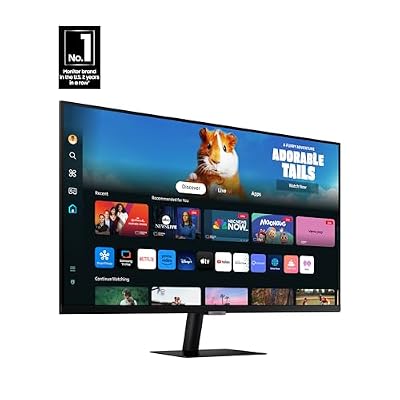
SAMSUNG 27-Inch M5 (M50D) Series FHD Smart Monitor with Streaming TV, Speakers, HDR10, Gaming Hub, Multiple Ports, Workout Tracker, Vision Accessibility Tools, LS27DM500ENXGO, 2024




As an Amazon Associate we earn from qualifying purchases. Product prices and availability are accurate as of the date/time indicated.
Rounding out the list is the Samsung 27-inch M5 (M50D), a smart monitor that neatly bridges the gap between the two device classes. It is a 27-inch FHD monitor with built-in streaming apps, speakers and a TV-like smart interface, so it behaves like a compact all-in-one TV-and-display on your desk. At around $259 it is by far the most affordable screen here.
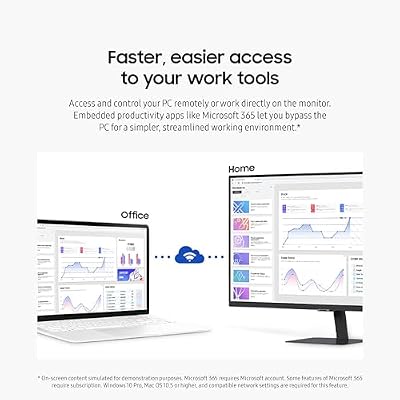
As a workstation pick it is the compact, do-it-all choice for tighter spaces or a secondary station: a normal monitor footprint with proper desk-distance usability, plus the convenience of streaming apps and TV functions baked in so you can watch or cast without a PC. Be clear-eyed about the spec — it is FHD rather than 4K and 27 inches rather than wall-sized, so it is the right call when you value a tidy, affordable, TV-flavored all-in-one over maximum 4K real estate. For a small smart-monitor workstation, the M5 is a smart, low-cost option.
Pros: Built-in smart TV apps and speakers, true monitor desk usability, very affordable.
Cons: Only FHD and 27″ — modest resolution and size versus the 4K screens here.
How to Choose a Workstation Gaming TV
The first and most important decision is whether you actually want a TV or a large monitor, because they are different tools. A TV like the VIZIO, Hisense or TCL gives you the most 4K screen area for the money and is unbeatable for a wall-sized, sit-back desktop and media. A large monitor like the MSI 32-inch or LG ultrawide is built for desk distance, with much sharper text and pixel density, but costs more per inch. If you sit close and stare at text all day, lean monitor; if you want maximum acreage and sit back, a TV wins.
Size and viewing distance go hand in hand and are easy to get wrong. A 50-inch screen like the VIZIO is about the practical ceiling for a typical desk you sit directly in front of; 55 and especially 65 inches, like the TCL and Hisense, really want a deep desk, a wall mount, or a few feet of distance, or you will be turning your head to see the corners. Measure your space and be honest about how far back you can sit before you buy the biggest panel.
Text clarity is the trade-off nobody mentions in the store. TVs render at normal sofa distances and use subpixel layouts and processing tuned for video, so fine text can look softer or fringed up close compared with a monitor of the same resolution. A 4K TV at 50 to 65 inches mitigates this with sheer pixel count, and sitting back helps a lot, but if crisp text is your top priority the desk-first monitors here — the MSI 4K and LG ultrawide — are the safer choice. Set your expectations accordingly.
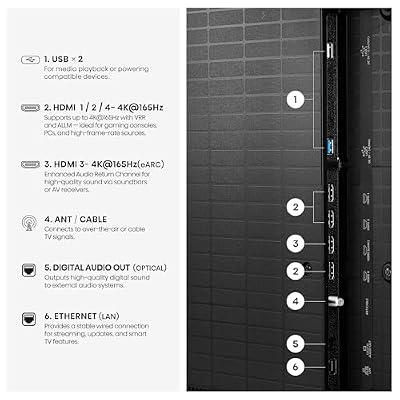
Finally, confirm the gaming and connectivity essentials. Look for a 4K panel with at least 120Hz and a dedicated low-lag or game mode — the VIZIO’s 120Hz, the TCL’s lag-free mode and the monitors’ high refresh rates all qualify — and check that the HDMI ports match your PC’s output. Decide your budget, settle the TV-versus-monitor question, match the size to your seating distance, and pick the screen on this list that fits how you really work and play. The best workstation gaming screen is the one whose size, sharpness and lag suit your desk, not just the biggest number.
Frequently Asked Questions
Can you really use a TV as a workstation monitor?
Yes, and many people do — a 50 to 65-inch 4K TV gives you a huge desktop for tiling windows at a price a similar-area monitor cannot match. The honest caveats are seating distance and text sharpness: TVs are tuned for sofa distance, so fine text can look softer up close than on a monitor. Sit back a little, favor 4K for pixel density, and a TV like the VIZIO or TCL works well as a big-screen workstation.
What size TV is best for a desk workstation?
Around 50 inches, like the VIZIO Quantum Pro, is the practical sweet spot for a screen you sit directly in front of. 55 and 65-inch sets like the TCL and Hisense are fantastic for area but really want a deep desk, a wall mount, or a few feet of distance so you are not turning your head to see the corners. Measure your space first and match the size to how far back you can sit.
Is a large monitor better than a TV for desk work?
For pure desk work and crisp text, yes — that is why we included the MSI 32-inch 4K QD-OLED and LG 34-inch ultrawide OLED, which are monitors, not TVs. They offer monitor-grade pixel density and clarity at desk distance. A TV wins on raw 4K area per dollar and big-screen media; a large monitor wins on sharpness and being built for an arm’s-length view. Choose based on whether area or clarity matters more to you.
Do I need 120Hz on a workstation gaming TV?
For the workstation half of the job, no — desktop work feels fine at 60Hz. For the gaming half, 120Hz (as on the VIZIO Quantum Pro) or a high-refresh monitor panel makes fast games noticeably smoother and more responsive. Since the whole point of a workstation gaming screen is to do both, a 4K panel with at least 120Hz and a low-lag game mode is worth prioritizing if you game seriously after work.
Related Guides
- Best 4K Monitors
- Best Gaming TVs
- Best Monitors for Every Setup
- Best Ultrawide Monitors
- Best Monitor Arms for Big Screens
- Best Gaming PCs to Drive 4K
Affiliate Disclosure: As an Amazon Associate, we earn from qualifying purchases. If you click a link and make a purchase, we may earn a small commission at no extra cost to you. Prices and availability are accurate as of publication and may change.










