- Top Pick: SwitchBot Hub 3 (3rd Gen), Smart Home Hub with 2.4" IPS Screen & Knob Control, WiFi Thermometer Hygrometer, IR Remote (Matter/Bluetooth 200m), Alexa/Google/Apple Home Compatible
- Best Value: SwitchBot Hub 3 (3rd Gen) Smart Home Command Center: Screen + Physical Dial, IR Remote Hub for TVs/ACS, Temp/Humidity Sensor (±0.2°C), Matter Bridge, Bluetooth 200m, Works on 2.4GHz WiFi
- Premium Choice: SwitchBot Hub 2 (2nd Gen), Work as a WiFi Thermometer Hygrometer, IR Remote Control, Smart Remote and Light Sensor, Link SwitchBot to Wi-Fi (Support 2.4GHz), Alexa, Google Home, Apple Home Compatible
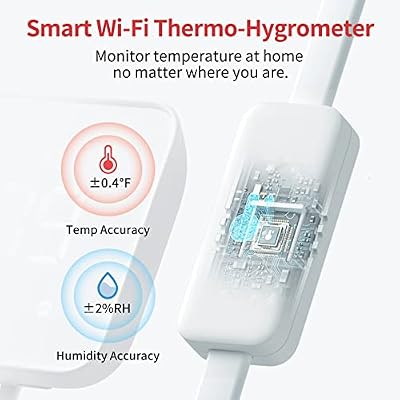
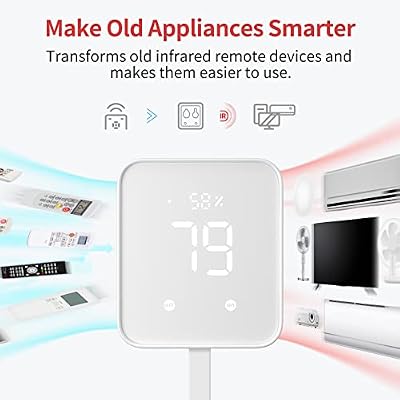
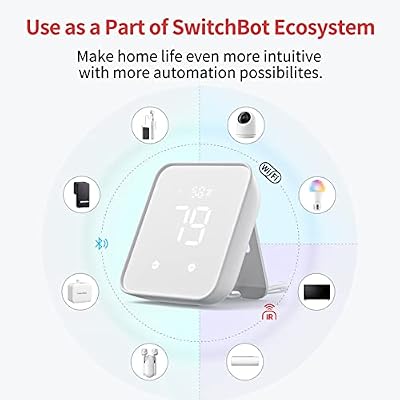
The SwitchBot Hub 2 is one of the more quietly clever smart home devices of the past two years — it bundles an IR universal remote, a built-in thermometer and hygrometer, a smart button, and a Matter bridge for the rest of the SwitchBot ecosystem into a single small box. Priced around $70, it brings traditional IR appliances (TVs, air conditioners, fans) into Alexa, Google Assistant and Apple HomeKit homes via Matter. This SwitchBot Hub 2 review covers setup, smart home integration, and how the Hub 2 fits a gamer-streamer setup.

SwitchBot Hub 2 (2nd Gen), Work as a WiFi Thermometer Hygrometer, IR Remote Control, Smart Remote and Light Sensor, Link SwitchBot to Wi-Fi (Support 2.4GHz), Alexa, Google Home, Apple Home Compatible




As an Amazon Associate we earn from qualifying purchases. Product prices and availability are accurate as of the date/time indicated.
🛒 Best Price Today on Amazon
Prime members get fast, free shipping on everything above, plus member-only deals. New members get a 30-day free trial — cancel anytime.
As an Amazon Associate we earn from qualifying purchases.






SwitchBot Hub 2 at a Glance
| Component | Specification |
|---|---|
| Type | Smart home hub with IR remote and thermometer |
| Voice assistant | Works with Alexa, Google Assistant, Siri / HomeKit (via Matter) |
| Display size | E-ink front display showing temperature, humidity, smart button states |
| Smart home protocols | Matter (over Wi-Fi), Bluetooth, IR, SwitchBot Cloud |
| Audio output (W) | None (silent device) |
| Camera | No |
| Connectivity | Dual-band Wi-Fi (2.4/5GHz), Bluetooth Low Energy |
| App support | SwitchBot app (iOS, Android) |
| Approx price | around $70 |
Setup & App Experience
The SwitchBot app drives the experience: download, pair via Bluetooth, push Wi-Fi credentials, and the Hub 2 is online in a few minutes. The genuinely clever part is IR learning — point a TV, AC or fan remote at the Hub 2 and the app will identify the appliance from a large database, or you can teach individual buttons one by one for older or obscure remotes. Once learned, those appliances appear as virtual devices in the SwitchBot app and, via the Matter bridge, in Alexa, Google Home or Apple Home. The two physical smart buttons on the front of the Hub 2 can be assigned to any scene — useful as a one-touch ‘streaming mode’ that dims lights, switches AC to quiet mode and starts a routine on the PC. The on-board e-ink display shows current room temperature and humidity at a glance, which is genuinely informative for a small streaming room.
Smart Home Compatibility — Matter / Alexa / Google
This is the SwitchBot Hub 2’s main reason to exist. It is a Matter bridge for the entire SwitchBot ecosystem, which means SwitchBot Bots (the physical button-pusher), Curtain motors, smart locks, smart plugs and the Hub 2’s own thermometer all appear as Matter devices in Apple Home, Google Home and the SmartThings or Alexa ecosystems — a big upgrade for SwitchBot users who previously had to bounce through SwitchBot’s own cloud. The IR remote function also exposes traditional appliances to those platforms as switches, so an old IR-only AC unit becomes a Google or Alexa device for the first time. For a household mixing ecosystems (HomeKit phone, Alexa speakers, Google TV) the Hub 2 quietly stitches them together.
Audio & Display Quality
The Hub 2 is a silent device — no speaker, no voice output. The e-ink display is small but well chosen: it shows current temperature and humidity in clear numbers, plus the status of the two front smart buttons, and the e-ink technology means it does not glow or distract in a dark room. For a streaming desk or bedside placement, that matters. There is no camera and no microphone, which is part of why the Hub 2 makes a sensible upgrade in privacy-conscious households that do not want another always-listening device on the network.
Use Cases — Streamer Setup / Kitchen / Garage
On a streaming desk the Hub 2 earns its keep by bringing old appliances under voice control: an IR-only AC unit, a ceiling fan with a remote, an older Samsung or Sony TV used as a second monitor — all become Alexa, Google or HomeKit devices through the Hub 2’s IR and Matter bridge. The two smart buttons make excellent panic-style scene triggers (one-touch ‘going live’ or ‘mute everything’) that do not require voice commands which would be picked up on stream. In a kitchen it can fold a learning thermometer-based notification into smart-home routines (alert if it gets too warm during a long cook). In a garage or workshop it is useful primarily for the IR remote function — controlling an older portable AC or fan from the SwitchBot app on a phone.
Privacy & Microphone Mute
There are no microphones and no camera on the Hub 2 at all, which removes both privacy concerns inherent to smart displays. The Hub 2 is also one of relatively few hubs whose Matter bridge means devices can be controlled directly by your phone over the local network through Apple Home, Google Home or SmartThings — that is, without round-tripping through SwitchBot’s cloud — which is a real advantage for households that want to minimise cloud exposure for routine commands. Local-only control is not yet complete, since some legacy SwitchBot functions still cloud-round, but Matter dramatically reduces that footprint.
Verdict
At around $70, the SwitchBot Hub 2 is the most useful single smart home upgrade we can recommend to a household that already has older IR-controlled appliances or a mixed-ecosystem stack. The combination of IR universal remote, Matter bridge, built-in thermometer/hygrometer and two programmable physical buttons puts it in a class of its own at the price; there is genuinely nothing else doing exactly this job for this money. For a streamer it brings AC, TV and fans under voice or one-touch control, exposes a streaming-room temperature reading worth knowing, and adds two hardware buttons that do not require a voice command on a live stream. If you have no IR appliances and live in a single-ecosystem house, the Hub 2 is less essential — pick an Echo Show 8 or Echo Hub instead. For everyone with mixed devices, it is the buy. The Hub 2 also acts as a useful gateway for other SwitchBot accessories — the Bot button-pusher, Curtain motor and various sensors — which become Matter-bridged through the Hub 2 to whichever ecosystems your phones live on. For households who want to dip into Matter without committing to one platform vendor, this is one of the lowest-friction ways to do it. See our best streaming setup guide for stream automation ideas and our best gaming speakers for audio gear that pairs well with smart climate control.
Frequently Asked Questions
Does the SwitchBot Hub 2 work with Apple HomeKit?
Yes, via Matter. The Hub 2 is a Matter bridge, so SwitchBot devices and IR-controlled appliances appear in Apple Home, Google Home, Alexa and SmartThings through the standard Matter onboarding flow.
Can the SwitchBot Hub 2 control my old air conditioner?
Yes, provided the AC has an IR remote. Point the original remote at the Hub 2 to teach it, or pick the model from SwitchBot’s large database, and the AC becomes a smart device controllable from the app and voice assistants.
Does the SwitchBot Hub 2 have a microphone or camera?
No. The Hub 2 has neither a microphone nor a camera, which is part of what makes it a good fit for privacy-conscious households or as a complement to a Show without adding another listening device.
Is the SwitchBot Hub 2 a Thread border router?
No. The Hub 2 is a Matter-over-Wi-Fi bridge but does not include a Thread radio. For Thread-only devices, pair the Hub 2 with an Echo Show 8, Echo Hub or HomePod mini that does include Thread.
More Smart Home Reviews
- Amazon Echo Show 15 Review: 15.6″ Full HD Wall-Mount Kitchen Hub
- Amazon Echo Show 21 Review: 21″ Wall-Mount Smart Display & Fire TV
- Google Nest Thermostat Review: Affordable Smart Thermostat (Snow)
- Amazon Smart Thermostat Review: Honeywell-Built Alexa Thermostat
- Kasa Smart Power Strip HS300 Review: 6-Outlet Surge with Energy Monitoring
- Google Nest Wifi AC2200 Review: Mesh Router for Smaller Smart Homes
- Chamberlain Smart Garage Control Review: MyQ WiFi + Bluetooth Hub
- Amazon Echo Dot (Newest) Review: Compact Alexa Speaker for Gamers
Affiliate Disclosure: As an Amazon Associate, we earn from qualifying purchases. If you click a link and make a purchase, we may earn a small commission at no extra cost to you. Prices and availability are accurate as of publication and may change.