

- Top Pick: Google Nest Wifi – AC2200 – Mesh WiFi System – Wifi Router – 2200 Sq Ft Coverage – 1 pack
- Best Value: Google Nest WiFi – AC2200 (2nd Generation) Router and Add On Access Point Mesh Wi-Fi System (3-Pack, Snow)
- Premium Choice: Google Nest Wifi – AC2200 (2nd Generation) Router and Add On Access Point Mesh Wi-Fi System (2-Pack, Snow)
The Google Nest Wifi AC2200 (1-pack) is Google’s older-generation mesh router — a single AC2200 dual-band WiFi 5 unit designed as the starting node of a Nest Wifi mesh, or as a stand-alone router for smaller homes and apartments. Priced around $130, it is the budget Google mesh option that sits below the newer Nest Wifi Pro and is still actively supported in the Google Home app. This Google Nest Wifi AC2200 review covers setup, smart home integration, performance, and where it fits a streamer-friendly home network.

Google Nest Wifi - AC2200 - Mesh WiFi System - Wifi Router - 2200 Sq Ft Coverage - 1 pack


As an Amazon Associate we earn from qualifying purchases. Product prices and availability are accurate as of the date/time indicated.
🛒 Best Price Today on Amazon
Prime members get fast, free shipping on everything above, plus member-only deals. New members get a 30-day free trial — cancel anytime.
As an Amazon Associate we earn from qualifying purchases.





Google Nest Wifi AC2200 at a Glance
| Component | Specification |
|---|---|
| Type | Mesh Wi-Fi router (1-pack) |
| Voice assistant | Works with Google Assistant via Google Home (no built-in speaker on the router) |
| Display size | None |
| Smart home protocols | Wi-Fi 5 (802.11ac) dual-band (no Thread border router on this router model) |
| Audio output (W) | None on router; Nest Wifi Point add-on includes a speaker |
| Camera | No |
| Connectivity | WiFi 5 dual-band — 5 GHz up to 1733 Mbps, 2.4 GHz up to 400 Mbps; 2x Gigabit Ethernet |
| App support | Google Home app (iOS, Android) |
| Approx price | around $130 |
Setup & App Experience
Setup runs entirely through the Google Home app — plug the router into a modem via Gigabit Ethernet, scan the QR code on the base of the router, and the app walks through Wi-Fi naming, password and parental-control setup. Most installs are online in under ten minutes. The Google Home app has matured into a genuinely usable network-management surface: per-device pause, scheduled downtime, guest network, family Wi-Fi (per-device parental schedules), and a network performance speed test built in. Where Nest Wifi differs from many mesh systems is the deliberately consumer-friendly tone — there is no telnet, no command-line, no advanced QoS sliders for power users. For a household that wants reliable mesh that just works, that is a strength; for an enthusiast network builder it is a limit.
Smart Home Compatibility — Matter / Alexa / Google
The Nest Wifi router itself does not include a Thread border router on this older AC2200 model (that arrived on the newer Nest Wifi Pro), and it does not act as a Matter controller — those duties live on a Google Nest Hub, Nest Hub Max or another Matter controller in the home. What the Nest Wifi does well is sit cleanly alongside Google Assistant: per-device pause works via voice (‘Hey Google, pause kids’ Wi-Fi’), and Wi-Fi-based smart home devices share the same network smoothly. For Alexa households the router is still usable as a regular Wi-Fi router; it is just not as integrated as Eero is with Alexa or as Nest Wifi is with Google Home.
Audio & Display Quality
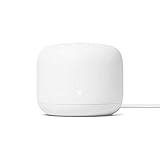
The router itself has no audio output or display — these are reserved for the Nest Wifi Point add-on, which combines a mesh node with a Google Assistant speaker. The router unit is a soft puck with a small status LED on the front edge that changes colour for setup, normal operation and error states. The deliberately minimal industrial design is the point — it sits on a shelf without drawing attention, which is a real strength against the spider-shaped ‘gaming router’ aesthetic.
Use Cases — Streamer Setup / Kitchen / Garage
For a streamer the relevant question is bandwidth and reliability for upload, and the AC2200 WiFi 5 design delivers solid performance for 1080p60 and 1440p streaming up to 8-10 Mbps upload, with headroom for cloud backup and household traffic. The two Gigabit Ethernet ports on the back support a wired connection from the router to the streaming PC, which is the reliability upgrade we recommend over Wi-Fi for any serious streamer — see our best Ethernet cables for gaming for cable picks. For a small apartment or single-floor home the 1-pack provides solid coverage; for larger homes or multiple floors, pair with Nest Wifi Point add-ons. For 4K streaming or Wi-Fi 6 households, look at the newer Nest Wifi Pro or Eero 6 — see our best mesh Wi-Fi systems for gaming for current picks.
One real practical detail for streamers is the family Wi-Fi parental-control system: per-device pause and scheduled access. Pause the household’s other devices during a stream window to free upload bandwidth for the streaming PC, then resume them automatically when the stream ends — a small but genuinely useful feature for households where roommates’ Netflix or family backup tasks would otherwise contend with stream upload during peak hours. The Google Home speed-test feature also makes diagnosing ‘why did my stream stutter’ more straightforward, with a per-device historical view of throughput and signal strength. The AC2200 model is now several years old in the Nest line, so consider whether the newer Nest Wifi Pro’s WiFi 6E and Thread radio make sense for your timeline — see our best gaming routers for the broader picture.
Privacy & Microphone Mute
The router has no microphone (unlike the Nest Wifi Point add-on, which does include a Google Assistant mic). Google’s Nest Wifi privacy notes confirm the router itself does not log per-device browsing data; the Google Home app shows aggregated per-device data transfer for the speed-test feature and parental controls. For privacy-minded streamers the router-only AC2200 model is a sensible choice over the Point add-on, since it provides mesh capability without adding another always-listening device to the network.
Verdict
At around $130, the Google Nest Wifi AC2200 1-pack is the right pick only for a specific buyer — a small home or apartment that wants a Google-friendly mesh router on a budget, accepts WiFi 5 rather than WiFi 6, and may add Nest Wifi Points later for larger coverage. For most new-buyer streamers in 2026 the newer Nest Wifi Pro (WiFi 6E, with Thread border router built in) is the better forward-looking choice; for an Alexa household, Eero 6 is the natural alternative. But for an existing Google Home household where simplicity, reliability and clean industrial design matter more than peak speeds, the AC2200 still earns its keep at the current price. The puck-shaped industrial design also matters when the router has to sit on a visible shelf or media unit, since the unit is genuinely tidy compared to spider-shaped gaming routers from competing brands. See our best gaming routers for the broader gaming router picture and our best mesh Wi-Fi systems for gaming for newer mesh options.
Frequently Asked Questions
Is the Google Nest Wifi AC2200 a WiFi 6 router?
No. The AC2200 is a WiFi 5 (802.11ac) dual-band router — 5 GHz up to 1733 Mbps and 2.4 GHz up to 400 Mbps. For WiFi 6 or 6E, look at the newer Google Nest Wifi Pro instead.
Can I use the Nest Wifi AC2200 with an existing modem?
Yes. It plugs into an existing cable or fibre modem via Gigabit Ethernet, and the Google Home app walks through setup in under ten minutes.
Does the Nest Wifi AC2200 have a built-in Google Assistant speaker?
No. The 1-pack router unit has no speaker or microphone — those are on the separate Nest Wifi Point add-on. The router itself is silent.
Is the Nest Wifi AC2200 a Thread border router?
No. The older AC2200 model does not include a Thread radio. The newer Nest Wifi Pro does include a Thread border router for Matter-over-Thread devices.
More Smart Home Reviews
- Chamberlain Smart Garage Control Review: MyQ WiFi + Bluetooth Hub
- Amazon Echo Dot (Newest) Review: Compact Alexa Speaker for Gamers
- Amazon Echo Show 5 (Newest) Review: 5.5″ Smart Display for the Desk
- Amazon Echo Spot (Newest) Review: Smart Alarm Clock with Alexa
- Amazon Echo Show 8 Review: 8″ Spatial Audio Smart Display
- SwitchBot Hub 2 Review: Matter Bridge with IR Remote & Thermometer
- Amazon Echo Show 15 Review: 15.6″ Full HD Wall-Mount Kitchen Hub
- Amazon Echo Show 21 Review: 21″ Wall-Mount Smart Display & Fire TV
Affiliate Disclosure: As an Amazon Associate, we earn from qualifying purchases. If you click a link and make a purchase, we may earn a small commission at no extra cost to you. Prices and availability are accurate as of publication and may change.










