- Top Pick: Kasa Smart Plug Power Strip, KP303, Smart Outlet, No Hub Required
- Best Value: Geeni Surge Ultra Smart 8-Outlet Surge Protector, No Hub, 6 ft. Cord, Black
- Premium Choice: Amazon Basics Smart Plug Power Strip with 6 Individually Controlled Outlets and 3 USB Ports (2 USB-A and 1 USB-C), WiFi, Works with Alexa Only, 2.4 GHz, No Hub Required, White
The Kasa Smart Power Strip HS300 from TP-Link is the smart power strip we recommend most often — six individually-controlled smart outlets, three USB ports, real energy monitoring per outlet, and proper surge protection in a single tidy desk-side strip. Priced around $70, it works with Alexa and Google Assistant via the Kasa Smart app. This Kasa HS300 review covers setup, smart home integration, energy monitoring, and how it fits a gamer-streamer battlestation.

Amazon Smart Plug, Works with Alexa, Simple Setup, Endless Possibilities


As an Amazon Associate we earn from qualifying purchases. Product prices and availability are accurate as of the date/time indicated.
🛒 Best Price Today on Amazon
Prime members get fast, free shipping on everything above, plus member-only deals. New members get a 30-day free trial — cancel anytime.
As an Amazon Associate we earn from qualifying purchases.



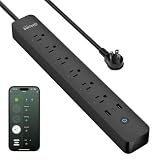


Kasa Smart Power Strip HS300 at a Glance
| Component | Specification |
|---|---|
| Type | Smart surge-protector power strip |
| Voice assistant | Works with Alexa, Google Assistant, SmartThings |
| Display size | LED status lights only |
| Smart home protocols | Wi-Fi only (no Matter, no Thread, no Zigbee) |
| Audio output (W) | None |
| Camera | No |
| Connectivity | 2.4 GHz Wi-Fi |
| App support | Kasa Smart app (iOS, Android) |
| Approx price | around $70 |
Setup & App Experience
The Kasa Smart app drives setup: plug in the HS300, open the app, follow the standard Wi-Fi pairing flow and the strip is online in a couple of minutes. Each of the six outlets gets its own name (Monitor, PC, Capture Card, Stream Light, Subwoofer, Speakers — whatever fits the rig), and individual on/off schedules, voice-control aliases and energy-monitoring data live per outlet. Scenes group multiple outlets together — a single ‘Going Live’ scene can switch on stream lights, the subwoofer and capture card while leaving the always-on NAS untouched. Schedules support sunrise/sunset, away timers, and one-touch scene activation; the Kasa app is one of the more polished smart-plug apps and a strong reason to pick this brand over generic Tuya rebrands.
Smart Home Compatibility — Matter / Alexa / Google
The HS300 works with Alexa and Google Assistant (each outlet appears as a separate voice-controllable device) and integrates with Samsung SmartThings and IFTTT for cross-platform routines. It does not currently support Matter or Apple HomeKit, which is the main caveat — TP-Link has rolled out Matter on newer Kasa devices but not this slightly older strip. For an Alexa or Google household it is a tidy fit. For HomeKit-only households a Belkin Wemo or Eve Energy Strip is the alternative.
Audio & Display Quality
The HS300 is a power strip — no audio, no display, just LED status lights on the front edge of the strip showing which outlets are on. The lights are reasonably bright but not aggressive, and they make a useful glance-able status indicator for whether the streaming PC, capture card and lights are powered. There is no display to give energy readings on the device — that data is in the Kasa app, where per-outlet running power consumption (watts) and historical usage (kWh) are tracked over time.
Use Cases — Streamer Setup / Kitchen / Garage
This is exactly the right device for a battlestation. Six individually-controlled outlets cover monitor, PC, capture card, stream lights, subwoofer and an aux speaker (or a Stream Deck/USB hub) with energy monitoring on each — useful for working out what your gaming rig actually pulls under load and how much that costs per month. The three USB-A ports add desk-clutter relief for charging a phone, controller and headset. A ‘Stream Mode’ scene switches the rig to broadcasting state in one tap; an ‘Away’ scene drops standby drain from monitors and speakers when the rig is unattended. In a kitchen the same logic applies to coffee maker, blender and toaster; in a garage or workshop it covers a charger station for power tools with overnight schedules. Proper surge protection means the HS300 also doubles as the rig’s primary surge defence; complement it with our best surge protectors for tower-class systems.
The energy-monitoring data is more useful than it sounds for a serious streamer. Logging per-outlet wattage over time reveals exactly how much a streaming PC, monitors, capture card and stream lights cost to run per hour of broadcast, which lets a streamer calculate true operating cost per stream and price out hardware upgrades against their energy bill. The Kasa app stores running power and historical kWh per outlet for thirty days by default, with longer-term export available. Combined with a smart thermostat for room cooling and an Echo for voice control, the HS300 becomes the physical layer that makes a full automated streaming routine possible — and unlike a generic smart strip, the per-outlet control means you can power-cycle the capture card without affecting the monitor.
Privacy & Microphone Mute
The HS300 has no microphone and no camera, so the entire smart-display privacy conversation does not apply. Data shared with TP-Link’s cloud is per-outlet on/off state and energy telemetry — there is no audio, no video, no voice recording. For a privacy-conscious streamer this makes the HS300 an easy add to a rig: it gives smart control without adding another always-listening device near the recording space. Voice commands themselves are recorded by whichever Echo or Nest speaker is in the room, not by the strip.
Verdict
At around $70, the Kasa HS300 is the smart power strip we recommend to most gamer-streamers, and the one that actually lives behind our own battlestations. The combination of six individually-controlled outlets, three USB-A ports, per-outlet energy monitoring, proper surge protection and Alexa/Google support is more capability than competing strips offer at the price, and the Kasa app is polished enough to be a daily-use surface rather than a setup-then-forget afterthought. The honest caveats are real: no Matter or HomeKit support, no Thread/Zigbee, 2.4 GHz Wi-Fi only. For an Alexa or Google household running a gaming rig those are not blockers. If you specifically need HomeKit, the Eve Energy Strip is the alternative. For everyone else the HS300 is the buy. Practical layout tip: route the always-on devices (NAS, network gear, smart hubs) to outlets you do not control by routine, and reserve the controllable outlets for monitors, capture cards and accent lighting where one-tap power management actually saves time and electricity. The HS300’s heavy strip and four-foot cable mean it sits well at the back of a typical desk without strain on outlet boxes. For households running multiple gaming or streaming spaces, a second HS300 covers the bedroom or second rig at the same price — and Kasa scenes can group outlets across multiple strips for property-wide ‘all off’ or ‘movie mode’ routines. See our best streaming setup guide for tying smart plugs into a one-tap ‘Going Live’ routine.
Frequently Asked Questions
Can the Kasa HS300 control each outlet separately?
Yes. That is the headline feature — each of the six outlets has its own name, schedule, voice-control alias and energy-monitoring data, so you can control the PC, monitor, lights and capture card independently from a single strip.
Does the Kasa HS300 monitor energy use?
Yes, per outlet. The Kasa app shows running power consumption (watts) and historical usage (kWh) over time per outlet, which is genuinely useful for understanding what a streaming PC draws under load.
Does the Kasa HS300 work with HomeKit?
No. The HS300 does not support Apple HomeKit or Matter — it works with Alexa, Google Assistant and Samsung SmartThings via Wi-Fi only. For HomeKit households, the Eve Energy Strip is the alternative.
Is the Kasa HS300 surge protected?
Yes. It includes proper surge protection in addition to the smart-control features, so it can serve as a battlestation’s primary surge defence alongside its smart-plug duties.
More Smart Home Reviews
- Google Nest Wifi AC2200 Review: Mesh Router for Smaller Smart Homes
- Chamberlain Smart Garage Control Review: MyQ WiFi + Bluetooth Hub
- Amazon Echo Dot (Newest) Review: Compact Alexa Speaker for Gamers
- Amazon Echo Show 5 (Newest) Review: 5.5″ Smart Display for the Desk
- Amazon Echo Spot (Newest) Review: Smart Alarm Clock with Alexa
- Amazon Echo Show 8 Review: 8″ Spatial Audio Smart Display
- SwitchBot Hub 2 Review: Matter Bridge with IR Remote & Thermometer
- Amazon Echo Show 15 Review: 15.6″ Full HD Wall-Mount Kitchen Hub
Affiliate Disclosure: As an Amazon Associate, we earn from qualifying purchases. If you click a link and make a purchase, we may earn a small commission at no extra cost to you. Prices and availability are accurate as of publication and may change.