

A $2,500 budget is the sweet spot where prebuilt gaming moves decisively into high-end 1440p and the doorway to 4K. At this ceiling you are no longer making the hard compromises of an entry build — instead you can pair a high-tier GPU like the RTX 5070 with a strong modern CPU, plenty of fast memory, and roomy NVMe storage, and expect to drive a high-refresh 1440p monitor with headroom to spare. This guide rounds up the best gaming PC under 2500 dollars in 2026, prebuilt systems judged on how much high-resolution gaming muscle each one delivers for the money, plus a parts plan if you would rather build.
- Best Gaming PC Under 2500 in 2026: Quick Answer
- Best Prebuilt Gaming PCs under $2,500 at a Glance
- 1. Skytech Gaming Archangel 5, Intel i7-14700F / NVIDIA RTX 5070 12GB
- 2. Skytech Gaming O11 Vision, AMD Ryzen 7 9700X / NVIDIA RTX 5070
- 3. Skytech Gaming Shadow 5, AMD Ryzen 7 / NVIDIA RTX 5070 (32GB RAM)
- 4. Skytech Gaming Azure 3 Desktop, Ryzen 7 / NVIDIA RTX 5070 (24GB RAM)
- 5. Skytech Gaming Archangel, Intel i5-14400F / NVIDIA RTX 5060
- 6. STGAubron Gaming PC Desktop, Intel Core i7 / Radeon RX 580 8GB
- More Prebuilt Gaming PCs Worth Considering Under $2,500
- Five More Prebuilt Gaming PCs Under $2,500 to Compare
- Best Prebuilt Gaming PC by Budget Tier (October 2026)
- How to Choose a Prebuilt Gaming PC under $2,500
- RTX 5070 vs RTX 5070 Ti vs RX 9070 XT: Which GPU Tier Fits a $2,500 Budget?
- Prebuilt vs Building Your Own at $2,500 in 2026
- Best Gaming Build Under $2,500: A Balanced Parts Plan
- Spec-Sheet Red Flags to Check Before You Buy
- First Upgrades That Make Sense for a Sub-$2,500 Prebuilt
- Frequently Asked Questions
- Related Guides
Our picks were chosen on the components that actually decide gaming performance at this tier: the GPU first, then the CPU, memory and storage, followed by build quality and value. We have ordered the list to lead with the configurations that make the strongest case for high-end 1440p and entry-4K play, then include capable step-downs and a couple of value alternatives, with typical prices from around $500 up to roughly $2,400, so every pick stays under the $2,500 ceiling. Prebuilt prices move often, so treat every figure here as an approximate October 2026 range. We describe each system by capability and fit rather than quoting invented frame rates. Below is an at-a-glance comparison, then a closer look at each PC and a buyer’s guide to spending a $2,500 budget wisely.
As an Amazon Associate we earn from qualifying purchases at no extra cost to you.
Best Gaming PC Under 2500 in 2026: Quick Answer
Updated October 2026 – model lineups and price ranges below were rechecked against current listings this month.
The best gaming PC under 2500 dollars for most buyers is the Skytech Gaming Archangel 5 with the Intel Core i7-14700F and RTX 5070 12GB, which sells around $1,900-$2,000 and handles high-refresh 1440p with room to spare. For a showcase build, choose the Skytech Gaming O11 Vision with the Ryzen 7 9700X and RTX 5070. For the strongest GPU that still fits the budget, choose the msi Aegis R2 AI with the Core Ultra 7 265 and RTX 5070 Ti 16GB. Each prebuilt gaming PC under $2500 below is judged on its GPU first, then CPU, memory, storage and warranty.
🛒 Best Price Today on Amazon
Prime members get fast, free shipping on everything above, plus member-only deals. New members get a 30-day free trial — cancel anytime.
Best Prebuilt Gaming PCs under $2,500 at a Glance
| Prebuilt PC | Best For | Standout Spec | Approx Price |
|---|---|---|---|
| Skytech Archangel 5 (i7-14700F / RTX 5070) | Top high-end 1440p pick | i7-14700F + RTX 5070 | around $2,000 |
| Skytech O11 Vision (Ryzen 7 9700X / RTX 5070) | Showcase 1440p build | Ryzen 7 9700X + RTX 5070 | around $2,100 |
| Skytech Shadow 5 (Ryzen 7 / RTX 5070) | AMD 1440p with 32GB RAM | Ryzen 7, RTX 5070, 32GB DDR5 | around $2,100 |
| Skytech Azure 3 (Ryzen 7 / RTX 5070) | Value RTX 5070 | Ryzen 7, RTX 5070, 24GB RAM | around $1,900 |
| Skytech Archangel (i5-14400F / RTX 5060) | Budget high-refresh 1080p/1440p | i5-14400F + RTX 5060 | around $1,200 |
| STGAubron (i7 / RX 580) | Entry esports starter | Core i7, RX 580 8GB | around $500 |
1. Skytech Gaming Archangel 5, Intel i7-14700F / NVIDIA RTX 5070 12GB
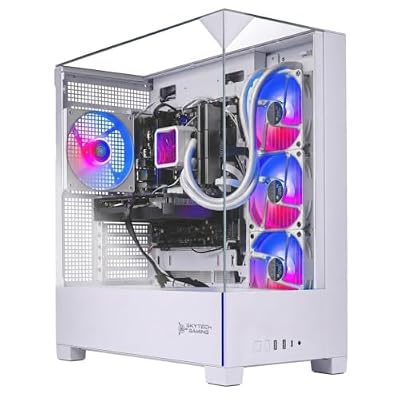
The Skytech Archangel 5 with the Intel Core i7-14700F and RTX 5070 leads this list as the strongest all-round high-end 1440p pick under $2,500. It pairs a powerful multi-core i7 — with high clocks and ample cores for gaming and multitasking — with the high-tier RTX 5070 graphics card, backed by fast RAM and NVMe storage. At around $2,000 it leaves headroom in the budget while delivering serious high-resolution muscle.
This is the configuration to choose if your goal is high-refresh 1440p gaming with the confidence to step into 4K in less demanding titles. The RTX 5070 is a genuine high-end GPU built for high resolutions and modern features, the i7-14700F gives you the CPU headroom to feed it and to handle streaming or background tasks without choking, and the balanced memory and storage keep everything responsive. For the buyer who wants the most capable, well-rounded high-end 1440p prebuilt at this price, the i7 Archangel 5 is the clear lead pick.
Pros: High-tier RTX 5070, powerful i7-14700F, fast RAM and NVMe, well under the $2,500 ceiling.
Cons: Tower aesthetics are understated; airflow-focused rather than showcase.
2. Skytech Gaming O11 Vision, AMD Ryzen 7 9700X / NVIDIA RTX 5070

The Skytech O11 Vision pairs the AMD Ryzen 7 9700X with the RTX 5070 inside a dual-chamber showcase chassis, making it the pick for buyers who want high-end 1440p performance and a build that looks the part. The Ryzen 7 9700X is a strong gaming CPU, the RTX 5070 supplies the high-resolution graphics power, and the O11-style case puts the components on display. The listing also names a 360mm liquid cooler, an 850W Gold power supply, 16GB of DDR5 and a 1TB NVMe SSD. At around $2,100 it lands neatly under budget.
Choose this system if presentation matters as much as performance and you want a centerpiece for the desk without overspending. The RTX 5070 handles high-refresh 1440p and entry-4K play with ease, the 9700X’s strong per-core speed suits gaming beautifully, and the glass-forward chassis with clean cable management makes the most of the RGB and liquid cooling. The 16GB of RAM is the one spec worth upgrading later. For a gamer who wants high-end 1440p capability wrapped in a genuine showcase build that still comes in under $2,500, the O11 Vision is the standout.
Pros: RTX 5070 high-end power, strong Ryzen 7 9700X, dual-chamber showcase chassis, 360mm liquid cooler, under budget.
Cons: Only 16GB of RAM in the listing; showcase cases prioritise looks, so verify cooling for sustained loads.
3. Skytech Gaming Shadow 5, AMD Ryzen 7 / NVIDIA RTX 5070 (32GB RAM)

The Skytech Shadow 5 pairs an AMD Ryzen 7 (the listing title does not name the exact model) with the RTX 5070, 32GB of DDR5 and a 1TB NVMe SSD, and at around $2,100 it is the AMD route to high-end 1440p with a full 32GB of memory. It delivers the same high-tier graphics horsepower as the lead picks, which makes it a strong choice if you prefer AMD processors.
This is the build for the gamer who wants RTX 5070 high-resolution muscle, prefers AMD’s gaming CPUs and does not want to upgrade the memory right away. The listing also names a 360mm liquid cooler and a 750W Gold power supply, and the RTX 5070 drives high-refresh 1440p with room for entry-4K. With around $400 of headroom left under the $2,500 ceiling, it frees up budget for a high-refresh 1440p monitor — exactly the display this rig is built to push.
Pros: RTX 5070 with 32GB of DDR5, Ryzen 7 CPU, 360mm liquid cooler listed, budget headroom for a monitor.
Cons: The listing does not name the exact Ryzen 7 model; it costs a little more than the Azure 3; case and styling details are not stated.
4. Skytech Gaming Azure 3 Desktop, Ryzen 7 / NVIDIA RTX 5070 (24GB RAM)

The Skytech Azure 3 pairs a Ryzen 7 processor with an RTX 5070 and 24GB of RAM at around $1,900, making it the value-focused way into RTX 5070 gaming on this list. The listing does not name the exact Ryzen 7 model, so confirm the CPU before ordering.
This is the pick for the buyer who wants high-end 1440p capability at a lower entry price than most RTX 5070 systems here. The RTX 5070 handles high-refresh 1440p and entry-4K play, and the price leaves a generous chunk of the budget for a monitor, peripherals, or a later move to 32GB of RAM. For a gamer who wants strong 1440p performance with money left over, the Azure 3 is a sensible choice.
Pros: RTX 5070 at a lower price, Ryzen 7 CPU, 1TB SSD, large remaining budget headroom.
Cons: Only 24GB of RAM; the exact Ryzen 7 model is not named in the listing; styling is functional.
5. Skytech Gaming Archangel, Intel i5-14400F / NVIDIA RTX 5060

Skytech Gaming PC Desktop, Intel i5 14400F, RTX 5060, 16GB RAM, 1TB SSD | Windows 11, NVMe SSD, DDR5 6000, 750W GOLD PSU, Wi-Fi 5, Archangel 5 Series


As an Amazon Associate we earn from qualifying purchases. Product prices and availability are accurate as of the date/time indicated.
The Skytech Archangel with the Intel i5-14400F and RTX 5060 is the budget high-refresh pick, coming in at around $1,200 — roughly half the ceiling. It steps down to a capable mainstream CPU and the RTX 5060 graphics card, delivering excellent high-refresh 1080p and very competent 1440p gaming for far less than the high-end picks.
This is the system to choose if you want strong, current-generation gaming performance but do not need to chase 4K, or if you want to bank a large part of the $2,500 budget. The i5-14400F is a well-balanced gaming CPU, the RTX 5060 comfortably drives high-refresh 1080p and handles 1440p in most titles, and the low price leaves enormous headroom for a great monitor, peripherals, or savings. For the budget-conscious buyer shopping under $2,500 who values money in the bank over maximum resolution, the i5 Archangel is the smart pick.
Pros: Great high-refresh 1080p and capable 1440p, balanced i5-14400F, leaves huge budget headroom.
Cons: RTX 5060 is a step below the high-end picks for 4K and ultra 1440p.
6. STGAubron Gaming PC Desktop, Intel Core i7 / Radeon RX 580 8GB
Rounding out the list is the STGAubron desktop with a Core i7 and Radeon RX 580 8GB, the entry esports starter at around $500. It is by far the cheapest system here and uses older-generation parts, but it is an honest, budget way to get into PC gaming, and pairing it with a $2,500 budget leaves almost the entire allowance for a monitor, peripherals, or a future upgrade.
Be clear about what this is: the RX 580 8GB is a capable 1080p esports and older-title card, not a high-end 1440p or 4K solution like the RTX 5070 picks above it. For competitive shooters, MOBAs and less demanding games at 1080p it performs well, and the Core i7 keeps the system snappy for everyday use. If you want a low-cost starting point under $2,500 and intend to put the rest of the budget elsewhere — or upgrade the GPU later — the STGAubron is a sensible entry, described honestly for what it is.
Pros: Very low entry price, capable 1080p esports performance, Core i7, leaves most of the budget free.
Cons: Older RX 580 GPU; not a high-end 1440p or 4K machine like the RTX picks.
More Prebuilt Gaming PCs Worth Considering Under $2,500
The six systems above cover the core of this budget, but they lean heavily on one builder. If you would rather compare across brands, want an AMD Radeon graphics card, or want to stretch to an RTX 5070 Ti without crossing the $2,500 line, these five alternatives are worth a close look. Prices for prebuilts move often, so treat the ranges below as typical rather than fixed.
| Prebuilt PC | CPU | GPU | Memory / Storage | Typical Price |
|---|---|---|---|---|
| MSI Codex R2 | Intel Core i5-14400F | RTX 5070 12GB | 32GB DDR5 / 1TB NVMe | about $1,600–$1,800 |
| Alienware Aurora ACT1250 | Intel Core Ultra 7 265F | RTX 5070 | 32GB / 1TB | about $2,100–$2,300 |
| KOTIN Gaming PC | AMD Ryzen 7 9700X | Radeon RX 9070 XT 16GB | 32GB DDR5 / 1TB SSD | about $2,100–$2,300 |
| iBUYPOWER Element | AMD Ryzen 9 7900X | RTX 5070 12GB | 32GB DDR5 / 1TB NVMe | about $2,200–$2,400 |
| MSI Aegis R2 AI | Intel Core Ultra 7 265 | RTX 5070 Ti 16GB | 32GB / 2TB SSD | about $2,200–$2,400 |
MSI Codex R2 (i5-14400F / RTX 5070) — Best for the Cheapest Way Into RTX 5070
As an Amazon Associate we earn from qualifying purchases at no extra cost to you.

The MSI Codex R2 is the lowest-cost route to RTX 5070 graphics on this page, usually landing somewhere around $1,600–$1,800. It pairs the 12GB RTX 5070 with Intel’s Core i5-14400F, a 10-core chip that is perfectly capable of feeding a 5070 at 1440p, and it does not cut corners elsewhere: 32GB of DDR5 memory and a 1TB NVMe drive come standard.
This is the pick for a gamer who wants the same high-end 1440p graphics tier as the lead Skytech systems while keeping several hundred dollars of the budget for a high-refresh monitor. The trade-off is CPU headroom. In very CPU-heavy games at high frame rates, or if you stream while you play, a Core i7 or Ryzen 7 system will hold up better. For pure 1440p gaming, though, the GPU does the heavy lifting and the i5 rarely becomes the bottleneck.
Pros
- RTX 5070 at the lowest price here, 32GB DDR5 as standard, leaves room in the budget for a monitor
- Mainstream brand with wide support coverage
Cons
- Core i5 has less headroom for streaming or CPU-bound esports titles
- 1TB fills quickly with large modern games
Alienware Aurora ACT1250 (Core Ultra 7 265F / RTX 5070) — Best for Brand Support and a Polished Chassis

Alienware’s redesigned Aurora is the choice for buyers who value a well-finished case and a large service network as much as raw specs. This configuration combines Intel’s Core Ultra 7 265F, a 20-core processor with plenty of multi-threaded muscle, with an RTX 5070, 32GB of memory and a 1TB drive, and it usually sells in the $2,100–$2,300 range.
You pay a modest premium over boutique builders for the brand, but in return you get a cleaner, more cohesive chassis design, straightforward warranty handling, and the option of extended support plans. That makes the Aurora a sensible pick for a family PC, a first gaming desktop, or anyone who would rather call support than troubleshoot a fault themselves. Performance in games is in the same class as the other RTX 5070 systems on this list, so the decision comes down to how much you value the chassis and the support experience.
Pros
- Strong 20-core CPU, polished chassis, established support network with extended coverage options
- RTX 5070 and 32GB of memory suit high-refresh 1440p well
Cons
- Costs more than boutique builds with similar gaming performance
- Power supply and cooling details vary by configuration, so confirm them before ordering
KOTIN Gaming PC (Ryzen 7 9700X / RX 9070 XT) — Best AMD Radeon Pick

If you prefer AMD graphics, this KOTIN system is the strongest all-AMD build in this roundup, usually priced around $2,100–$2,300. The Radeon RX 9070 XT is a 16GB card that competes with NVIDIA’s upper-midrange offerings in traditional rasterized games, and its larger memory buffer is a real advantage for 1440p ultra settings, high-resolution texture packs and early 4K play. The 8-core Ryzen 7 9700X is a modern Zen 5 chip with excellent per-core speed, and 32GB of DDR5 plus a 1TB SSD round out a balanced spec.
Choose this build if you play mostly at 1440p with high settings, care about VRAM headroom, and do not depend on NVIDIA-specific features. NVIDIA still holds the edge in heavy path-traced ray tracing and in the breadth of game support for its upscaling and frame generation, so players who chase maximum ray-tracing settings should lean toward the RTX picks instead.
Pros
- 16GB of VRAM, strong 1440p raster performance, fast Zen 5 CPU on the upgrade-friendly AM5 platform
- 32GB of DDR5 as standard
Cons
- Trails NVIDIA in the heaviest ray-tracing workloads
- Smaller builder, so check warranty terms before ordering
iBUYPOWER Element (Ryzen 9 7900X / RTX 5070) — Best for Gaming Plus Content Creation

The iBUYPOWER Element stands out for its processor. The Ryzen 9 7900X brings 12 cores and 24 threads, which is more multi-threaded power than any other system in this price band, paired with an RTX 5070 12GB, 32GB of DDR5 and a 1TB NVMe drive. Expect to see it around $2,200–$2,400.
For gaming alone, the extra cores add little over an 8-core chip, but they make a real difference if you also edit video, stream with software encoding, compile code or run heavy background tasks while you play. This is the build for the gamer-creator who wants one machine to handle both jobs. The AM5 socket also gives you a path to newer Ryzen processors later on, and the RGB-heavy styling will appeal to anyone who wants a showy desk setup.
Pros
- 12-core CPU for streaming, editing and multitasking, RTX 5070 graphics, 32GB DDR5
- AM5 platform leaves room for future CPU upgrades
Cons
- Extra cores bring little benefit in games alone
- Price sits close to RTX 5070 Ti systems
MSI Aegis R2 AI (Core Ultra 7 265 / RTX 5070 Ti) — Best RTX 5070 Ti Under $2,500

The MSI Aegis R2 AI is the most powerful gaming configuration in this roundup, and it typically sells in the $2,200–$2,400 range. It steps up to the RTX 5070 Ti with 16GB of GDDR7 memory, a clear tier above the RTX 5070 that makes 4K gaming with upscaling far more comfortable and gives you more VRAM for the years ahead. The 20-core Intel Core Ultra 7 265 keeps it fed, and 32GB of memory plus a roomy 2TB SSD mean you will not be shopping for upgrades on day one.
Pick this system if your target is high-refresh 1440p at maximum settings or a real attempt at 4K, and you want the best GPU your $2,500 can buy. Because RTX 5070 Ti prebuilts hover close to the budget ceiling, check the current price before buying and avoid paying extra for bundled peripherals you do not need.
Pros
- RTX 5070 Ti with 16GB GDDR7, 2TB of storage, strong 20-core CPU
- Best 4K capability on this list while staying under budget
Cons
- Price can drift close to the $2,500 ceiling
- Leaves less money for a high-end monitor
Five More Prebuilt Gaming PCs Under $2,500 to Compare
These five systems come from other builders and mostly use an RTX 5070, so they work as cross-shopping options against the Skytech picks above. Listing titles do not always state every spec, so confirm RAM, storage and the power supply before ordering.
| Prebuilt PC | CPU | GPU | Memory / Storage | Typical Price |
|---|---|---|---|---|
| CyberPowerPC Gaming PC | Ryzen 9 9900X | RTX 5070 12GB | Confirm on listing | about $2,300-$2,400 |
| ASUS ROG G700 | Core Ultra 7 265F | RTX 5070 | 32GB DDR5 / 1TB NVMe | about $1,900-$2,000 |
| KOTIN Gaming PC | Ryzen 7 9800X3D | RTX 5070 12GB | 32GB DDR5 / 1TB SSD | about $2,400 |
| HP OMEN 45L | Core Ultra 7 265K | RTX 5070 | 16GB / 1TB SSD | about $1,900-$2,000 |
| msi Codex Z2 | Ryzen 7 8700F | RTX 5070 | 32GB DDR5 / 2TB SSD | about $2,050-$2,150 |
CyberPowerPC Gaming PC (Ryzen 9 9900X / RTX 5070 12GB) – Best for Streaming and Content Work

CyberPowerPC pairs a 12-core Ryzen 9 processor with an RTX 5070, which makes this the multitasking pick for anyone who streams, edits video or runs background apps while gaming. It sits near the top of the budget at roughly $2,300-$2,400.
- AMD Ryzen 9 9900X, a 12-core, 24-thread Zen 5 processor
- NVIDIA GeForce RTX 5070 with 12GB of video memory
- Listing title does not state RAM or SSD size
- Priced close to the $2,500 ceiling
Pros: strong multi-core CPU, RTX 5070 graphics, room to grow. Cons: costs more than the i7 Skytech with similar gaming speed; sparse title specs. Skip it if you only play games, since the extra cores add little there.
ASUS ROG G700 (Core Ultra 7 265F / RTX 5070) – Best for Brand Support

The ROG G700 is the pick for buyers who want a large brand behind the warranty and a clean, finished chassis. At roughly $1,900-$2,000 it undercuts the Alienware Aurora with the same CPU and GPU tier.
- Intel Core Ultra 7 265F processor
- NVIDIA GeForce RTX 5070
- 32GB DDR5 RAM
- 1TB M.2 NVMe PCIe 4 SSD
- Windows 11 Home, model G700TF-AS776
Pros: 32GB of DDR5 as standard, major-brand support, price below the Alienware. Cons: only 1TB of storage; model year 2025 hardware. Skip it if you want the newest platform or more than 1TB of storage.
KOTIN Gaming PC (Ryzen 7 9800X3D / RTX 5070 12GB) – Best for CPU-Heavy Games

The Ryzen 7 9800X3D uses AMD’s 3D V-Cache design, which suits esports titles, simulators and other games that lean on the processor. Paired with an RTX 5070 it makes a fast, balanced machine at roughly $2,400.
- AMD Ryzen 7 9800X3D, 8 cores with 3D V-Cache
- NVIDIA GeForce RTX 5070 12GB
- 32GB DDR5 RAM
- 1TB SSD
Pros: top-tier gaming CPU, 32GB DDR5, AM5 upgrade path. Cons: price sits near the ceiling; smaller builder, so check warranty terms. Skip it if you play mostly GPU-bound games at 4K, where a faster GPU matters more.
HP OMEN 45L (Core Ultra 7 265K / RTX 5070) – Best for Airflow and Upgrade Room

The OMEN 45L is HP’s tempered-glass tower with an unlocked Core Ultra 7 265K and an RTX 5070. This listing ships with 16GB of RAM, so budget for a 32GB upgrade, but the roomy case and mainstream brand make it an easy system to maintain.
- Intel Core Ultra 7 265K, an unlocked 20-core processor
- NVIDIA GeForce RTX 5070
- 16GB RAM and a 1TB SSD
- Tempered-glass case, Windows 11 Pro
Pros: unlocked CPU, easy to upgrade, major-brand support. Cons: only 16GB of RAM as listed; 1TB fills quickly. Skip it if you do not want to upgrade the memory yourself.
msi Codex Z2 (Ryzen 7 8700F / RTX 5070) – Best for Storage Space

The Codex Z2 pairs an RTX 5070 with a 2TB SSD and 32GB of DDR5, so you will not be shopping for storage soon. The Ryzen 7 8700F is an older Zen 4 chip, but it is more than enough for an RTX 5070.
- AMD Ryzen 7 8700F, 8 cores on the AM5 platform
- NVIDIA GeForce RTX 5070
- 32GB DDR5 RAM
- 2TB SSD
Pros: 2TB of storage and 32GB of DDR5 for the price, mainstream brand. Cons: previous-generation CPU. Skip it if you want an X3D processor for CPU-heavy games.
Best Prebuilt Gaming PC by Budget Tier (October 2026)
If you would rather pick by price than by brand, use these tiers. Each line lists one prebuilt with its key specs.
Best prebuilt gaming PC around $1,200-$1,500
- Skytech Gaming Archangel (i5-14400F) · RTX 5060 · 16GB RAM · 1TB SSD · best for high-refresh 1080p
Best prebuilt gaming PC from $1,500 to $2,000
- msi Codex R2 · Core i5-14400F · RTX 5070 12GB · 32GB DDR5 · 1TB NVMe · cheapest RTX 5070 with 32GB
- Skytech Gaming Azure 3 · Ryzen 7 · RTX 5070 · 24GB RAM · 1TB SSD · value RTX 5070
- ASUS ROG G700 · Core Ultra 7 265F · RTX 5070 · 32GB DDR5 · 1TB NVMe · best brand support at this price
- Skytech Gaming Archangel 5 · Core i7-14700F · RTX 5070 12GB · 32GB RAM · 1TB SSD · best all-round 1440p pick
Best prebuilt gaming PC from $2,000 to $2,500
- Skytech Gaming O11 Vision · Ryzen 7 9700X · RTX 5070 · 16GB DDR5 · 1TB NVMe · showcase chassis with a 360mm cooler
- Skytech Gaming Shadow 5 · Ryzen 7 · RTX 5070 · 32GB DDR5 · 1TB NVMe · AMD pick with 32GB of RAM
- Alienware Aurora ACT1250 · Core Ultra 7 265F · RTX 5070 · 32GB · 1TB · polished chassis and support
- KOTIN Gaming PC · Ryzen 7 9700X · RX 9070 XT 16GB · 32GB DDR5 · 1TB SSD · best Radeon option
- KOTIN Gaming PC · Ryzen 7 9800X3D · RTX 5070 12GB · 32GB DDR5 · 1TB SSD · best for CPU-heavy games
- msi Aegis R2 AI · Core Ultra 7 265 · RTX 5070 Ti 16GB · 32GB · 2TB SSD · best for 4K with upscaling
How to Choose a Prebuilt Gaming PC under $2,500
With a $2,500 budget the GPU is where most of your money should concentrate, because graphics power is what decides whether you can game at high-end 1440p and dip into 4K. At this ceiling a high-tier card like the RTX 5070 — found in the lead Skytech picks — is the target, since it delivers the high-resolution performance and modern features that justify a premium prebuilt. Treat the GPU as the headline component and judge a build first on which card it carries.
The CPU comes next, and at this price it should be strong enough never to hold the GPU back. A modern CPU with at least six to eight fast cores, such as the 20-core Intel Core i7-14700F (8 performance cores) or the 8-core AMD Ryzen 7 7700X, gives you the per-core speed games crave plus the cores for streaming and multitasking. A capable i5 like the 14400F is fine if you step down the GPU to match, as in the RTX 5060 Archangel, but for a high-end RTX 5070 build you want a strong i7 or Ryzen 7 to keep the pairing balanced.
Memory and storage are the supporting cast that keep a high-end system responsive. For high-resolution gaming in 2026, 16GB of fast RAM is the floor and 32GB is the comfortable choice if you stream, edit or multitask, and a $2,500 budget should never force you below a roomy NVMe SSD as the boot and game drive. Fast NVMe storage cuts load times and keeps a big game library close to hand; confirm the prebuilt includes a generous SSD rather than a small drive plus a slow hard disk.
Finally, spend the whole budget thoughtfully rather than blindly maxing the tower. Every PC on this list comes in under $2,500 — several well under — which means you can put the difference toward the high-refresh 1440p monitor this class of rig is built to drive, or quality peripherals, instead of a marginally faster machine you will not notice. Decide your target resolution, prioritise a high-tier GPU like the RTX 5070, make sure the CPU, RAM and storage keep pace, and pick the prebuilt on this list that leaves you the best complete setup for your $2,500.
RTX 5070 vs RTX 5070 Ti vs RX 9070 XT: Which GPU Tier Fits a $2,500 Budget?
Almost every serious prebuilt under $2,500 in 2026 is built around one of three graphics cards. Knowing how they differ makes it much easier to judge whether a given system is fairly priced.
| GPU | Video Memory | Sweet-Spot Resolution | Main Strength | Typical Prebuilt Price |
|---|---|---|---|---|
| RTX 5070 | 12GB GDDR7 | High-refresh 1440p | Best value for 1440p, full access to DLSS 4 and frame generation | about $1,600–$2,300 |
| RX 9070 XT | 16GB GDDR6 | 1440p ultra, entry 4K | Strong raster performance and more VRAM for the money | about $2,000–$2,400 |
| RTX 5070 Ti | 16GB GDDR7 | 1440p max settings, 4K with upscaling | Fastest card realistically available under $2,500, strong ray tracing | about $2,200–$2,500 |
The RTX 5070 is the default choice for high-refresh 1440p and is the GPU in most of the systems above. The RX 9070 XT is the value alternative when you want 16GB of memory without paying NVIDIA’s premium, while the RTX 5070 Ti is worth stretching for only if you plan to game at 4K or want the longest possible runway before an upgrade. If a seller lists only “RTX 50-series” without naming the exact card, confirm the model before you buy, because the gap between a 5060 and a 5070 Ti is enormous.
Prebuilt vs Building Your Own at $2,500 in 2026
A few years ago, building your own PC almost always saved money at this budget. That advantage has narrowed considerably. Memory prices rose sharply from late 2025 into 2026, and prebuilt makers buy components in volume, so a ready-made system with 32GB of DDR5 often costs about the same as, or less than, the same parts bought individually. Factor in a Windows license and the value of a single warranty that covers the whole machine, and a well-chosen prebuilt is now the sensible default for most buyers.
Building still makes sense if you want a specific case, a premium power supply, quieter cooling or particular brands for every component, or if you can reuse parts such as storage, a case or a power supply from an older PC. If none of that applies, buy the prebuilt and put the time you save into setting up your games.
Best Gaming Build Under $2,500: A Balanced Parts Plan
If you decide to build instead of buy, a balanced gaming build under $2,500 puts roughly 40 percent of the budget into the graphics card, about 15 percent into the CPU, and the rest into memory, storage, motherboard, power supply, case and cooling. A sensible parts list looks like this:
- GPU: RTX 5070 Ti 16GB or Radeon RX 9070 XT 16GB for 1440p ultra and entry 4K
- CPU: Ryzen 7 9700X for value, or Ryzen 7 9800X3D if you play CPU-heavy games
- Memory: 32GB of DDR5 as two matched sticks
- Storage: a 2TB PCIe 4.0 NVMe SSD from a known brand
- Power supply: a quality 750-850W 80+ Gold unit with spare headroom
- Cooling and case: a tower air cooler or 240mm liquid cooler in an airflow-focused case
A build gives you control over the power supply, cooler and case, which are the parts prebuilt makers trim first. The trade-off is that you carry the assembly work and separate warranties, and the memory shortage has narrowed the price gap, so compare the parts total against the prebuilts above before you commit.
Spec-Sheet Red Flags to Check Before You Buy
Two prebuilts with the same CPU and GPU can feel very different in daily use because of the parts that get less attention in the listing. Run through these checks before you order:
- Unnamed power supply. Look for a stated wattage and an efficiency rating. An RTX 5070 system should have a quality unit of around 650–750W, and an RTX 5070 Ti system around 750W or more, so you have headroom for upgrades.
- Single-stick memory. One memory module runs in single-channel mode and can cost noticeable performance. Two matched sticks (for example 2 x 16GB) are what you want.
- Vague GPU or CPU naming. “RTX 50-series” or “Core i7” on its own is not a spec. The exact model decides performance.
- Weak CPU cooling. A high-end processor paired with a small stock cooler will run hot and loud. A tower air cooler or a 240mm-plus liquid cooler is a better sign.
- Small or unbranded storage. 1TB is the practical minimum in 2026, and a known-brand NVMe drive is worth more than a larger no-name one.
- Missing Wi-Fi or limited ports. Some towers skip wireless or front USB-C. Check if you cannot run an Ethernet cable to your desk.
- Warranty length and process. One year of parts and labor is common. Check who handles repairs and whether you must ship the whole tower back.
First Upgrades That Make Sense for a Sub-$2,500 Prebuilt
Because most of the systems in this guide come in well under the ceiling, you can plan the leftover budget around upgrades that actually improve your experience:
- A high-refresh 1440p monitor. A 27-inch 1440p panel at 165Hz or higher is the single best match for RTX 5070-class hardware, and OLED models are now within reach of this budget.
- A second NVMe drive. Modern games regularly exceed 100GB each, so adding a 2TB drive is an easy, inexpensive quality-of-life upgrade.
- More memory if you start at 16GB. Moving to 32GB in two matched sticks helps streaming, editing and heavy multitasking.
- Good peripherals. A responsive mouse, a comfortable keyboard and a decent headset change how the system feels far more than a small step up in GPU tier.
Frequently Asked Questions
What can a gaming PC under $2,500 actually run?
Comfortably high-refresh 1440p gaming, with room to step into 4K in less demanding titles. At this budget a high-tier GPU like the RTX 5070 — in the lead Skytech picks — paired with a strong i7 or Ryzen 7 CPU delivers high-end 1440p performance with modern graphics features. It is the sweet spot where you no longer make the hard compromises of an entry build.
Is the RTX 5070 enough for 1440p and 4K gaming?
Yes for high-refresh 1440p, where it is a genuinely strong performer, and yes for entry-4K in many titles, especially with modern upscaling features. It is the high-tier card to target under $2,500. If 4K at maximum settings in the most demanding games is your absolute priority, that is the territory of a $3,000-plus build with a top-end GPU.
Should I prioritise the CPU or GPU at this budget?
The GPU. Graphics power decides your gaming performance at high resolutions, so concentrate the budget there — aim for an RTX 5070 — and then make sure the CPU is strong enough not to bottleneck it. A modern i7-14700F or Ryzen 7 7700X is an ideal partner for a 5070; you only need a more modest CPU if you also step down the GPU to match.
Do I need 32GB of RAM in a sub-$2,500 gaming PC?
16GB of fast RAM is the floor for high-resolution gaming and is fine for pure play, but 32GB is the comfortable choice at this budget if you stream, edit, or keep many apps open alongside a game. Since these prebuilts leave headroom under $2,500, opting for or upgrading to 32GB is an easy, worthwhile call for a high-end system you want to last.
Should I choose an RTX 5070 Ti or an RX 9070 XT prebuilt?
Both carry 16GB of memory and both are excellent at 1440p. Choose the RTX 5070 Ti if you want the strongest ray tracing, the widest support for NVIDIA’s upscaling and frame generation, or the best chance at smooth 4K. Choose the RX 9070 XT if you mainly play without heavy ray tracing and want to save a few hundred dollars for a better monitor or more storage.
How long will a gaming PC under $2,500 stay relevant?
A balanced system with an RTX 5070-class GPU, a modern 8-core or better CPU and 32GB of memory should handle new releases at 1440p for several years, with settings gradually stepping down over time. The GPU is usually the first part worth upgrading, so a quality power supply with spare capacity is what keeps that option open.
Can these prebuilt PCs handle streaming while gaming?
Yes. Every RTX 50-series and Radeon RX 9000-series card includes a dedicated hardware video encoder, so streaming to Twitch or YouTube adds very little load on the processor. If you also plan to edit video or run many background apps, a higher core-count CPU such as a Ryzen 9 or Core Ultra 7 and 32GB of memory give you more breathing room.
What is the best prebuilt gaming PC for 2500 dollars?
The best prebuilt gaming PC for 2500 dollars is an RTX 5070 system with a strong i7 or Ryzen 7, such as the Skytech Gaming Archangel 5 (Core i7-14700F). Stretch to the msi Aegis R2 AI with the RTX 5070 Ti only if you want 4K with upscaling and accept less money for a monitor.
Are these prebuilt gaming PCs available in Canada?
The same CPU and GPU tiers are sold in Canada, but model names, stock and prices differ by retailer, and these listings are US-based. Set your ceiling in Canadian dollars after checking the exchange rate, then compare an RTX 5070-class system from a Canadian retailer against the specs listed here.
Is a $2,500 gaming PC worth it over a $1,500 one?
Yes, if you play at 1440p high refresh or want to try 4K. The step from an RTX 5060 system to an RTX 5070 or 5070 Ti brings a clear jump in frame rate and VRAM headroom. If you play at 1080p, a roughly $1,200 RTX 5060 system such as the Skytech Gaming Archangel is enough.
What warranty should I expect on a sub-$2,500 prebuilt?
One year of parts and labor is the most common standard coverage, with some brands offering longer terms or paid extensions. Before buying, check whether repairs are handled by the system builder or by individual component makers, and whether opening the case to add storage or memory affects coverage.
Related Guides
- Best Prebuilt Gaming PCs under $3,000 in 2026
- Best Prebuilt Gaming PCs under $2,000 in 2026
- Best Prebuilt Gaming PCs under $4,000 in 2026
- Best $2,500 Gaming PC Build (2026)
- RTX 5070 vs RX 9070
- Best Gaming PCs
Affiliate Disclosure: As an Amazon Associate, we earn from qualifying purchases. If you click a link and make a purchase, we may earn a small commission at no extra cost to you. Prices and availability are accurate as of publication and may change.










