- Top Pick: Synology DiskStation DS224+ NAS Server with Celeron 2.0GHz CPU, 6GB Memory, 16TB HDD Storage, 2 x 1GbE LAN Ports, DSM Operating System
- Best Value: Synology DS225+ 2-Bay Diskstation NAS (Intel Celeron J4125 Quad-Core, 2 GB Non-ECC DDR4 SODIMM 1 x 2,5 GbE und 1 x 1 GbE RJ-45 LAN-Port) 16TB Bundle with 2X 8TB Seagate Ironwolf
- Premium Choice: Synology DiskStation DS224+ NAS Server with Celeron 2.0GHz CPU, 6GB Memory, 8TB HDD Storage, 2 x 1GbE LAN Ports, DSM Operating System
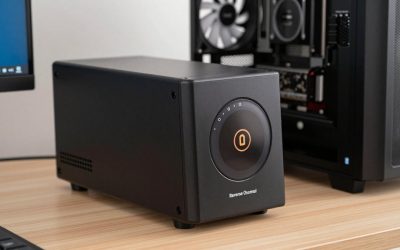
The Synology DS224+ 16TB bundle packages Synology’s well-regarded 2-bay desktop NAS with 16TB of pre-installed drives, aimed squarely at home users and small offices who want a turnkey solution at a lower price than the 24TB bundle. Like its larger-capacity sibling, it runs the quad-core Intel Celeron J4125 with integrated graphics, making it a strong Plex-capable choice. Total bundle cost is around $749. This Synology DS224+ review covers the hardware, software and value.

Synology DiskStation DS224+ NAS Server with Celeron 2.0GHz CPU, 6GB Memory, 16TB HDD Storage, 2 x 1GbE LAN Ports, DSM Operating System


As an Amazon Associate we earn from qualifying purchases. Product prices and availability are accurate as of the date/time indicated.
🛒 Best Price Today on Amazon
Prime members get fast, free shipping on everything above, plus member-only deals. New members get a 30-day free trial — cancel anytime.
As an Amazon Associate we earn from qualifying purchases.


Synology DS224+ at a Glance
| Component | Specification |
|---|---|
| Bay count | 2 bays (3.5″/2.5″ SATA HDD/SSD) |
| CPU | Intel Celeron J4125 quad-core (4C/4T, 2.0 GHz, burst 2.7 GHz) with Intel UHD Graphics 600 |
| RAM (default + max) | 2GB DDR4 default, expandable to 6GB |
| Network ports | 2x 1GbE RJ-45 (link aggregation supported) |
| USB ports | 2x USB 3.2 Gen 1 Type-A |
| Max raw capacity | 36TB with 2x 18TB drives (this bundle ships at 16TB) |
| RAID modes supported | SHR, JBOD, Basic, RAID 0/1 |
| OS / Software | Synology DSM 7.2+ (web-based) |
| Approx price | around $749 (bundle with 16TB drives) |
Hardware & Performance
The DS224+ uses an Intel Celeron J4125 quad-core processor with integrated UHD Graphics 600 — the same chip as the 24TB bundle. The headline feature is the integrated GPU, which brings Quick Sync hardware acceleration for Plex and Emby transcoding. Combined with four CPU cores, the DS224+ handles multiple simultaneous transcoded streams without breaking a sweat — unusual for a 2-bay unit at this price. Base RAM is 2GB, expandable to a Synology-supported 6GB; for a home Plex server, file shares and Synology Photos the default capacity is workable, though 6GB gives more comfortable headroom for Docker containers. The dual-bay form factor keeps the unit small, quiet and power-efficient — a desirable profile for a piece of equipment that will run 24/7.
Storage & RAID Options
This bundle ships with 16TB of pre-installed drives — typically configured as 2x 8TB in RAID 1 (mirrored) for 8TB of usable, redundant capacity, though SHR and other configurations are available during setup. Maximum raw capacity is 36TB if you upgrade to 2x 18TB drives later. Because there are only 2 bays, RAID options are limited to RAID 0, RAID 1, Basic, JBOD and SHR (which behaves like RAID 1 in a 2-bay configuration). There are no M.2 NVMe cache slots on the DS224+, which is a notable omission compared with 4-bay models such as the DS420+. BTRFS is the recommended filesystem and is well worth using even on a 2-bay unit for its snapshot and self-healing features.
Software & App Ecosystem
The DSM software experience on the DS224+ 16TB bundle is identical to that of every Synology NAS — the polished web UI, the mature app ecosystem and the comprehensive backup tooling are all the same as on enterprise hardware. Synology Drive provides Dropbox-style sync with versioning; Synology Photos handles AI-organised libraries; Hyper Backup covers cloud destinations including S3 and Backblaze B2; Active Backup for Business protects Windows, Mac, Linux and SaaS workloads. Plex is officially supported via the package centre, and the J4125’s iGPU is the key reason this unit is so often recommended for media-server duties. For broader recommendations see our best Synology NAS guide and our best NAS for Plex Media Server guide.
Synology’s Active Backup for Business deserves a particular mention because it is genuinely best-in-class for the price tier: free with the NAS, it backs up Windows, Mac and Linux clients, VMware and Hyper-V virtual machines, plus Microsoft 365 and Google Workspace tenants, all to the same NAS. For a home buyer that may seem overkill, but for users running a side business or working from home it can replace several commercial backup subscriptions. Synology C2 cloud (Synology’s own off-site cloud backup) integrates natively for buyers who want an off-site copy of NAS data without configuring third-party providers. Mobile apps cover iOS and Android comprehensively, including remote file access via QuickConnect.
Networking & Throughput
The DS224+ has two 1GbE RJ-45 ports, link-aggregatable for 2Gbps of theoretical throughput. There is no 2.5GbE option — gigabit is the unit’s most obvious limitation in 2026. For the target buyer (Plex households, home users, small offices) gigabit is more than enough to stream high-bitrate 4K HEVC content and back up clients overnight. SMB 3.0, NFS, AFP, iSCSI and WebDAV are all supported. Buyers who later want 2.5GbE can attach a Synology-supported USB-to-2.5GbE adapter, but the cleaner path is to budget for a faster NAS at purchase time rather than retrofitting on a 2-bay home unit.
Use Cases — Plex / Backup / Files
For Plex the DS224+ 16TB bundle is one of the most accessible Synology options that does Plex well — the J4125’s iGPU and four cores handle multiple hardware-transcoded streams comfortably. For backup it covers Hyper Backup, Active Backup for Business and Synology C2 nicely. For file sharing it suits home and small-office use without strain. The smaller 16TB capacity is appropriate for users who do not yet need the larger 24TB bundle and want to keep budget in check. For more recommendations see our best home NAS guide and best NAS for backup guides.
Verdict
At around $749 the Synology DS224+ 16TB bundle is excellent value for home buyers — you get a polished, mature NAS platform with a Plex-capable iGPU and 16TB of pre-installed storage. The 6GB RAM ceiling, gigabit-only networking and 2-bay form factor are honest compromises at this price, but for the target buyer they are unlikely to be deal-breakers. For Plex households and home users new to NAS storage, it earns a strong recommendation. Buyers needing more capacity should consider the 24TB bundle or a 4-bay model instead.
First-time NAS buyers in particular benefit from the bundle approach — taking the guesswork out of drive selection, compatibility and initial setup. The drives included in Synology bundles are typically NAS-rated SATA HDDs from Seagate IronWolf or Western Digital Red Plus, which are specifically engineered for 24/7 NAS duty with vibration-tolerant designs and longer warranty periods than consumer drives. Buyers who would otherwise have spent hours researching the right drives can simply unbox, install and start using the unit on the same day. For comparison shopping against rival platforms see our best QNAP NAS roundup and our best home NAS guide guide, which covers more entry-level options.
Frequently Asked Questions
What is the difference between the 16TB and 24TB DS224+ bundles?
The hardware (DS224+ chassis, J4125 CPU, DSM software) is identical — the only difference is the size of the pre-installed drives. The 16TB bundle is around $150 less and is the right choice if you do not yet need 24TB of storage.
Is 16TB enough for a home NAS?
For most home users it is plenty. In RAID 1 / SHR configuration you get about 8TB of usable redundant capacity — enough for a sizeable Plex library, family photo archive and full client backups. You can upgrade to larger drives later.
Can the DS224+ run Plex hardware transcoding?
Yes. The Intel Celeron J4125 has an integrated GPU with Quick Sync Video acceleration, which Plex uses to transcode H.264 and HEVC streams efficiently — multiple simultaneous transcoded streams are comfortably possible.
Does the DS224+ have NVMe M.2 cache slots?
No. Unlike the DS420+, the DS224+ does not have M.2 NVMe cache slots. SSD caching is therefore not available on this model.
More NAS Reviews
- Synology DS1520+ Review: 5-Bay 80TB Celeron 8GB NAS Bundle
- QNAP TS-873A Review: 8-Bay NAS with 2.5GbE + PCIe Gen3
- QNAP TS-1264U-RP Review: 12-Bay 1U Rackmount NAS
- TerraMaster U12-500 Plus Review: 12-Bay i7 Rackmount NAS
- UGREEN NAS DXP4800 Pro Review: 4-Bay Intel i3 NAS (2026)
- UGREEN NAS DXP2800 Review: 2-Bay Intel N100 NAS (2026)
- BUFFALO LinkStation 710 Review: 2TB 1-Bay Home NAS
- Synology DS923+ Review: 4-Bay NAS with 32GB RAM + 40TB Bundle
Affiliate Disclosure: As an Amazon Associate, we earn from qualifying purchases. If you click a link and make a purchase, we may earn a small commission at no extra cost to you. Prices and availability are accurate as of publication and may change.
Related Articles
Looking for more on this topic? Browse the hand-picked guides below — each one applies the same scoring rubric used in this review.