- Top Pick: Synology DiskStation DS420+ NAS Server for Business with Celeron CPU, 6GB Memory, 1TB M.2 NVMe SSD, 16TB HDD Storage, DSM Operating System
- Best Value: Synology 2 bay NAS DiskStation DS420+ (Diskless)
- Premium Choice: Synology DS1525+ Video Editing & Production Server – Scale to 300TB, 10GbE Ready & Multi-User Workflows (5-Bay Diskless NAS)
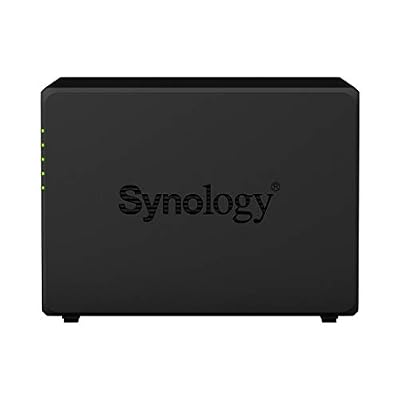
The Synology DS420+ is one of Synology’s most popular 4-bay home and small-office NAS units, and it carries a feature its newer Ryzen-based siblings lack: an Intel Celeron J4025 processor with integrated graphics, which enables hardware-accelerated video transcoding. That makes it a particularly strong choice for Plex media server duties. This bundle ships with 6GB of RAM and a 1TB M.2 NVMe cache for around $649. This Synology DS420+ review covers the hardware, software and value.

Synology DiskStation DS420+ NAS Server for Business with Celeron CPU, 6GB Memory, 1TB M.2 NVMe SSD, 16TB HDD Storage, DSM Operating System



As an Amazon Associate we earn from qualifying purchases. Product prices and availability are accurate as of the date/time indicated.
🛒 Best Price Today on Amazon
Prime members get fast, free shipping on everything above, plus member-only deals. New members get a 30-day free trial — cancel anytime.
As an Amazon Associate we earn from qualifying purchases.


Synology DS420+ at a Glance
| Component | Specification |
|---|---|
| Bay count | 4 bays (3.5″/2.5″ SATA HDD/SSD) |
| CPU | Intel Celeron J4025 dual-core (2C/2T, 2.0 GHz, burst 2.9 GHz) with Intel UHD Graphics 600 |
| RAM (default + max) | 2GB DDR4 default, expandable to 6GB (this bundle ships at 6GB) |
| Network ports | 2x 1GbE RJ-45 (link aggregation supported) |
| USB ports | 2x USB 3.2 Gen 1 Type-A |
| Max raw capacity | Up to 72TB with 4x 18TB drives |
| RAID modes supported | SHR, SHR-2, JBOD, Basic, RAID 0/1/5/6/10 |
| OS / Software | Synology DSM 7.2+ (web-based) |
| Approx price | around $649 (bundle with 6GB RAM + 1TB M.2 cache) |
Hardware & Performance
The DS420+ is built around the Intel Celeron J4025 — a dual-core, x86-64 processor with integrated Intel UHD Graphics 600. It is not a fast chip by modern standards, but the integrated GPU is the headline feature: it provides Quick Sync Video hardware acceleration, which Plex and Emby can use to transcode H.264 and HEVC streams efficiently without taxing the CPU. The result is a NAS that handles 4K-to-1080p Plex transcoding noticeably better than CPU-only alternatives, including newer Synology models with AMD Ryzen processors. The base unit ships with 2GB of RAM; this bundle includes a 6GB upgrade (1x 4GB SODIMM added to the soldered 2GB), giving sensible headroom for DSM, Plex and multiple file-sharing clients. The 1TB NVMe M.2 cache included in the bundle accelerates random-access workloads such as databases, virtual machines and busy file shares.
Storage & RAID Options
The DS420+ has 4 hot-swappable bays accepting 3.5″ and 2.5″ SATA HDDs and SSDs, plus two NVMe M.2 slots for SSD caching (the bundle includes a 1TB M.2). Maximum raw capacity is 72TB with 4x 18TB drives. RAID options are the standard Synology suite: SHR and SHR-2 for flexible mixed-size arrays, plus RAID 0, 1, 5, 6 and 10. SHR is particularly useful for home users who plan to grow capacity one drive at a time. BTRFS is the recommended filesystem and brings snapshots and self-healing. As with every Synology NAS, the base SKU ships with empty bays — bundle listings like this one include drives or cache modules at a premium, which is why prices vary so widely.
Software & App Ecosystem
DSM is the reason the DS420+ has remained popular despite its modest CPU. The same Synology DSM 7.2+ release runs on the DS420+ as on the much more expensive enterprise models, and the user experience is identical. Synology Drive provides Dropbox-style sync; Synology Photos handles AI-organised libraries; Hyper Backup covers cloud and off-site backups; Active Backup for Business protects clients and SaaS. The Plex package is officially supported, and the J4025’s iGPU is the key reason this unit is so often recommended for media-server duties — see our best NAS for Plex Media Server guide for comparisons. Container Manager (Docker) runs on this CPU but is best kept to lightweight workloads. The DS420+ punches above its weight thanks to DSM’s polish.
Networking & Throughput
The DS420+ has two 1GbE RJ-45 ports, link-aggregatable for 2Gbps of theoretical throughput. There is no built-in 2.5GbE or 10GbE option — networking is the unit’s most obvious limitation compared with newer models. For the target buyer (home users, small offices, Plex households) gigabit is still more than enough to stream 4K HEVC content and back up clients. SMB 3.0, NFS, AFP, iSCSI and WebDAV are supported. Buyers determined to push beyond gigabit can use a USB 3.0-to-2.5GbE adapter, which Synology supports via DSM’s package centre, though built-in 2.5GbE in the newer DS425+ class is preferable for buyers prioritising network speed.
Use Cases — Plex / Backup / Files
For Plex the DS420+ is one of Synology’s most-recommended units — the J4025’s iGPU handles hardware transcoding efficiently, and multiple simultaneous transcodes are comfortably possible. For file serving and backup it is well judged for home and small-office use, with DSM’s tooling making setup and maintenance easy. For more demanding workloads — busy multi-user file sharing, several VMs, heavy Active Backup loads — the dual-core CPU is a limiting factor and a quad-core model (DS920+, DS923+ or DS925+) is a better fit. For the typical home user, our best home NAS guide is a useful reference. Surveillance Station runs nicely on the J4025 too — most home installations of two to four IP cameras work comfortably within DSM’s free licence allocation, with the iGPU helping decode camera streams efficiently.
Verdict
At around $649 the Synology DS420+ in this 6GB / 1TB cache bundle is excellent value for the right buyer. The Intel J4025’s integrated GPU makes it one of the best small Synology NAS units for Plex, the M.2 cache accelerates random-access workloads, and DSM’s polish makes the experience pleasant. The dual-core CPU and gigabit-only networking are honest compromises at this price. For Plex households and home users who want a polished platform, it earns a strong recommendation. Compare it with rivals in our best NAS for Plex Media Server guide and our best home NAS guide.
Long-term value is one of the DS420+’s quieter strengths — Synology has supported earlier DiskStation models with DSM updates for years past their release, so a unit bought in 2026 should still be receiving security and feature updates well into the late 2020s. The chassis is small enough to live discreetly in a home office, fan noise is modest, and idle power draw is roughly 20-30W with spun-up drives — meaningful for a device that runs 24/7. For buyers upgrading from a single-drive USB enclosure or a consumer NAS the experience is night and day. Households leading with Plex should compare directly against the DS224+ — the 4-bay capacity is the DS420+’s key advantage; the DS224+ has a quad-core J4125. For households needing more than 4 bays our best NAS for small business covers the DS1520+ and DS1522+ instead.
Frequently Asked Questions
Is the Synology DS420+ good for Plex?
Yes — it is one of Synology’s best Plex NAS units. The Intel Celeron J4025 has an integrated GPU that supports Quick Sync hardware transcoding, which Plex uses to transcode 4K H.264/HEVC streams efficiently without taxing the CPU.
How much RAM does the DS420+ support?
The DS420+ has 2GB soldered to the board and one SODIMM slot, with Synology officially supporting up to 6GB total. The bundle in this review ships at 6GB.
Does the DS420+ have 2.5GbE networking?
No. The DS420+ has two 1GbE RJ-45 ports, link-aggregatable for 2Gbps. There is no 2.5GbE or 10GbE option — gigabit is the unit’s most obvious limitation.
Is the DS420+ still worth buying in 2026?
Yes, for Plex households and home users. The Intel iGPU and DSM software remain compelling, and the price is much lower than newer Ryzen-based Synology models — but business buyers should look at the DS923+ or DS925+ instead.
More NAS Reviews
- Synology DS224+ Review: 2-Bay NAS with 24TB Bundle (2026)
- Synology DS224+ 16TB Bundle Review: 2-Bay NAS Smaller Build
- Synology DS1520+ Review: 5-Bay 80TB Celeron 8GB NAS Bundle
- QNAP TS-873A Review: 8-Bay NAS with 2.5GbE + PCIe Gen3
- QNAP TS-1264U-RP Review: 12-Bay 1U Rackmount NAS
- TerraMaster U12-500 Plus Review: 12-Bay i7 Rackmount NAS
- UGREEN NAS DXP4800 Pro Review: 4-Bay Intel i3 NAS (2026)
- UGREEN NAS DXP2800 Review: 2-Bay Intel N100 NAS (2026)
Affiliate Disclosure: As an Amazon Associate, we earn from qualifying purchases. If you click a link and make a purchase, we may earn a small commission at no extra cost to you. Prices and availability are accurate as of publication and may change.
Related Articles
Looking for more on this topic? Browse the hand-picked guides below — each one applies the same scoring rubric used in this review.