

- Top Pick: MSI MAG X870 Tomahawk WiFi Gaming Motherboard (AMD Ryzen 9000/8000/7000 Series Processors, AM5, DDR5, PCIe 5.0, M.2 Gen5, SATA 6Gb/s, USB 40Gbps, HDMI/DP, Wi-Fi 7, Bluetooth 5.4, 5Gbps LAN, ATX)
- Best Value: GIGABYTE X670 AORUS Elite AX AMD AM5 ATX Motherboard, Support Ryzen 9000/8000/7000 Series, DDR5, 8+8 Power Phase, 4X M.2, PCIe 5.0, USB-C 3.2 Gen2x2, WIFI6E, 2.5GbE, EZ-Latch, Q-Flash, Smart Fan 6
- Premium Choice: MSI X670E GAMING PLUS WIFI Gaming Motherboard (AMD Ryzen 9000/8000/7000 Series Processors, AM5, DDR5, PCIe 5.0, SATA 6Gb/s, M.2 slots, USB 3.2 Gen 2, Wi-Fi 6E, Bluetooth 5.3, 2.5Gbps LAN, HDMI/DP,ATX)
If you are building a new AMD Ryzen system on the AM5 socket, the motherboard chipset sets the ceiling for connectivity, expansion and overclocking headroom. X670 (and its X870 successor) sits at the high end, pairing the AM5 platform with the most generous PCIe 5.0 support, robust power delivery for the top Ryzen chips, and full DDR5 memory support. This guide rounds up the best X670-class motherboards in 2026 — leading with two genuine high-end AM5 boards — and then presents sensible B650 and Intel B760 alternatives, so you can match the right board to your CPU and budget without overpaying.
- Best X670 and AM5 Motherboards at a Glance
- 1. GIGABYTE X670 AORUS Elite AX AMD AM5 ATX, Ryzen 9000/8000/7000
- 2. ASUS ROG Strix X870-A Gaming WiFi AMD AM5 ATX, 16+2+2 Power Stages
- 3. GIGABYTE B650 AORUS Elite AX AMD AM5 ATX
- 4. MSI B650 Gaming Plus WiFi AMD B650 AM5 ATX
- 5. GIGABYTE B650 Eagle AX AM5 ATX, DDR5, Triple M.2
- 6. MSI B760 Gaming Plus WiFi (12th/13th/14th Gen Intel)
- How to Choose an X670 / AM5 Motherboard
- Frequently Asked Questions
- Related Guides
- Related Articles
Our picks were chosen on what genuinely matters for an AM5 build: chipset and socket compatibility, VRM power delivery for Ryzen 7000/8000/9000 CPUs, PCIe and M.2 expansion, memory support and connectivity, and value. To be honest about chipset, the two true high-end picks here are the X670/X870-class boards; the B650 boards are excellent lower-cost AM5 alternatives that share the same socket and DDR5, and we include one Intel B760 board purely as a cross-platform alternative for builders weighing Intel instead. Prices run from around $140 to around $260. Below is an at-a-glance comparison, then a closer look at each board and a buyer’s guide built around the AM5 socket, chipsets, VRM and DDR5.
As an Amazon Associate we earn from qualifying purchases.


🛒 Best Price Today on Amazon
Prime members get fast, free shipping on everything above, plus member-only deals. New members get a 30-day free trial — cancel anytime.
Best X670 and AM5 Motherboards at a Glance
| Motherboard | Best For | Standout Spec | Approx Price |
|---|---|---|---|
| GIGABYTE X670 AORUS Elite AX | High-end AM5 X670 build | X670, PCIe 5.0, AM5 ATX | around $150 |
| ASUS ROG Strix X870-A Gaming WiFi | Premium X870 flagship | X870, 16+2+2 power stages | around $260 |
| GIGABYTE B650 AORUS Elite AX | Value AM5 alternative | B650 AM5, WiFi, ATX | around $150 |
| MSI B650 Gaming Plus WiFi | Budget AM5 gaming | B650 AM5, PCIe 4.0, WiFi | around $173 |
| GIGABYTE B650 Eagle AX | Affordable triple-M.2 AM5 | B650, DDR5, triple M.2 | around $140 |
| MSI B760 Gaming Plus WiFi (Intel) | Intel cross-platform alt | B760, 12th/13th/14th Gen | around $160 |
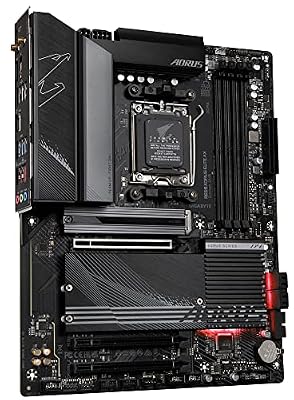
1. GIGABYTE X670 AORUS Elite AX AMD AM5 ATX, Ryzen 9000/8000/7000

GIGABYTE B650 AORUS Elite AX AMD AM5 ATX Motherboard, Support Ryzen 9000/8000/7000 Series, DDR5, 14+2+1 Power Phase, PCIe 5.0 M.2, USB-C 3.2 Gen 2, WIFI6E, 2.5GbE, EZ-Latch, Q-Flash, RGB Fusion



As an Amazon Associate we earn from qualifying purchases. Product prices and availability are accurate as of the date/time indicated.
The GIGABYTE X670 AORUS Elite AX is the genuine high-end X670 pick of this list and the natural foundation for a serious AM5 build. As a true X670 board it brings the chipset’s generous PCIe 5.0 support, full DDR5 memory, multiple M.2 slots and integrated WiFi to the AM5 socket, with support across Ryzen 7000, 8000 and 9000 processors. At around $150 it is remarkable value for a high-end chipset board.
This is the board to choose when you want the X670 chipset’s expansion and future-proofing for a high-end Ryzen CPU without paying flagship money. The robust power delivery comfortably feeds the top Ryzen chips, PCIe 5.0 readies you for next-generation graphics cards and SSDs, and the multiple M.2 slots and DDR5 support give a fast, expandable platform. For most enthusiasts building a high-end AM5 system, the X670 AORUS Elite AX hits the sweet spot of true high-end features and sensible cost, and it is the obvious starting point.
Pros: True X670 chipset, PCIe 5.0, AM5 with Ryzen 7000/8000/9000, strong VRM, WiFi.
Cons: High-end chipset is overkill for an entry CPU; ATX only.
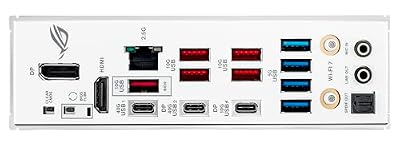
2. ASUS ROG Strix X870-A Gaming WiFi AMD AM5 ATX, 16+2+2 Power Stages

ASUS ROG Strix X870-A Gaming WiFi AMD AM5 X870 ATX Motherboard 16+2+2 Power Stages, Dynamic OC Switcher, Core Flex, DDR5 AEMP, WiFi 7, 4X M.2, PCIe® 5.0, Q-Release Slim, USB4®, AI OCing & Networking


As an Amazon Associate we earn from qualifying purchases. Product prices and availability are accurate as of the date/time indicated.
The ASUS ROG Strix X870-A Gaming WiFi is the premium flagship pick and the most capable board here. Built on the newer X870 chipset — the high-end successor to X670 on the AM5 socket — it brings a serious 16+2+2 power-stage VRM, the latest PCIe 5.0 and connectivity, full DDR5 support and ASUS’s ROG feature set. At around $260 it is the top-tier option for a no-compromise AM5 build.
This is the board for the enthusiast who wants the strongest power delivery and the newest high-end platform features for a flagship Ryzen CPU. The 16+2+2 power stages deliver clean, stable power for the most demanding chips and overclocking, the X870 chipset offers the latest PCIe 5.0 and high-speed I/O, and the ROG build quality, cooling and BIOS make tuning a pleasure. If you are building at the very top of the AM5 stack and want headroom for everything, the ROG Strix X870-A is the standout — and the priciest pick for good reason.
Pros: High-end X870 chipset, strong 16+2+2 VRM, latest PCIe 5.0, DDR5, premium ROG build.
Cons: Most expensive board here; flagship features exceed budget builds.
3. GIGABYTE B650 AORUS Elite AX AMD AM5 ATX
GIGABYTE B650 AORUS Elite AX AMD AM5 ATX Motherboard, Support Ryzen 9000/8000/7000 Series, DDR5, 14+2+1 Power Phase, PCIe 5.0 M.2, USB-C 3.2 Gen 2, WIFI6E, 2.5GbE, EZ-Latch, Q-Flash, RGB Fusion
As an Amazon Associate we earn from qualifying purchases. Product prices and availability are accurate as of the date/time indicated.
The GIGABYTE B650 AORUS Elite AX is our value AM5 alternative to the high-end X670 boards. It shares the same AM5 socket and DDR5 memory support but uses the more affordable B650 chipset, which trims some of X670’s PCIe 5.0 lane count while keeping a strong VRM, M.2 storage and integrated WiFi. At around $150 it is a popular foundation for a mainstream Ryzen gaming build.
This is the board to choose when you want a capable AM5 platform for a mid-range or high-end gaming CPU but do not need the full PCIe 5.0 expansion of an X670 board. The B650 chipset still supports modern Ryzen processors and DDR5, the AORUS power delivery handles popular chips well, and you get WiFi and fast M.2 storage. To be clear, this is a B650 board, not X670 — but as a lower-cost route onto the same AM5 socket, it is an excellent, honest alternative.
Pros: Same AM5 socket and DDR5 as X670, solid VRM, WiFi, M.2, great value.
Cons: B650 chipset, not X670; fewer PCIe 5.0 lanes than the high-end boards.
4. MSI B650 Gaming Plus WiFi AMD B650 AM5 ATX
The MSI B650 Gaming Plus WiFi is a budget-friendly AM5 alternative built around the value B650 chipset. Like the GIGABYTE B650 board it uses the AM5 socket and DDR5 memory, focusing the budget on solid PCIe 4.0 connectivity, a dependable VRM and integrated WiFi rather than X670’s premium PCIe 5.0 expansion. At around $173 it is a sensible base for a mainstream Ryzen system.
This is the board for a builder who wants a reliable, well-rounded AM5 motherboard for a mid-range Ryzen gaming CPU at a fair price. MSI’s clear BIOS, stable power delivery and tidy connectivity make it an easy build, and the DDR5 support keeps it current on memory. Again, this is a B650 board rather than a true X670 — so it is positioned here as a budget AM5 alternative — but for value-focused builders on the AMD platform, it is a dependable, well-supported choice.
Pros: AM5 socket, DDR5, dependable VRM, PCIe 4.0, WiFi, easy BIOS, good value.
Cons: B650, not X670; PCIe 4.0 rather than the high-end boards’ PCIe 5.0.
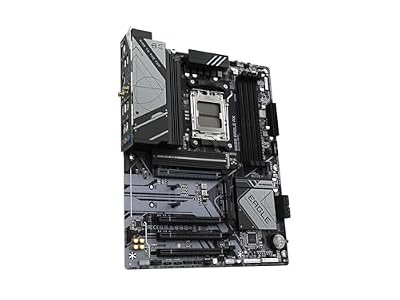
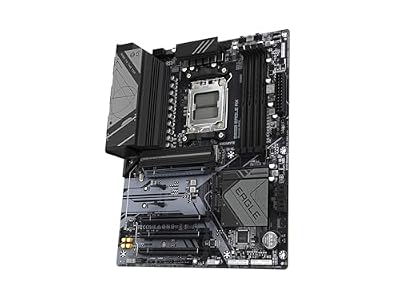
5. GIGABYTE B650 Eagle AX AM5 ATX, DDR5, Triple M.2

GIGABYTE B650 Eagle AX AM5 LGA 1718 ATX Motherboard, DDR5, Triple M.2 Slots (1x PCIe 5.0, 2X PCIe 4.0), USB 3.2 Gen2x2 Type-C, WiFi 6E, Realtek GbE LAN



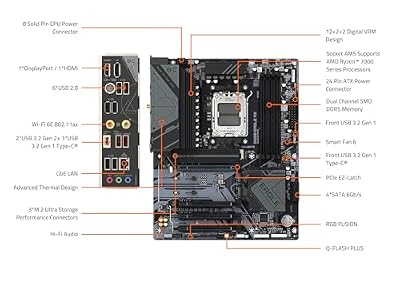
As an Amazon Associate we earn from qualifying purchases. Product prices and availability are accurate as of the date/time indicated.
The GIGABYTE B650 Eagle AX is the affordable storage-friendly AM5 alternative, and the cheapest board on this list. It uses the value B650 chipset on the AM5 socket with DDR5 support, and its standout feature is triple M.2 slots for generous, fast SSD expansion alongside integrated WiFi. At around $140 it packs useful storage flexibility into a budget board.
This is the board to choose when you are building an AM5 system on a tight budget but still want room for multiple NVMe SSDs. The three M.2 slots are unusually generous at this price, the AM5 socket and DDR5 support keep it current, and integrated WiFi rounds out a practical feature set. As with the other B650 boards, this is not a high-end X670 part — it is an affordable AM5 alternative — but for a value Ryzen build that prioritises storage expansion, the B650 Eagle AX is a smart, honest pick.
Pros: Cheapest AM5 board here, triple M.2 storage, DDR5, WiFi, strong budget value.
Cons: B650 entry chipset, not X670; leaner power delivery for top CPUs.
6. MSI B760 Gaming Plus WiFi (12th/13th/14th Gen Intel)
Rounding out the list is the MSI B760 Gaming Plus WiFi, included purely as an Intel cross-platform alternative for builders weighing Intel against AMD’s AM5. It is not an AM5 board at all — it uses Intel’s LGA 1700 socket and the B760 chipset, supporting 12th, 13th and 14th Gen Intel Core CPUs with DDR5 memory, PCIe expansion and integrated WiFi. At around $160 it is a solid mainstream Intel base.
This is the board to consider only if you decide to build on Intel rather than AMD. The B760 chipset pairs with three generations of LGA 1700 Core processors, the power delivery handles popular mid-range Intel chips well, and DDR5 support and WiFi keep it modern and convenient. It is explicitly the odd one out on a list about X670 — different brand, different socket — but if you are still choosing platforms, it shows the comparable Intel option at this price so you can make an informed AM5-versus-Intel decision.
Pros: Solid Intel B760 base, supports 12th/13th/14th Gen Core, DDR5, WiFi, fair price.
Cons: Intel LGA 1700, not AMD AM5 or X670; included only as a platform alternative.
How to Choose an X670 / AM5 Motherboard
Start with the socket and chipset, because they define the platform. X670 — and its newer X870 sibling, as on the ASUS ROG Strix here — is AMD’s high-end chipset for the AM5 socket, offering the most PCIe 5.0 lanes and connectivity for top Ryzen 7000/8000/9000 CPUs. B650, used by the three GIGABYTE and MSI B650 boards, shares the exact same AM5 socket and DDR5 support but trims PCIe 5.0 to hit a lower price. Pick X670/X870 for a high-end build and B650 to save money on a mainstream one — both run the same AM5 Ryzen chips.
VRM and power delivery decide how well the board feeds your CPU, especially under load and when overclocking. A stronger VRM, like the 16+2+2 power stages on the ASUS ROG Strix X870-A, delivers clean, stable power to flagship Ryzen chips and gives overclocking headroom, while the solid VRMs on the X670 AORUS Elite and B650 boards comfortably handle mainstream-to-high-end CPUs. Match the board’s power delivery to the CPU you intend to run — a top-tier chip deserves a high-end board, while a mid-range Ryzen is happy on a good B650.
Expansion and connectivity are where chipsets visibly differ. PCIe 5.0, found in full force on the X670/X870 boards, future-proofs you for next-generation graphics cards and ultra-fast NVMe SSDs, whereas B650 boards typically offer PCIe 5.0 more selectively or focus on PCIe 4.0, as the MSI B650 does. Count the M.2 slots too — the GIGABYTE B650 Eagle AX stands out with triple M.2 for storage-heavy builds — and check for the integrated WiFi and USB ports your setup needs. Buy the expansion you will actually use.
Finally, weigh memory, form factor and honesty about platform. Every AM5 board here uses DDR5, so factor a DDR5 kit into your budget, and confirm the ATX form factor fits your case. Crucially, be clear-eyed about chipset: only the GIGABYTE X670 AORUS Elite AX and ASUS ROG Strix X870-A are genuine high-end X670-class boards; the B650 boards are value AM5 alternatives, and the MSI B760 is an Intel board for those weighing the other platform. Decide your CPU and budget first, then pick the board on this list whose chipset and power delivery honestly match your build.
Frequently Asked Questions
Is X670 worth it over B650 for an AM5 build?
It depends on your CPU and expansion needs. X670 (and X870) offers more PCIe 5.0 lanes and connectivity, which suits high-end Ryzen chips and builders who want maximum future-proofing — the GIGABYTE X670 AORUS Elite and ASUS ROG Strix X870-A are the genuine high-end picks here. B650 shares the same AM5 socket and DDR5 but costs less, making it ideal for mainstream builds. For a top-tier CPU choose X670/X870; for value, a good B650 is plenty.
Do all these boards use the AM5 socket?
All except the MSI B760, which is an Intel board. The two X670/X870 boards and the three B650 boards all use AMD’s AM5 socket and support Ryzen 7000/8000/9000 CPUs with DDR5 memory. The MSI B760 Gaming Plus WiFi uses Intel’s LGA 1700 socket for 12th/13th/14th Gen Core chips and is included only as a cross-platform alternative for builders still choosing between AMD and Intel.
What VRM and power delivery do I need for a high-end Ryzen CPU?
A flagship Ryzen chip benefits from a strong VRM for clean, stable power and overclocking headroom — the ASUS ROG Strix X870-A’s 16+2+2 power stages are a good example. The GIGABYTE X670 AORUS Elite also offers robust delivery for high-end chips. A mid-range Ryzen runs comfortably on a solid B650 board’s VRM, so match the power delivery to how demanding your CPU is rather than overbuying.
Do X670 and AM5 boards require DDR5 memory?
Yes. The AM5 platform — including every AMD board here, X670, X870 and B650 alike — uses DDR5 memory exclusively; it does not accept older DDR4. Budget for a DDR5 kit when planning an AM5 build. The Intel B760 board also uses DDR5 in this case, though some Intel boards offer DDR4 variants; always check the specific board’s memory support before buying.
Related Guides
- Best Motherboards
- Best B650 Motherboards
- Best AM5 Motherboards
- Best CPUs for Gaming
- Best DDR5 RAM
- Best CPU Coolers
Affiliate Disclosure: As an Amazon Associate, we earn from qualifying purchases. If you click a link and make a purchase, we may earn a small commission at no extra cost to you. Prices and availability are accurate as of publication and may change.










