

- Top Pick: Insta360 Link 2C – 4K Webcam for PC/Mac, 1/2" Sensor, Auto Framing, HDR, AI Noise-Canceling Mic, Gesture Control for Streaming, Video Calls, Gaming, Works with Zoom, Teams, Twitch & More
- Best Value: OBSBOT Meet SE 1080P 100FPS Webcam for PC, AI Framing Streaming Camera
- Premium Choice: Insta360 Link 2 – PTZ 4K Webcam for PC/Mac, 1/2" Sensor, AI Tracking, HDR, AI Noise-Canceling Mic, Gesture Control for Streaming, Video Calls, Gaming, Works with Zoom, Teams, Twitch & More
🛒 Best Price Today on Amazon
Prime members get fast, free shipping on everything above, plus member-only deals. New members get a 30-day free trial — cancel anytime.
- Top Webcams Hdr Picks for 2026
- Best Webcams with HDR at a Glance
- 1. Logitech C922x HD Pro PC Webcam, 1080p/30fps or 720p/60fps, HD Light Correction
- 2. Logitech C920x HD Pro PC Webcam, Full HD 1080p/30fps, HD Light Correction
- 3. Logitech 4K Webcam, 4K UHD with HDR Support
- 4. Anker PowerConf C200 2K Webcam for PC/Laptop/Mac, Low-Light Correction
- 5. Logitech HD Pro Webcam C920, Widescreen 1080p with HD Light Correction
- 6. Logitech HD Pro C920S 1080p USB Webcam with Privacy Cover (960-001252)
- How to Choose a Webcam for HDR and Tricky Lighting
- Frequently Asked Questions
- Related Guides
- Related Articles
Top Webcams Hdr Picks for 2026
Here are our current top webcams hdr picks, compared on real Amazon owner reviews, price, and features. Live prices update below.
As an Amazon Associate we earn from qualifying purchases at no extra cost to you.


When people search for a webcam with HDR, what they really want is to look good in difficult lighting — to stay clear and properly exposed when there is a bright window behind them or harsh light overhead. True HDR (high dynamic range) and the closely related WDR (wide dynamic range) and automatic light-correction features all aim at the same goal: balancing bright and dark areas of the frame so your face is neither blown out nor lost in shadow. This guide rounds up webcams for HDR-style exposure handling in 2026, and because honesty matters here, it is upfront about which models market genuine HDR features and which rely on strong automatic light correction instead.
Our picks were chosen on what genuinely helps in tricky lighting: HDR or WDR support, the quality of automatic exposure and light correction, resolution and sensor capability, and value. A clear caveat: several of the most popular options here are from Logitech’s C920 family, which deliver excellent automatic light correction and 1080p clarity but are NOT marketed as true-HDR cameras — we flag that plainly rather than overstate it. Prices run from around $60 up to around $160. Below is an at-a-glance comparison, then a closer look at each camera and an honest buyer’s guide to HDR, light correction and exposure — so you buy the right tool for your lighting.
Best Webcams with HDR at a Glance
| Webcam | Best For | Standout Spec | Approx Price |
|---|---|---|---|
| Logitech C922x HD Pro | Best light correction overall | 1080p/30 or 720p/60, auto light | around $105 |
| Logitech C920x HD Pro | Streaming with auto light | 1080p/30, HD light correction | around $91 |
| Logitech 4K Webcam (Brio-class) | True HDR 4K capture | 4K UHD with HDR support | around $118 |
| Anker PowerConf C200 2K | Low-light value pick | 2K, low-light correction | around $60 |
| Logitech HD Pro C920 | Classic 1080p workhorse | 1080p, HD light correction | around $68 |
| Logitech HD Pro C920S (privacy) | 1080p with privacy shutter | 1080p USB, privacy cover | around $158 |
1. Logitech C922x HD Pro PC Webcam, 1080p/30fps or 720p/60fps, HD Light Correction

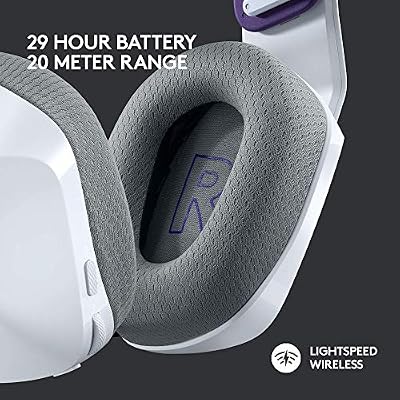
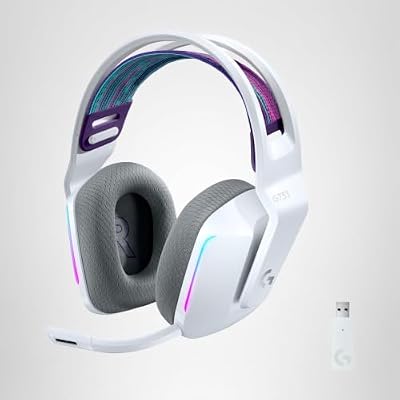
Logitech G733 Lightspeed Wireless Gaming Headset - White | Suspension headband, LIGHTSYNC RGB, Blue VO!CE mic technology, PRO-G audio drivers



As an Amazon Associate we earn from qualifying purchases. Product prices and availability are accurate as of the date/time indicated.
The Logitech C922x HD Pro leads the list for handling tricky lighting, even though its headline feature is HD automatic light correction rather than a true-HDR badge. It captures 1080p at 30fps or a smoother 720p at 60fps, and its automatic exposure and light correction work hard to keep your face balanced when lighting is uneven. At around $105 it is a streamer favorite for good reason.
To be clear about the HDR question: the C922x is not sold as an HDR camera, but its strong automatic light correction tackles the same real-world problem of mixed and backlit scenes, brightening your face without blowing out the background. The 720p/60fps mode suits smooth streaming and the 1080p mode suits crisp calls, the dual mics capture clear stereo audio, and it bundles background-removal software. If your goal is to look well-exposed in imperfect lighting, the C922x delivers that through excellent auto correction rather than HDR marketing.
Pros: Excellent automatic light correction, 1080p/30 or 720p/60, dual mics, proven streaming pick.
Cons: Not marketed as true HDR; relies on auto light correction, not an HDR sensor mode.
2. Logitech C920x HD Pro PC Webcam, Full HD 1080p/30fps, HD Light Correction

Logitech C920x HD Pro PC Webcam Full 1080p/30fps Video - Black | 30fps Video, Clear Audio, Light Correction, Works with Teams, Meet, Zoom, Nintendo Switch 2, Mac, Tablet





As an Amazon Associate we earn from qualifying purchases. Product prices and availability are accurate as of the date/time indicated.
The Logitech C920x is the streaming-and-calls staple, and another camera whose lighting strength is HD automatic light correction rather than HDR. It shoots Full HD 1080p at 30fps with clear stereo audio, and its automatic exposure quietly compensates for less-than-ideal lighting to keep you looking presentable. At around $91 it is one of the most popular 1080p webcams anywhere.
On the HDR point, the C920x is honest about what it is: a superb 1080p webcam with reliable automatic light correction, not an HDR-labelled camera. That correction still does the job most people want — evening out a backlit or unevenly lit scene so your face stays visible — and the 1080p sensor produces a crisp, natural image for streaming, meetings and content. It is TAA-compliant and certified for major calling platforms. If you want a dependable, great-looking 1080p camera that copes well with everyday lighting, the C920x is a safe, value-friendly pick.

Pros: Reliable 1080p/30 image, effective HD light correction, clear stereo audio, certified for calls.
Cons: No true-HDR mode; lighting handled by automatic correction rather than HDR.
3. Logitech 4K Webcam, 4K UHD with HDR Support

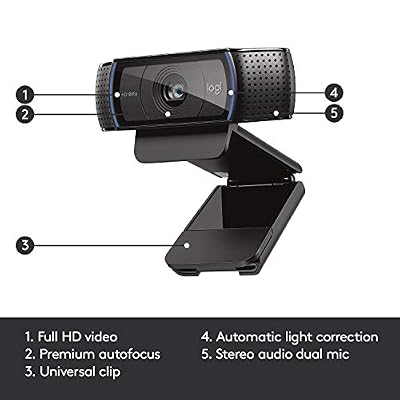
Logitech HD Pro Webcam C920, Widescreen Video Calling and Recording, 1080p Camera, Desktop or Laptop Webcam




As an Amazon Associate we earn from qualifying purchases. Product prices and availability are accurate as of the date/time indicated.
The Logitech 4K Webcam is the genuine HDR pick of this list, and the one that best matches the search. This Brio-class camera captures up to 4K Ultra HD and, crucially, supports HDR to expand the range between bright and dark areas of the frame — exactly the technology that keeps you well-exposed against a bright window. At around $118 it is the camera to buy if real HDR is your priority.
This is the webcam for the user who specifically wants HDR rather than just good auto-exposure. The HDR support helps tame high-contrast scenes so highlights are not blown out and shadows are not crushed, the 4K sensor captures sharp detail (and gives clean downsampled 1080p), and it typically offers adjustable field-of-view and Windows Hello support depending on configuration. It is the most capable imaging option here for difficult lighting. If your reason for shopping is HDR specifically, this is the standout, true-HDR choice.
Pros: Genuine HDR support, 4K UHD sensor, strong high-contrast handling, sharp detail and clean 1080p.
Cons: HDR and 4K need a capable PC and good light to shine; priced above the 1080p models.
4. Anker PowerConf C200 2K Webcam for PC/Laptop/Mac, Low-Light Correction

Anker PowerConf C200 2K Webcam for PC/Laptop/Mac, Low-Light Correction | Conference Microphone, 360° Voice Coverage, Smart Voice Enhancement, Powerful Sound, Desktop PC Speaker, Online Meetings



As an Amazon Associate we earn from qualifying purchases. Product prices and availability are accurate as of the date/time indicated.
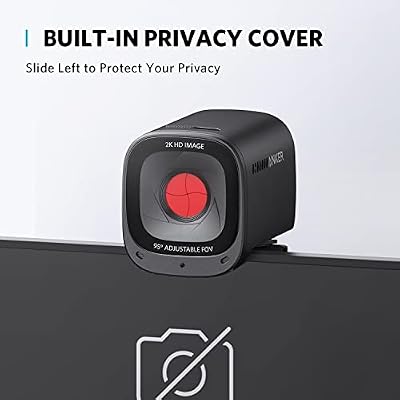
The Anker PowerConf C200 is the low-light value pick, and the most affordable camera here at around $60. It captures 2K resolution — a step above 1080p — and leans on low-light correction to keep you visible in dim rooms, plus an adjustable field of view and a built-in privacy cover. For tackling poor lighting on a budget, it offers a lot.
On the HDR question, the C200 is best described honestly as a 2K camera with low-light correction rather than a true-HDR model — but that low-light processing addresses a real lighting problem many people face. The 2K sensor gives crisper detail than a 1080p webcam, the light correction brightens dim scenes, and the dual noise-reducing mics keep audio clean. The integrated privacy shutter is a welcome bonus. As an affordable camera that improves how you look in less-than-ideal light, the PowerConf C200 is a smart, low-cost choice.

Pros: 2K resolution, helpful low-light correction, privacy cover, dual noise-reducing mics, great value.
Cons: Low-light correction is not full HDR; aimed at dim rooms more than high-contrast scenes.
5. Logitech HD Pro Webcam C920, Widescreen 1080p with HD Light Correction
Logitech HD Pro Webcam C920, Widescreen Video Calling and Recording, 1080p Camera, Desktop or Laptop Webcam
As an Amazon Associate we earn from qualifying purchases. Product prices and availability are accurate as of the date/time indicated.
The Logitech HD Pro C920 is the classic 1080p workhorse, the camera that defined the category — and, again, a model whose lighting tool is HD automatic light correction, not HDR. It records widescreen Full HD 1080p with clear stereo sound, and its automatic light correction adjusts exposure to keep you looking good across a range of conditions. At around $68 it remains outstanding value years after launch.
It is worth stating plainly: the original C920 is not an HDR camera, but its long-proven automatic light correction handles the everyday lighting problems most users actually have, smoothing out uneven or backlit scenes so your face stays clear. The 1080p image is crisp and natural, the glass lens and dual mics punch above the price, and compatibility is essentially universal across apps and platforms. For a dependable, affordable 1080p webcam with solid light correction, the C920 is a perennial recommendation.
Pros: Proven 1080p quality, dependable HD light correction, clear stereo mics, universal compatibility, great value.
Cons: Not an HDR camera; lighting handled by automatic correction rather than HDR.
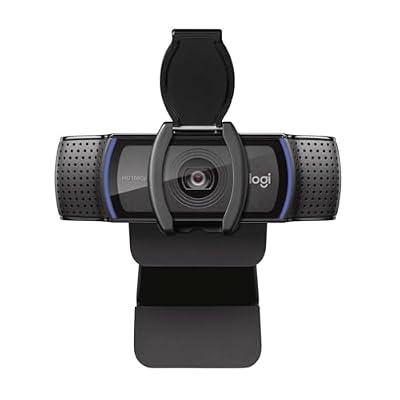
6. Logitech HD Pro C920S 1080p USB Webcam with Privacy Cover (960-001252)

Logitech Webcam HD Pro C920S 1080p USB, 960-001252 (1080p USB Include Cover to Lens)





As an Amazon Associate we earn from qualifying purchases. Product prices and availability are accurate as of the date/time indicated.
Rounding out the list is the Logitech C920S, the privacy-focused take on the 1080p classic — and like the rest of the C920 family, it uses HD automatic light correction rather than true HDR. It adds an integrated privacy shutter to the familiar Full HD 1080p USB camera, so you can physically cover the lens when you are not on a call. At around $158 in this listing it is the privacy-minded option here.
On HDR, the C920S is the same honest story as its siblings: a reliable 1080p webcam with effective automatic light correction, not an HDR-labelled camera. That correction still evens out tricky and backlit lighting so you stay visible, the 1080p sensor delivers a clean image for calls and streaming, and the built-in privacy cover adds genuine peace of mind that the others lack. If a physical privacy shutter matters to you and you are happy with correction-based exposure rather than HDR, the C920S covers that need — literally.
Pros: Built-in privacy shutter, reliable 1080p image, effective HD light correction, broad app compatibility.
Cons: Not true HDR; correction-based exposure, and this listing is the priciest 1080p option.
How to Choose a Webcam for HDR and Tricky Lighting
The first thing to be clear-eyed about is what HDR really means on a webcam, because the term is used loosely. True HDR (and the related WDR) widens the range a camera can capture between the brightest and darkest parts of a scene, so a face stays exposed even with a bright window behind it. Many popular webcams — including the entire Logitech C920 family here — instead use strong automatic light correction, which adjusts exposure intelligently but is not the same as a dedicated HDR sensor mode. If you specifically need HDR, look for it named explicitly, as on the Logitech 4K Webcam.
Decide which lighting problem you are actually solving, because the right feature differs. For high-contrast scenes — strong backlight, a window behind you — genuine HDR like the Logitech 4K Webcam offers the best balance of highlights and shadows. For generally uneven or imperfect lighting, the automatic light correction on the C920x, C920 and C922x does an excellent job of keeping you presentable. For dim rooms, low-light correction like the Anker C200’s is what helps most. Match the technology to your specific lighting, not to the marketing buzzword.
Resolution and sensor quality still matter alongside exposure handling. A 1080p sensor like the C920 family’s is crisp and the streaming standard, 2K on the Anker C200 adds extra detail, and 4K on the Logitech 4K Webcam captures the most resolution and downsamples to very clean 1080p. Higher resolution and HDR do ask more of your PC and your internet bandwidth, so make sure your computer and connection can keep up with a 4K HDR stream before you buy for that capability.
Finally, weigh the practical extras and your budget. A built-in privacy shutter, as on the C920S and Anker C200, lets you physically block the lens for peace of mind; good built-in mics save you buying a separate one; and adjustable field of view helps frame your space. Be honest with yourself about whether you need true HDR or simply reliable auto-exposure in normal lighting — the answer changes which camera here is right. If HDR is non-negotiable, the Logitech 4K Webcam is the genuine pick; if great light correction at lower cost is enough, the C920 family delivers.
Frequently Asked Questions
Which of these webcams actually has true HDR?
Of this list, the Logitech 4K Webcam is the one that genuinely supports HDR, which is why it is the pick if HDR is your priority. The Logitech C920, C920x, C920S and C922x are excellent cameras but use HD automatic light correction rather than a true-HDR sensor mode, and the Anker C200 uses low-light correction. They all improve exposure in tricky lighting, but only the Logitech 4K model is marketed with real HDR.
What is the difference between HDR and automatic light correction?
HDR (and WDR) widens the range of brightness a camera captures in a single frame, balancing very bright and very dark areas — ideal for backlit scenes. Automatic light correction, used across the Logitech C920 family, instead adjusts overall exposure to keep you looking good in imperfect light. Both help, but HDR is better for extreme high-contrast situations, while light correction handles everyday uneven lighting well.
Do I need HDR, or is light correction enough for video calls?
For most video calls and streaming in normal indoor lighting, the automatic light correction on cameras like the C920x or C922x is more than enough to keep you well-exposed. You mainly benefit from true HDR when you regularly shoot against strong backlight, such as a bright window behind you. If that describes your setup, choose the Logitech 4K Webcam; otherwise, a C920-family camera is a cost-effective choice.
Does higher webcam resolution help in bad lighting?
Resolution and lighting handling are separate things. A 2K or 4K sensor like the Anker C200’s or the Logitech 4K Webcam’s captures more detail, but it is the HDR or light-correction processing that determines how well you are exposed in difficult light. For tricky lighting specifically, prioritise a camera with genuine HDR or strong light correction over chasing the highest resolution alone.
Related Guides
- Best Webcams
- Best Webcams for Streaming
- Best Microphones for Streaming
- Best Ring Lights for Video
- Best Streaming Setup
- Best Gaming Headsets
Affiliate Disclosure: As an Amazon Associate, we earn from qualifying purchases. If you click a link and make a purchase, we may earn a small commission at no extra cost to you. Prices and availability are accurate as of publication and may change.










