

The Thrustmaster TCA Sidestick Airbus Edition is something different in the flight stick market — a civilian airliner-style sidestick rather than a combat fighter stick. Officially licensed by Airbus, modelled on the sidestick of the A320 family, it is the natural choice for pilots flying Microsoft Flight Simulator in heavy airliners and study-level Airbus add-ons in X-Plane. This Thrustmaster TCA Sidestick Airbus Edition review covers the design, ergonomics, compatibility and value at around $80.

Thrustmaster TCA Sidestick Airbus Edition Flight Sim Joystick - PC | A320 1:1 replica, drift-free magnetic sensor, 17 mappable action buttons, built-in throttle, thrust reverser, Hall sensor


As an Amazon Associate we earn from qualifying purchases. Product prices and availability are accurate as of the date/time indicated.
🛒 Best Price Today on Amazon
Prime members get fast, free shipping on everything above, plus member-only deals. New members get a 30-day free trial — cancel anytime.
As an Amazon Associate we earn from qualifying purchases.


Thrustmaster TCA Sidestick Airbus Edition at a Glance
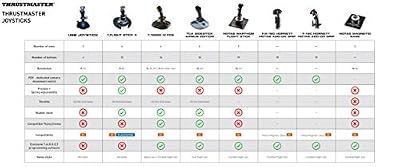
| Component | Specification |
|---|---|
| Type | Sidestick — civilian airliner-style joystick |
| Compatibility | PC (Windows) — USB |
| Buttons / axes | 14 action buttons, 8-way hat, push-button stick; 3 axes |
| Hall-effect sensors | No — uses standard potentiometer sensors on the stick |
| Hat switches | 1 multidirectional hat plus a separate trim hat |
| Throttle / pedals included | Stick only — TCA Quadrant Airbus throttle sold separately |
| Detachable parts | Ambidextrous — wrist rest and base can be reconfigured for left or right hand |
| Connection | Wired USB |
| Approx price | around $80 |
Build Quality & Realism
The TCA Sidestick is the only consumer flight stick officially licensed by Airbus, and the design reflects that. The grip is a faithful reproduction of the A320 sidestick — short, contoured, with a thumb-operated trim hat and a comfortable arc to the action. The base is rounded and includes a moulded wrist rest. The whole assembly is plastic, the action is light and progressive, and the centring is firm enough for precise small inputs.
Where the sidestick differs from a combat joystick is the geometry: a real airliner sidestick lives by the pilot’s hip rather than between their knees, and the TCA Sidestick is designed to be placed on the side of the desk, with the grip angled to suit either right-hand or left-hand operation. The wrist rest can be reconfigured to suit either orientation — a useful touch for left-handed pilots and for first-officer-position simulation.
Compatibility & Platforms
The TCA Sidestick is a PC product, connecting over USB and recognised as a standard HID device in Windows. Microsoft Flight Simulator recognises it as the ‘Airbus Sidestick’ and offers default Airbus mappings on connection. X-Plane works equally well with the standard joystick assignment dialog.
There is no console support — the TCA range is firmly PC-focused. For pilots wanting the matching throttle, Thrustmaster sells the TCA Quadrant Airbus Edition separately, which is a dual-throttle quadrant with Airbus detents (REV, IDLE, CL, FLX/MCT, TOGA) modelled on the A320. The TCA Sidestick on its own is a sidestick; with the matching quadrant it becomes a complete civilian airliner HOTAS. For the wider category, our best controllers for PC guide compares input gear across genres.
Sim Programs / Game Support
Microsoft Flight Simulator is the natural home of the TCA Sidestick. The default A320neo and A320 Asobo aircraft, as well as community Airbus add-ons such as the Fenix A320 and FlyByWire A32NX, all map cleanly to the sidestick’s axes and buttons. The thumb trim hat is correctly assigned to elevator and aileron trim by default, and the side-mounted buttons map to the autopilot and flight director controls familiar to Airbus pilots. Pilots flying the heavy Boeing iron in MSFS will of course prefer a yoke setup, but for Airbus operations the sidestick is the correct hardware.
In X-Plane the same is true with the JARDesign or ToLiSS A320 and A321 study-level add-ons. Outside the Airbus catalogue the stick works perfectly well as a general-purpose joystick — the airliner styling does not prevent use in other aircraft — but it is most at home in heavy iron. The light centring and short throw of the sidestick suit airliner inputs, where smooth control of an autopilot-coupled aircraft matters more than the wide throws of an aerobatic stick. For pilots building a complete airliner setup, our best flight sim gear article covers throttles, pedals and cockpit gear, and the matching TCA Quadrant is the natural throttle pairing.
What’s in the Box
The TCA Sidestick ships with the stick, a permanent USB cable, the reconfigurable wrist rest and a printed manual. Setup is plug-and-play — no driver disc is needed, though Thrustmaster’s mapping utility is available from the company’s website for advanced customisation.
What is not included is the matching TCA Quadrant Airbus Edition throttle, which is a separate product. For a complete Airbus-style HOTAS the two are typically purchased together; alternatively the TCA bundle bundles the sidestick and quadrant in a single SKU. A set of rudder pedals is also a natural addition for airliner pilots who want to taxi properly.
Who It’s For
The TCA Sidestick is for the PC sim pilot whose main interest is civilian airliner flying. If you spend your simulator hours in the A320, A321 or A330 in MSFS, the official Airbus licence and faithful grip make this the natural sidestick. It is also a sensible choice for left-handed pilots, since the ambidextrous design accommodates either hand, and for two-pilot virtual cockpit setups where one pilot acts as captain and the other as first officer.
It is less suited to combat or aerobatic flyers, who will want a centre-mounted stick like the T16000M or Warthog; to console players, since it is PC-only; or to space sim pilots in Elite Dangerous or Star Citizen, who will appreciate the much higher button count of a dedicated HOTAS. For the Airbus sim pilot it is uniquely well judged and, paired with the matching TCA Quadrant, makes a complete airliner control setup at a sensible total spend.
Pros and Cons
Pros: Officially licensed by Airbus — the only consumer stick with this licence; faithful A320-style grip with thumb trim hat; ambidextrous design and reconfigurable wrist rest for left- or right-hand use; recognised by MSFS as the Airbus Sidestick with default mappings; pairs cleanly with the matching TCA Quadrant Airbus throttle; sensible price for the design; works with the FlyByWire A32NX, Fenix A320 and ToLiSS study-level add-ons.
Cons: No Hall-effect sensors at this price; only the stick is included — no throttle quadrant or rudder pedals; PC-only with no console certification; sidestick geometry is wrong for combat fighter sims that want a centre-mounted stick; sensible-but-not-large button count; plastic construction throughout; light enough to require positioning care on a smooth desk.
Verdict
The Thrustmaster TCA Sidestick Airbus Edition is the right stick for the right pilot. At around $80 it delivers an officially licensed Airbus sidestick, ambidextrous design, sensible button count and faithful A320 styling. For the civilian airliner sim pilot — especially the MSFS Airbus pilot — it is the natural choice, and it pairs beautifully with the matching TCA Quadrant for a complete airliner setup. The lack of Hall-effect sensors at this price is the only mild caveat.
Frequently Asked Questions
Is the TCA Sidestick officially licensed by Airbus?
Yes. It is officially licensed by Airbus and modelled on the sidestick of the A320 family — the only consumer flight stick with this licence.
Can left-handed pilots use the TCA Sidestick?
Yes. The wrist rest and base are reconfigurable for either left- or right-hand orientation, which suits both left-handed pilots and first-officer position simulation.
Does the TCA Sidestick include a throttle?
No. The TCA Sidestick is sold as a sidestick only. The matching TCA Quadrant Airbus Edition throttle is a separate product.
Does the TCA Sidestick work with Microsoft Flight Simulator?
Yes. MSFS recognises it as the Airbus Sidestick and offers default Airbus mappings on connection. It is the natural choice for MSFS Airbus pilots.
More Flight Stick & Sim Controller Reviews
- Logitech G Extreme 3D Pro Review: Budget USB Flight Stick Joystick
- Logitech G X56 HOTAS Review: RGB HOTAS with Twin Throttles
- Logitech G PRO Flight Yoke System Review: Airliner Yoke for MSFS
- Logitech G PRO Flight Rudder Pedals Review: Civilian Sim Pedals
- MAYFLASH F300 Arcade Fight Stick Review: Multi-Platform Budget Stick
- 8BitDo Arcade Stick Review: Wireless Switch and PC Fight Stick
- Thrustmaster T16000M FCS HOTAS Review: Hall-Effect Joystick + Throttle
- Thrustmaster T-Flight Hotas X Review: Budget HOTAS for PS3 and PC
Affiliate Disclosure: As an Amazon Associate, we earn from qualifying purchases. If you click a link and make a purchase, we may earn a small commission at no extra cost to you. Prices and availability are accurate as of publication and may change.
Related Articles
Looking for more on this topic? Browse the hand-picked guides below — each one applies the same scoring rubric used in this review.










