- Top Pick: Logitech G X56 H.O.T.A.S Throttle and Joystick Flight Simulator Game Controller, 4 Spring Options, +189 Programmable Controls, RGB Lighting, 2x USB, PC – Black
- Best Value: logitech G X56 H.O.T.A.S Throttle and Joystick Flight Simulator Game Controller + Pro Flight Rudder Pedals Bundle
- Premium Choice: Hikig 2 Set Desk Mount for Flight Sim Game Joystick, Throttle and HOTAS Systems – Compatible With Logitech X56, X52, X52 Pro, Thrustmaster T-Flight HOTAS, T.16000M, TCA
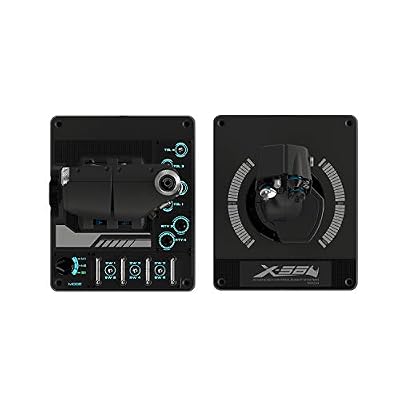
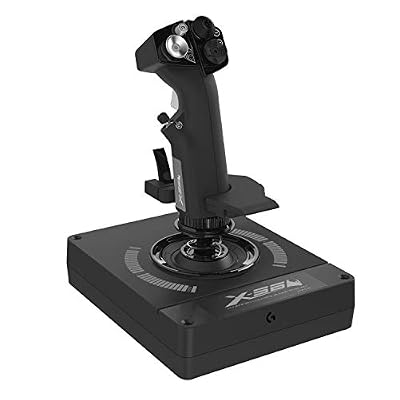
The Logitech G X56 HOTAS is the X-series HOTAS that Logitech inherited and renewed from the Saitek brand it acquired, and it remains a popular alternative to Thrustmaster’s mid-range HOTAS gear. It pairs a feature-dense stick with a twin-throttle quadrant — a configuration normally seen on enthusiast hardware — at a price that does not require enthusiast spend.

Logitech G X56 H.O.T.A.S Throttle and Joystick Flight Simulator Game Controller, 4 Spring Options, +189 Programmable Controls, RGB Lighting, 2x USB, PC - Black




As an Amazon Associate we earn from qualifying purchases. Product prices and availability are accurate as of the date/time indicated.
Updated October 2026 – added a quick answer, Rhino and Saitek naming notes, and a features, compatibility and price summary.
Logitech G X56 H.O.T.A.S. Review: Quick Answer
The Logitech G X56 H.O.T.A.S. is a PC-only throttle and joystick set with a twin-throttle quadrant, four interchangeable stick springs and RGB lighting, best for space and multi-engine flight sims.
- Good for: Elite Dangerous, Star Citizen, MSFS twin-engine aircraft, DCS World
- Trade-offs: no Hall-effect sensors, no console support, rudder pedals sold separately
- Alternatives: Thrustmaster T16000M FCS for a cheaper Hall-effect set; Thrustmaster Warthog for a metal-bodied upgrade
🛒 Best Price Today on Amazon
Prime members get fast, free shipping on everything above, plus member-only deals. New members get a 30-day free trial — cancel anytime.
As an Amazon Associate we earn from qualifying purchases.





Logitech G X56 HOTAS at a Glance
| Component | Specification |
|---|---|
| Type | HOTAS — joystick + twin-throttle quadrant |
| Compatibility | PC (Windows) — USB |
| Buttons / axes | Stick: 4-way hats, push-buttons, mode switch; throttle: 33+ programmable controls |
| Hall-effect sensors | No — sensors are not Hall-effect on the X56 stick |
| Hat switches | Multiple — 4-way hats on stick and throttle, plus a mini-stick on the throttle |
| Throttle / pedals included | Twin-throttle quadrant included; rudder pedals sold separately |
| Detachable parts | Adjustable spring tension on the stick (swappable spring kits included) |
| Connection | Wired USB |
| Approx price | Varies |
Logitech G X56 Rhino H.O.T.A.S. RGB: Is It the Saitek X-56?
Yes. The Logitech G X56 Rhino H.O.T.A.S. RGB is the Logitech-branded version of the Saitek X-56 Rhino, the design Logitech inherited when it acquired Saitek.
That naming overlap is why searches mix “Saitek X-56 HOTAS”, “X56 Rhino” and “Logitech G X56 HOTAS”. Listings may use any of these names for the same family of stick-and-throttle hardware, so compare the exact title, whether the unit is new or renewed, and whether a rudder pedal bundle is included before you buy.
| Item | Logitech G X56 |
|---|---|
| Parts | Weighted stick plus twin-throttle quadrant, two USB connections |
| Controls | Listing quotes 189 programmable controls across both units |
| Stick feel | Four interchangeable centring springs |
| Lighting | RGB, customised through Logitech G HUB |
| Compatibility | Windows PC only; no Xbox or PlayStation support |
| Price tier | Mid-range; recent listings sit roughly between $250 and $330, with renewed units lower |
Logitech X56 Review: What Reviewers and Owners Agree On
Owner feedback agrees that the twin throttle and spring options are the main strengths, while setup effort and build feel divide opinion.
- Praised: the split-or-linked twin throttle, the number of buttons and mini-sticks, and the stick tuning options.
- Criticised: a steep configuration learning curve, with detailed keybinding profiles taking hours; plastic that feels less solid than metal rivals; and a price some buyers consider high for the build.
- Best fit: pilots who value throttle realism and control count over premium materials.
If you want fewer setup hours, start with a community profile for your main game and adjust from there rather than building every binding from scratch.
Build Quality & Realism
The X56’s headline feature is the twin throttle — two physical levers in a single quadrant that can move together or split, just like the dual-throttle quadrant on the Warthog but at less than half the price. For pilots flying twin-engined aircraft in DCS World, MSFS or Falcon BMS, that asymmetric throttle control is a meaningful realism upgrade over a single-lever throttle. The quadrant carries 33+ programmable controls — mini-stick, hats, push-buttons and a wide rotary array — making it one of the most feature-dense throttles in the consumer market.
The stick is mounted on a heavy base with adjustable spring tension — Logitech ships four interchangeable centring springs in the box, so you can tune the stick’s resistance from light to firm. The action is positive and the chassis is more substantial than the budget Thrustmaster sticks, though the sensors are not Hall-effect — they are conventional, and have been the subject of community criticism for drift over time. The RGB lighting on the stick base and throttle is purely cosmetic but is well executed and customisable through the Logitech G HUB software.
Compatibility & Platforms
The X56 is a PC product, with stick and throttle each connecting independently over USB. Logitech G HUB provides full mapping, macro and profile management on Windows, and the hardware is recognised as a standard HID device for sims that prefer in-game mapping. There is no console support.
The independent USB connections mean the stick and throttle can be used separately if needed, and a serious sim pilot might pair the X56 throttle with a different stick. For the broader picture of PC input gear, see our best controllers for PC guide; for matching pedals our best rudder pedals article covers the obvious next step.
Sim Programs / Game Support
The X56 is a strong fit for space and combat sims. Elite Dangerous and Star Citizen are the obvious fits — both games’ communities have developed mature profiles for the X56, taking advantage of the twin-throttle layout for thruster control and the wide button array for ship systems. DCS World works well with the X56 across the catalogue, though serious DCS enthusiasts often graduate to the Warthog. MSFS recognises the stick and throttle automatically and benefits from the twin-throttle for multi-engine airliners.
The X56’s mini-stick on the throttle is unusual and useful — it functions as a coolie-hat or thruster controller depending on the profile, and gives the throttle hand a second axis input. For pilots building out a serious sim setup, our best flight sim gear and best flight sim cockpits guides cover the matching gear.
What’s in the Box
The X56 ships with the stick on its weighted base, the twin-throttle quadrant, four interchangeable centring springs, two USB cables and a printed manual. The interchangeable springs are a genuinely thoughtful inclusion — light springs suit precise small inputs for space sims, firm springs suit positive control in combat flight sims, and the user can choose between them.
What is not included is rudder pedals. Logitech sells its own G PRO Flight Rudder Pedals as a matching pedal product, though they are sold separately. The X56 stick can also be paired with any other pedal product as an independent USB device.
Who It’s For
The X56 is for the PC sim pilot who wants a feature-dense HOTAS with twin-throttle control without paying enthusiast money. It is particularly well suited to space sim pilots — Elite Dangerous and Star Citizen players have a long history with the X56 — and to multi-engine airliner pilots who want asymmetric throttle realism. The interchangeable springs add a useful tuning option that no other HOTAS in the price range offers, and the layout has aged well over many years of Saitek and now Logitech production.
It is less suited to combat sim enthusiasts who can stretch to the Warthog for milled-metal construction and Hall-effect sensors; to budget buyers who would be better served by the T16000M FCS at less than half the price; or to players who want Hall-effect sensors, since the X56’s sensors are not Hall-effect. For the mid-to-upper sim pilot wanting twin throttles in a single product without crossing into enthusiast spend, however, it is a strong option with no obvious direct competition at the price.
Pros and Cons
Pros: Twin-throttle quadrant at a mid-range price — rare outside the Warthog; 33+ programmable controls on the throttle including a ministick; interchangeable centring springs let pilots tune stick tension; RGB lighting customisable via G HUB; independent USB stick and throttle for flexible setups; well supported in Elite Dangerous and Star Citizen communities; substantial weighted base.
Cons: No Hall-effect sensors — and the conventional sensors have attracted community concern around long-term drift; no console support; rudder pedals are not included; higher price than entry-level HOTAS gear; the feature density on the throttle has a real learning curve; build quality is a step below the Warthog despite the price climbing closer to it; not the right choice for buyers wanting Hall-effect at the mid-range.
Verdict
The Logitech G X56 HOTAS occupies its own niche in the mid-range. The sensors are the trade-off — not Hall-effect, and with some community concern around long-term drift — but for the pilot who wants twin throttles and a feature-rich layout, it remains a strong recommendation.
Getting It Running: Step-by-Step Setup
- Plan the desk first. The stick sits on a weighted base and the twin-throttle quadrant sits on its own. Leave room for both, plus two USB cables, before you unpack.
- Connect each unit to its own USB port. The stick and throttle connect independently over USB, so avoid crowded hubs that share limited power or bandwidth.
- Install G HUB. It controls the RGB lighting on the stick base and throttle, and handles profile assignment.
- Check calibration in Windows. Open the game controller settings, confirm that every axis moves smoothly across its full range, and note where the centre sits.
- Assign controls in the game. Because the units appear as standard HID devices, most sim titles let you bind axes and buttons in their own menus.
- Tune the spring. The kit includes four interchangeable centring springs, so start with a light one for precise inputs and move firmer if you overcorrect.
Which Setup Suits Which Kind of Flying?
| Style of flying | Sensible starting point |
|---|---|
| Airliner and general aviation sims | Lighter spring, smooth throttle, limited use of the mini-stick |
| Combat flight | Firmer spring for steadier aiming, with hat switches mapped to view and weapon functions |
| Space games | Light spring, with the twin throttles split between thrust and strafe control |
| Twin-engine aircraft | Use the independent left and right throttle levers for separate engines |
These are starting points only. Each game has its own sensitivity and curve options, so expect to adjust.
Common Mistakes
- Expecting console support. The X56 is a Windows PC product, and it does not work with Xbox or PlayStation.
- Treating a deadzone as a fault. A small deadzone around centre is normal. Adjust it in the game rather than assuming the stick is defective.
- Binding everything to one layer. The stick’s mode switch multiplies the functions available. Plan which layer holds which commands before you start mapping.
- Using an unstable surface. A wobbling desk, or a base sliding on a slick top, will cost accuracy faster than any spec can.
- Ignoring the sensor type. This stick does not use Hall-effect sensors, and some owners raise long-term drift concerns with conventional sensors, so recalibrate occasionally.
Troubleshooting
- Axis jumps or drifts. Unplug both units, reconnect them, and recalibrate in the Windows game controller panel. Avoid touching the stick while it starts up.
- A control is not detected. Try a different USB port directly on the PC, and remove any other flight controllers from the game’s input list.
- Buttons trigger the wrong action. Check whether a G HUB profile is active and remapping inputs. Clear it, then bind in the game.
- Lighting stays off or stuck. Confirm G HUB sees the device, and update the software if it does not.
Is the X56 Right for You?
| If you… | Then the Logitech G X56… |
|---|---|
| Fly on a Windows PC and want twin throttles with lots of controls | Fits, with 33 or more programmable controls on the throttle alone |
| Play on Xbox or PlayStation | Is not an option, since it is PC only |
| Want yaw control from pedals | Needs a separate purchase, because rudder pedals are not included |
| Care most about sensor longevity | Deserves a second look, as it lacks Hall-effect sensors |
| Like tuning stick feel | Suits you, with four interchangeable centring springs |
Desk Setup and Comfort
A HOTAS rewards a deliberate layout. Place the stick so your forearm rests naturally on the desk edge, and put the throttle where your other hand lands without stretching. Many flyers clamp or weigh down the throttle so it does not creep during hard pushes. Leave space for a keyboard, since a large control count still leaves some functions on keys. If wrist discomfort appears, raise the chair slightly or add a wrist rest, and take short breaks during long flights. Cable routing matters too: give both USB leads enough slack that turning the stick or sliding the throttle never tugs a connector.
Frequently Asked Questions
Does the Logitech G X56 have Hall-effect sensors?
No. The X56 uses conventional sensors. For Hall-effect at a lower price, the Thrustmaster T16000M is the alternative; for a metal-bodied Hall-effect HOTAS the Warthog is the step up.
Why does the X56 have two throttles?
The twin-throttle quadrant lets the X56 simulate independent throttle control for the left and right engines of twin-engine aircraft. The two levers can move together or split for asymmetric thrust.
Can you change the X56 stick’s spring tension?
Yes. The X56 ships with four interchangeable centring springs of different tensions, so the stick can be tuned from light to firm action.
Is the Logitech G X56 compatible with Xbox or PlayStation?
No. The X56 is a PC-only HOTAS. Console flight sticks are more limited — see the Thrustmaster T-Flight Hotas One for Xbox.
Is the Saitek X-56 the same as the Logitech G X56?
Yes, the Logitech G X56 is the rebranded Saitek X-56 Rhino, so reviews and profiles for either name generally apply to both.
Does the Logitech G X56 work on Xbox or PlayStation?
No. The X56 is a Windows PC product, with no console support.
More Flight Stick & Sim Controller Reviews
- Logitech G PRO Flight Yoke System Review: Airliner Yoke for MSFS
- Logitech G PRO Flight Rudder Pedals Review: Civilian Sim Pedals
- MAYFLASH F300 Arcade Fight Stick Review: Multi-Platform Budget Stick
- 8BitDo Arcade Stick Review: Wireless Switch and PC Fight Stick
- Thrustmaster T16000M FCS HOTAS Review: Hall-Effect Joystick + Throttle
- Thrustmaster T-Flight Hotas X Review: Budget HOTAS for PS3 and PC
- Thrustmaster T-Flight Hotas One Review: Xbox-Certified Flight Stick
- Thrustmaster TFRP Flight Rudder Pedals Review: Sliding-Rail Sim Pedals
Affiliate Disclosure: As an Amazon Associate, we earn from qualifying purchases. If you click a link and make a purchase, we may earn a small commission at no extra cost to you. Prices and availability are accurate as of publication and may change.
Related Articles
Looking for more on this topic? Browse the hand-picked guides below — each one applies the same scoring rubric used in this review.