

- Top Pick: Thrustmaster TFRP Precision Flight Sim Rudder Pedals – PS5, XBOX & PC
- Best Value: Thrustmaster TPR Rudder Pedals, Flight Simulator Rudder Control – PC
- Premium Choice: ThrustMaster TFRP Rudder Pedals & T16000M FCS HOTAS for PC (USB, Pedals, Joystick, Ergonomic, Flight Controller, PC, PS4, Xbox One)
The Thrustmaster TFRP Flight Rudder Pedals are the natural pedals partner for the T16000M FCS HOTAS, and they sit firmly in the mid-tier of consumer flight sim pedals — above novelty plastic sets, below the metal-plate enthusiast pedals from MFG or Slaw. Their party trick is a sliding-rail design rather than the more common pivot mechanism, which gives a different and arguably more natural foot motion for rudder input. This Thrustmaster TFRP review covers the build, mechanism, compatibility and value at around $130.
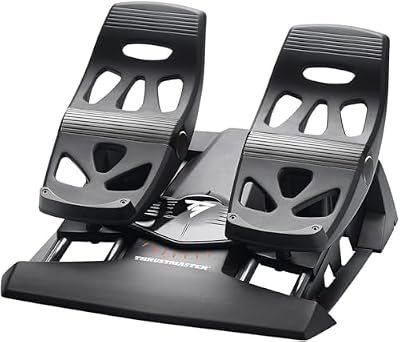
Thrustmaster TFRP Precision Flight Sim Rudder Pedals - PS5, XBOX & PC


As an Amazon Associate we earn from qualifying purchases. Product prices and availability are accurate as of the date/time indicated.
🛒 Best Price Today on Amazon
Prime members get fast, free shipping on everything above, plus member-only deals. New members get a 30-day free trial — cancel anytime.
As an Amazon Associate we earn from qualifying purchases.



Thrustmaster TFRP at a Glance
| Component | Specification |
|---|---|
| Type | Rudder pedals — sliding-rail design |
| Compatibility | PC (Windows) — USB |
| Buttons / axes | 3 axes (rudder + 2 toe brakes); no buttons |
| Hall-effect sensors | No — uses S.M.A.R.T. (Sliding Motion Advanced Rail Tracks) sensors |
| Hat switches | None — pedals are axis-only |
| Throttle / pedals included | Pedals only — joystick and throttle sold separately |
| Detachable parts | Pedals are fixed to a single chassis |
| Connection | Wired USB |
| Approx price | around $130 |
Build Quality & Realism
The TFRP’s headline feature is the sliding-rail rudder. Rather than the conventional pivot — where each pedal rocks on an axle and your foot tilts to send rudder input — the TFRP places both pedals on rails that slide forward and back. Pushing the left pedal forward sends the rails in one direction; pushing the right does the opposite. The motion mimics a real aircraft rudder more closely than a pivot, and many pilots find the longer travel gives finer rudder coordination.
Each pedal also has a toe brake — a forward-tilting top surface that delivers independent braking input. The toe brakes are sprung and progressive, suitable for differential braking on landing roll. The overall construction is heavyweight plastic with metal rail tracks; it is not the milled aluminium of enthusiast pedals, but for the money the build feels solid, the action is smooth, and the unit is heavy enough to stay put without needing to be screwed down (though screw holes are provided).
Compatibility & Platforms
The TFRP is a PC product, connecting over USB and recognised as a standard HID controller in Windows. It is plug-and-play in MSFS, DCS World, Elite Dangerous, X-Plane, IL-2 and every other major sim. Thrustmaster’s T.A.R.G.E.T. software allows axis curves and calibration to be saved into game profiles.
The pedals are not officially Xbox or PlayStation certified — third-party pedal support on consoles is sparse — so this is firmly a PC product. As a pedals-only purchase, the TFRP is naturally paired with a joystick and throttle; the T16000M FCS HOTAS bundle is the canonical Thrustmaster ecosystem pairing. For other pedal options at higher and lower tiers, see our best rudder pedals article.
Sim Programs / Game Support
The TFRP is well supported wherever a HOTAS-and-pedals setup makes sense. Microsoft Flight Simulator uses the pedals for rudder and toe brakes by default, and the longer-travel rail motion gives notably finer control of taxi steering and crosswind landings than a stick-twist rudder. In DCS World the toe-brake differential braking is essential for taxiing tail-dragger aircraft. IL-2, X-Plane and Falcon BMS all recognise the pedals automatically.
Where the TFRP is less ideal is in cramped desks — the rail design means the unit has a deeper footprint than pivot pedals, and you need clear floor space in front of your chair for full pedal travel. The pedals also benefit from being placed at a sensible height: a chair with adjustable height makes coordinating rudder and toe brakes far more comfortable than a fixed-height desk chair. For pilots planning a permanent sim setup, our best flight sim cockpits guide covers cockpit and chair options that accommodate pedals properly, and the matched pairings within Thrustmaster’s ecosystem are well documented across the community.
What’s in the Box
The TFRP ships as a complete pedals unit — the two pedals are pre-installed on the rail chassis — with a permanent USB cable and a printed manual. There is no separate base plate, but the chassis includes screw holes for permanent mounting to a flight rig or cockpit frame. The rubber feet on the underside give enough grip on carpet to hold position in casual use.
What is not included is anything else — these are pedals only. A complete sim rig requires a stick and throttle in addition, which is the natural pairing within Thrustmaster’s ecosystem.
Who It’s For
The TFRP is for the PC sim pilot who has outgrown a stick-twist rudder and wants a dedicated set of pedals without spending enthusiast money. The sliding rail mechanism gives a distinctive and pleasant feel for rudder coordination, the toe brakes are genuine and progressive, and the build holds up to long sessions. It is the natural step in a Thrustmaster ecosystem and the obvious pedal pairing for the T16000M HOTAS, and a sensible standalone purchase for any PC pilot stepping up from twist-axis rudder to dedicated pedals.
It is less suited to console-only pilots, since console pedal support is sparse; to enthusiasts who want all-metal milled construction such as the Logitech G PRO Pedals or specialist enthusiast hardware; or to pilots with very limited desk-and-floor space, where a more compact pivot design might be a better fit. For the mid-range PC sim pilot it is well judged and a sensible long-term keep at this price.
Pros and Cons
Pros: Distinctive sliding-rail rudder mechanism gives a longer, more aircraft-like motion than pivot pedals; sprung, progressive toe brakes for differential braking; heavyweight construction stays put under foot pressure; broad PC sim software recognition; mounting screw holes for permanent rig installation; pairs naturally with Thrustmaster’s T16000M FCS HOTAS; sensible price for the build quality.
Cons: No Hall-effect sensors; PC-only — there is no console certification; the rail design has a deeper footprint than pivot pedals and requires clear floor space; construction is plastic with metal rail tracks, not the milled aluminium of enthusiast pedals; permanent USB cable; no buttons or hats; some pilots prefer the centred-feel of pivot pedals to the rail motion.
Verdict
The Thrustmaster TFRP Flight Rudder Pedals are an honest mid-tier set with one genuine distinguishing feature — the sliding-rail rudder design — that gives them a feel many pilots prefer to pivot pedals. At around $130 they complete a Thrustmaster HOTAS-and-pedals setup without crossing into enthusiast spend, and they bring real toe brakes, sensible construction and broad sim software support. For a serious PC sim pilot who has not yet committed to enthusiast-tier hardware, they are an easy recommendation.
Frequently Asked Questions
How do the TFRP pedals’ sliding rails differ from pivot pedals?
The TFRP pedals slide forward and back on rails rather than tilting on a pivot. The motion mimics a real aircraft rudder more closely, and many pilots find the longer travel gives finer rudder coordination.
Do the TFRP pedals have toe brakes?
Yes. Each pedal has a sprung, progressive toe brake on the top surface for independent braking — essential for differential braking on the landing roll.
Are the TFRP pedals compatible with Xbox or PlayStation?
No. The TFRP is a PC-only product. Console third-party pedal support is very limited.
Do the TFRP pedals work with the T16000M HOTAS?
Yes — they are the canonical pairing within Thrustmaster’s ecosystem. Both connect to the PC as independent USB devices, and game profiles recognise them together.
More Flight Stick & Sim Controller Reviews
- Thrustmaster HOTAS Warthog Review: Metal A-10C Replica Flight Stick
- Thrustmaster TCA Sidestick Airbus Edition Review: Civilian Airliner Sidestick
- Logitech G Extreme 3D Pro Review: Budget USB Flight Stick Joystick
- Logitech G X56 HOTAS Review: RGB HOTAS with Twin Throttles
- Logitech G PRO Flight Yoke System Review: Airliner Yoke for MSFS
- Logitech G PRO Flight Rudder Pedals Review: Civilian Sim Pedals
- MAYFLASH F300 Arcade Fight Stick Review: Multi-Platform Budget Stick
- 8BitDo Arcade Stick Review: Wireless Switch and PC Fight Stick
Affiliate Disclosure: As an Amazon Associate, we earn from qualifying purchases. If you click a link and make a purchase, we may earn a small commission at no extra cost to you. Prices and availability are accurate as of publication and may change.
Related Articles
Looking for more on this topic? Browse the hand-picked guides below — each one applies the same scoring rubric used in this review.


