

Video editing is one of the most demanding things you can ask of a PC, and the good news is that the same hardware that powers great gaming also makes a superb editing rig. What matters for editing is a capable GPU to accelerate encoding, decoding, effects and previews, a fast multi-core CPU to keep the timeline responsive, and plenty of RAM so high-resolution projects scrub smoothly. This guide rounds up the best gaming PCs for video editing in 2026, leading with the builds whose GPU and CPU combination best suits modern editing software and ranging across budgets so every creator can find a fit.
- Best Gaming PCs for Video Editing at a Glance
- 1. iBUYPOWER Element Gaming PC Desktop, AMD Ryzen 9 7900X, NVIDIA GeForce
- 2. Skytech Gaming O11 Vision, AMD Ryzen 7 7800X3D, NVIDIA RTX 5060 Ti
- 3. Skytech Gaming Archangel 5, Intel i7-14700F, NVIDIA RTX 5070
- 4. Skytech Gaming O11 Vision, AMD Ryzen 7 7700X, NVIDIA RTX 5070
- 5. Skytech Gaming Azure 3 Desktop PC, Ryzen 7 7700X, NVIDIA RTX 50-Series
- 6. Skytech Gaming Archangel, Intel i5-14400F, NVIDIA RTX 5060
- How to Choose a Gaming PC for Video Editing
- Frequently Asked Questions
- Related Guides
- Related Articles
- Related Guides
Our picks were chosen on what genuinely speeds up an editing workflow: GPU performance for hardware encode/decode and effects acceleration, CPU cores and speed for timeline scrubbing and exports, RAM capacity for high-resolution projects, and value. We have included a focused price spread — from around $1,199 up to around $2,300 — because the best editing PC pairs the right GPU and CPU with a budget that makes sense for your projects. Below is an at-a-glance comparison of all six, then a closer look at each build and a buyer’s guide built around GPU, CPU and memory — the trio that decides how fast your edits really go.
As an Amazon Associate we earn from qualifying purchases at no extra cost to you.




🛒 Best Price Today on Amazon
Prime members get fast, free shipping on everything above, plus member-only deals. New members get a 30-day free trial — cancel anytime.
Best Gaming PCs for Video Editing at a Glance
| PC | Best For | Standout Spec | Approx Price |
|---|---|---|---|
| iBUYPOWER Element (Ryzen 9 7900X) | Most cores for exports | 12-core Ryzen 9 7900X | around $2,300 |
| Skytech O11 Vision (Ryzen 7 7800X3D, RTX 5060 Ti) | Balanced edit-and-play | Ryzen 7 7800X3D, RTX 5060 Ti | around $1,899 |
| Skytech Archangel 5 (i7-14700F, RTX 5070) | Strong GPU acceleration | i7-14700F, RTX 5070 | around $2,000 |
| Skytech O11 Vision (Ryzen 7 7700X, RTX 5070) | GPU value for effects | Ryzen 7 7700X, RTX 5070 | around $2,000 |
| Skytech Azure 3 (Ryzen 7 7700X, RTX 50-series) | Mid-range editing value | Ryzen 7 7700X, fast RTX GPU | around $1,800 |
| Skytech Archangel (i5-14400F, RTX 5060) | Budget 1080p editing | i5-14400F, RTX 5060 | around $1,200 |
1. iBUYPOWER Element Gaming PC Desktop, AMD Ryzen 9 7900X, NVIDIA GeForce

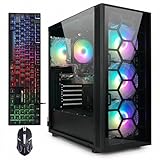
iBUYPOWER Element Gaming PC Desktop Computer AMD Ryzen 9 7900X CPU, NVIDIA GeForce RTX 5070 12GB GPU, 32GB DDR5 RAM, 1TB NVMe SSD, Windows 11 Home, Gamer Keyboard and Mouse - EWA9N5702






As an Amazon Associate we earn from qualifying purchases. Product prices and availability are accurate as of the date/time indicated.
The iBUYPOWER Element leads this editing list because of its CPU: a 12-core, 24-thread AMD Ryzen 9 7900X. Video exports, transcoding and CPU-bound effects scale beautifully with cores, so this is the build that finishes renders fastest of the group. Paired with a capable GeForce GPU for accelerated preview and encode, it is a well-rounded editing machine at around $2,300.
For video editing this is the pick when export and render times are your bottleneck. The 12-core Ryzen 9 7900X chews through multi-threaded encoding and effects far faster than a typical 6- or 8-core gaming CPU, keeping long timelines responsive and slashing the wait on final exports, while the GPU accelerates playback and hardware encode in apps like Premiere Pro and DaVinci Resolve. If you push a lot of footage through your timeline and value raw export throughput above all, the Element’s high core count makes it the standout editing rig here.
Pros: 12-core Ryzen 9 7900X for fast exports, capable GPU encode, strong all-round editing power.
Cons: Highest price here; GPU is solid but not the largest in the group.
2. Skytech Gaming O11 Vision, AMD Ryzen 7 7800X3D, NVIDIA RTX 5060 Ti
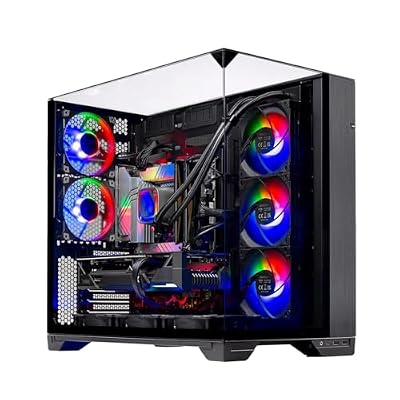
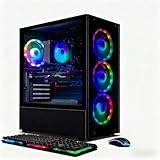
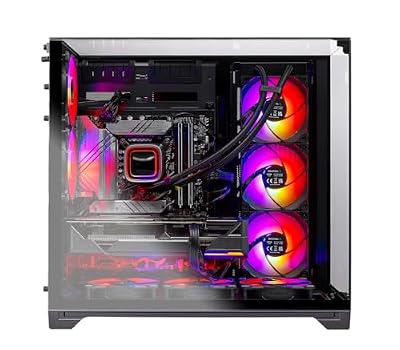
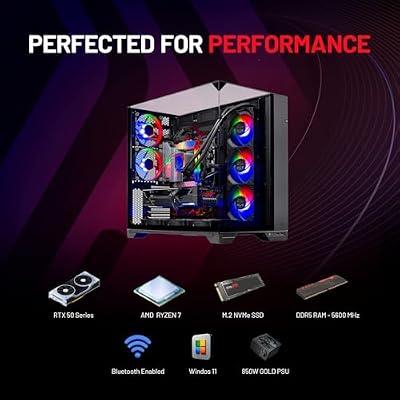
Skytech Gaming O11 Vision Gaming PC, AMD Ryzen 7 7700X 4.5GHz, NVIDIA RTX 5070 12GB, X670 Board, 1TB Gen4 NVMe SSD, 32GB DDR5 RAM 5600, 850W Gold ATX 3 PSU, 360 ARGB AIO, Wi-Fi, Win 11, Desktop







As an Amazon Associate we earn from qualifying purchases. Product prices and availability are accurate as of the date/time indicated.
The Skytech O11 Vision with the Ryzen 7 7800X3D is the balanced edit-and-play pick. It combines AMD’s celebrated 7800X3D — exceptional at responsive, latency-sensitive work — with an RTX 5060 Ti for solid GPU acceleration, in Lian Li’s airflow-friendly O11 case. At around $1,899 it blends snappy editing with excellent gaming.
This is the build for the creator who edits and games in equal measure and values a responsive, fluid timeline. The 7800X3D’s strong per-core speed keeps scrubbing, trimming and the editing UI feeling instant, while the RTX 5060 Ti handles hardware encode/decode and effects acceleration for smooth previews. It has fewer cores than the Ryzen 9 Element, so very heavy multi-threaded exports take a little longer, but for fluid day-to-day editing of HD and 4K projects plus top-tier gaming afterward, the 7800X3D O11 Vision is a superb, well-balanced choice.
Pros: Snappy Ryzen 7 7800X3D, capable RTX 5060 Ti encode, balanced for editing and gaming.
Cons: 8-core CPU trails the 12-core Element on the heaviest exports.
3. Skytech Gaming Archangel 5, Intel i7-14700F, NVIDIA RTX 5070
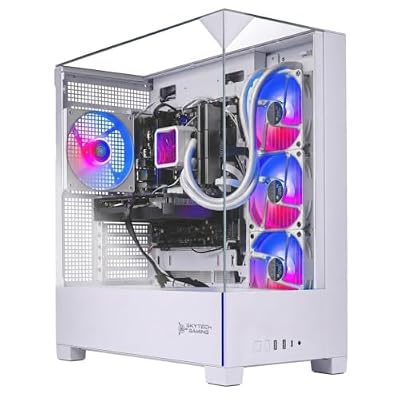
The Skytech Archangel 5 is the strong-GPU-acceleration pick. It pairs Intel’s i7-14700F — a high-core-count CPU with both performance and efficiency cores — with a powerful RTX 5070 GPU, giving you ample threads for exports and serious GPU muscle for effects and previews. At around $2,000 it is a well-rounded, GPU-forward editing build.
This is the machine for editors who lean on GPU-accelerated effects, color grading and rendering, common in DaVinci Resolve and modern Premiere Pro workflows. The RTX 5070 speeds up timeline playback with effects applied, accelerates encode and decode, and shortens GPU-bound renders, while the many-threaded i7-14700F keeps CPU-side exports and multitasking quick. With more GPU power than the RTX 5060 Ti builds and a high core count, the Archangel 5 is an excellent pick when your editing depends heavily on the GPU as well as the CPU.
Pros: High-core i7-14700F, powerful RTX 5070 for effects and encode, well-rounded for editing.
Cons: Intel F-series has no integrated graphics fallback; price near the top here.
4. Skytech Gaming O11 Vision, AMD Ryzen 7 7700X, NVIDIA RTX 5070
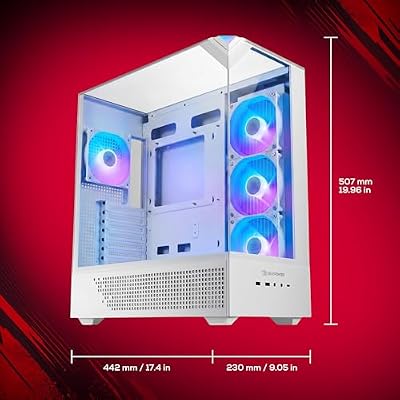
Skytech Gaming O11 Vision Gaming PC, AMD Ryzen 7 7700X 4.5GHz, NVIDIA RTX 5070 12GB, X670 Board, 1TB Gen4 NVMe SSD, 32GB DDR5 RAM 5600, 850W Gold ATX 3 PSU, 360 ARGB AIO, Wi-Fi, Win 11, Desktop
As an Amazon Associate we earn from qualifying purchases. Product prices and availability are accurate as of the date/time indicated.
The Skytech O11 Vision with the Ryzen 7 7700X is the GPU-value pick for effects-heavy editing. It teams an 8-core Ryzen 7 7700X with a strong RTX 5070 GPU in the well-built O11 chassis, prioritising GPU acceleration at a sensible around $2,000. For editors who want a powerful GPU without paying flagship money, it is a smart configuration.
This is the build to choose when GPU-accelerated work — effects, transitions, color and hardware encode — drives your editing experience. The RTX 5070 delivers smooth previews with effects stacked on the timeline and quick GPU-bound exports, while the 8-core 7700X provides solid CPU performance for everyday cutting and multitasking. It shares the excellent O11 Vision airflow and looks. With the same capable GPU as the pricier Archangel 5 but a different CPU balance, this O11 Vision is a strong value route to GPU-forward editing that also games extremely well.
Pros: Strong RTX 5070 for effects and encode, solid 8-core 7700X, great O11 build, good value.
Cons: 8-core CPU is modest for the heaviest multi-threaded exports.
5. Skytech Gaming Azure 3 Desktop PC, Ryzen 7 7700X, NVIDIA RTX 50-Series

Skytech Gaming PC Azure 3, Ryzen 7, RTX 5070 Ti, 32GB RAM, 1TB SSD | Windows 11, AMD 7800X3D, NVIDIA 5070 Ti, Gen4 NVMe SSD, DDR5 5600, 850W GOLD ATX 3 PSU, 360 ARGB AIO , Wi-Fi 5


As an Amazon Associate we earn from qualifying purchases. Product prices and availability are accurate as of the date/time indicated.
The Skytech Azure 3 is the mid-range editing value pick. It pairs the capable 8-core Ryzen 7 7700X with a fast RTX 50-series GPU in Skytech’s clean Azure chassis, delivering well-rounded editing and gaming performance at around $1,800. For creators who want a balanced machine a notch below the $2,000 builds, it is a sensible step down without big compromises.
This is the build for the editor on a moderate budget who still wants smooth HD and 4K editing. The 8-core 7700X keeps timelines responsive and handles exports at a reasonable pace, while the RTX 50-series GPU accelerates encode, decode and effects for fluid previews. The Azure 3 trades a little outright horsepower for a lower price than the RTX 5070 O11 Vision builds, making it a great-value choice for mainstream editing projects. For dependable mid-range editing that doubles as a strong gaming PC, the Azure 3 fits the bill nicely.
Pros: Balanced 8-core 7700X, fast RTX 50-series GPU, smooth mid-range editing value.
Cons: A tier below the RTX 5070 builds; best for mainstream rather than heavy projects.
6. Skytech Gaming Archangel, Intel i5-14400F, NVIDIA RTX 5060

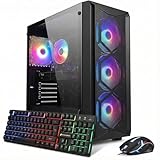
Skytech Gaming PC Desktop, Intel i5 14400F, RTX 5060, 16GB RAM, 1TB SSD | Windows 11, NVMe SSD, DDR5 6000, 750W GOLD PSU, Wi-Fi 5, Archangel 5 Series


As an Amazon Associate we earn from qualifying purchases. Product prices and availability are accurate as of the date/time indicated.
Rounding out the list is the Skytech Archangel, the budget editing pick. It pairs Intel’s efficient 10-core i5-14400F with an RTX 5060 GPU at around $1,199 — the most affordable build here. For creators starting out or editing primarily at 1080p, it provides a genuine, capable editing platform without stretching the budget.
This is the machine for the newer or budget-conscious editor focused on HD and lighter 4K work. The 10-core i5-14400F offers respectable multi-threaded performance for exports and keeps timelines workable, while the RTX 5060 handles hardware encode/decode and modest effects acceleration for smoother previews than CPU-only editing. It is the least powerful build here, so very heavy 4K and effects-laden projects will ask more of it, but as an affordable entry point into real video editing that still games well at 1080p, the Archangel is a strong-value way to close the list.
Pros: Affordable 10-core i5-14400F, capable RTX 5060 encode, solid entry-level editing value.
Cons: Entry GPU and CPU here; heavy 4K and effects projects will push it.
How to Choose a Gaming PC for Video Editing
For video editing, the GPU has become one of the most important components, so weigh it carefully. Modern editors like Premiere Pro and DaVinci Resolve lean heavily on the GPU for hardware-accelerated encode and decode, real-time effects, color grading and smooth playback of high-resolution footage. A stronger GPU — the RTX 5070 in the Archangel 5 and O11 Vision builds, for example — means fluid previews with effects applied and faster GPU-bound exports. If your work is effects- and color-heavy, prioritise GPU power.
The CPU is the other half of editing performance, especially for exports and timeline responsiveness. Encoding, transcoding and many effects are multi-threaded, so a higher core count finishes exports faster — which is why the 12-core Ryzen 9 7900X in the iBUYPOWER Element leads for raw throughput. Strong per-core speed, as in AMD’s 7800X3D, keeps scrubbing and the editing UI feeling instant. Decide whether export time or timeline fluidity matters more to you, and choose a CPU that emphasises cores, per-core speed, or both.
RAM capacity is critical for editing high-resolution projects smoothly. Video editing is memory-hungry: 4K timelines, multiple layers, effects and large previews all consume RAM, and running short forces stutter and slow scrubbing. 16GB is a workable minimum for HD, but 32GB is the comfortable target for serious 4K editing, and heavy projects benefit from more. Check the RAM in your chosen build and plan to add more if you regularly work with high-resolution footage or many layers — it is one of the cheapest ways to keep editing smooth.
Finally, balance storage and budget against your project scale. Fast NVMe storage matters for editing because your software reads and writes large media files constantly, and a roomy SSD keeps active projects responsive. Match the build to your resolution and complexity: budget machines like the Archangel suit 1080p and lighter 4K, while the RTX 5070 and Ryzen 9 builds handle demanding 4K and effects-heavy work. Decide whether GPU, CPU or memory is your likely bottleneck, set your budget, and pick the editing PC on this list that lands on your priorities while gaming brilliantly when the timeline is done.
Frequently Asked Questions
Is the GPU or CPU more important for video editing?
Both matter, but in different ways. The GPU accelerates hardware encode/decode, effects, color grading and smooth high-resolution playback, so it is crucial for effects-heavy work — a strong card like the RTX 5070 helps a lot. The CPU drives exports and timeline responsiveness, with high core counts like the Ryzen 9 7900X’s speeding up multi-threaded renders. Prioritise the GPU for effects and the CPU cores for fast exports.
How much RAM do I need for video editing?
16GB is a workable minimum for HD editing, but 32GB is the comfortable target for serious 4K work, and heavy multi-layer projects benefit from more. Video editing is memory-hungry — 4K timelines, effects and previews all consume RAM, and running short causes stutter. Check the memory in your chosen build, such as the Skytech and iBUYPOWER models here, and add more if you regularly work in high resolution.
Can a gaming PC really handle professional video editing?
Absolutely. The same components that power great gaming — a strong GPU, a fast multi-core CPU and ample RAM — also make an excellent editing machine. The Skytech and iBUYPOWER builds here use exactly that hardware, accelerating encode, effects and exports in Premiere Pro, DaVinci Resolve and similar apps. A well-specified gaming PC is a genuinely capable, cost-effective editing workstation that also plays games beautifully.
Which build is best for 4K editing on a budget?
For budget 4K editing, look at the balance of CPU, GPU and RAM. The Skytech Azure 3 and the RTX 5070 O11 Vision offer a strong middle ground for smooth 4K work around $1,800 to $2,000, while the more affordable Archangel with an RTX 5060 suits 1080p and lighter 4K. Make sure you have at least 32GB of RAM for comfortable 4K editing, adding memory to the cheaper builds if needed.
Related Guides
- Best Gaming PCs
- Best Workstation Gaming PCs
- Best Monitors for Content Creation
- Best NVMe SSDs
- Best RAM for Gaming
- Best Gaming Monitors
Affiliate Disclosure: As an Amazon Associate, we earn from qualifying purchases. If you click a link and make a purchase, we may earn a small commission at no extra cost to you. Prices and availability are accurate as of publication and may change.










