

Wireless VR lives and dies by latency. When you stream PC VR to a standalone headset like a Quest over Wi-Fi, or play bandwidth-hungry standalone titles, every millisecond of delay and every dropped packet shows up as stutter, compression artefacts, or that uneasy lag between your head moving and the image catching up. A good VR router is not about headline internet speed — it is about a fast, stable, low-latency local link between your PC or access point and your headset. This guide rounds up the best routers for VR in 2026, focused on low-latency wireless streaming for untethered headsets.
- Best Routers for VR at a Glance
- 1. TP-Link AX1800 WiFi 6 Router (Archer AX21 V5), Dual Band Gigabit
- 2. Amazon eero 6 Mesh WiFi Router, Supports Plans up to 900 Mbps
- 3. TP-Link Deco X55 AX3000 WiFi 6 Mesh System, up to 2,500 Sq.Ft.
- 4. TP-Link Smart WiFi 6 Router (Archer AX10), 4 Gigabit LAN, Dual Band
- 5. TP-Link AC1200 Gigabit WiFi Router (Archer A6), Dual Band MU-MIMO
- 6. Amazon eero 6+ Mesh WiFi Router, Supports Gigabit Plans, Wide Coverage
- How to Choose a Router for VR
- Frequently Asked Questions
- Related Guides
- Related Articles
Our picks were chosen on what genuinely matters for wireless VR: low latency and a stable connection, modern Wi-Fi 6 with enough bandwidth for a compressed VR stream, strong coverage so you do not lose signal mid-room, and value. We have included a mix of single routers and whole-home mesh systems, with prices from around $40 up to around $140, because the right router depends on your space as much as your headset. The list spans value Wi-Fi 6 routers and easy mesh kits from eero and TP-Link. Below is an at-a-glance comparison, then a closer look at each and a buyer’s guide built around latency, Wi-Fi 6 and placement — the things that actually make VR smooth.
As an Amazon Associate we earn from qualifying purchases at no extra cost to you.


🛒 Best Price Today on Amazon
Prime members get fast, free shipping on everything above, plus member-only deals. New members get a 30-day free trial — cancel anytime.
Best Routers for VR at a Glance
| Router | Best For | Standout Spec | Approx Price |
|---|---|---|---|
| TP-Link Archer AX21 (AX1800) | Best-value VR Wi-Fi 6 | Wi-Fi 6 dual-band, gigabit, OFDMA | around $52 |
| Amazon eero 6 mesh | Whole-home VR coverage | Mesh Wi-Fi 6, up to 900 Mbps plans | around $90 |
| TP-Link Deco X55 (AX3000) | Large-space mesh | AX3000 mesh, 2,500 sq ft coverage | around $70 |
| TP-Link Archer AX10 (AX1500) | Budget Wi-Fi 6 entry | Wi-Fi 6, 4 gigabit LAN ports | around $60 |
| TP-Link Archer A6 (AC1200) | Budget AC fallback | AC1200 dual-band, MU-MIMO | around $40 |
| Amazon eero 6+ mesh | Premium gigabit mesh | Gigabit-class Wi-Fi 6, wide coverage | around $140 |
1. TP-Link AX1800 WiFi 6 Router (Archer AX21 V5), Dual Band Gigabit
The TP-Link Archer AX21 is our best-value pick for wireless VR, and a smart place to start. It is a dual-band Wi-Fi 6 (AX1800) router with gigabit Ethernet and the OFDMA and MU-MIMO features that help Wi-Fi 6 handle many devices and time-sensitive traffic efficiently. At around $52 it brings the modern wireless standard VR benefits from to a genuinely affordable price.
For wireless VR this is the responsive, sensible foundation: Wi-Fi 6 reduces congestion and improves efficiency over older standards, which helps keep your VR stream’s latency low and steady, while the 5GHz band carries the compressed video your headset needs. A wired gigabit link from your VR-ready PC to the router gives the cleanest path, with the headset on 5GHz nearby. If you have a single room or modest space and want low-latency VR Wi-Fi without overspending, the Archer AX21 is the obvious value choice.
Pros: Affordable Wi-Fi 6, gigabit wired port, OFDMA for efficient low-latency traffic.
Cons: Single-unit coverage; large or multi-floor homes may want mesh.
2. Amazon eero 6 Mesh WiFi Router, Supports Plans up to 900 Mbps

Amazon eero 6 mesh wifi router - Supports internet plans up to 900 Mbps, Coverage up to 1,500 sq. ft., Connect 75+ devices, 1-pack


As an Amazon Associate we earn from qualifying purchases. Product prices and availability are accurate as of the date/time indicated.
The Amazon eero 6 is the whole-home coverage pick, trading a single powerful box for a mesh system that blankets your space in consistent Wi-Fi 6. It supports internet plans up to 900 Mbps, expands easily by adding units, and is famously simple to set up and manage from a phone app. At around $90 it is a fuss-free way to get reliable wireless across a larger home.
For VR, the appeal of mesh is consistency: instead of a strong signal that fades as you move away from one router, eero hands your headset between nodes to keep the connection stable wherever you play. That matters because a sudden signal drop mid-session is what causes the worst VR stutter. Wi-Fi 6 keeps the link efficient and low-latency, and the simple app makes it easy to place nodes well. For untethered VR in a home where one router cannot reach every room, eero 6 is a clean, dependable solution — wire your PC to the main node for the best results.
Pros: Whole-home Wi-Fi 6 mesh, easy app setup, consistent coverage as you move.
Cons: Per-unit speed is modest; best paired with a wired host PC.
3. TP-Link Deco X55 AX3000 WiFi 6 Mesh System, up to 2,500 Sq.Ft.

TP-Link Deco X55 AX3000 WiFi 6 Mesh System, Deco X55(1-Pack) | Covers up to 2500 Sq.Ft., Replaces Wireless Router and Extender, 3 Gigabit Ports, Supports Ethernet Backhaul




As an Amazon Associate we earn from qualifying purchases. Product prices and availability are accurate as of the date/time indicated.
The TP-Link Deco X55 is the large-space mesh pick, combining higher AX3000 Wi-Fi 6 bandwidth with whole-home mesh coverage of up to 2,500 square feet. It is designed to replace both a router and range extenders with a single seamless network, and at around $70 it is excellent value for a higher-speed mesh kit suited to bigger play spaces.
For wireless VR in a larger home, the Deco X55 hits a strong balance: the AX3000 rating gives more 5GHz headroom for the compressed VR stream than entry mesh kits, while the mesh design keeps the connection seamless as you turn and move around a roomscale play area. Wi-Fi 6 efficiency helps hold latency steady even with other devices on the network. Connect your VR PC to the main Deco unit by Ethernet and let the mesh carry the headset, and you get responsive, consistent VR across a big footprint. It is a great-value upgrade over basic mesh for serious wireless play.
Pros: Higher AX3000 mesh bandwidth, 2,500 sq ft coverage, seamless roaming for roomscale.
Cons: Wireless backhaul shares bandwidth; wired backhaul ideal but extra work.
4. TP-Link Smart WiFi 6 Router (Archer AX10), 4 Gigabit LAN, Dual Band
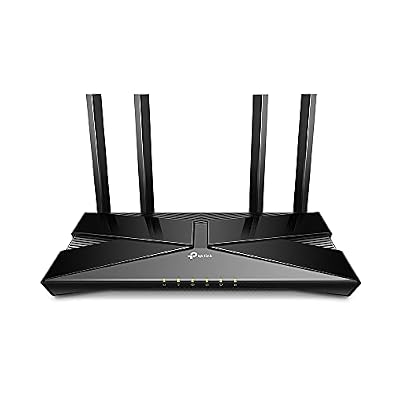
TP-Link Smart WiFi 6 Dual Band Router 4 Gigabit LAN Ports | 802.11AX Router, Beamforming, OFDMA, MU-MIMO, Parental Controls, Dual-Core 900MHz Processor, Works with Alexa (Archer AX10)


As an Amazon Associate we earn from qualifying purchases. Product prices and availability are accurate as of the date/time indicated.
The TP-Link Archer AX10 is the budget Wi-Fi 6 entry point. It is a dual-band AX1500 Wi-Fi 6 router with four gigabit LAN ports, bringing the efficiency benefits of the modern standard to a tight budget. At around $60 it is an easy, low-cost way to put your wireless VR setup on Wi-Fi 6 rather than older Wi-Fi 5 hardware.
For VR, the AX10’s value is getting you onto Wi-Fi 6 — with its better handling of busy networks and time-sensitive traffic — without spending much. The four gigabit LAN ports let you hardwire your VR-ready PC for the cleanest possible path to the router, while your headset connects over the 5GHz band in the same room. It is an entry-level Wi-Fi 6 router rather than a high-bandwidth one, so it suits a single room and a focused setup. For a wallet-friendly step up to Wi-Fi 6 for wireless VR, the Archer AX10 does the job well.
Pros: Budget Wi-Fi 6, four gigabit LAN ports for a wired host, efficient on busy networks.
Cons: Entry-level AX1500 bandwidth; single-room coverage only.
5. TP-Link AC1200 Gigabit WiFi Router (Archer A6), Dual Band MU-MIMO

TP-Link AC1200 Gigabit Dual Band WiFi Router (Archer A6) | MU-MIMO Wireless Internet Router, 4 x Antennas, OneMesh and AP Mode, Long Range Coverage


As an Amazon Associate we earn from qualifying purchases. Product prices and availability are accurate as of the date/time indicated.
The TP-Link Archer A6 is the budget AC fallback, and at around $40 it is the cheapest router on this list. It is a dual-band AC1200 Wi-Fi 5 router with gigabit ports and MU-MIMO, and while it is the previous wireless generation rather than Wi-Fi 6, it remains a capable, low-cost option for a simple VR setup in a small space. We are honest that this is the older standard, chosen for its price.
For wireless VR, the A6 can absolutely work if your play area is one room and your headset sits close to the router on the 5GHz band — a strong, nearby 5GHz signal with a wired host PC is what really matters, and MU-MIMO helps it juggle a few devices. What you give up versus Wi-Fi 6 is the newer standard’s efficiency advantages on busier networks, which can matter as you add devices. If your budget is tight, your space is small and your network is uncomplicated, the Archer A6 is a sensible, honest budget choice — just know you are buying Wi-Fi 5, not Wi-Fi 6.
Pros: Cheapest pick here, gigabit ports, MU-MIMO, fine for a small single-room VR setup.
Cons: Wi-Fi 5 (AC1200), not Wi-Fi 6; less efficient on busy networks.
6. Amazon eero 6+ Mesh WiFi Router, Supports Gigabit Plans, Wide Coverage

Amazon eero 6+ mesh wifi router - Supports internet plans up to a Gigabit, Coverage up to 1,500 sq. ft., Connect 75+ devices, 1-pack


As an Amazon Associate we earn from qualifying purchases. Product prices and availability are accurate as of the date/time indicated.
Rounding out the list is the Amazon eero 6+, the premium gigabit mesh pick. It steps up from the standard eero 6 with support for gigabit-class internet plans and more capable Wi-Fi 6 hardware, while keeping the same dead-simple app-based setup and wide, seamless coverage. At around $140 it is the most expensive option here, aimed at those who want premium whole-home VR performance.
For VR, the eero 6+ delivers the consistency of mesh with extra headroom: the gigabit-class capability and stronger Wi-Fi 6 radios give the compressed VR stream more room to breathe, while the mesh keeps your headset’s connection rock-steady as you move through a large home. As with any mesh, wiring your VR PC to the main eero gives the cleanest link, with the headset roaming on Wi-Fi 6. If you want the smoothest untethered VR across a big space and value eero’s effortless setup, the 6+ is the premium standout — at a premium price.
Pros: Gigabit-class Wi-Fi 6 mesh, wide seamless coverage, effortless app setup.
Cons: Highest price here; overkill for a single small VR room.
How to Choose a Router for VR
For wireless VR, latency and stability matter far more than headline internet speed. Streaming PC VR to a standalone headset is a local job — the data travels from your PC to the router to the headset — so you want a fast, low-latency, drop-free link rather than the fastest broadband plan. The single biggest improvement most people can make is wiring the VR-ready PC directly to the router with gigabit Ethernet, which every router here supports, and letting only the headset use Wi-Fi. That removes one wireless hop from the equation entirely.
Wi-Fi 6 is the standard to prioritise. Routers like the Archer AX21, Deco X55, Archer AX10 and both eero models use Wi-Fi 6, which handles busy networks and time-sensitive traffic more efficiently than the older Wi-Fi 5 in the Archer A6. That efficiency helps keep your VR stream’s latency low and consistent, especially when other devices share the network. Just as important is the 5GHz band: VR streaming wants the cleaner, faster 5GHz channels, with the headset close to the router or a mesh node for the strongest signal.
Coverage shapes whether you choose a single router or a mesh. For one room or a modest space, a single Wi-Fi 6 router like the Archer AX21 or AX10 is ideal and more affordable. For a larger or multi-floor home where signal would otherwise fade, a mesh system like the eero 6, eero 6+ or Deco X55 keeps the connection consistent as you move, which prevents the sudden signal drops that cause the worst VR stutter. With mesh, a wired backhaul between nodes is ideal where possible, since wireless backhaul shares bandwidth with your stream.
Finally, focus on placement and set your budget. Put the router or the nearest mesh node in or beside your play space with a clear line of sight to the headset, keep it away from interference, and reserve the 5GHz band for VR. Decide whether your space needs a single router or whole-home mesh, prioritise Wi-Fi 6 if you can, and pick the option here that fits your room and budget. Get those fundamentals right — wired host PC, strong nearby 5GHz, modern Wi-Fi 6 — and wireless VR feels remarkably close to tethered.
Frequently Asked Questions
What actually matters in a router for wireless VR?
Low latency and a stable, drop-free connection — not headline internet speed. Wireless VR streams data locally from your PC to the headset, so a clean, low-latency link is everything. The biggest win is wiring your VR-ready PC to the router with gigabit Ethernet and letting only the headset use Wi-Fi, ideally on a strong, nearby 5GHz signal. Modern Wi-Fi 6 then keeps that link efficient even when other devices are active.
Do I need Wi-Fi 6 for VR, or will Wi-Fi 5 do?
Wi-Fi 6 is the better choice and what most picks here use — it handles busy networks and time-sensitive VR traffic more efficiently, helping keep latency low and steady. Wi-Fi 5 hardware like the TP-Link Archer A6 can still work for a simple single-room setup with the headset close to the router, but you give up Wi-Fi 6’s efficiency advantages. If your budget allows, prioritise Wi-Fi 6 for wireless VR.
Is a mesh system better than a single router for VR?
It depends on your space. For one room or a modest area, a single Wi-Fi 6 router like the Archer AX21 is ideal and cheaper. For a larger or multi-floor home, a mesh like the eero 6, eero 6+ or Deco X55 keeps the connection consistent as you move, preventing the signal drops that cause VR stutter. With mesh, wire your VR PC to the main node and, where possible, use a wired backhaul between nodes for the best results.
How should I set up my router for the smoothest wireless VR?
Place the router or nearest mesh node in or beside your play space with a clear line of sight to the headset, and connect your VR-ready PC to it with gigabit Ethernet so only the headset is wireless. Put the headset on the 5GHz band for the cleaner, faster channels, keep it close to the router, and reduce interference from other devices. Those steps matter more than the specific router model for keeping latency low.
Related Guides
- Best Gaming Routers
- Best Mesh WiFi Systems
- Best WiFi 6 Routers
- Best VR Headsets
- Best Gaming PCs for VR
- Best Budget Gaming Setup
Affiliate Disclosure: As an Amazon Associate, we earn from qualifying purchases. If you click a link and make a purchase, we may earn a small commission at no extra cost to you. Prices and availability are accurate as of publication and may change.










