

- Top Pick: Crucial 32GB DDR5 RAM Kit (2x16GB), 5600MHz (or 5200MHz or 4800MHz) Laptop Memory 262-Pin SODIMM, Compatible with Intel Core and AMD Ryzen 7000, Black – CT2K16G56C46S5
- Best Value: Crucial 32GB DDR4 RAM Kit (2x16GB), 3200MHz (PC4-25600) CL22 Laptop Memory, SODIMM 260-Pin, Downclockable to 2933/2666MHz, Compatible with 13th Gen Intel Core and AMD Ryzen 7000 – CT2K16G4SFRA32A
- Premium Choice: A-Tech DDR4 RAM 32GB Kit (2x16GB) 2666MHz PC4-21300 SODIMM Laptop Memory
If your PC stutters the moment you stack a dozen browser tabs on top of a game, Discord, a stream, and a couple of editing windows, the fix is almost always more memory. Multitasking is the one job where capacity beats everything else: the more RAM you have, the more applications your system can keep loaded at once without falling back on slow disk paging. For heavy multitaskers, 32GB has become the comfortable target in 2026, with 16GB the sensible floor. This guide rounds up the best RAM for multitasking across the kits people actually buy, leading with the high-capacity options that give you the most room to work.
- Best RAM for Multitasking at a Glance
- 1. Corsair Vengeance RGB Pro 32GB (2x16GB) DDR4 3200 (PC4-25600) C16
- 2. CORSAIR Vengeance LPX DDR4 RAM 32GB (2x16GB) up to 3200MHz CL16
- 3. Crucial 32GB DDR4 RAM Kit (2x16GB) 3200MHz (PC4-25600) CL22 Laptop Memory (SODIMM)
- 4. Corsair Vengeance LPX DDR4 RAM 16GB (2x8GB) 3200MHz CL16-18-18-36 1.35V
- 5. CORSAIR Vengeance RGB PRO DDR4 RAM 16GB (2x8GB) 3200MHz CL16-18-18-36 1.35V
- 6. CORSAIR VENGEANCE LPX DDR4 RAM 16GB (2x8GB) 3000MHz CL15-17-17-35 1.35V
- How to Choose RAM for Multitasking
- Frequently Asked Questions
- Related Guides
- Related Articles
Our picks were chosen on what genuinely keeps a busy system smooth under load: total capacity first, then dual-channel configuration, frequency and value. We have led the list with 32GB kits because that is the capacity that transforms multitasking, then included strong 16GB kits for tighter budgets and smaller loads. Prices run from around $119 up to around $245, and we describe each kit by what it lets you do rather than quoting invented benchmark numbers. One kit here is a laptop SODIMM rather than a desktop DIMM, and we flag that clearly so you buy the right form factor. Below is an at-a-glance comparison of all six, then a closer look at each and a buyer’s guide built around capacity, dual-channel kits and headroom — the things that actually matter when you run everything at once.
As an Amazon Associate we earn from qualifying purchases at no extra cost to you.


🛒 Best Price Today on Amazon
Prime members get fast, free shipping on everything above, plus member-only deals. New members get a 30-day free trial — cancel anytime.
Best RAM for Multitasking at a Glance
| Memory Kit | Best For | Standout Spec | Approx Price |
|---|---|---|---|
| Corsair Vengeance RGB Pro 32GB 3200 C16 | Heavy desktop multitasking | 2x16GB, 32GB, RGB | around $130 |
| Corsair Vengeance LPX 32GB 3200 CL16 | Low-profile 32GB build | 2x16GB, 32GB, low profile | around $220 |
| Crucial 32GB DDR4 3200 SODIMM (Laptop) | Laptop multitasking upgrade | 2x16GB SODIMM, 32GB | around $245 |
| Corsair Vengeance LPX 16GB 3200 CL16 | Value everyday multitasking | 2x8GB, 16GB, low profile | around $119 |
| Corsair Vengeance RGB PRO 16GB 3200 CL16 | 16GB with RGB | 2x8GB, 16GB, RGB | around $119 |
| Corsair Vengeance LPX 16GB 3000 CL15 | Tight-timing 16GB | 2x8GB, CL15, low profile | around $119 |
1. Corsair Vengeance RGB Pro 32GB (2x16GB) DDR4 3200 (PC4-25600) C16

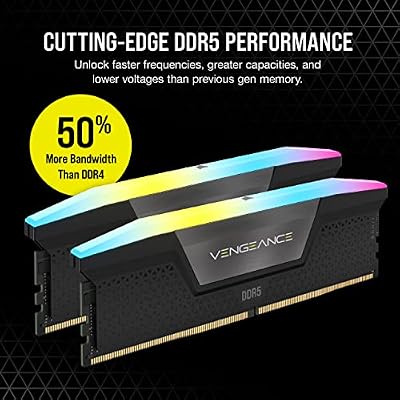
CORSAIR Vengeance RGB DDR5 RAM 32GB (2x16GB) Up to 6000MHz CL30-36-36-76 1.40V AMD EXPO Intel XMP Desktop Computer Memory - Gray (CMH32GX5M2B6000Z30K)


As an Amazon Associate we earn from qualifying purchases. Product prices and availability are accurate as of the date/time indicated.
The Corsair Vengeance RGB Pro 32GB kit is the headline pick for multitasking, and the reason is simple: capacity. Thirty-two gigabytes across two 16GB modules gives your system room to keep a game, a browser stuffed with tabs, a streaming app, a chat client and a couple of productivity windows all loaded at once without paging to disk. It runs at 3200MHz with a tight C16 timing and adds Corsair’s well-regarded RGB. At around $130 it is outstanding value for a 32GB kit.
This is the kit to choose if you genuinely live in a dozen apps at a time. The 32GB capacity is the single biggest upgrade a heavy multitasker can make — it is what stops the slow, grinding stutter that happens when memory fills up and Windows starts shuffling data to the drive. The dual-channel layout delivers the bandwidth your CPU expects, the C16 timing keeps it responsive, and the iCUE-controlled RGB ties into a coordinated build. For most multitaskers who want capacity, speed and looks at a sensible price, this is the obvious starting point.
Pros: Generous 32GB capacity, dual-channel 3200MHz C16, attractive RGB, excellent value.
Cons: RGB modules are taller; confirm cooler clearance before buying.
2. CORSAIR Vengeance LPX DDR4 RAM 32GB (2x16GB) up to 3200MHz CL16

CORSAIR Vengeance LPX DDR4 RAM 32GB (2x16GB) Up to 3200MHz CL16-20-20-38 1.35V Intel XMP AMD EXPO Computer Memory – Black (CMK32GX4M2E3200C16)


As an Amazon Associate we earn from qualifying purchases. Product prices and availability are accurate as of the date/time indicated.
The Corsair Vengeance LPX 32GB kit is the low-profile route to serious multitasking headroom. It delivers the same transformative 32GB capacity — two 16GB modules at up to 3200MHz with a CL16 timing — but in Corsair’s famously slim LPX heat spreaders that clear tall air coolers and tight cases. At around $220 it is a proven, no-nonsense kit for a build that values clearance and reliability over lighting.
This is the kit for the multitasker who wants 32GB of dependable memory and either runs a big CPU cooler or simply does not care about RGB. The 32GB capacity comfortably absorbs heavy workloads — many tabs, background apps, a game and a stream together — while the CL16 timing keeps things snappy and the slim profile fits where taller modules will not. For a long-term, low-maintenance 32GB DDR4 kit that just works under load, the Vengeance LPX is a long-standing favorite and an easy recommendation.
Pros: Transformative 32GB capacity, low-profile LPX heat spreaders, dependable 3200MHz CL16.
Cons: No RGB; styling is plain, and it costs more than the RGB Pro 32GB here.
3. Crucial 32GB DDR4 RAM Kit (2x16GB) 3200MHz (PC4-25600) CL22 Laptop Memory (SODIMM)

As an Amazon Associate we earn from qualifying purchases. Product prices and availability are accurate as of the date/time indicated.
The Crucial 32GB DDR4-3200 kit is the multitasking pick for laptops, and it is important to be clear up front: these are SODIMM modules, the smaller form factor laptops use, not full-size desktop DIMMs. As a 2x16GB kit rated at 3200MHz (PC4-25600) with a CL22 timing, it doubles or quadruples the memory in a notebook so you can multitask properly on the move. At around $245 it is the way to bring desktop-class capacity to a laptop.
This is the kit for the mobile power user whose notebook chokes under a heavy load of tabs, apps and background tasks. Jumping to 32GB is the upgrade that lets a laptop keep everything resident in memory instead of constantly paging, and Crucial’s modules are known for broad compatibility and reliability. The looser CL22 timing is normal for laptop SODIMMs and has little real-world impact on multitasking, where sheer capacity rules. Just confirm your laptop takes SODIMM memory and has two accessible slots before buying.
Pros: Large 32GB laptop capacity, dual-channel SODIMM kit, reliable Crucial compatibility.
Cons: SODIMM (laptop) form factor, not desktop; CL22 is looser than desktop kits.
4. Corsair Vengeance LPX DDR4 RAM 16GB (2x8GB) 3200MHz CL16-18-18-36 1.35V

CORSAIR Vengeance DDR5 32GB (2 x 16GB) Up to 6000MHz AMD Intel RAM | Desktop Gaming Memory, AMD EXPO & Intel XMP 3.0 Compatible, CL30, Grey, CMK32GX5M2B6000Z30


As an Amazon Associate we earn from qualifying purchases. Product prices and availability are accurate as of the date/time indicated.
The Corsair Vengeance LPX 16GB kit is the value everyday-multitasking pick. It pairs two 8GB modules at 3200MHz with a CL16 timing in the slim, reliable LPX package, giving you a solid dual-channel 16GB base for around $119. For lighter multitasking — a game plus a browser, music and a chat app — 16GB still does the job well, and this kit delivers it affordably.
This is the kit to choose if you multitask in moderation rather than running twenty things at once, or if you are building to a budget and may add a second 16GB kit later. The 3200MHz CL16 spec is the DDR4 sweet spot, the low-profile LPX heat spreaders fit almost any cooler, and Corsair’s reliability is well-earned. If your loads are typical rather than extreme, this Vengeance LPX 16GB kit is a dependable, well-priced foundation that keeps a single-task-plus workflow smooth.
Pros: Solid 16GB dual-channel base, 3200MHz CL16, low-profile and reliable, great price.
Cons: 16GB is modest for heavy multitasking; consider 32GB if you stack many apps.
5. CORSAIR Vengeance RGB PRO DDR4 RAM 16GB (2x8GB) 3200MHz CL16-18-18-36 1.35V

CORSAIR Vengeance RGB DDR5 RAM 32GB (2x16GB) 6400MHz CL36-48-48-104 1.35V AMD EXPO Intel XMP 3.0 Desktop Computer Memory – Gray (CMH32GX5M2B6400Z36)


As an Amazon Associate we earn from qualifying purchases. Product prices and availability are accurate as of the date/time indicated.
The Corsair Vengeance RGB PRO 16GB kit is the pick for a 16GB build that also wants some glow. It offers the same dependable 3200MHz CL16 dual-channel 16GB spec as the LPX, but adds Corsair’s well-regarded per-module RGB lighting, controlled through iCUE. At around $119 it is a strong-value way to get responsive memory and a coordinated lighting scheme in one kit.
This is the kit for the multitasker on a moderate load who cares about how the build looks as much as how it runs. The 16GB dual-channel capacity handles a game alongside a browser, chat and music comfortably, the CL16 timing keeps it snappy, and the RGB ties into the rest of an iCUE-lit system. If you want a tidy, attractive 16GB kit and your workload does not demand the 32GB tier, the Vengeance RGB PRO is an easy, good-looking recommendation.
Pros: Dependable 16GB at 3200MHz CL16, attractive iCUE RGB, dual-channel, fair price.
Cons: 16GB suits lighter multitasking; RGB modules sit taller than LPX.
6. CORSAIR VENGEANCE LPX DDR4 RAM 16GB (2x8GB) 3000MHz CL15-17-17-35 1.35V
CORSAIR Vengeance RGB DDR5 RAM 32GB (2x16GB) 6400MHz CL36-48-48-104 1.35V AMD EXPO Intel XMP 3.0 Desktop Computer Memory – Gray (CMH32GX5M2B6400Z36)
As an Amazon Associate we earn from qualifying purchases. Product prices and availability are accurate as of the date/time indicated.
Rounding out the list is the Corsair Vengeance LPX 16GB 3000MHz kit, the tight-timing 16GB pick. It runs slightly lower at 3000MHz but with a tighter CL15 timing, two 8GB modules in the same slim, reliable LPX package. At around $119 it is another dependable 16GB foundation, and the tighter CAS latency makes it a sensible choice on platforms that prefer 3000MHz.
This is the kit for the builder who wants a proven 16GB dual-channel base and values a tight timing, or whose motherboard runs most stably at 3000MHz. The CL15 timing keeps the memory responsive, the low-profile LPX heat spreaders clear tall coolers, and the capacity suits a single game plus everyday apps. For moderate multitasking on a 3000MHz-friendly platform, this LPX kit is a reliable, well-priced option that completes the lineup with a slightly different speed-and-timing balance.
Pros: Tight CL15 timing, reliable 16GB LPX kit, low-profile, dependable on 3000MHz boards.
Cons: 3000MHz rather than 3200; 16GB is best for lighter multitasking loads.
How to Choose RAM for Multitasking
For multitasking, capacity is the metric that matters most — far more than frequency or timing. Every application you open, every browser tab, every background task reserves a slice of memory, and when the total exceeds your installed RAM the system starts paging data to the drive, which causes the slow, grinding stutter heavy multitaskers know well. The single most effective upgrade is simply having enough memory, which is why this guide leads with 32GB kits like the two Corsair 32GB options.
How much you actually need depends on how you work. For light multitasking — a game plus a browser, music and a chat app — 16GB, as in the several 16GB kits here, is still adequate. But if you keep dozens of tabs open, stream while you play, run editing or office software in the background, or use memory-hungry creative tools, 32GB is the comfortable target in 2026 and the capacity that removes the bottleneck. When in doubt, more capacity is the safer buy for a busy machine.
Always buy memory as a matched dual-channel kit rather than a single module. Two sticks running in dual channel deliver markedly more bandwidth than one stick of the same total size, and matched kits are tested to run together at their rated speed and timing. Every desktop kit here is a 2x configuration for exactly this reason, and the Crucial laptop kit is a matched 2x16GB SODIMM pair so a notebook can run dual channel too.
Finally, confirm the form factor and enable the rated speed. Desktops use full-size DIMMs, while laptops use the smaller SODIMM modules — the Crucial 32GB kit here is SODIMM, so it belongs in a notebook, not a desktop. Check your motherboard’s height clearance if you choose tall RGB modules, match the memory standard to your platform, and remember that kits rated at 3000MHz or 3200MHz usually run slower until you enable their XMP profile in the BIOS. Set your capacity first, buy a matched dual-channel kit in the right form factor, and pick the option on this list that fits your machine and your load.
Frequently Asked Questions
How much RAM do I need for heavy multitasking?
For serious multitasking — many browser tabs, a game, a stream, chat and background apps all at once — 32GB is the comfortable target in 2026, which is why this guide leads with 32GB kits like the Corsair Vengeance RGB Pro and LPX 32GB options. 16GB still works for lighter loads, but 32GB gives the headroom that stops your system paging to disk and stuttering under pressure.
Is 16GB still enough for multitasking?
For moderate multitasking it can be. If you run a game plus a browser, music and a chat app, the 16GB kits here, such as the Vengeance LPX 16GB, handle that comfortably. The limit shows when you stack many tabs, stream, and run background editing or office tools together — at that point 32GB removes the bottleneck and keeps everything resident in memory.
Does faster RAM help with multitasking?
It helps a little, but capacity matters far more for multitasking. Once you have enough memory to keep all your apps loaded, jumping from 3000MHz to 3200MHz makes only a modest difference. Spending on capacity — moving from 16GB to 32GB — does far more for a busy system than chasing a higher frequency or a tighter timing at the same size.
Will this desktop RAM work in my laptop?
Only the Crucial 32GB kit here is laptop memory — it uses the smaller SODIMM form factor that notebooks require. The Corsair kits are full-size desktop DIMMs and will not fit a laptop. Always check whether your machine takes DIMM or SODIMM modules, and how many slots it has, before buying so you get the right form factor and can run dual channel.
Related Guides
- Best RAM for Gaming
- Best DDR4 RAM Kits
- Best Low Latency RAM
- Best RGB RAM
- Best NVMe SSDs
- Best Budget Gaming Setup
Affiliate Disclosure: As an Amazon Associate, we earn from qualifying purchases. If you click a link and make a purchase, we may earn a small commission at no extra cost to you. Prices and availability are accurate as of publication and may change.










