

- Top Pick: acer Nitro V 15.6” FHD IPS 165Hz Gaming Laptop, Intel Core i5-13420H, NVIDIA GeForce RTX 5050 with 8GB GDDR7 VRAM, Win11H, w/Mouse pad (16GB RAM, 512GB PCIe SSD)
- Best Value: Acer Nitro V Gaming Laptop | Intel Core i5-13420H Processor | NVIDIA GeForce RTX 4050 Laptop GPU | 15.6" FHD IPS 165Hz Display | 8GB DDR5 | 512GB Gen 4 SSD | Wi-Fi 6 | Backlit KB | ANV15-52-586Z
- Premium Choice: Acer Nitro V 15.6" FHD IPS 165Hz Gaming Laptop, Intel Core i5-13420H, GeForce RTX 4050, 8GB RAM 512GB SSD, Webcam, Wi-Fi, Backlit Keyboard, 128gb 9H Docking Station, Windows 11 Pro, Black
The Acer Nitro V 15 is Acer’s budget-friendly 15-inch entry into the Nitro range — accessible, well-known and engineered for buyers who want playable modern gaming without stretching the budget. It pairs an Intel Core i5-13420H with an NVIDIA GeForce RTX 4050 Laptop GPU and a 15.6-inch FHD-class display for around $700. This Acer Nitro V 15 review covers the specifications, gaming and everyday performance, the display, the practicalities and the verdict.
- Acer Nitro V 15 at a Glance
- Which Nitro V 15 Are You Looking At? Model Codes Explained
- Performance: Gaming and Productivity
- Display Quality
- What to Expect in Real Games (Estimates by Genre)
- Design, Build and Cooling
- Battery, Portability and Connectivity
- Upgrade Guide: Memory and Storage
- Who Is the Acer Nitro V 15 For?
- Nitro V 15 vs the Budget Rivals: Victus 15, LOQ 15 and Thin 15
- Pros and Cons
- Is the Acer Nitro V 15 Worth It?
- How We Researched This Review
- Common Mistakes When Buying a Nitro V 15
- Frequently Asked Questions
- Sources
- More Gaming Laptop Reviews
- Related Articles
- Related Articles
- Related Guides

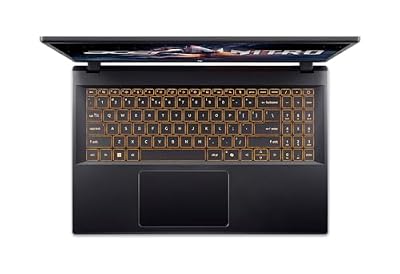
Acer Nitro V Gaming Laptop | Intel Core i7-13620H Processor | NVIDIA GeForce RTX 4050 Laptop GPU | 15.6" FHD IPS 165Hz Display | 16GB DDR5 | 1TB Gen 4 SSD | Wi-Fi 6 | Backlit KB | ANV15-52-76NK




As an Amazon Associate we earn from qualifying purchases. Product prices and availability are accurate as of the date/time indicated.
🛒 Best Price Today on Amazon
Prime members get fast, free shipping on everything above, plus member-only deals. New members get a 30-day free trial — cancel anytime.
Acer Nitro V 15 at a Glance
| Component | Specification |
|---|---|
| Processor | Intel Core i5-13420H (8 cores, hybrid) |
| Graphics | NVIDIA GeForce RTX 4050 Laptop GPU 6GB (Ada Lovelace) |
| Memory | 8-16GB DDR5 |
| Storage | 512GB NVMe SSD |
| Display | 15.6″ FHD-class (1920×1080), high-refresh |
| Operating system | Windows 11 Home |
| Battery | Up to 6-8 hours light use |
| Weight | Approx. 2.1 kg |
| Price | Around $700 |
Which Nitro V 15 Are You Looking At? Model Codes Explained
“Acer Nitro V 15” is not one laptop. Acer has sold several generations under the same name, and listings mix them freely, so the first job before buying is to read the model code on the spec sheet. The three versions most buyers see in 2026 share the same Intel Core i5-13420H processor but differ in screen, memory type and graphics chip.
| Model code | Graphics | Display | Memory type | What it means for you |
|---|---|---|---|---|
| ANV15-51 (2023-2024) | RTX 4050 Laptop, 6GB GDDR6 | 15.6″ FHD IPS, 144Hz | DDR5 SO-DIMM, 2 slots | The original. Often the cheapest, easy RAM upgrade. |
| ANV15-52 (2024 refresh) | RTX 4050 Laptop, 6GB GDDR6 | 15.6″ FHD IPS, 165Hz | DDR5 or DDR4 depending on configuration | Slightly faster panel, otherwise very close to the ANV15-51. |
| ANV15-52 with RTX 5050 (2025-2026) | RTX 5050 Laptop, 8GB GDDR7 | 15.6″ FHD IPS, 165Hz | Often DDR4-3200, both slots filled | Adds 2GB of video memory and DLSS 4 Multi Frame Generation. |
This review focuses on the RTX 4050 version, which is still the most common configuration at the budget end. If the listing you are reading names an RTX 5050, everything about the chassis, keyboard, ports and cooling below still applies, but the graphics notes change: the RTX 5050 Laptop GPU is a Blackwell chip, so it does support DLSS 4 with Multi Frame Generation, and its 8GB of faster GDDR7 memory gives more breathing room for high-resolution texture packs than the 6GB RTX 4050.
The memory type matters more than most buyers expect. Acer’s own spec pages list DDR5 for some ANV15-52 configurations and DDR4 for others, and retail units often ship with two 8GB modules, so upgrading means replacing both sticks rather than adding one. Check the full suffix on the underside label (for example -58P7 or -574M) or on the maker’s spec page before you buy any RAM.
Key specs at a glance (RTX 4050 configuration)
- CPU: Intel Core i5-13420H, 8 cores (4 performance + 4 efficient), 12 threads, up to 4.6GHz
- GPU: GeForce RTX 4050 Laptop, 6GB GDDR6, around 75W maximum graphics power in reviewed units
- Battery: 57Wh in the configurations Acer lists
- Ports: one USB-C port (Thunderbolt 4 on some configurations, USB 3.2 on others), three USB-A, HDMI (version varies by configuration), Gigabit Ethernet, headset jack
- Weight: about 2.1 kg (around 4.6 lb)
- Max official memory: 32GB across two slots
Performance: Gaming and Productivity
The Nitro V 15 is honest about what it is — a budget gaming laptop that prioritises playable modern gaming over outright power. The 8-core Intel Core i5-13420H is a Raptor Lake-class hybrid chip that is efficient, responsive in everyday work, and capable enough to feed the GPU well in modern games. The NVIDIA GeForce RTX 4050 Laptop GPU is an Ada Lovelace mobile chip with 6GB of memory, matched well to the Nitro V’s 1080p-class display.
As an Amazon Associate we earn from qualifying purchases at no extra cost to you.




Because the GPU is Ada Lovelace rather than Blackwell, the Nitro V supports DLSS 3 with Frame Generation rather than the newer DLSS 4 with Multi Frame Generation — DLSS 3 nevertheless lifts frame rates meaningfully in supported titles. The base 8GB DDR5 configuration is workable; buyers who plan to stream or multitask heavily will be much happier with the 16GB option. For its price, the combination delivers a properly playable modern gaming experience. For the broader context on this tier, see our best gaming laptops under $1,200 guide.
Display Quality
Acer fits the Nitro V 15 with a 15.6-inch FHD-class (1920×1080) high-refresh display. The choice is well-judged for the GPU and the price: the 1080p resolution is one the RTX 4050 can comfortably drive at high frame rates, and the high-refresh panel gives a clear step beyond a standard 60Hz screen for smoother motion in both games and everyday use.
It is not a colour-critical or HDR-capable panel — those features sit further up the price ladder — but for a buyer whose first priority is playable, smooth gaming at a tight budget, it does the essentials well. Anyone moving from an older 60Hz laptop will notice the high-refresh panel in everyday use as much as in games. The 15.6-inch size is a sensible balance between immersion and portability for a budget gaming laptop.
What to Expect in Real Games (Estimates by Genre)
Rather than quote one benchmark number, it is more useful to know which settings each type of game will tolerate on this hardware. The guidance below is an estimate based on the RTX 4050 Laptop GPU’s class and published independent reviews of this chassis, not a measurement, and actual frame rates move with driver versions, game patches and the power mode you select in Acer’s NitroSense software.
| Game type | Examples | Suggested settings at 1080p | What to expect |
|---|---|---|---|
| Esports shooters | Valorant, CS2, Overwatch 2 | High, no upscaling | Comfortably above 144 fps in most matches, enough to use the high-refresh panel |
| Battle royale | Fortnite, Apex Legends, Warzone | Medium to high, DLSS Quality | Smooth play in the 90-140 fps range, lower in busy late-game moments |
| Recent AAA action | Cyberpunk 2077, Alan Wake 2, Black Myth: Wukong | Medium, DLSS Balanced, Frame Generation on | Playable 60 fps-class experience; ray tracing is best left low or off |
| Open-world and RPG | Baldur’s Gate 3, Elden Ring, Forza Horizon 5 | High with some shadows dropped | Steady 60 fps is a realistic target; texture settings may need trimming to stay inside 6GB |
| Strategy and indie | Civilization VII, Hades II, Stardew Valley | High to ultra | No meaningful limits |
Two practical notes. First, always run games in the laptop’s performance mode with the charger connected; on battery the GPU is throttled hard and frame rates drop sharply. Second, the 6GB of video memory is the component most likely to limit you in 2026 releases. When a game stutters despite a decent average frame rate, lowering texture quality one step usually fixes it faster than lowering resolution.
Design, Build and Cooling
The Nitro line is Acer’s tidier, more grown-up take on gaming-laptop design — gaming-friendly cues without the more aggressive visual flourishes of higher-tier ranges. The Nitro V chassis is functional and unfussy, with a backlit keyboard and a sensible port layout. Build is acceptable for the asking price, and the overall look is one a student or a working buyer can carry without drawing attention.
Cooling is engineered to keep the i5-13420H and the RTX 4050 within their performance windows during gaming sessions — both components are efficient, so the thermal load is manageable, and the chassis is sized for the job. It is not a thin-and-light machine, but it is sensibly proportioned for a 15.6-inch gaming laptop. The build is honest for the price, with the recognisable Acer support network behind it.
Battery, Portability and Connectivity
The Nitro V 15 is one of the more genuinely portable gaming laptops at this tier — efficient components and a 15.6-inch chassis mean it is reasonable to carry to classes, work or a friend’s house. As with any gaming laptop, full performance is only available plugged in; on battery the laptop scales down to preserve runtime, but for light productivity and media it is usable for a typical working day stretch.
Connectivity covers the modern essentials needed for external displays, peripherals, fast storage and modern wireless networking. The 512GB NVMe SSD is modest for a game library — most owners will fill it before long and will want to add storage. Acer’s mainstream support network is a quiet reassurance smaller brands cannot match. Buyers comparing other affordable options should see our best gaming laptops under $1,200 guide.
Upgrade Guide: Memory and Storage
The two weakest parts of a base Nitro V 15, the 8GB of memory and the 512GB drive, are also the two easiest to fix. Both upgrades sit behind the bottom panel and need only a small Phillips screwdriver and some care with the plastic clips.
Memory: go to 16GB or 32GB in matched pairs
Acer officially supports up to 32GB across two slots. Many units ship with both slots filled (for example two 8GB modules), so plan to replace both sticks with a matched kit rather than adding a single module, which also keeps the memory running in dual-channel mode. The critical step is confirming whether your configuration uses DDR5 or DDR4, because the two are physically incompatible. DDR5 configurations take standard 262-pin DDR5 SO-DIMMs; 4800, 5200 or 5600MT/s modules will run at whatever speed the platform supports.
- Best for most DDR5 units: a 2x16GB DDR5-5600 SO-DIMM kit. It gives comfortable headroom for gaming plus a browser, voice chat and streaming software.
- DDR4 units: a 2x16GB DDR4-3200 SO-DIMM kit instead. Do not buy DDR5 for these.

Storage: add or swap a 1TB Gen 4 SSD
A handful of 2026 games now exceed 100GB each, so 512GB fills quickly once Windows and updates are counted. Teardowns of the ANV15-52 show two M.2 2280 slots on some units, while some owners report only one usable slot on their configuration. If you have a free slot, a second drive is the simplest path; if not, clone the original drive onto a larger one. A mainstream PCIe 4.0 drive is plenty here, since the laptop cannot take advantage of PCIe 5.0 speeds.

Opening the bottom panel to install memory or storage does not by itself void the warranty in most regions, but keep the original parts and check Acer’s local terms first. Ground yourself before touching components and disconnect the internal battery connector if the service guide recommends it.
Who Is the Acer Nitro V 15 For?
The Nitro V 15 is for the buyer who wants a recognisable-brand budget gaming laptop that plays modern games at sensible settings and stays close to a $700 price. If you play a mix of esports and AAA titles at 1080p, value a tidy design you can carry to classes or work, and want a major-brand laptop with proper support, the Nitro V is squarely your machine. It is also a sound pick for a student who games.
It is less suited to two groups. Buyers who want maxed high-resolution gaming, or who play the most demanding AAA titles at very high settings, will need a more powerful GPU. And buyers who multitask heavily will be much happier with the 16GB memory option than the 8GB base. For accessible, brand-backed mainstream gaming at a tight budget, the Nitro V 15 is well judged.
Nitro V 15 vs the Budget Rivals: Victus 15, LOQ 15 and Thin 15
The i5-13420H plus RTX 4050 recipe is used by several brands, and on paper the spec lines look almost identical. The real difference is how much power each maker lets the graphics chip draw. The RTX 4050 Laptop GPU can be configured anywhere from about 35W to 115W, and a higher limit means higher sustained clocks. That single number, which rarely appears in listing titles, explains most of the performance gap between these laptops.
| Laptop | CPU / GPU | GPU power limit | Display | Watch for | Price tier |
|---|---|---|---|---|---|
| Acer Nitro V 15 | i5-13420H / RTX 4050 | About 75W in reviewed units | FHD 144Hz or 165Hz IPS | Dim panel, bundled software | Budget |
| HP Victus 15 (fa1) | i5-13420H / RTX 4050 | 75W including Dynamic Boost (HP spec) | FHD 144Hz IPS | Often DDR4 memory | Budget |
| Lenovo LOQ 15 | Ryzen 5 7235HS or Intel HX / RTX 4050 | Varies by model, up to 105W on some | FHD 144Hz IPS | Check the exact model number | Budget |
| MSI Thin 15 (B13VE) | i5-13420H / RTX 4050 | 45W (MSI spec) | FHD 144Hz IPS | Lowest sustained GPU speed | Budget |
| Lenovo LOQ 15 (RTX 5060) | Ryzen 7 250 / RTX 5060 | Varies by model | FHD 144Hz IPS | Costs a tier more | Mid-range |
HP Victus 15: the closest like-for-like alternative
Key specs: Intel Core i5-13420H, RTX 4050 6GB at 75W, 15.6″ FHD 144Hz IPS, 16GB memory in many current configurations, 512GB SSD.
Best for: buyers who want the same platform in a quieter, plainer chassis. Skip if: you want the faster 165Hz panel of the ANV15-52.

Because HP rates the GPU at the same 75W ceiling, expect gaming performance in the same band as the Nitro V. The decision comes down to chassis feel, keyboard preference and which configuration ships with 16GB at the price you find.
Lenovo LOQ 15 (RTX 4050): more GPU headroom on some models
Key specs: AMD Ryzen 5 7235HS (4 cores, 8 threads), RTX 4050 6GB, 15.6″ FHD 144Hz IPS, 16GB memory, 512GB SSD.
Best for: gamers who care most about GPU performance per dollar. Skip if: you run heavy multitasking, because the four-core Ryzen 5 7235HS is a step down from the eight-core i5 for CPU-bound work.

Some LOQ 15 models run the RTX 4050 at a noticeably higher power limit than the Nitro V, which can translate into higher sustained frame rates in GPU-bound games. Lenovo publishes the exact figure per model on its PSREF spec sheets, so confirm it for the specific unit before paying extra for it.
MSI Thin 15 (B13VE): the lightest of the group
Key specs: Intel Core i5-13420H, RTX 4050 6GB at 45W, 15.6″ FHD 144Hz IPS, 16GB DDR4, 512GB SSD, about 1.86 kg.
Best for: students who carry the laptop daily and game lightly. Skip if: AAA gaming is the priority; the 45W limit leaves noticeably less GPU performance than the Nitro V’s configuration.

Step-up pick: Lenovo LOQ 15 with RTX 5060
Key specs: AMD Ryzen 7 250 (8 cores, 16 threads), RTX 5060 Laptop 8GB GDDR7, 15.6″ FHD 144Hz IPS, 16GB memory, 512GB SSD.
Best for: buyers who can stretch one price tier and want DLSS 4 Multi Frame Generation plus 8GB of video memory. Skip if: your budget is firm at the entry tier.

The RTX 5060 Laptop GPU sits a full class above the RTX 4050, and the extra 2GB of video memory is the bigger long-term advantage as 2026 games push texture budgets higher.
Pros and Cons
Pros: Genuinely accessible price near $700; capable RTX 4050 Laptop GPU with DLSS 3 Frame Generation; tidy Nitro V design that does not look out of place outside the bedroom; high-refresh FHD panel; recognisable Acer brand with proper support; reasonable 15.6-inch portability.
Cons: Entry-tier GPU is not built for maxed high-resolution gaming; base 8GB of memory is tight by 2026 standards; 512GB storage is modest for a game library; DLSS 3 rather than the newer DLSS 4 because the GPU is Ada Lovelace, not Blackwell.
Is the Acer Nitro V 15 Worth It?
At around $700 the Acer Nitro V 15 is a sensible budget buy. It delivers genuinely playable 1080p-class gaming, pairs it with a well-matched high-refresh display and packs it into a tidy, recognisable-brand chassis with Acer’s support behind it. The strong buyer-review base on this configuration shows mainstream owners are satisfied with what it delivers at the price.
The honest compromises are the entry-tier GPU, the base 8GB of memory and the modest 512GB storage. For a buyer whose first concern is staying close to a $700 budget while still playing modern games at sensible settings, it earns a clear recommendation; buyers who can stretch should compare the stronger picks in our best RTX 5070 gaming laptops guide.
How We Researched This Review
This review is research-based. We did not run our own benchmarks on the laptop. The assessment draws on Acer’s published spec sheets for the ANV15-51 and ANV15-52 model families, NVIDIA’s specifications for the RTX 4050 and RTX 5050 Laptop GPUs, Intel’s specifications for the Core i5-13420H, teardown reports covering memory and storage slots, and independent published reviews of this chassis from established hardware outlets. Rival laptops were compared on the makers’ own stated GPU power limits rather than on listing titles. Game-settings guidance is an estimate based on the GPU’s class and those published results.
Common Mistakes When Buying a Nitro V 15
- Ignoring the model code. An ANV15-51 with a 144Hz screen and an ANV15-52 with an RTX 5050 can carry nearly the same listing title. Read the full spec line before comparing prices.
- Paying a premium for reseller memory bundles. Some listings bundle 32GB or 64GB and a larger drive at a large markup; a retail kit installed yourself is usually cheaper.
- Buying the wrong memory type. DDR4 and DDR5 configurations both exist. Confirm before ordering an upgrade.
- Expecting long battery life while gaming. With a 57Wh battery, gaming on battery is short and heavily throttled. Treat it as a plugged-in gaming machine that happens to be portable.
- Skipping the software clean-up. Independent reviewers have criticised the amount of preinstalled software. Removing trial apps you do not use frees memory, which matters most on 8GB units.
Frequently Asked Questions
Can the Acer Nitro V 15 run modern AAA games?
Yes, at sensible settings. The RTX 4050 Laptop GPU with 6GB of memory is well matched to the 1080p display for playable AAA gaming, and DLSS 3 with Frame Generation helps in supported titles.
Does the Acer Nitro V 15 support DLSS 4?
No. Its RTX 4050 Laptop GPU is built on the Ada Lovelace architecture, which supports DLSS 3 with Frame Generation. DLSS 4 with Multi Frame Generation is a Blackwell-architecture feature reserved for RTX 50-series GPUs.
Is 8GB of memory enough on the Nitro V 15?
It is workable for gaming and light productivity, but tight by 2026 standards. Buyers who plan to stream or multitask heavily will be more comfortable with the 16GB configuration.
How does the Nitro V 15 compare to the HP Victus 15?
Both are recognisable-brand budget gaming laptops on the same i5-13420H plus RTX 4050 platform. The choice tends to come down to chassis preference, display specifics and the configuration options each retailer offers at the time of purchase.
What is the difference between the Nitro V 15 with RTX 4050 and RTX 5050?
The RTX 5050 version has 8GB of GDDR7 video memory instead of 6GB of GDDR6, and as a Blackwell GPU it supports DLSS 4 with Multi Frame Generation. The processor, screen size and chassis are essentially the same. Expect a modest raw performance gain plus more headroom for texture-heavy games.
Can I upgrade the RAM in the Acer Nitro V 15?
Yes. It has two SO-DIMM slots and Acer supports up to 32GB. Check whether your configuration uses DDR5 or DDR4 first, and replace both modules with a matched pair for dual-channel performance.
How long does the Nitro V 15 battery last?
Independent reviews generally report roughly four to six hours of light use from the 57Wh battery, depending on brightness and power mode. Gaming on battery lasts far less and runs at reduced performance, so plug in for games.
Is the Acer Nitro V 15 good for students?
Yes, if gaming is part of the plan. It handles coursework, video calls and light creative work easily, and at about 2.1kg it is portable enough for a backpack. Students who rarely game will get better battery life from a non-gaming ultrabook.
Is the Nitro V 15 screen bright enough?
It is fine indoors but not outdoors. Independent measurements of the 144Hz panel put peak brightness around 275 nits with limited colour coverage, so it suits gaming in a normal room but not colour-critical editing or use near a bright window.
Sources
- Acer Nitro V 15 (ANV15-51 and ANV15-52) official tech specification pages
- NVIDIA GeForce RTX 4050 and RTX 5050 Laptop GPU specifications
- Intel Core i5-13420H product specifications
- Independent reviews of the Nitro V 15 from PCWorld, Tom’s Hardware and Tom’s Guide
- HP, Lenovo PSREF and MSI spec sheets for rival GPU power limits
Last updated: October 2026.
More Gaming Laptop Reviews
- MSI Thin 15 Gaming Laptop Review (B13VE)
- Lenovo Legion LOQ AI-Powered Gaming Laptop Review
- MSI Cyborg 17 Gaming Laptop Review
- Acer Nitro 16S AI Copilot+ PC Gaming Laptop Review
- Acer Predator Helios Neo 18 AI Gaming Laptop Review
- ASUS TUF Gaming A18 (RTX 5070) Review
- ASUS V16 Gaming Laptop Review (Core 7 240H / RTX 5060)
- MSI Thin A15 Gaming Laptop Review (Ryzen)
Affiliate Disclosure: As an Amazon Associate, we earn from qualifying purchases. If you click a link and make a purchase, we may earn a small commission at no extra cost to you. Prices and availability are accurate as of publication and may change.
Related Articles
Looking for more on this topic? Browse the hand-picked guides below — each one applies the same scoring rubric used in this review.










