

For a developer, a router is not just internet access — it is the backbone of a home lab. You need a connection that stays up under load, the freedom to forward ports to local servers and containers, VPN support for reaching your network remotely or routing traffic securely, and enough headroom to keep a sprawl of laptops, phones, dev boards, IoT gadgets and virtual machines all connected at once. A flaky router means dropped SSH sessions, broken builds and time wasted rebooting hardware. This guide rounds up the best routers for developers in 2026, from a dedicated wired VPN gateway to flexible WiFi 6 routers and mesh systems that blanket a whole house in a stable signal.
- Best Routers for Developers at a Glance
- 1. TP-Link Festa FR307-M2 | Multi-Gigabit VPN Wired Router Gateway
- 2. TP-Link AX1800 WiFi 6 Router (Archer AX21 V5) – Dual Band, Gigabit
- 3. TP-Link Deco X55 AX3000 WiFi 6 Mesh System – Covers up to 2500 Sq.Ft.
- 4. Amazon eero 6 mesh wifi router – Supports internet plans up to 900 Mbps
- 5. Google Nest Wifi – AC2200 – Mesh WiFi System – 2200 Sq Ft Coverage
- 6. TP-Link AC1200 Gigabit WiFi Router (Archer A6) – Dual Band MU-MIMO
- How to Choose a Router for Development Work
- Frequently Asked Questions
- Related Guides
- Related Articles
Our picks were chosen on what genuinely matters for development work: connection stability, VPN and port-forwarding flexibility, capacity for many simultaneous devices, and value. We have avoided quoting invented throughput numbers — instead we explain where each router fits and who it is for, with prices from around $39 up to around $99. The list spans a multi-gigabit wired VPN gateway for a serious home lab, single-unit WiFi 6 routers, and mesh systems for whole-home coverage. Below is an at-a-glance comparison of all six, then a closer look at each and a buyer’s guide built around stability, VPN, port forwarding and device count — the criteria that actually matter when your network is part of your toolchain.
🛒 Best Price Today on Amazon
Prime members get fast, free shipping on everything above, plus member-only deals. New members get a 30-day free trial — cancel anytime.
Best Routers for Developers at a Glance
| Router | Best For | Standout Spec | Approx Price |
|---|---|---|---|
| TP-Link Festa FR307-M2 VPN Wired Gateway | VPN + home lab control | Multi-gig wired, VPN gateway | around $99 |
| TP-Link Archer AX21 (AX1800 WiFi 6) | Flexible WiFi 6 all-rounder | WiFi 6, gigabit, OpenVPN | around $52 |
| TP-Link Deco X55 (AX3000 Mesh) | Whole-home many devices | Mesh, up to 2500 sq ft | around $69 |
| Amazon eero 6 Mesh WiFi | Simple reliable mesh | Mesh, plans up to 900 Mbps | around $89 |
| Google Nest Wifi (AC2200 Mesh) | Easy expandable coverage | Mesh, 2200 sq ft per point | around $69 |
| TP-Link Archer A6 (AC1200) | Budget wired backbone | Dual-band, gigabit ports | around $39 |
1. TP-Link Festa FR307-M2 | Multi-Gigabit VPN Wired Router Gateway

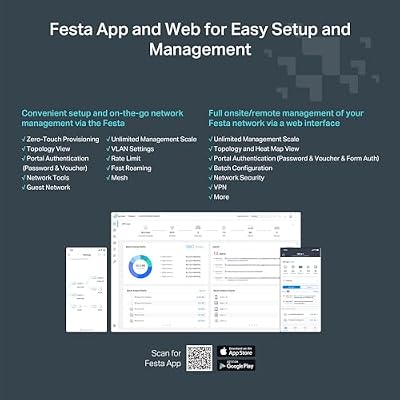
TP-Link Festa FR307-M2, Multi-Gigabit VPN Wired Router Gateway | 2*2.5G+ 5*Gigabit+ 1*USB WAN, Self-Organizing Network, Free Cloud, Load Balance, IPSec/PPTP/L2TP/OpenVPN, Not Work with Omada



As an Amazon Associate we earn from qualifying purchases. Product prices and availability are accurate as of the date/time indicated.
The TP-Link Festa FR307-M2 is the standout pick for developers who treat their network as part of their stack. It is a dedicated wired router gateway — not a WiFi router — with multi-gigabit ports (2.5G plus gigabit) and built-in VPN capability, designed to sit at the edge of a home lab and give you direct, low-level control over routing, port forwarding and secure remote access. At around $99 it is the premium, most capable networking device here.
This is the router for the developer who runs local servers, containers or virtual machines and needs rock-solid wired stability plus serious VPN and firewall flexibility. The multi-gigabit wired ports give consistent, interference-free connections for your most important machines, the VPN gateway lets you reach your lab remotely or tunnel traffic securely, and the gateway feature set gives you the port-forwarding and routing control a power user wants. Note it provides no WiFi of its own — you pair it with access points or a mesh system for wireless. For a developer who wants a dedicated, professional-grade wired core for their network, the Festa FR307-M2 is the clear choice.
Pros: Dedicated multi-gig wired gateway, strong VPN and port-forwarding control, rock-solid stability.
Cons: No built-in WiFi — needs separate access points; most advanced to set up.
2. TP-Link AX1800 WiFi 6 Router (Archer AX21 V5) – Dual Band, Gigabit
The TP-Link Archer AX21 is the flexible WiFi 6 all-rounder and a developer favorite for good reason. It is a dual-band AX1800 WiFi 6 router with gigabit ports, support for OpenVPN and PPTP/L2TP VPN servers, and straightforward port-forwarding controls — a genuinely capable router at a very fair price. At around $52 it punches well above its cost for a home-lab-friendly wireless router.
This is the router for the developer who wants WiFi 6 speed and real control without buying enterprise gear. The built-in OpenVPN server lets you reach your home network securely from anywhere — ideal for SSHing into a dev box on the road — while the clear port-forwarding settings make exposing a local server easy. WiFi 6 keeps a busy mix of laptops, phones and IoT devices responsive, and the router is widely supported and well documented. For a flexible, VPN-capable single-unit router that handles a developer’s needs affordably, the Archer AX21 is an easy recommendation.
Pros: WiFi 6 with OpenVPN server, easy port forwarding, handles many devices, excellent value.
Cons: Single-unit coverage only; very large homes may want mesh.
3. TP-Link Deco X55 AX3000 WiFi 6 Mesh System – Covers up to 2500 Sq.Ft.

TP-Link Deco X55 AX3000 WiFi 6 Mesh System, Deco X55(1-Pack) | Covers up to 2500 Sq.Ft., Replaces Wireless Router and Extender, 3 Gigabit Ports, Supports Ethernet Backhaul




As an Amazon Associate we earn from qualifying purchases. Product prices and availability are accurate as of the date/time indicated.
The TP-Link Deco X55 is the whole-home mesh pick for developers with devices scattered across a house. It is an AX3000 WiFi 6 mesh system covering up to 2500 square feet, designed to blanket multiple rooms in one seamless, stable network so connections do not drop as you move between a desk, a workshop and a lab bench. At around $69 it is a strong-value mesh for broad, reliable coverage.
This is the system for the developer whose dev boards, servers, smart-home kit and laptops are spread out and who is tired of dead spots and reconnections. WiFi 6 and the mesh design keep a high count of simultaneous devices connected smoothly across the whole space, the single unified network means no manual switching between access points, and the Deco app makes managing it simple. It supports basic VPN client features for routing traffic, though its main strength is dependable coverage. For stable, whole-home WiFi that handles a lot of devices, the Deco X55 is a smart choice.
Pros: WiFi 6 mesh, up to 2500 sq ft, handles many simultaneous devices, seamless whole-home coverage.
Cons: VPN options are more limited than a dedicated gateway or Archer router.
4. Amazon eero 6 mesh wifi router – Supports internet plans up to 900 Mbps

Amazon eero 6 mesh wifi router - Supports internet plans up to 900 Mbps, Coverage up to 1,500 sq. ft., Connect 75+ devices, 1-pack


As an Amazon Associate we earn from qualifying purchases. Product prices and availability are accurate as of the date/time indicated.
The Amazon eero 6 is the simple, reliable mesh pick. It is a WiFi 6 mesh router that supports internet plans up to 900 Mbps and is built around ease of use, delivering a stable, expandable network with minimal fuss through the eero app. At around $89 it is the choice for a developer who values rock-solid uptime and simplicity over deep manual configuration.
This is the router for the developer who wants their network to just work and stay up, without spending evenings tuning settings. The mesh design keeps connections steady across a home full of devices, support for plans up to 900 Mbps covers fast broadband, and you can add more eero units later to extend coverage. Be aware that eero’s most flexible controls and some features sit behind its ecosystem and subscription, so it is less open than a TP-Link router for hands-on port and VPN tinkering. For dependable, low-maintenance mesh that keeps many devices online, the eero 6 is a solid, hassle-free option.
Pros: Reliable WiFi 6 mesh, supports plans up to 900 Mbps, very easy setup, expandable.
Cons: Advanced controls are more limited; some features need a subscription.
5. Google Nest Wifi – AC2200 – Mesh WiFi System – 2200 Sq Ft Coverage

Google Nest Wifi - AC2200 - Mesh WiFi System - Wifi Router - 2200 Sq Ft Coverage - 1 pack


As an Amazon Associate we earn from qualifying purchases. Product prices and availability are accurate as of the date/time indicated.
The Google Nest Wifi is the easy, expandable coverage pick. It is an AC2200 mesh system with each point covering around 2200 square feet, focused on simple setup and clean, reliable whole-home wireless managed through the Google Home app. At around $69 it is an approachable mesh for a developer who wants broad coverage without complexity.
This is the system for the developer who prioritises a stable, far-reaching signal and straightforward management over low-level network control. The mesh design keeps a houseful of devices connected as you move around, each point adds substantial coverage so you can scale to your home’s size, and the Google Home app keeps administration simple. Note that it runs WiFi 5 (AC) rather than WiFi 6, and like other consumer-friendly mesh systems its VPN and port-forwarding options are basic compared with a dedicated router. For easy, expandable, dependable coverage, the Nest Wifi is a sensible pick.
Pros: Easy mesh setup, strong per-point coverage, reliable signal, simple app management.
Cons: WiFi 5 not WiFi 6; limited VPN and port-forwarding flexibility.
6. TP-Link AC1200 Gigabit WiFi Router (Archer A6) – Dual Band MU-MIMO

TP-Link AC1200 Gigabit Dual Band WiFi Router (Archer A6) | MU-MIMO Wireless Internet Router, 4 x Antennas, OneMesh and AP Mode, Long Range Coverage


As an Amazon Associate we earn from qualifying purchases. Product prices and availability are accurate as of the date/time indicated.
Rounding out the list is the TP-Link Archer A6, the budget wired-backbone pick. It is a dual-band AC1200 router with gigabit ports and MU-MIMO, delivering dependable wired and wireless connectivity at the lowest price on this list. At around $39 it is a cost-effective way to add a stable, well-supported router to a setup.
This is the router for the developer on a tight budget, or anyone who wants a reliable secondary router for a test network or to hang off a primary gateway. The gigabit LAN ports give steady wired connections for a dev machine or a small server, MU-MIMO helps it serve several wireless devices at once, and TP-Link’s interface offers basic port forwarding for exposing local services. It is WiFi 5 and single-unit, so it suits smaller spaces and lighter needs, but as an affordable, stable building block for a home network, the Archer A6 does its job well.
Pros: Very affordable, gigabit wired ports, MU-MIMO for several devices, basic port forwarding.
Cons: WiFi 5 and single-unit; best for small spaces or as a secondary router.
How to Choose a Router for Development Work
Choosing a router as a developer starts with stability, because an unreliable connection costs you far more than slow speed. You want hardware that holds sessions open under sustained load — long builds, SSH connections, file transfers — without dropping or needing reboots. Wired connections are inherently the most stable, which is why a dedicated wired gateway like the Festa FR307-M2 is so appealing for a home lab, while a quality WiFi 6 router or mesh keeps wireless steady. Prioritise dependable uptime over a flashy headline number.
VPN and port-forwarding flexibility is the next thing to weigh, and it varies a lot between consumer and prosumer gear. If you need to reach your home network remotely or expose a local server, look for a router with a built-in VPN server and clear port-forwarding controls — the Festa gateway and the TP-Link Archer AX21, with its OpenVPN support, lead here. Consumer-friendly mesh systems like eero and Nest Wifi keep these controls deliberately simple, which is great for ease of use but limiting if you want to tinker. Match the level of control to how hands-on you want to be.
Capacity for many simultaneous devices matters because a developer’s network is rarely just a laptop. Between dev boards, virtual machines, phones, IoT gadgets and test devices, the connection count adds up fast. WiFi 6 hardware like the Archer AX21 and Deco X55 handles dense device counts more gracefully than older WiFi 5 gear, and a mesh system spreads that load across multiple points so no single unit is overwhelmed. If you run a busy home lab, favour WiFi 6 and consider mesh to keep everything responsive at once.
Finally, match the form factor to your space and your role, and set your budget. A single capable router like the Archer AX21 suits an apartment or a focused home office; a mesh system like the Deco X55, eero 6 or Nest Wifi is the answer for a larger home with devices in several rooms; and a dedicated wired gateway like the Festa FR307-M2 — paired with access points for WiFi — is the choice for the developer who wants professional-grade control of routing and security. Decide whether stability, VPN flexibility, device count or coverage is your top priority, and pick the router on this list that lands on it. The best developer router is the one you forget is there because it never drops.
Frequently Asked Questions
What makes a router good for developers specifically?
Developers need more than raw speed: rock-solid connection stability so SSH sessions and builds do not drop, VPN support for secure remote access to a home lab, clear port-forwarding controls to expose local servers, and the capacity to keep many devices online at once. A wired gateway like the Festa FR307-M2 or a flexible WiFi 6 router like the Archer AX21 covers these needs far better than a basic ISP-supplied box.
Do I need a router with a built-in VPN?
If you want to reach your home network or dev machines securely while away, or route traffic through a tunnel, a built-in VPN server is very convenient. The TP-Link Archer AX21 includes an OpenVPN server, and the Festa FR307-M2 is a dedicated VPN gateway. Consumer mesh systems like eero and Nest Wifi offer only limited VPN features, so choose router-grade hardware if VPN flexibility is important to you.
Is a mesh system or a single router better for a home lab?
It depends on your space. A single capable WiFi 6 router like the Archer AX21 is ideal for an apartment or one-room office and usually offers the most hands-on control. A mesh system like the Deco X55, eero 6 or Nest Wifi is better for a larger home with devices spread across rooms, spreading the load across multiple points for stable, whole-home coverage of many devices.
Can these routers handle a lot of connected devices?
Yes, especially the WiFi 6 models. The Archer AX21 and Deco X55 use WiFi 6, which handles dense device counts more gracefully than older WiFi 5 hardware, and mesh systems spread that load across several units. If you run a busy home lab with dev boards, VMs, phones and IoT gadgets, favour WiFi 6 and consider mesh so every device stays responsive at once.
Related Guides
- Best Mesh WiFi Systems
- Best WiFi 6 Routers
- Best Network Switches
- Best NAS for Home Labs
- Best Ethernet Cables
- Best Budget Gaming Setup
Affiliate Disclosure: As an Amazon Associate, we earn from qualifying purchases. If you click a link and make a purchase, we may earn a small commission at no extra cost to you. Prices and availability are accurate as of publication and may change.










