

The Kensington Orbit K75327WW is the modern black-and-grey colour-refresh of Kensington’s long-running Orbit Scroll Ring trackball. The underlying design is unchanged from the original Orbit — finger-operated, ambidextrous, 40mm ball, signature scroll ring, included wrist rest — but the K75327WW carries the contemporary office-friendly colourway that fits better against modern grey-and-black desk setups. This Kensington Orbit K75327WW review covers ergonomics, cursor precision, the scroll ring, wired performance and value at around $50 for the trackball plus included accessories.

Kensington Orbit Trackball Mouse with Scroll Ring (K75327WW), Black-Grey


As an Amazon Associate we earn from qualifying purchases. Product prices and availability are accurate as of the date/time indicated.
🛒 Best Price Today on Amazon
Prime members get fast, free shipping on everything above, plus member-only deals. New members get a 30-day free trial — cancel anytime.
As an Amazon Associate we earn from qualifying purchases.


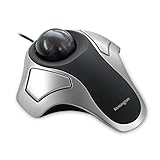


Kensington Orbit K75327WW at a Glance
| Component | Specification |
|---|---|
| Ball position | Centre-mounted (finger-operated), ambidextrous |
| Ball size | 40mm removable black ball |
| DPI / tracking | Fixed sensor — cursor speed adjusted in OS and Kensington Works software |
| Sensor type | Optical |
| Wireless / wired | Wired — USB-A cable, black/grey colourway |
| Battery type | None (wired) |
| Programmable buttons | 2 buttons (left/right) — remappable in Kensington Works, chord for middle-click |
| Tilt scroll | Scroll ring around the ball (replaces scroll wheel) — bidirectional, infinite rotation |
| Approx price | around $49 |
Ergonomics & Wrist Strain Relief
The K75327WW is mechanically identical to the original Kensington Orbit with Scroll Ring — the only difference is the colour scheme. That is genuinely good news: the design has been in continuous production for two decades because the fundamentals work. The body is low and ambidextrous, the 40mm ball sits centred under the fingers, the two large buttons frame the ball, and the included detachable wrist rest properly supports the heel of the hand. For users who already know they prefer finger-operated trackballs over thumb-operated designs, the Orbit’s symmetric layout is benchmark territory. The K75327WW’s restrained black-and-grey aesthetic looks more at home in a modern office or home workspace than the older cream colourway, which is reason enough for many buyers to choose this variant. For users transitioning from a conventional mouse who have struggled with vertical mice (too aggressive an angle, too steep a learning curve), the Orbit’s symmetric low profile is a much gentler ergonomic step — the wrist sits flat rather than rotated, which suits most hands without weeks of acclimatisation. The included wrist rest is properly sized rather than a token gesture, and pairs naturally with a low-profile keyboard for a coordinated desk setup. For long-session use, taking a few minutes to position the Orbit so the wrist rest aligns with the keyboard’s leading edge makes a meaningful difference to all-day comfort.
Cursor Precision & Sensor
The optical sensor is fixed-DPI — cursor speed is adjusted in the OS and refined in Kensington Works software. As with the original Orbit, the 40mm finger-operated ball gives genuinely fine cursor control for precision work: detailed photo retouching, vector illustration, small UI targets in spreadsheets, exact point selection in CAD. Two strong fingers offer more dexterity over the ball than the single thumb of a thumb trackball, and the larger 40mm ball means smaller wrist motion translates into useful cursor travel. The sensor is not a gaming sensor; for casual play it is fine, for competitive shooters a gaming mouse remains the right tool.
Programmable Buttons & Software
Two main buttons, the scroll ring, and chord-click middle-button emulation via Kensington Works software. Some buyers want more buttons — Kensington’s own Expert offers four buttons plus scroll ring — but the Orbit’s deliberate simplicity has its admirers. For minimalist setups, accessibility use cases and left-handers, fewer buttons mean fewer accidental clicks and a more consistent ambidextrous experience. Kensington Works runs on Windows and macOS and lets you remap the two buttons per-application, set scroll-ring acceleration and configure chord-click behaviour. The customisation suite is functional rather than glossy, but it covers the essentials reliably. New users should know that the chord-click takes a few hours to internalise — pressing both main buttons at once for middle-click feels awkward at first — but after a week of normal use it becomes second nature and feels no more deliberate than any other click.
Battery / Wireless Performance
The K75327WW is wired — USB-A cable, zero battery anxiety, zero latency, plug and play. The wired connection makes it a dependable choice for studio, broadcast and professional desk setups where wireless interference is unwelcome. The cable is generous enough for desktop use, and for users who want wireless Kensington sells separate wireless Orbit variants. The simplicity of a wired peripheral — no pairing, no batteries, no firmware-update drama — remains genuinely appealing for many trackball users. Modern laptop users without USB-A ports will need a hub or USB-C adapter to use the K75327WW, which is a small but worth-noting consideration before purchase.
Use Cases — CAD / Streaming / Photo Editing
The K75327WW is at home on a creative or accessibility desk for the same reasons as the original Orbit. The scroll ring is excellent for long documents, web pages, timelines and code; the finger-operated 40mm ball gives precision for photo retouching and vector illustration; the ambidextrous layout makes it the right tool for left-handers and for users with limited dominant-hand mobility. The black-and-grey colourway makes it less visually intrusive in a professional setting than the older cream variant. As with all trackballs, regular ball cleaning is essential — pop the ball out every few weeks, wipe the support bearings and the cursor stays smooth.
Verdict
At around $50 the Kensington Orbit K75327WW is the proven Orbit Scroll Ring design in a contemporary, office-friendly colourway. Choosing between the K75327WW and the original Orbit is purely a question of aesthetics — both deliver the same precision finger control, the same useful scroll ring, the same wired reliability and the same ambidextrous experience. For modern setups the K75327WW’s restrained colour scheme is the better visual fit. For the same buyers as the original Orbit — left-handers, precision creatives, accessibility users and minimalists who want a dependable wired trackball — it earns the same strong recommendation. The longevity of the Orbit Scroll Ring design is itself a strong endorsement: when a peripheral has been in continuous production for two decades and Kensington keeps refreshing its colourway rather than redesigning the body, that is the market saying the design fundamentals are right. The K75327WW carries that lineage into a contemporary look without disturbing what works.
It is also worth saying that the Orbit family is one of the few computer peripherals where second-hand or refurbished units remain genuinely usable — the simplicity of the design (no battery to degrade, no firmware to obsolete, no rechargeable cell to die) means a working unit stays working for many years. Buying new at around $50 is the safe path, but the longevity is a quiet endorsement of how solid the underlying design is.
Frequently Asked Questions
What is the difference between the K75327WW and the original Kensington Orbit?
Mechanically nothing — same body, same ball, same scroll ring, same buttons. The K75327WW is the black-and-grey colour refresh; the original Orbit has the older cream colourway. Choose by aesthetic preference.
Is the K75327WW good for left-handers?
Yes. The Orbit’s ambidextrous design is one of its main strengths and the K75327WW shares it — same shape, same buttons, same scroll ring on either side.
Does the K75327WW work with Mac?
Yes. It works as a plug-and-play USB device on macOS. Install Kensington Works for button remapping, scroll-ring tuning and chord-click middle-button emulation.
Can you replace the ball in the K75327WW?
Yes. The ball is removable for cleaning, and Kensington sells coloured replacement balls if you want to personalise the look.
More Trackball Reviews
- Logitech M575 Trackball (Latin America) Review (2026)
- TECKNET Pro Wireless Trackball Mouse Review (2026)
- Kensington Expert Wireless Trackball K72359WW Review (2026)
- Kensington Orbit K64327F Silver Trackball Review (2026)
- Kensington Expert Trackball K64325 Wired Review (2026)
- Kensington Orbit Trackball with Touch Scroll Ring K72352US Review (2026)
- Logitech Ergo M575 Wireless Trackball Review (2026)
- Nulea M501 Wireless Trackball Mouse Review (2026)
Affiliate Disclosure: As an Amazon Associate, we earn from qualifying purchases. If you click a link and make a purchase, we may earn a small commission at no extra cost to you. Prices and availability are accurate as of publication and may change.










