

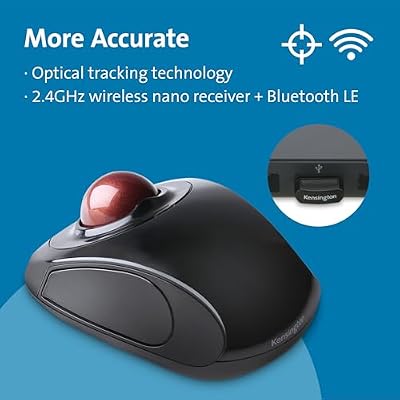
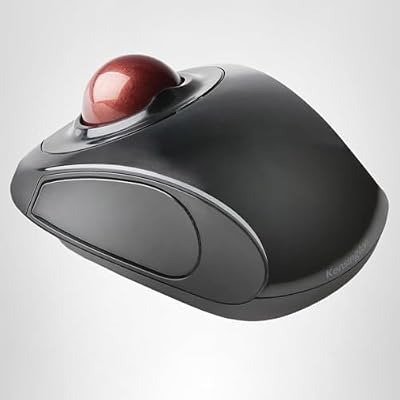
The Kensington Orbit K72352US with touch scroll ring is a variant of the classic Orbit family that replaces the conventional rotating scroll ring with a touch-sensitive scroll surface — you swipe a finger across the touch ring instead of rotating it. It pairs that touch scroll with the familiar finger-operated, ambidextrous Orbit body and 40mm ball. This Kensington Orbit K72352US review covers ergonomics, cursor precision, the touch scroll, wired performance and value at around $50.

Kensington Orbit Wireless Trackball Mouse with Touch Scroll Ring (K72352US),Black


As an Amazon Associate we earn from qualifying purchases. Product prices and availability are accurate as of the date/time indicated.
🛒 Best Price Today on Amazon
Prime members get fast, free shipping on everything above, plus member-only deals. New members get a 30-day free trial — cancel anytime.
As an Amazon Associate we earn from qualifying purchases.


Kensington Orbit Touch Scroll K72352US at a Glance
| Component | Specification |
|---|---|
| Ball position | Centre-mounted (finger-operated), ambidextrous |
| Ball size | 40mm removable ball |
| DPI / tracking | Fixed sensor — cursor speed adjusted in OS and Kensington Works |
| Sensor type | Optical |
| Wireless / wired | Wired — USB-A cable |
| Battery type | None (wired) |
| Programmable buttons | 2 buttons (left/right) — remappable in Kensington Works, chord-click for middle-button |
| Tilt scroll | Touch-sensitive scroll ring (swipe instead of rotate) — bidirectional |
| Approx price | around $49 |
Ergonomics & Wrist Strain Relief
The K72352US shares the Orbit family’s ambidextrous, finger-operated body — a low, symmetric shape with the 40mm ball centred and the two primary buttons either side. The finger-operated design distributes the cursor workload across the index and middle fingers rather than concentrating it on a single thumb, which most users find less fatiguing for long sessions. The ambidextrous layout makes the K72352US one of the best trackballs for left-handers. The touch scroll surface adds a different ergonomic dimension — swiping is a different motion from rotating and some users find it more relaxed for long bouts of scrolling — while others prefer the tactile precision of a conventional rotating scroll ring. It is a genuine preference matter rather than a clear win for either design.
Cursor Precision & Sensor
The optical sensor is fixed-DPI, with cursor speed adjusted in the OS and refined in Kensington Works software. The 40mm finger-operated ball gives the same precision advantage as other Orbit variants — noticeably finer cursor control than any thumb trackball for detailed photo retouching, vector illustration and pixel-level UI work, because two strong fingers offer more dexterity over the ball than a single thumb. The K72352US is not a gaming sensor; for casual use it is fine, for competitive shooters a gaming mouse is the right tool. Ball cleaning every few weeks remains essential maintenance — pop the ball out, wipe the support bearings, keep the cursor smooth.
Programmable Buttons & Software
Two main buttons remappable in Kensington Works, plus chord-click for middle-button emulation. The deliberately minimal button count is consistent with the Orbit family philosophy — fewer buttons for fewer accidental clicks and a more consistent ambidextrous experience. The touch scroll ring adds a third interaction surface, and Kensington Works lets you tune its sensitivity and direction. The software is functional rather than flashy, but it covers the essentials reliably on Windows and macOS. For users who want more buttons, the Kensington Expert (four buttons plus scroll ring) is the step up; for users who want the simplest, cleanest Orbit experience, the K72352US covers the bases.
Battery / Wireless Performance
The K72352US is wired — USB-A cable, no battery, no Bluetooth, no pairing. The wired connection adds the dependability that long-session and professional users prize, and removes any wireless variable. The cable is long enough for desktop use and the simplicity of plug-and-play is its appeal. Kensington sells separate wireless Orbit variants for buyers who need wireless; the K72352US is the touch-scroll variant of the wired Orbit family. Users on modern laptops that lack USB-A ports will need a USB-C adapter or hub to use the K72352US — a small inconvenience that comes with any wired USB-A peripheral on newer machines, but worth flagging before purchase.
Use Cases — CAD / Streaming / Photo Editing
The K72352US suits the same precision use cases as the other Orbit variants — photo retouching, vector illustration, video editing, accessibility use, left-handed use, minimalist setups. The touch scroll is the main point of differentiation: in long document and timeline navigation some users prefer the swipe motion, others prefer the conventional rotating ring. For touch-screen-familiar users transitioning from tablets and laptops, the swipe feel may be more intuitive. As always, ball cleaning every few weeks is essential maintenance to keep the cursor smooth, and the wired connection means there is no battery or pairing variable to worry about. The touch surface also has a small accessibility advantage: users with reduced fine motor control sometimes find a swipe gesture easier to perform reliably than the precise rotational motion a scroll ring requires, which is a meaningful consideration for users buying a trackball specifically for assistive purposes.
Verdict
At around $50 the Kensington Orbit K72352US is the touch-scroll variant of the classic wired Orbit, sharing the same precise finger-operated body and 40mm ball as the rotating-scroll variants but swapping the rotating ring for a touch-sensitive surface. Choosing between the K72352US and the rotating-scroll K75327WW or original Orbit is largely a question of scroll-feel preference — both deliver the same precision cursor control, the same ambidextrous body and the same wired reliability. For users who actively prefer a touch surface over a rotating ring (often touch-familiar users from tablets and laptops), the K72352US is the right Orbit variant. For users who prefer the tactile precision of a rotating ring, the K75327WW remains the better choice.
It is worth flagging one practical consequence of the touch scroll: there is no scroll-wheel click as such, so middle-click is bound to the chord (both buttons together) by default and is best left there. Users who frequently middle-click as a primary action — open-in-new-tab habits in heavy browsing workflows — may find the chord less convenient than a dedicated wheel button, and for them a rotating-scroll Orbit with the conventional scroll-wheel click is the better choice. For users whose middle-clicks are occasional, the chord works well.
The touch scroll’s biggest underrated advantage is reliability: there are no moving parts in the scroll mechanism, no wheel encoder to wear out and no detents to slip. Over years of heavy use the rotating scroll rings on some other Kensington trackballs have been known to develop a slight wobble or notch; the touch surface has nothing to go wrong. For users who buy a peripheral expecting a decade of life, that reliability is a quiet but real benefit, and one of the genuine reasons Kensington has kept this variant in the lineup alongside the rotating models.
Frequently Asked Questions
How is the touch scroll ring different from the rotating scroll ring?
The touch scroll ring is a flat touch-sensitive surface — you swipe a finger across it to scroll. The rotating scroll ring is a physical wheel that rotates around the ball. Touch is more like a phone or trackpad gesture; rotating is more tactile and precise. It is a preference matter.
Is the K72352US good for left-handers?
Yes. The Orbit family’s ambidextrous design carries over, and the K72352US works identically for left and right hands — same shape, same buttons, same touch scroll on either side.
Does the K72352US need drivers?
It works plug-and-play on Windows and macOS for basic mouse functions. To tune touch scroll sensitivity, enable middle-button chord-click and remap buttons, install Kensington Works.
Can you replace the ball in the K72352US?
Yes. The ball is removable for cleaning, and Kensington sells coloured replacement balls if you want to personalise the look.
More Trackball Reviews
- Logitech Ergo M575 Wireless Trackball Review (2026)
- Nulea M501 Wireless Trackball Mouse Review (2026)
- Logitech Trackman Marble Wired USB Trackball Review (2026)
- ELECOM EX-G Trackball Mouse 2.4GHz Wireless Review (2026)
- Kensington Orbit Trackball with Scroll Ring Review (2026)
- Kensington Orbit K75327WW Trackball Review (2026)
- Logitech M575 Trackball (Latin America) Review (2026)
- TECKNET Pro Wireless Trackball Mouse Review (2026)
Affiliate Disclosure: As an Amazon Associate, we earn from qualifying purchases. If you click a link and make a purchase, we may earn a small commission at no extra cost to you. Prices and availability are accurate as of publication and may change.










