

- Top Pick: Logitech Trackman Marble Trackball Mouse – Wired USB Ergonomic Mouse for Computers, with 4 Programmable Buttons, Dark Gray
- Best Value: Logitech Trackman Marble Mouse, Four-Button, Programmable, Dark Gray (Renewed)
- Premium Choice: Logitech Trackman Marble Trackball Mouse – Wired USB Ergonomic Mouse for Computers, with 4 Programmable Buttons
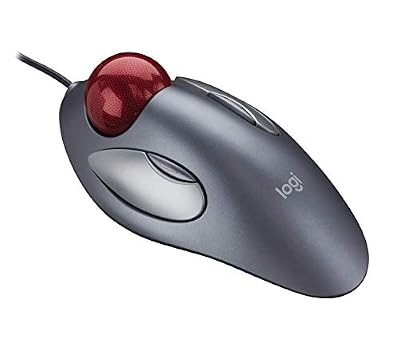
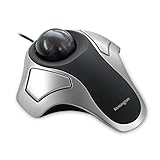
The Logitech Trackman Marble is a legendary peripheral, in production since the late 1990s and still selling steadily nearly three decades later. It is a finger-operated, ambidextrous, wired USB trackball with a large central ball and four buttons. It has outlasted countless competitors because the formula simply works. This Logitech Trackman Marble review covers ergonomics, cursor precision, button layout, wired performance and value at around $30.

Logitech Trackman Marble Trackball Mouse – Wired USB Ergonomic Mouse for Computers, with 4 Programmable Buttons, Dark Gray


As an Amazon Associate we earn from qualifying purchases. Product prices and availability are accurate as of the date/time indicated.
🛒 Best Price Today on Amazon
Prime members get fast, free shipping on everything above, plus member-only deals. New members get a 30-day free trial — cancel anytime.
As an Amazon Associate we earn from qualifying purchases.




Logitech Trackman Marble at a Glance
| Component | Specification |
|---|---|
| Ball position | Centre-mounted (finger-operated), ambidextrous |
| Ball size | 40mm red marble-pattern ball |
| DPI / tracking | 300 DPI base (no hardware adjustment) — software multipliers via OS cursor speed |
| Sensor type | Optical |
| Wireless / wired | Wired only — USB-A cable |
| Battery type | None (wired) |
| Programmable buttons | 4 buttons (2 large primary, 2 small auxiliary) — driver-level remapping via Logitech SetPoint / Logi Options+ |
| Tilt scroll | No — no scroll wheel at all (scrolling done via button + ball) |
| Approx price | around $29 |
Ergonomics & Wrist Strain Relief
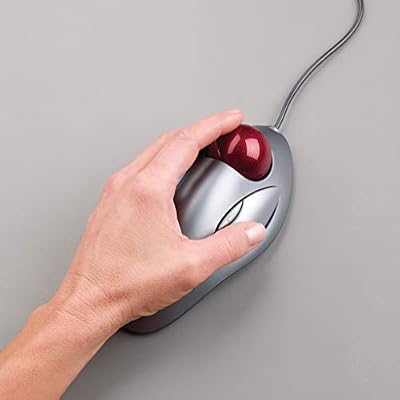
The Trackman Marble is symmetric — left-handers and right-handers use the same device, simply rotated to suit. The body is a low, wide rest for the palm, the large 40mm ball sits dead centre under the fingers, and the four buttons surround the ball in pairs. The finger-operated design is a different ergonomic proposition from a thumb trackball: instead of one digit rolling a small ball, your stronger, more dexterous fingers (index and middle) roll a much larger ball. For long sessions many users find finger trackballs less fatiguing than thumb trackballs, because the workload is spread across multiple fingers rather than concentrated in one thumb. The Marble is genuinely flat — no sculpted dome — which makes it accessible to almost any hand size and shape. As an entry to finger-operated trackballs it is unbeatable on price.
Cursor Precision & Sensor
The Trackman Marble’s optical sensor runs at a relatively low 300 DPI, which sounds underwhelming on paper but works in practice because the large 40mm ball travels much further than a thumb-sized ball per revolution — the resulting cursor speed is well calibrated for typical use, and you raise sensitivity in the OS or with the SetPoint software if needed. Pixel-precise work (detailed photo retouching, vector illustration, small UI targets) is where finger-operated trackballs traditionally excel: the larger ball and the use of two fingers give noticeably finer control than any thumb trackball. The Marble is not a gaming-grade sensor and would frustrate a competitive shooter player, but for everyday precision tasks it is genuinely accurate.
Programmable Buttons & Software
The Marble has four buttons: two large primary clicks adjacent to the ball, and two smaller auxiliary buttons set further out. Default mapping is left/right click plus forward/back. There is no scroll wheel — instead, the Logitech driver software (SetPoint on Windows, with macOS support via Logi Options+) lets you hold a button while rolling the ball to scroll. It takes a few hours to internalise but becomes second nature, and many long-term Marble owners prefer it to a wheel. The four buttons are fully remappable, and the small button count is part of the Marble’s charm — it focuses on doing the essentials precisely. For users who want forward/back navigation, middle-click and on-demand scroll, the Marble is well sorted.
Battery / Wireless Performance
The Marble is unapologetically wired. It connects over a sleeved USB-A cable to any USB port and that is the entire wireless story — there is no battery, no charging, no Bluetooth, no receiver. For some buyers that is a deal-breaker; for others it is the appeal — zero latency, zero battery anxiety, zero pairing drama, plug it in and use it for a decade. The cable is long enough for desktop use and the wired connection makes the Marble a sensible choice for studio, broadcast and professional environments where wireless interference is unwelcome. Logitech sells the Marble wireless TB (M570 lineage / M575) for buyers who want wireless; the wired Marble remains the cheaper, more reliable option.
Use Cases — CAD / Streaming / Photo Editing
The Marble’s finger-operated, large-ball design genuinely shines for precision work. For CAD, vector illustration, photo retouching and detailed creative tasks it is far more capable than any thumb trackball, because the finger control over a 40mm ball gives finer cursor motion. For streaming and broadcast it is a popular choice because of the wired reliability. For everyday office work it is comfortable, low-strain and durable. For competitive gaming it remains the wrong tool — the sensor and button count are not built for that purpose. Ball cleaning is essential maintenance — wipe the bearings every couple of weeks and the cursor remains glass-smooth. Many long-term Marble owners describe a quiet sense of satisfaction in how undemanding the device is — there is nothing to update, nothing to charge, nothing to pair, just a trackball that has been doing the same job reliably for decades, ready whenever a USB port is.
Verdict
At around $30 the Logitech Trackman Marble is one of the great enduring computer peripherals. Nearly thirty years of continuous production is unprecedented in the input-device market and is the strongest possible evidence that the design works. It is ambidextrous, finger-operated, wired-reliable, precise enough for genuine creative work, and inexpensive. The compromises — no scroll wheel, no wireless, no DPI button — are honest and consistent with the price. For left-handers who want a trackball, for buyers who want precise finger control on a budget, and for anyone who values a no-nonsense wired peripheral, the Trackman Marble earns a strong recommendation. Buyers who want wireless or a scroll wheel should look elsewhere.
The Marble’s longevity matters beyond mere sentiment: it means replacement balls, support resources, community guides and software compatibility are all easy to find. A trackball you can buy new today for $30 and still find drivers and forum advice for in a decade is a different proposition from a fashionable new peripheral whose support ecosystem may not survive its first product refresh. For users who value tools that simply outlast trends, the Marble is the prototype.
It is also genuinely worth saying that the Marble’s lack of a scroll wheel is not the limitation new buyers expect. After the initial adjustment period — usually a day or two — the button-held scroll-via-ball motion feels natural and, in some respects, superior: you can scroll at any speed with the same gesture, the scroll axis is whichever way you want to roll, and there is no separate component to wear out. Many long-term Marble owners actively dislike scroll wheels after years on this trackball. The minimalism is part of the design, not a missing feature.
Frequently Asked Questions
Is the Logitech Trackman Marble good for left-handers?
Yes — and that is one of its main strengths. It is fully ambidextrous, simply rotated to use with either hand, which is rare in the trackball category.
How do you scroll without a scroll wheel?
You hold a programmable button (configured in Logitech’s driver software) while rolling the ball. It feels strange for a few hours, then becomes second nature, and many long-term owners prefer it to a wheel.
Does the Logitech Trackman Marble need drivers?
It works as a plug-and-play USB device for basic mouse functions on Windows and macOS. To enable button remapping and scroll-on-ball, install Logitech’s SetPoint (Windows) or Logi Options+.
Is the Trackman Marble still in production?
Yes. It has been in continuous production since the late 1990s — an extraordinary lifespan for a computer peripheral — and Logitech continues to manufacture it new at a low price.
More Trackball Reviews
- ELECOM EX-G Trackball Mouse 2.4GHz Wireless Review (2026)
- Kensington Orbit Trackball with Scroll Ring Review (2026)
- Kensington Orbit K75327WW Trackball Review (2026)
- Logitech M575 Trackball (Latin America) Review (2026)
- TECKNET Pro Wireless Trackball Mouse Review (2026)
- Kensington Expert Wireless Trackball K72359WW Review (2026)
- Kensington Orbit K64327F Silver Trackball Review (2026)
- Kensington Expert Trackball K64325 Wired Review (2026)
Affiliate Disclosure: As an Amazon Associate, we earn from qualifying purchases. If you click a link and make a purchase, we may earn a small commission at no extra cost to you. Prices and availability are accurate as of publication and may change.










