

The Kensington Orbit with Scroll Ring is one of the most recognisable trackballs ever made, a finger-operated, ambidextrous design distinguished by Kensington’s signature feature: a scroll ring that encircles the ball itself, replacing a conventional scroll wheel. It is a long-running design that pairs accessible pricing with a layout that has won converts for two decades. This Kensington Orbit review covers ergonomics, cursor precision, the scroll ring, wired performance and value at around $50.

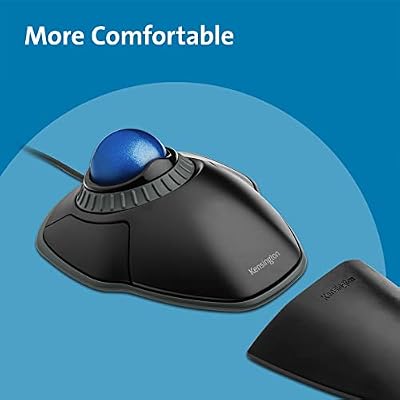
Kensington Orbit Trackball Mouse with Scroll Ring (K72337US), 4 1/2X5 1/2X2"


As an Amazon Associate we earn from qualifying purchases. Product prices and availability are accurate as of the date/time indicated.
🛒 Best Price Today on Amazon
Prime members get fast, free shipping on everything above, plus member-only deals. New members get a 30-day free trial — cancel anytime.
As an Amazon Associate we earn from qualifying purchases.



Kensington Orbit at a Glance
| Component | Specification |
|---|---|
| Ball position | Centre-mounted (finger-operated), ambidextrous |
| Ball size | 40mm removable ball (multiple colour options sold separately) |
| DPI / tracking | Fixed sensor — cursor speed adjusted in OS and Kensington Works software |
| Sensor type | Optical |
| Wireless / wired | Wired — USB-A cable |
| Battery type | None (wired) |
| Programmable buttons | 2 buttons (left/right) — remappable in Kensington Works software, plus chord-click for middle-click |
| Tilt scroll | Scroll ring around the ball (replaces scroll wheel) — bidirectional, infinite rotation |
| Approx price | around $49 |
Ergonomics & Wrist Strain Relief
The Kensington Orbit is symmetric — fully ambidextrous, with the 40mm ball dead centre and the two main buttons either side. The body is low and shaped to support a relaxed hand on either side. The included detachable wrist rest is generously sized and properly supports the heel of the hand, which is unusually thoughtful for a trackball at this price. Like the Logitech Trackman Marble, the Orbit’s finger-operated design spreads the work of moving the cursor across the index and middle fingers, which most users find less fatiguing for long sessions than the single-thumb concentration of a thumb trackball. For users who tried a thumb trackball and disliked the workload on the one digit, the Orbit’s finger control is a different and often more comfortable experience.
Cursor Precision & Sensor
The Orbit uses an optical sensor without a hardware DPI switch — cursor speed is set in the OS and refined in Kensington’s Kensington Works software. The 40mm ball is large enough that, even at modest sensor sensitivity, normal cursor travel across multiple monitors is comfortable. The finger-operated design genuinely excels at precision tasks: detailed photo retouching, vector illustration, small UI targets and selecting individual data points in CAD or spreadsheets are noticeably easier than with any thumb trackball, because two strong fingers offer more control over the ball than one thumb. The Orbit is not a gaming sensor and not built for that purpose, but for precision creative work it is genuinely a tool of choice.
Programmable Buttons & Software
The button count is deliberately minimal: two main left/right clicks. Kensington Works software adds middle-click via a chord (both buttons together), and the two buttons can be remapped per-application. Some users want more buttons; others appreciate the simplicity, especially for left-handers who get the same uncomplicated experience. The Kensington Works software (Windows and macOS) is functional and stable rather than feature-rich, but it covers the essentials. For users who want a richer button layout there is the Kensington Expert (four buttons plus scroll ring) and the Slimblade Pro; the Orbit is the entry to Kensington’s ambidextrous family. Buyers who later upgrade to the Expert will find the Kensington Works configuration concepts transfer directly — the same per-application profiles, the same chord-click conventions, the same scroll-ring tuning.
Battery / Wireless Performance
The standard Orbit Scroll Ring is wired — USB-A cable, zero battery anxiety, zero latency, plug and play. The cable is long enough for desktop use and the wired connection means it is a dependable choice for studio, broadcast and professional environments. Kensington also makes the Orbit Wireless (model K72352US and others) for buyers who need wireless; the wired Orbit Scroll Ring remains the cheaper and more reliable option. There is no Bluetooth and no battery to worry about — for many trackball users that is the appeal of the design.
Use Cases — CAD / Streaming / Photo Editing
The Orbit’s combination of large ball, finger control and scroll ring makes it a popular choice in creative professions. The scroll ring is the standout feature — it surrounds the ball and rotates infinitely in either direction, which is genuinely useful in long documents, web pages and timelines. Photographers, video editors, illustrators and CAD users have been buying Kensington trackballs for decades for exactly these reasons. For accessibility use cases — users with limited hand mobility, RSI sufferers, one-handed operators — the Orbit’s ambidextrous design and finger-only operation make it one of the most accessible mice on the market. Regular ball cleaning is essential maintenance to keep the cursor smooth. The Orbit also has a quiet reputation in education settings, where its symmetric layout means a single device can suit teachers, students and assistive-technology users alike without per-user adjustments — a small but meaningful advantage in shared-equipment environments where right-hand-only mice cause friction.
Verdict
At around $50 the Kensington Orbit Scroll Ring is one of the great everyday trackballs and a benchmark for finger-operated, ambidextrous design. It delivers precision cursor control via the 40mm ball, the signature scroll ring is a genuinely useful feature once you adapt to it, the wrist rest is well sized, and the wired reliability is the appeal of the design. The two-button layout is the chief compromise — power users who want forward/back and many programmable buttons should step up to the Kensington Expert. For left-handers, for precision creative work, for accessibility use cases and for anyone who wants a simple, dependable trackball, the Orbit earns a strong recommendation.
The scroll ring deserves a closer look because it is the single feature that most clearly distinguishes Kensington from the rest of the trackball market. Unlike a conventional scroll wheel, the ring rotates freely in either direction without indexed clicks, so scrolling long documents and timelines is genuinely fluid rather than ratcheted; and because the ring surrounds the ball at fingertip height, the hand never has to move from the ball to scroll — a small ergonomic detail that quietly reduces wrist motion over a long working day. Users who have spent a few weeks with a Kensington scroll ring often find conventional scroll wheels feel coarse afterward.
There is also a practical point about the Orbit’s longevity in support: as a long-running Kensington product, replacement parts and accessories (different coloured balls, replacement wrist rests, drivers for older operating systems) remain easy to find. Buying into the Orbit means buying into an established product family that will be supported for years to come — a quiet but real advantage over the budget challengers.
Frequently Asked Questions
What does the scroll ring do?
It is a ring that surrounds the ball and rotates in either direction, replacing a conventional scroll wheel. You spin it with the fingertips to scroll up or down; it rotates infinitely in either direction, which is excellent for long documents and timelines.
Is the Kensington Orbit good for left-handers?
Yes. It is fully ambidextrous — same shape, same buttons, same scroll ring — and is one of the most recommended trackballs for left-handed users.
Does the Kensington Orbit have a middle button?
Not as a separate physical button. The Kensington Works software enables a chord-click — press both main buttons together — to emulate middle-click.
Is the Kensington Orbit wireless?
The Scroll Ring version covered here is wired (USB-A). Kensington sells separate wireless Orbit variants (such as the K72352US) for buyers who need wireless.
More Trackball Reviews
- Kensington Orbit K75327WW Trackball Review (2026)
- Logitech M575 Trackball (Latin America) Review (2026)
- TECKNET Pro Wireless Trackball Mouse Review (2026)
- Kensington Expert Wireless Trackball K72359WW Review (2026)
- Kensington Orbit K64327F Silver Trackball Review (2026)
- Kensington Expert Trackball K64325 Wired Review (2026)
- Kensington Orbit Trackball with Touch Scroll Ring K72352US Review (2026)
- Logitech Ergo M575 Wireless Trackball Review (2026)
Affiliate Disclosure: As an Amazon Associate, we earn from qualifying purchases. If you click a link and make a purchase, we may earn a small commission at no extra cost to you. Prices and availability are accurate as of publication and may change.










