

- Top Pick: Kensington Expert Wireless Trackball Mouse (K72359WW) Black, 3.5" x 6.1" x 8"
- Best Value: Kensington Expert Trackball Mouse (K64325), Black Silver, 5"W x 5-3/4"D x 2-1/2"H
- Premium Choice: Kensington SlimBlade™ Pro Wireless Trackball, Rechargeable Battery, Bluetooth 2.4GHz Connection Options (K72080WW)
The Kensington Expert Wireless K72359WW is one of the most respected trackballs in the world, the wireless edition of Kensington’s professional-tier Expert Mouse line. It pairs a large 55mm finger-operated ball with four programmable buttons, the signature scroll ring, an ambidextrous body and dual wireless connectivity. It is a benchmark device for CAD professionals, video editors and creatives. This Kensington Expert review covers ergonomics, cursor precision, the four-button layout, battery and value at around $130.

Kensington Expert Wireless Trackball Mouse (K72359WW) Black, 3.5" x 6.1" x 8"


As an Amazon Associate we earn from qualifying purchases. Product prices and availability are accurate as of the date/time indicated.
🛒 Best Price Today on Amazon
Prime members get fast, free shipping on everything above, plus member-only deals. New members get a 30-day free trial — cancel anytime.
As an Amazon Associate we earn from qualifying purchases.

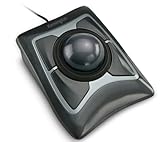


Kensington Expert Wireless K72359WW at a Glance
| Component | Specification |
|---|---|
| Ball position | Centre-mounted (finger-operated), ambidextrous |
| Ball size | 55mm removable ball (one of the largest in any trackball) |
| DPI / tracking | Fixed sensor — cursor speed adjusted in OS and Kensington Works |
| Sensor type | Optical |
| Wireless / wired | Wireless: 2.4GHz USB-A nano receiver + Bluetooth, plus included USB-A cable for wired fallback |
| Battery type | 2x AA alkaline |
| Programmable buttons | 4 buttons surrounding the ball — fully remappable in Kensington Works, plus chord-click options |
| Tilt scroll | Scroll ring around the ball (replaces scroll wheel) — bidirectional, infinite rotation |
| Approx price | around $130 |
Ergonomics & Wrist Strain Relief
The Expert Wireless is built around the largest ball in mainstream trackballs — 55mm of finger-operated billiard ball, sitting dead centre in an ambidextrous body. The included detachable wrist rest is generous, properly shaped and a meaningful contributor to all-day comfort. The Expert is designed for professional users who keep one hand on the trackball for eight hours a day, and the design priorities reflect that: a large enough ball that even very fine cursor motion uses gentle finger movements rather than wrist articulation, a wide low body that supports a relaxed hand, and a symmetric layout that suits left-handers as well as right-handers. For users moving from a conventional mouse who want the most professionally proven trackball, the Expert is the device working CAD professionals and video editors have been buying for decades.
Cursor Precision & Sensor
The Expert’s combination of a 55mm ball under finger control delivers the best precision in the consumer trackball market. The large ball means a small finger motion equals a usefully large cursor motion at low effective sensitivity, so you can do precise pixel-level work without straining for tiny ball rolls. Two strong fingers offer far more dexterity than a thumb, and the ball’s mass gives it a momentum that makes long cursor sweeps across multiple monitors feel deliberate and controlled. The sensor itself is fixed-DPI — cursor speed is adjusted in the OS and the Kensington Works software — and the optical tracking is rock-solid. The Expert is not a gaming sensor; it is built for precision creative work, and at that it excels.
Programmable Buttons & Software
The Expert has four programmable buttons arranged around the ball — two larger main buttons for primary clicks and two smaller secondary buttons for navigation, with the scroll ring between them. The four-button layout is the Expert’s hallmark and is fully remappable in Kensington Works. Power users typically configure copy, paste, undo, redo, switch tab and per-application macros. The software also enables chord-clicking (pressing button combinations) for additional virtual buttons, which extends the four physical buttons into a much larger functional set. For users who can map their workflow to the Expert’s buttons, the device becomes a genuine productivity multiplier — many CAD users do not touch the keyboard for routine actions.
Battery / Wireless Performance
The Expert Wireless runs on two AA alkaline batteries and connects three ways: 2.4GHz via the included USB-A nano receiver, Bluetooth Low Energy directly, or wired via the included USB-A cable. The wired fallback is unusual and welcome — for the longest sessions, users can plug in and remove battery anxiety entirely. Battery life on AA alkaline is excellent, typically well over a year of normal use. The dual wireless connectivity means the Expert is at home on modern laptops (Bluetooth, no receiver required) and on traditional desktops (2.4GHz receiver). For multi-device workflows the Bluetooth pairing is straightforward, though it does not match the Nulea/TECKNET’s multi-device-switching channel count.
Use Cases — CAD / Streaming / Photo Editing
This is the trackball that genuinely earns the CAD recommendation. The 55mm finger-operated ball delivers the precision CAD professionals need for fine vertex selection, edge picking and detailed model manipulation; the scroll ring is excellent for zooming in 3D viewports; the four programmable buttons cover the most-used CAD shortcuts; and the ambidextrous body works for left and right hands alike. The same advantages apply to video editing (timeline scrubbing via scroll ring, precise cut points), high-resolution photo retouching (fine cursor control over a large ball), and accessibility use cases (large ball is easier for users with reduced fine motor control to operate). Ball cleaning every few weeks remains essential to keep the cursor smooth.
Verdict
At around $130 the Kensington Expert Wireless K72359WW is not cheap, and that is the point — it is a professional-grade peripheral built for users who depend on it for hours every day, and the price reflects the build, the precision and the decade-plus reputation behind it. The 55mm finger-operated ball, four programmable buttons, scroll ring, three-way connectivity (2.4GHz, Bluetooth, wired) and ambidextrous body together make it the most capable consumer trackball on the market. For CAD professionals, video editors, illustrators, photographers, accessibility users and anyone for whom the trackball is the primary input device, it earns a strong recommendation. Budget buyers should look at the Kensington Orbit or Logitech Ergo M575 instead; the Expert is for those who have decided the trackball is their tool.
There is a useful way to think about the Expert price relative to a Logitech Ergo M575: the Expert is around three times the price, and roughly speaking it delivers around three times the input device in terms of ball size, button count and connectivity options. The Ergo M575 is the sensible first trackball; the Expert is the trackball you graduate to after a few years if your work demands have justified the upgrade. Many professional CAD and editing users describe the same arc — start with an M575, learn the trackball workflow, then move up to the Expert when they realise the trackball has become their primary input device and is worth the investment.
Frequently Asked Questions
Why is the Kensington Expert so expensive?
It is a professional-grade peripheral with the largest ball in the consumer trackball market, four programmable buttons, a scroll ring, three-way connectivity (2.4GHz, Bluetooth, wired) and a decade-plus reputation in CAD and creative environments. The price reflects the build, the precision and the target user.
Is the Kensington Expert good for CAD?
Yes — it is the trackball of choice for many CAD professionals. The 55mm finger-operated ball, scroll ring for viewport zoom and four programmable buttons for application shortcuts together make it well suited to long CAD sessions.
Is the Kensington Expert left-handed friendly?
Yes. The ambidextrous body works identically for left and right hands, and the four-button layout is symmetric. It is one of the best premium trackballs for left-handed users.
What are the three ways to connect the Expert Wireless?
2.4GHz wireless via the included USB-A nano receiver, Bluetooth Low Energy directly to a paired device, or wired via the included USB-A cable. The wired fallback is unusual and welcome for the longest sessions.
More Trackball Reviews
- Kensington Orbit K64327F Silver Trackball Review (2026)
- Kensington Expert Trackball K64325 Wired Review (2026)
- Kensington Orbit Trackball with Touch Scroll Ring K72352US Review (2026)
- Logitech Ergo M575 Wireless Trackball Review (2026)
- Nulea M501 Wireless Trackball Mouse Review (2026)
- Logitech Trackman Marble Wired USB Trackball Review (2026)
- ELECOM EX-G Trackball Mouse 2.4GHz Wireless Review (2026)
- Kensington Orbit Trackball with Scroll Ring Review (2026)
Affiliate Disclosure: As an Amazon Associate, we earn from qualifying purchases. If you click a link and make a purchase, we may earn a small commission at no extra cost to you. Prices and availability are accurate as of publication and may change.










