

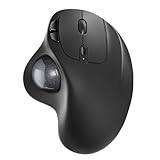
The Nulea M501 is a rechargeable wireless trackball that has built a strong following on Amazon as a thumb-operated alternative to the Logitech Ergo M575 at a noticeably lower price. It pairs a thumb-operated 34mm ball with a built-in rechargeable battery, three-way wireless connectivity and DPI switching on the device itself. This Nulea M501 review covers ergonomics, cursor precision, programmable buttons, battery and value at around $40.

Nulea M501 Wireless Trackball Mouse Ergonomic Thumb Control,4 DPI Levels | Rechargeable mouse with bluetooth USB receiver,3 device use,smooth tracking,compatible with PC Mac Windows


As an Amazon Associate we earn from qualifying purchases. Product prices and availability are accurate as of the date/time indicated.
🛒 Best Price Today on Amazon
Prime members get fast, free shipping on everything above, plus member-only deals. New members get a 30-day free trial — cancel anytime.
As an Amazon Associate we earn from qualifying purchases.





Nulea M501 at a Glance
| Component | Specification |
|---|---|
| Ball position | Thumb-operated, right-hand |
| Ball size | 34mm removable ball |
| DPI / tracking | 800 / 1200 / 1600 DPI (button-switchable) |
| Sensor type | Optical |
| Wireless / wired | Wireless: 2.4GHz USB-A receiver + Bluetooth (multi-device, up to 3 channels) |
| Battery type | Built-in rechargeable lithium-ion, USB-C charging |
| Programmable buttons | 6 buttons (2 main, scroll click, DPI, 2 thumb forward/back) — limited driver-level remapping |
| Tilt scroll | No — standard up/down scroll wheel only |
| Approx price | around $39 |
Ergonomics & Wrist Strain Relief
The Nulea M501 follows the now-familiar thumb-operated dome formula popularised by the Logitech M570 and M575: your palm rests on a sculpted body, fingers fall onto the main click buttons, and the thumb rolls the ball. The benefit is the same as the Logitech — no more forearm sweeping, no more repeated wrist motion, just a stationary, supported hand. Nulea’s shell is slightly more vertical than the Ergo M575’s, which some users find marginally more comfortable for longer sessions, though it is a matter of personal preference rather than a clear win. The thumb rest is well shaped, the main buttons are quiet and the body is solid in the hand. For anyone seeking wrist strain relief at a sub-$40 budget, the M501 delivers genuine ergonomic benefit — the design fundamentals are right.
Cursor Precision & Sensor
The M501 offers three switchable DPI levels — 800, 1200 and 1600 — selected by a dedicated button on the top of the device. That hardware DPI switch is a nice touch and avoids the need for driver software. The optical sensor is competent for office use, browsing and media work, though it is not a high-end gaming sensor. As with all thumb-operated trackballs, the thumb is a less precise digit than the fingers, so detailed retouching or CAD work is the M501’s weakness rather than the sensor itself. The ball is removable for cleaning — and cleaning is essential maintenance with any trackball, every two to four weeks depending on use — pop it out, wipe the support bearings and the cursor stays smooth. Skip the cleaning and tracking stutters; this is universal across trackballs.
Programmable Buttons & Software
The M501 has six buttons: two main clicks, a scroll wheel click, a top-mounted DPI button and two thumb-side forward/back buttons. The forward/back buttons work natively for browser navigation on both Windows and macOS, so out-of-the-box usability is good. Driver-level remapping is more limited than Logitech’s Logi Options+ — Nulea does not ship a comparable customisation suite, so for advanced macro and per-application profiles the M501 falls short of the Ergo M575. For most users who just want forward/back navigation and DPI switching that is fine; for users who want deep per-application customisation, Logitech’s ecosystem remains stronger.
Battery / Wireless Performance
The standout feature for many buyers is the built-in rechargeable lithium-ion battery, charged via USB-C. That is meaningfully more convenient than the Ergo M575’s swappable AA — no battery to buy, no battery to dispose of — though it does mean a long charge cable can be useful if the device dies mid-day. Battery life between charges is good for several weeks of typical office use; Nulea quotes around two months. Connectivity is the M501’s other strength: it supports both a 2.4GHz USB-A receiver and Bluetooth across up to three paired devices, so you can switch between a desktop, a laptop and a tablet with a button press. For a multi-device workflow it is a genuinely useful feature, and one Logitech only includes on its more expensive trackballs.
Use Cases — CAD / Streaming / Photo Editing
The M501 is best suited to everyday office work, web browsing, document editing, email, video meetings and content consumption. Streaming setups benefit from the wireless freedom and the multi-device pairing. For light photo editing it is adequate at 1600 DPI, though pixel-precise retouching will frustrate compared with a finger-operated trackball or a pen tablet. For CAD and 3D modelling the thumb-operated design is the limit, not the sensor — finger-operated trackballs (Kensington Expert, Orbit) are a better choice for professional CAD work. For casual gaming — strategy, simulation, turn-based — the M501 is comfortable; for competitive first-person shooters, a conventional gaming mouse is still the right tool.
Verdict
At around $40 the Nulea M501 is the strongest budget thumb-operated trackball on the market. It delivers the same fundamental ergonomic benefit as the Logitech Ergo M575, adds USB-C rechargeable convenience over the AA-powered Logitech, includes multi-device Bluetooth pairing, and undercuts the Logitech on price. The trade-off is weaker software customisation and a less established support ecosystem. For buyers who want a rechargeable trackball at a sensible price and do not need Logi Options+ depth, the M501 is an excellent value pick. Buyers who want serious software customisation, the most established trackball name, or who already use Logitech Flow across machines, will be happier with the Ergo M575.
The M501 has earned its place on Amazon largely on word-of-mouth among users who wanted the Ergo M575 experience at a lower entry price, and the strong review base reflects that. The build quality, while not quite at Logitech’s level, is genuinely solid for the money — the buttons have a satisfying click, the dome is well moulded and the USB-C port is set into the body cleanly. Buyers should also know that the support bearings on the M501 are conventional rather than the artificial ruby of the ELECOM EX-G, so the ball roll feel is closer to the Logitech than to the premium ELECOM, but for the price that is a fair trade-off.
One small but meaningful Nulea advantage is the multi-device button: physically present on the trackball, it makes switching between paired devices a one-press operation rather than a software dance. For users who actually live across multiple machines — a primary desktop, a work laptop, a tablet — that physical convenience adds up over a year of daily use, and it is the kind of feature that quietly tips the value calculation in the Nulea’s favour for the right buyer.
Frequently Asked Questions
Is the Nulea M501 better than the Logitech Ergo M575?
It depends on your priorities. The Nulea wins on rechargeable USB-C battery, multi-device Bluetooth pairing and price. The Logitech wins on software (Logi Options+), brand support and the maturity of its ecosystem. Ergonomically they are very close.
How long does the Nulea M501 battery last on a charge?
Nulea quotes around two months of typical office use between charges. Heavy daily users may see four to six weeks. USB-C charging is straightforward and you can use the trackball while charging.
Can the Nulea M501 connect to multiple devices?
Yes. It supports up to three Bluetooth paired devices plus the 2.4GHz USB-A receiver, with a button press to switch — useful for a desktop, laptop and tablet workflow.
Is the Nulea M501 good for left-handers?
No. Like most thumb-operated trackballs, the M501 is shaped for the right hand only. Left-handed trackball users should look at ambidextrous designs such as the Kensington Expert or Kensington Orbit.
More Trackball Reviews
- Logitech Trackman Marble Wired USB Trackball Review (2026)
- ELECOM EX-G Trackball Mouse 2.4GHz Wireless Review (2026)
- Kensington Orbit Trackball with Scroll Ring Review (2026)
- Kensington Orbit K75327WW Trackball Review (2026)
- Logitech M575 Trackball (Latin America) Review (2026)
- TECKNET Pro Wireless Trackball Mouse Review (2026)
- Kensington Expert Wireless Trackball K72359WW Review (2026)
- Kensington Orbit K64327F Silver Trackball Review (2026)
Affiliate Disclosure: As an Amazon Associate, we earn from qualifying purchases. If you click a link and make a purchase, we may earn a small commission at no extra cost to you. Prices and availability are accurate as of publication and may change.










