

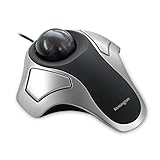
The Kensington Orbit K64327F is one of the original Kensington Orbit variants — a finger-operated, ambidextrous wired trackball with a 40mm ball and a conventional scroll wheel rather than the later scroll ring. It is the silver-and-white colourway that defined the Orbit look for many years and remains a staple choice for buyers who want the Orbit’s ambidextrous ergonomics with a familiar scroll wheel. This Kensington Orbit K64327F review covers ergonomics, cursor precision, button layout, wired performance and value at around $35.

Kensington Orbit Trackball Mouse with Scroll Ring (K75327WW), Black-Grey


As an Amazon Associate we earn from qualifying purchases. Product prices and availability are accurate as of the date/time indicated.
🛒 Best Price Today on Amazon
Prime members get fast, free shipping on everything above, plus member-only deals. New members get a 30-day free trial — cancel anytime.
As an Amazon Associate we earn from qualifying purchases.



Kensington Orbit K64327F at a Glance
| Component | Specification |
|---|---|
| Ball position | Centre-mounted (finger-operated), ambidextrous |
| Ball size | 40mm removable ball |
| DPI / tracking | Fixed sensor — cursor speed adjusted in OS and Kensington Works |
| Sensor type | Optical |
| Wireless / wired | Wired — USB-A cable |
| Battery type | None (wired) |
| Programmable buttons | 2 buttons (left/right) — remappable in Kensington Works, chord-click for middle-button |
| Tilt scroll | Conventional scroll wheel (not the scroll-ring variant) |
| Approx price | around $34 |
Ergonomics & Wrist Strain Relief
The K64327F shares the Orbit family’s ambidextrous, finger-operated layout — a low, wide, symmetric body with the 40mm ball centred and two large primary buttons on either side. The body is genuinely symmetric, so left-handers and right-handers use the same device with no compromise. The finger-operated design spreads the cursor work across the index and middle fingers, which most users find less fatiguing than the single-thumb workload of thumb trackballs. As an entry into ambidextrous finger trackballs at a lower price than the scroll-ring Orbit, the K64327F is one of the most affordable ways into a Kensington trackball. The wired connection adds reliability for buyers who do not want to worry about batteries or pairing.
Cursor Precision & Sensor
The optical sensor is fixed-DPI, with cursor speed adjusted in the OS and tuned in Kensington Works software. The 40mm finger-operated ball gives noticeably finer cursor control than any thumb trackball for precision tasks — detailed photo retouching, vector illustration, exact point selection in spreadsheets and CAD. The use of two strong fingers (index and middle) instead of a single thumb is the key to that precision advantage. The K64327F is not a gaming sensor; for casual play it is fine, for competitive shooters a gaming mouse remains the right tool. Ball cleaning is essential maintenance every few weeks — pop the ball out, wipe the support bearings, and tracking stays smooth.
Programmable Buttons & Software
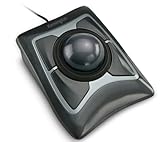
Two main buttons remappable in Kensington Works, with chord-click for middle-button emulation. The deliberately minimal button count is part of the design — for ambidextrous use, fewer buttons mean fewer accidental clicks, more consistent left/right hand operation and a simpler learning curve. Buyers who want more buttons should step up to the Kensington Expert (four buttons plus scroll ring) or look at the ELECOM EX-G family on the thumb-trackball side. For users who simply want left/right click, scroll, forward/back via chord and a comfortable ambidextrous body, the K64327F covers the essentials at a sensible price. New users adjusting to the chord-click middle-button should expect a few days of acclimatisation; after that the muscle memory is permanent.
Battery / Wireless Performance
The K64327F is wired — USB-A cable, no battery, no Bluetooth, no pairing, no receiver. Plug it in and it works. For buyers who value simplicity, the wired connection is the appeal of the design: zero latency, zero battery anxiety, zero firmware drama. The cable is long enough for desktop use, and the wired connection makes the K64327F a dependable choice for studio, broadcast and professional environments. Kensington sells separate wireless Orbit variants for buyers who need wireless; this K64327F remains the cheapest, most reliable variant in the family. The wired connection also means the K64327F is a sensible choice for shared workstations, library terminals and classroom computers — settings where wireless peripherals get lost, drained or paired to wrong machines, and where the simplicity of a permanently-attached USB device is the right design choice.
Use Cases — CAD / Streaming / Photo Editing
The K64327F is well suited to the same use cases as the scroll-ring Orbit, with the main difference being the use of a conventional scroll wheel rather than the scroll ring. For precision photo editing, vector illustration, accessibility use, left-handed users and minimalist setups, the K64327F is a sound choice at a lower price than the scroll-ring variant. For users who specifically want the scroll-ring feature (infinite-rotation scrolling for long documents and timelines), the scroll-ring K75327WW or the original Orbit Scroll Ring is the better choice. For users who prefer the familiarity of a conventional scroll wheel, the K64327F is the more accessible Orbit. Ball cleaning every few weeks keeps the cursor smooth. The K64327F is also a popular pick in classroom and library settings where its low price, ambidextrous design and lack of wireless variables (no batteries to die, no pairing to lose) make it well suited to shared-use environments — one of the unsung practical advantages of a wired peripheral in any institutional setting.
Verdict
At around $35 the Kensington Orbit K64327F is the cheapest way into Kensington’s ambidextrous finger trackball family. It delivers the same precision cursor control as the scroll-ring Orbit (same 40mm finger-operated ball, same ambidextrous body), uses a conventional scroll wheel rather than the scroll ring, and undercuts the scroll-ring Orbit by around $15. For left-handers, accessibility users, minimalist setups and buyers who want finger-trackball precision at the lowest sensible price, the K64327F earns a strong recommendation. Buyers who want the signature Kensington scroll ring should choose the K75327WW or the original scroll-ring Orbit instead.
The K64327F is also a sensible entry point for users who are not sure whether they want a thumb trackball or a finger trackball — at $35 the financial commitment to testing the finger-operated approach is low, and the conventional scroll wheel removes one variable (the unfamiliar scroll-ring gesture) from the learning curve. Users who decide the finger trackball suits them can then upgrade to the scroll-ring Orbit or the Expert when they are ready, taking their familiarity with the body shape and the ambidextrous layout with them.
It is also genuinely worth pointing out how good a left-handed mouse alternative the K64327F is. The mainstream gaming and productivity mouse market is overwhelmingly right-handed-sculpted, and left-handed buyers often struggle to find a high-quality alternative below the premium tier. The K64327F is a properly ambidextrous Kensington trackball at a price below most decent left-handed mice — a genuinely useful position in the market and one of the strongest reasons to consider it.
Frequently Asked Questions
What is the difference between the K64327F and the scroll-ring Orbit?
The K64327F has a conventional scroll wheel; the scroll-ring Orbit (K75327WW and original) has Kensington’s signature scroll ring around the ball. The K64327F is also a touch cheaper. Pick by which scrolling style you prefer.
Is the K64327F good for left-handers?
Yes. It is fully ambidextrous — the same shape, the same buttons, the same scroll wheel on either side — and is one of the most affordable trackballs for left-handed users.
Does the K64327F need drivers?
It works plug-and-play on Windows and macOS for basic mouse functions. To enable middle-button chord-click and per-application button remapping, install Kensington Works.
Can you replace the ball in the K64327F?
Yes. The ball is removable for cleaning, and Kensington sells coloured replacement balls if you want to personalise the look.
More Trackball Reviews
- Kensington Expert Trackball K64325 Wired Review (2026)
- Kensington Orbit Trackball with Touch Scroll Ring K72352US Review (2026)
- Logitech Ergo M575 Wireless Trackball Review (2026)
- Nulea M501 Wireless Trackball Mouse Review (2026)
- Logitech Trackman Marble Wired USB Trackball Review (2026)
- ELECOM EX-G Trackball Mouse 2.4GHz Wireless Review (2026)
- Kensington Orbit Trackball with Scroll Ring Review (2026)
- Kensington Orbit K75327WW Trackball Review (2026)
Affiliate Disclosure: As an Amazon Associate, we earn from qualifying purchases. If you click a link and make a purchase, we may earn a small commission at no extra cost to you. Prices and availability are accurate as of publication and may change.










