

- Top Pick: Kensington Expert Trackball Mouse (K64325), Black Silver, 5"W x 5-3/4"D x 2-1/2"H
- Best Value: Kensington Expert Wireless Trackball Mouse (K72359WW) Black, 3.5" x 6.1" x 8"
- Premium Choice: Kensington Expert Trackball Mouse (K64325) and Kensington Orbit Trackball Mouse with Scroll Ring (K75327WW)
The Kensington Expert Trackball K64325 is the original wired Expert Mouse, the device that established Kensington’s reputation in professional creative environments and remains in continuous production decades later. It pairs a large 55mm finger-operated ball with four programmable buttons, the signature scroll ring, an ambidextrous body and a wired USB connection. This Kensington Expert K64325 review covers ergonomics, cursor precision, the four-button layout, wired performance and value at around $90.

Kensington Expert Trackball Mouse (K64325), Black Silver, 5"W x 5-3/4"D x 2-1/2"H


As an Amazon Associate we earn from qualifying purchases. Product prices and availability are accurate as of the date/time indicated.
🛒 Best Price Today on Amazon
Prime members get fast, free shipping on everything above, plus member-only deals. New members get a 30-day free trial — cancel anytime.
As an Amazon Associate we earn from qualifying purchases.



Kensington Expert K64325 at a Glance
| Component | Specification |
|---|---|
| Ball position | Centre-mounted (finger-operated), ambidextrous |
| Ball size | 55mm removable ball (one of the largest in any trackball) |
| DPI / tracking | Fixed sensor — cursor speed adjusted in OS and Kensington Works |
| Sensor type | Optical |
| Wireless / wired | Wired — USB-A cable |
| Battery type | None (wired) |
| Programmable buttons | 4 buttons surrounding the ball — fully remappable in Kensington Works, plus chord-click options |
| Tilt scroll | Scroll ring around the ball — bidirectional, infinite rotation |
| Approx price | around $89.99 |
Ergonomics & Wrist Strain Relief
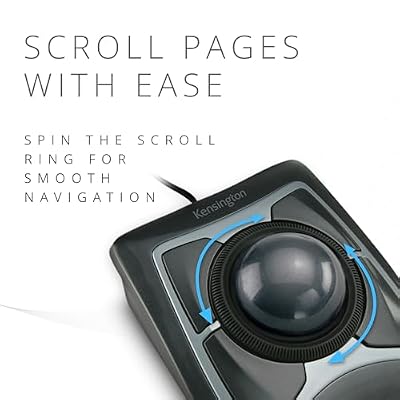
The K64325 is the wired ancestor of the wireless Expert Wireless K72359WW, and the ergonomic experience is the same: a 55mm finger-operated ball — the largest in mainstream trackballs — sitting centred in an ambidextrous body with four programmable buttons arranged symmetrically around it, plus the signature scroll ring. The included detachable wrist rest is generous and properly shaped. The body’s wide, low profile supports a relaxed hand for long sessions, and the symmetric layout means left-handers and right-handers have the same experience. This is the device that many CAD professionals, video editors and creatives have used for years; the wired connection removes any wireless variable and makes it a benchmark for dependability. For users who spend hours on the trackball every day, the Expert’s ergonomic priorities are exactly right.
Cursor Precision & Sensor
The combination of a 55mm ball under two-finger control delivers genuinely the best precision in the consumer trackball market. The ball’s size means that small finger motions translate to useful cursor travel at low effective sensitivity, so pixel-level work does not require strained tiny ball rolls. The mass of the ball gives a momentum that makes long sweeps across multi-monitor setups feel deliberate. The optical sensor is fixed-DPI — cursor speed is set in the OS and tuned in Kensington Works software — and tracking is rock-solid. For precision creative work the K64325 is, alongside the wireless Expert, the consumer trackball precision benchmark.
Programmable Buttons & Software
Four programmable buttons arranged around the ball — two larger primary clicks and two smaller secondary buttons — with the scroll ring nestled between them. The four-button layout is the Expert’s hallmark, remappable in Kensington Works for per-application profiles, keyboard shortcut binding and macros. Chord-clicking (pressing button combinations) adds further virtual buttons for users who push the customisation. Power users typically map copy, paste, undo, redo, application-specific shortcuts and switch-tab to the four buttons, eliminating most routine keyboard reaches. For users who can shape their workflow to the Expert’s button layout, the K64325 becomes a genuine productivity tool, not merely a mouse alternative. CAD-specific button mappings — viewport zoom, fit-to-view, select-all-visible — are common among architecture and engineering users and are often shared via community-maintained config files.
Battery / Wireless Performance
The K64325 is wired — USB-A cable to any USB port — and that is the entire wireless story. No battery, no charging, no pairing, no receiver. For professional environments and long-session users that is the appeal: zero latency, zero battery anxiety, zero firmware-update drama, plug it in and use it for a decade. The cable is long enough for desktop use and the wired connection makes the K64325 the safe choice for studio, broadcast and high-reliability environments. Buyers who want wireless should choose the Expert Wireless K72359WW instead; the K64325 is for users who actively prefer wired. Modern laptop users without USB-A ports will need a hub or adapter; for desk-bound professional setups that is a non-issue since dock stations and tower PCs retain USB-A as standard.
Use Cases — CAD / Streaming / Photo Editing
The K64325 is the trackball that earned Kensington its CAD reputation. The 55mm finger-operated ball delivers the precision needed for fine vertex selection and detailed model manipulation; the scroll ring is excellent for zooming and panning in 3D viewports; the four programmable buttons cover application shortcuts; the ambidextrous body works for left and right hands alike; and the wired connection guarantees zero-latency tracking. The same advantages apply to video editing, photo retouching, vector illustration and accessibility use cases — anywhere precision and reliability matter more than the convenience of wireless. Ball cleaning every few weeks remains essential maintenance to keep the cursor smooth. A common K64325 setup is to combine it with a low-profile mechanical keyboard and a properly aligned wrist rest, so that the trackball’s wrist rest and the keyboard’s leading edge sit at matched heights — small details that compound to make the difference between an okay desk and a properly comfortable one for eight-hour-a-day creative work.
Verdict
At around $90 the Kensington Expert K64325 is the wired sibling of the Expert Wireless and the more affordable of the two — around $40 less than the wireless version, with the same large ball, the same four buttons, the same scroll ring and the same ambidextrous body. For users who actively prefer wired peripherals — professional CAD environments, broadcast studios, accessibility setups, long-session users who do not want any wireless variable — the K64325 is the right Expert. The compromise is the cable itself; the benefit is reliability, zero latency and a lower price. It earns a strong recommendation for the same buyer profile as the Expert Wireless but with a clear preference for wired.
The K64325 has another quiet advantage that does not appear on the spec sheet: it is a known quantity in professional support communities. Architecture firms, post-production houses and engineering teams that have standardised on the Expert as their default trackball have, over the years, accumulated extensive in-house knowledge about Kensington Works configuration, button mapping conventions for specific CAD applications and best-practice cleaning routines. For a new hire joining one of those environments, sitting down to a K64325 means stepping into a workflow that has been refined by colleagues over years — a meaningful productivity benefit that comes with the device rather than from it.
Frequently Asked Questions
What is the difference between the K64325 and the Expert Wireless?
The K64325 is wired (USB-A); the Expert Wireless K72359WW is wireless (2.4GHz, Bluetooth, plus a wired fallback). The K64325 is around $40 cheaper. The ball, four buttons, scroll ring and ambidextrous body are otherwise the same.
Is the K64325 good for CAD?
Yes — it is one of the most established CAD trackballs. The 55mm finger-operated ball, scroll ring for viewport navigation and four programmable buttons for shortcuts are well matched to long CAD sessions, and the wired connection guarantees zero-latency tracking.
Is the Kensington Expert K64325 ambidextrous?
Yes. The body is fully symmetric — same shape, same four-button layout and same scroll ring on either side. It is one of the best premium trackballs for left-handed users.
Why choose the wired Expert over the wireless?
Reliability and price. The K64325 has zero latency, zero battery anxiety and no wireless variables to worry about, and costs around $40 less than the wireless Expert. For professional, accessibility and studio use where wired is actively preferred, the K64325 is the right choice.
More Trackball Reviews
- Kensington Orbit Trackball with Touch Scroll Ring K72352US Review (2026)
- Logitech Ergo M575 Wireless Trackball Review (2026)
- Nulea M501 Wireless Trackball Mouse Review (2026)
- Logitech Trackman Marble Wired USB Trackball Review (2026)
- ELECOM EX-G Trackball Mouse 2.4GHz Wireless Review (2026)
- Kensington Orbit Trackball with Scroll Ring Review (2026)
- Kensington Orbit K75327WW Trackball Review (2026)
- Logitech M575 Trackball (Latin America) Review (2026)
Affiliate Disclosure: As an Amazon Associate, we earn from qualifying purchases. If you click a link and make a purchase, we may earn a small commission at no extra cost to you. Prices and availability are accurate as of publication and may change.
Ready to decide? Our #1 pick for 2026 is the Ball position.
Live price & availability on Amazon.


