

- Top Pick: PROZOR 192KHz Digital to Analog Audio Converter Optical to RCA Adapter Upgrade Volume Adjustable DAC with Optical Cable, SPDIF TOSLINK to Stereo L/R & 3.5mm Jack Converters
- Best Value: PROZOR 192Khz Digital to Analog Audio Converter Support 5.1CH Optical to RCA Converter with Magnetic Ring Power Cord Digital Toslink SPDIF to Analog L/R RCA 3.5mm Adapter for HDTV Blu-Ray DVD PS3 PS4
- Premium Choice: PROZOR 192KHz Digital to Analog Audio Converter, DAC Optical to Analog L/R RCA 3.5mm Converter, Digital SPDIF Toslink Optical to 3.5mm Jack Adapter for PS3 HD DVD PS4 Amp Apple TV Home Cinema
The PROZOR 192kHz Digital to Analog DAC is a small budget converter that takes a digital optical (TOSLINK) or coaxial signal from a TV, set-top box, console or media player and outputs analog audio on RCA and 3.5mm jacks. It exists to solve one practical problem — connecting a modern digital source to older analog speakers or an amplifier that has no optical input. This PROZOR 192kHz DAC review covers the form factor, sound quality, connectivity, use cases and value at its budget price.
🛒 Best Price Today on Amazon
Prime members get fast, free shipping on everything above, plus member-only deals. New members get a 30-day free trial — cancel anytime.
As an Amazon Associate we earn from qualifying purchases.

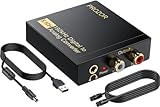


PROZOR 192kHz DAC at a Glance
| Feature | Specification |
|---|---|
| Type | External standalone DAC (optical/coaxial to analog) |
| Bit depth / sample rate | Up to 24-bit / 192kHz PCM |
| DAC chip | Not specified by manufacturer (typical entry-tier ESS or Cirrus DAC) |
| Headphone amp output power | None — line-level analog output only |
| Inputs | 1x optical (TOSLINK), 1x coaxial S/PDIF |
| Outputs | 2x RCA (stereo), 1x 3.5mm stereo |
| Channel count | 2.0 stereo (downmixes from stereo PCM; no Dolby/DTS decode) |
| Power source | External 5V USB / DC adapter |
| Approx price | around $15 |
Sound Quality & DAC Chip Performance
Before diving into the specifics of this product it is worth a brief refresher on the three technical decisions that shape every external audio device review: form factor (USB dongle, desktop DAC, PCIe internal sound card or USB audio interface), DAC chip and conversion quality (the digital-to-analog converter that turns the PC’s bitstream into a real audio signal), and headphone amplification (the small built-in amplifier that drives the headphones from the analog output). A USB dongle DAC like the UGREEN USB-C adapter or the Sabrent USB sound adapter is a tiny device that plugs straight into a USB port and adds a 3.5mm headphone output; it is small, cheap and ideal for laptops or PCs missing a working audio jack. A desktop DAC such as the iFi Zen DAC V2, FiiO K5 Pro or Fosi Audio Q4 sits beside the monitor on the desk, runs from external power or USB, and pairs a higher-quality DAC chip with a more capable headphone amplifier — the typical step up for audiophile listeners and demanding gaming headsets.
A PCIe internal sound card like the Creative Sound Blaster Audigy FX or Audigy RX 7.1 installs into a desktop PC’s PCIe slot, replaces the motherboard’s onboard audio, and is the traditional route for buyers who want surround-sound output, line-level inputs and a permanent solution that does not occupy a USB port. A USB audio interface like the Focusrite Scarlett Solo 3rd Gen is a desktop box that combines a high-quality DAC, headphone amp and one or more microphone preamps with phantom power — the standard tool for content creators recording vocals, instruments or podcasts at studio quality. The choice of form factor depends entirely on use case: dongles for portability, desktop DACs for listening, PCIe cards for desktop integration and surround output, and audio interfaces for recording.
Two practical points round out the refresher. First, headphone impedance matters. Easy-to-drive consumer headphones (most gaming headsets, earbuds and 32-ohm cans) work well from any output, including a phone jack. Harder-to-drive audiophile headphones (250-ohm or 600-ohm models from Beyerdynamic, Sennheiser HD600 series, planar magnetics from HiFiMan) benefit substantially from a dedicated headphone amp inside a desktop DAC — they reach proper listening volume with cleaner dynamics and tighter bass. Second, onboard motherboard audio is better than it used to be, so the upgrade is most worthwhile if you have demanding headphones, noticeable interference (buzz, hiss, coil whine on the analog output), or specific needs like a clean microphone input or surround output. Keep these three decisions in mind — they decide more about whether a sound card or DAC is right for you than the marketing on the box.
The PROZOR is a pure conversion box. It does not amplify, equalise or process — it accepts a digital S/PDIF stream and outputs a clean analog signal at line level. Sound quality from a budget converter at this price will not match a desktop DAC like the iFi Zen DAC V2 or FiiO K5 Pro, but it is honest and quiet for what it is. Owners report a clean stereo signal without obvious hum, buzz or clipping. The 192kHz / 24-bit capability is a marketing headline more than a practical benefit at this price — the device handles whatever PCM stream is sent to it up to that ceiling, but the limiting factor in real-world audibility is the analog output stage rather than the digital ceiling. For its target use case — pulling stereo PCM out of a TV optical output and into an analog amplifier — it does the job well.
Headphone Amp Power & Impedance Matching
The PROZOR has no built-in headphone amplifier. The 3.5mm output is line-level rather than headphone-driving, so plugging headphones directly into it will produce a quiet signal and is not the intended use. If you need headphone output, look at desktop DACs with dedicated headphone amps like the Fosi Audio Q4, FiiO K5 Pro or iFi Zen DAC V2, or a USB dongle DAC like the Sabrent or UGREEN adapters covered in this guide. The PROZOR is for feeding a separate amplifier or powered speakers, not headphones. Match it with a stereo integrated amplifier, a pair of active monitors, or a soundbar with RCA inputs and it does exactly what is needed.
Connectivity & I/O
The PROZOR’s connectivity is its raison d’etre. On the input side it accepts both common consumer S/PDIF formats: optical TOSLINK (the square plastic-fibre connector found on most TVs and Blu-ray players) and coaxial S/PDIF (the orange RCA connector found on receivers and some media players). On the output side it offers stereo RCA jacks (the standard input on every integrated amplifier, receiver and pair of powered speakers) and a 3.5mm stereo jack (for soundbars, mini systems and computer speakers). Power is supplied over a small DC barrel jack, typically via the included USB cable from a phone charger or a free USB port on the TV. It is a thoroughly practical, no-nonsense connectivity set for its job.
Gaming / Music / Streaming Use Cases
The PROZOR’s natural home is in a living-room or older-system setup rather than a gaming PC desk. Three common use cases: (1) a modern TV with an optical output but no analog audio jacks, paired with an older stereo amplifier or active speakers that need RCA in; (2) a games console or set-top box that outputs S/PDIF to feed a separate powered speaker system; (3) a Blu-ray player or media streamer connecting to a vintage hi-fi system. For PC gaming on a desk it is not the right tool — a USB dongle DAC like the UGREEN, a desktop DAC like the Fosi Q4 or Sound Blaster G6, or a PCIe sound card like the Audigy FX is more practical because PCs do not normally output S/PDIF over optical without a sound-card upgrade. Pair it with a separate amplifier and analog speakers in the lounge and it adds real value. For desk-bound PC gaming, see our best PC speakers guide for active-monitor alternatives.
Setup & Compatibility
Setup is genuinely plug-and-play. Connect the source’s optical or coaxial output to the PROZOR’s matching input, run an RCA or 3.5mm cable from the PROZOR’s output to the amplifier or speakers, supply power over USB, and the converter is ready. There are no drivers because the PROZOR sits downstream of the digital source — your TV, console or media player handles its own audio output as usual; the PROZOR simply converts. One configuration note: most TVs default to multichannel surround output on optical, which the PROZOR cannot decode — it expects stereo PCM. Set the source’s optical output to PCM / stereo in its audio settings and the converter will work correctly. If you hear silence or a digital hash through the speakers, that PCM setting is the first thing to check.
Verdict
For around $15 the PROZOR 192kHz DAC is a useful little converter. It is not an audiophile DAC, it does not amplify headphones and it does not decode surround formats — but it does its one job (converting consumer S/PDIF to analog stereo) cleanly and reliably. For anyone trying to bridge a modern TV or console to an older amplifier or pair of analog speakers, it is one of the cheapest practical solutions available. Use it within its intended scope. For PC desktop listening with headphones, look at desktop DACs and dongles covered elsewhere in this guide, or see our best gaming headsets guide for active solutions.
Frequently Asked Questions
Does the PROZOR decode Dolby Digital or DTS?
No. It accepts stereo PCM only. If your TV or console outputs Dolby Digital or DTS over optical, set the source’s audio output to PCM or stereo so the PROZOR can convert it.
Can I drive headphones from the PROZOR?
Not really. The 3.5mm output is line-level, not headphone-driving, so the volume will be too quiet for most headphones. For headphone use, look at a desktop DAC with a built-in headphone amp like the Fosi Audio Q4, FiiO K5 Pro or iFi Zen DAC V2.
Will the PROZOR work with my modern TV?
Yes, if the TV has an optical (TOSLINK) or coaxial S/PDIF output, which most TVs still do. Set the TV’s audio output to PCM stereo and connect the PROZOR’s RCA or 3.5mm output to your amplifier or speakers.
Does the PROZOR work for PC audio output?
Only if your PC has an S/PDIF optical or coaxial output, which most do not by default. For PC use a USB DAC like the Sabrent or UGREEN adapter, or a USB desktop DAC like the FiiO K5 Pro is a more practical solution.
More Sound Card & DAC Reviews
- SABRENT USB External Stereo Sound Adapter Review: Budget USB DAC
- Focusrite Scarlett Solo 3rd Gen Review: USB Audio Interface
- UGREEN USB-C to 3.5mm Audio Adapter Review: 24bit/96kHz Hi-Fi Dongle DAC
- Sound BlasterX G6 Review: 130dB 32-bit/384kHz Gaming DAC and Amp
- Creative Sound Blaster Audigy FX Review: PCIe 5.1 Internal Sound Card
- Creative Sound Blaster Play! 3 Review: External USB Audio Adapter
- Fosi Audio Q4 DAC Headphone Amp Review: Desktop PC DAC
- Creative Sound Blaster Audigy RX 7.1 Review: PCIe Sound Card
Affiliate Disclosure: As an Amazon Associate, we earn from qualifying purchases. If you click a link and make a purchase, we may earn a small commission at no extra cost to you. Prices and availability are accurate as of publication and may change.
Related Articles
Looking for more on this topic? Browse the hand-picked guides below — each one applies the same scoring rubric used in this review.










