

The Creative Sound Blaster Audigy FX is a low-profile PCIe internal sound card that brings 5.1 analog surround output, a 600-ohm-capable headphone amplifier and Creative’s SBX Pro Studio audio processing to desktop PCs. It is the entry-tier modern member of the long-running Sound Blaster line and a traditional alternative to USB DACs for desktop buyers who want a permanent solution that does not occupy a USB port. This Sound Blaster Audigy FX review covers the form factor, sound quality, connectivity, use cases and value as an internal sound card.
🛒 Best Price Today on Amazon
Prime members get fast, free shipping on everything above, plus member-only deals. New members get a 30-day free trial — cancel anytime.
As an Amazon Associate we earn from qualifying purchases.

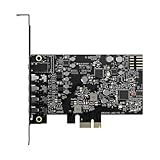


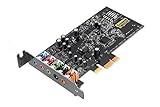


Sound Blaster Audigy FX at a Glance
| Feature | Specification |
|---|---|
| Type | PCIe x1 internal sound card (low-profile) |
| Bit depth / sample rate | 24-bit / 192kHz stereo, 24-bit / 96kHz 5.1 |
| DAC chip | Creative-tuned 24-bit / 192kHz converter (Audigy FX class) |
| Headphone amp output power | Built-in amp rated to drive headphones up to 600 ohms |
| Inputs | 1x 3.5mm microphone input |
| Outputs | 3x 3.5mm analog (front / centre+sub / rear) for 5.1 surround |
| Channel count | 5.1 analog surround out |
| Power source | PCIe slot bus power, no external connector |
| Approx price | around $40 |
Sound Quality & DAC Chip Performance
Before diving into the specifics of this product it is worth a brief refresher on the three technical decisions that shape every external audio device review: form factor (USB dongle, desktop DAC, PCIe internal sound card or USB audio interface), DAC chip and conversion quality (the digital-to-analog converter that turns the PC’s bitstream into a real audio signal), and headphone amplification (the small built-in amplifier that drives the headphones from the analog output). A USB dongle DAC like the UGREEN USB-C adapter or the Sabrent USB sound adapter is a tiny device that plugs straight into a USB port and adds a 3.5mm headphone output; it is small, cheap and ideal for laptops or PCs missing a working audio jack. A desktop DAC such as the iFi Zen DAC V2, FiiO K5 Pro or Fosi Audio Q4 sits beside the monitor on the desk, runs from external power or USB, and pairs a higher-quality DAC chip with a more capable headphone amplifier — the typical step up for audiophile listeners and demanding gaming headsets.
A PCIe internal sound card like the Creative Sound Blaster Audigy FX or Audigy RX 7.1 installs into a desktop PC’s PCIe slot, replaces the motherboard’s onboard audio, and is the traditional route for buyers who want surround-sound output, line-level inputs and a permanent solution that does not occupy a USB port. A USB audio interface like the Focusrite Scarlett Solo 3rd Gen is a desktop box that combines a high-quality DAC, headphone amp and one or more microphone preamps with phantom power — the standard tool for content creators recording vocals, instruments or podcasts at studio quality. The choice of form factor depends entirely on use case: dongles for portability, desktop DACs for listening, PCIe cards for desktop integration and surround output, and audio interfaces for recording.
Two practical points round out the refresher. First, headphone impedance matters. Easy-to-drive consumer headphones (most gaming headsets, earbuds and 32-ohm cans) work well from any output, including a phone jack. Harder-to-drive audiophile headphones (250-ohm or 600-ohm models from Beyerdynamic, Sennheiser HD600 series, planar magnetics from HiFiMan) benefit substantially from a dedicated headphone amp inside a desktop DAC — they reach proper listening volume with cleaner dynamics and tighter bass. Second, onboard motherboard audio is better than it used to be, so the upgrade is most worthwhile if you have demanding headphones, noticeable interference (buzz, hiss, coil whine on the analog output), or specific needs like a clean microphone input or surround output. Keep these three decisions in mind — they decide more about whether a sound card or DAC is right for you than the marketing on the box.
The Audigy FX is built on Creative’s mainstream desktop sound-card silicon — a 24-bit / 192kHz converter for stereo and 24-bit / 96kHz for 5.1 surround. Sound quality is honest and cleaner than typical onboard motherboard audio, particularly on motherboards where the analog audio jacks suffer from electrical interference (coil whine, USB-induced buzz, hum from nearby components). Because the card sits inside the PC, it does benefit from clean shielding of its analog stage. The Audigy FX is not in the same audiophile listening class as a desktop DAC like the iFi Zen DAC V2 or FiiO K5 Pro, but for buyers whose motherboard audio has visible problems, it is a meaningful improvement at a low price.
Headphone Amp Power & Impedance Matching
Creative specifies the Audigy FX’s headphone output as capable of driving up to 600-ohm headphones — a generous figure for an entry-level internal sound card. In practical terms it means owners of higher-impedance audiophile headphones (250-ohm Beyerdynamics, 300-ohm Sennheiser HD600/650, even 600-ohm DT 880 Pro) reach proper listening volume from the front 3.5mm jack with reasonable headroom. The amp is not as authoritative as the Xamp inside the Sound BlasterX G6 or as refined as the dedicated headphone amps in the FiiO K5 Pro or iFi Zen DAC V2, but at this price the breadth of impedance support is a genuine strength.
Connectivity & I/O
The Audigy FX’s I/O is purpose-built for desktop 5.1 surround. Three 3.5mm output jacks on the rear bracket carry front L/R, centre + subwoofer and rear L/R signals — the standard PC 5.1 analog layout, compatible with multi-speaker PC sets like the venerable Logitech Z506 or Z906 (analog input mode). A single 3.5mm microphone input completes the picture. There is no optical, no S/PDIF, no line-in beyond the microphone jack — this is a pure analog-out card targeted at users who want to drive a multi-speaker analog system. For buyers needing optical out or line-in, the Audigy RX 7.1 is the step up; for buyers needing USB recording, look at the Focusrite Scarlett Solo.
Gaming / Music / Streaming Use Cases
The Audigy FX has two natural homes. (1) Older 5.1 PC speaker systems: if you already own a Logitech Z506, Z906, Creative Inspire 5.1 or similar analog 5.1 system, the Audigy FX is the lowest-cost way to drive all six channels properly from a modern PC, since many recent motherboards have dropped the rear 5.1 analog jacks. (2) Replacing problematic onboard audio: PCs with audible motherboard hiss, ground-loop hum on the front-panel jacks, or coil whine through the analog output often clean up noticeably with the Audigy FX, because the card’s analog stage is electrically isolated from the motherboard ports. SBX Pro Studio adds optional virtual surround processing for headphone users, although in 2026 most games and platforms (Windows Sonic, Dolby Atmos for Headphones) handle that natively. See our best PC speakers guide for compatible 5.1 systems.
Setup & Compatibility
Installation requires opening the PC case and seating the card in a free PCIe x1 slot — straightforward on any modern desktop, but not an option on laptops or small-form-factor systems without PCIe expansion. The low-profile bracket means the card fits both standard and slim cases. Driver installation runs from Creative’s downloadable Sound Blaster Command package on Windows 10/11. There is limited official Linux support; the card works in Linux with the ALSA snd-ca0106 driver on most distributions, but advanced features (SBX Pro Studio, EQ) are Windows-only. Once installed, the Audigy FX appears as the default audio device and supplants the onboard audio.
Verdict
For around $40 the Sound Blaster Audigy FX is a sensible budget upgrade for a specific buyer — a desktop user with an existing analog 5.1 speaker set or with noticeably bad onboard motherboard audio. It is not a modern USB DAC, it is not an audiophile listening device, and it is not appropriate for laptops or mini PCs that lack PCIe expansion. But within its scope, it solves real problems cleanly. For optical I/O and 7.1 surround, step up to the Audigy RX 7.1; for USB-based audiophile listening, see the FiiO K5 Pro or iFi Zen DAC V2 elsewhere in this guide.
Frequently Asked Questions
Does the Audigy FX work with my Windows 11 PC?
Yes. Creative maintains current Windows 11 drivers for the Audigy FX, downloadable from Creative.com via the Sound Blaster Command software.
Can the Audigy FX drive 5.1 PC speakers?
Yes. The card has three 3.5mm output jacks for front, centre + sub and rear channels — the standard PC 5.1 analog layout, compatible with sets like the Logitech Z506 and Z906 in analog mode.
Does the Audigy FX support optical S/PDIF?
No. The FX has analog outputs only. For optical / coaxial output and 7.1 surround, step up to the Sound Blaster Audigy RX 7.1.
Can the Audigy FX drive 250-ohm headphones?
Yes. Creative rates the headphone output to drive headphones up to 600 ohms, which covers all common audiophile impedances including 250-ohm Beyerdynamics and 300-ohm Sennheisers.
More Sound Card & DAC Reviews
- Creative Sound Blaster Play! 3 Review: External USB Audio Adapter
- Fosi Audio Q4 DAC Headphone Amp Review: Desktop PC DAC
- Creative Sound Blaster Audigy RX 7.1 Review: PCIe Sound Card
- iFi Zen DAC V2 Review: Desktop Audiophile DAC USB 3.0
- FiiO K5 Pro Review: Desktop DAC and Headphone Amp 768K/32Bit
- Fosi Audio K5 Pro Gaming DAC Review: Headphone Amp for Desktop
- PROZOR 192kHz Digital to Analog DAC Review: Optical to RCA Converter
- SABRENT USB External Stereo Sound Adapter Review: Budget USB DAC
Affiliate Disclosure: As an Amazon Associate, we earn from qualifying purchases. If you click a link and make a purchase, we may earn a small commission at no extra cost to you. Prices and availability are accurate as of publication and may change.
Related Articles
Looking for more on this topic? Browse the hand-picked guides below — each one applies the same scoring rubric used in this review.










