

- Top Pick: Samsung T7 Portable SSD 1TB Titan Gray, USB 3.2 Gen 2, Up to 1,050MB/s
- Best Value: SAMSUNG T7 Portable SSD, 1TB External Solid State Drive, Speeds Up to 1,050MB/s, USB 3.2 Gen 2, Reliable Storage for Gaming, Students, Professionals, MU-PC1T0H/AM, Blue
- Premium Choice: Samsung T9 Portable SSD 1TB, USB 3.2 Gen 2×2 External SSD, Up to 2,000 MB/s
The Samsung T7 Portable SSD 1TB is one of the most popular slim portable SSDs ever made — a credit-card-sized aluminium drive with USB 3.2 Gen 2 speeds, hardware AES 256-bit encryption and a huge base of more than 37,900 buyer reviews. It is the go-to choice for users who value a clean, slim design over rugged styling. This Samsung T7 Portable SSD review covers the capacity and interface, performance, durability and value.
- Samsung T7 1TB at a Glance
- Capacity and Interface
- Speed and Real-World Performance
- Durability, Form Factor and Portability
- Compatibility: PC, Mac, Console, Mobile
- Who Is the Samsung T7 1TB For?
- Pros and Cons
- Is the Samsung T7 1TB Worth It?
- Frequently Asked Questions
- More Portable SSD Reviews
- Related Articles
- Related Articles
- Related Guides

Samsung T7 Portable SSD 1TB Titan Gray, USB 3.2 Gen 2, Up to 1,050MB/s | Reliable External Solid State Drive Storage for Gaming, Students, Professionals (MU-PC1T0T/AM)



As an Amazon Associate we earn from qualifying purchases. Product prices and availability are accurate as of the date/time indicated.
🛒 Best Price Today on Amazon
Prime members get fast, free shipping on everything above, plus member-only deals. New members get a 30-day free trial — cancel anytime.
As an Amazon Associate we earn from qualifying purchases.







Samsung T7 1TB at a Glance
| Component | Specification |
|---|---|
| Capacity | 1TB |
| Interface | USB-C, USB 3.2 Gen 2 |
| Sequential read | Up to 1,050 MB/s |
| Sequential write | Up to 1,000 MB/s |
| Form factor | Slim credit-card-sized aluminium chassis |
| Durability rating | Aluminium unibody, 2 m drop protection, AES 256-bit hardware encryption |
| Compatible devices | Windows PC, Mac, PS4, PS5 (PS4 games / PS5 game storage), Xbox One, Android USB-C |
| Price | Around $235 |
Capacity and Interface
1TB is the most popular capacity in the T7 line and the right size for most users — enough for a working photo library, a sizeable game install set or a complete laptop backup. The interface is USB-C with USB 3.2 Gen 2, which gives a practical ceiling of about 1,000 MB/s and broad compatibility with any modern laptop, desktop, console or USB-C mobile device. Samsung supplies both a USB-C to USB-C and a USB-C to USB-A cable in the box, so the drive is ready for older PCs out of the gate. For a comparison of USB standards, see our USB 3.2 vs USB4 explained guide.
Speed and Real-World Performance
Samsung rates the T7 at up to 1,050 MB/s sequential read, which is the practical ceiling of USB 3.2 Gen 2 and matches the SanDisk Extreme exactly. In real use the T7 feels every bit as fast as its rugged rivals — large game transfers complete in well under a minute on suitable hosts, 4K video edits directly off the drive are comfortable, and PS4 game loads are markedly faster than from a portable hard drive. The T7 also benefits from Samsung’s own NAND and controller, which Samsung has long made for its own internal SSDs. For higher than ~1,000 MB/s speeds, Samsung’s own Gen 2×2 T9 is the upgrade path.
Samsung’s controller and NAND choice gives the T7 a small but consistent edge in mixed-workload scenarios — opening many small files, running game library scans, or copying directories with many small assets. That is the practical reason the T7 has held up so well over its long life on the market: it does the boring everyday work reliably and quickly. The Samsung Magician and Portable SSD software on Windows and Mac also expose firmware update, performance benchmark and encryption-management tools, which is a level of vendor support that rivals do not always match.
Durability, Form Factor and Portability
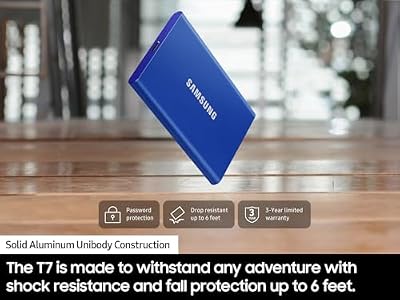
The T7 is the design-led alternative in this category. The chassis is a slim aluminium unibody about the size of a credit card and noticeably thinner than the rugged SanDisk Extreme. It slips into a shirt pocket, a wallet sleeve or a coin pouch in a way that field-rugged drives do not. Samsung rates it for 2 m drop protection thanks to internal shock absorption, but it is not IP-rated for dust or water — this is a drive for travel, desks and bags, not for rain, dust or jobsites. For ruggedised alternatives, see our best rugged portable SSDs guide.
Compatibility: PC, Mac, Console, Mobile
The T7 is broadly compatible. On Windows and macOS it appears as a standard external SSD with no drivers required, and Samsung’s optional Portable SSD software adds hardware encryption management. On PS5 it works as PS4 game storage and as PS5 game cold storage — PS5 games can be kept on the T7 but must be moved back to the internal SSD or to a Sony-approved internal M.2 NVMe expansion drive to play. On Xbox Series X|S, Xbox One games run from the T7 directly and Series X|S games can be stored but not played from it. USB-C Android phones and tablets, including USB-C iPads, read the T7 natively. See our best PS5 expansion SSD guide and best Xbox Series X|S storage guide for more on console storage workflows.
A practical note for iPad Pro and iPad Air users: the T7 works directly with USB-C iPads for Files app browsing, photo and video import, and direct ProRes recording in supported camera apps. That makes it a strong companion for mobile creators using an iPad as a primary editing and ingest device. The slim chassis fits comfortably alongside an iPad in a sleeve and the included braided cable is short enough to keep the setup tidy without dangling excess length.
Who Is the Samsung T7 1TB For?
The T7 1TB is for the buyer who wants a slim, well-built, fast portable SSD without rugged styling. If you carry a laptop bag rather than a backpack, work mostly indoors, and value how a drive looks and fits in a pocket as well as how it performs, the T7 is well judged. The aluminium chassis and AES 256-bit encryption suit business and creative users with sensitive data. It is less ideal for users who genuinely need IP-rated dust and water resistance — for fieldwork the SanDisk Extreme or Samsung’s own T7 Shield are better fits. The T7’s huge install base also means accessories — cases, cables, and dock-mount adapters — are widely available from third-party makers, which is a small but real advantage over newer, less established products.
Pros and Cons
Pros: Slim, credit-card-sized aluminium chassis; up to 1,050 MB/s on USB 3.2 Gen 2; hardware AES 256-bit encryption; USB-C and USB-A cables in the box; huge base of positive buyer reviews.
Cons: No IP rating for dust or water; less suited to outdoor fieldwork than rugged rivals; capped at Gen 2 speeds (T9 is the Gen 2×2 upgrade).
Is the Samsung T7 1TB Worth It?
At around $235 the Samsung T7 1TB is a strong choice for the buyer who wants a slim, fast, encrypted portable SSD with a long track record. The T9 is the upgrade for Gen 2×2 speeds; the T7 Shield is the upgrade for rugged use. For most users in offices, on flights and at desks, the standard T7 is the safe default. For more creator-focused alternatives, see our best portable SSDs for content creators guide.
Frequently Asked Questions
Is the Samsung T7 the same as the T7 Shield?
No. The Shield adds a rubberised IP65-rated outer chassis and 3 m drop resistance for fieldwork. The standard T7 is slimmer aluminium without an IP rating.
Does the Samsung T7 work with Mac and iPad?
Yes. It uses USB-C and works as a standard external SSD on macOS and on USB-C iPads, with Samsung’s optional Portable SSD software available on the Mac for encryption management.
Can I store PS5 games on the Samsung T7?
Yes, you can store PS5 games on it but cannot play them directly — PS5 games only run from the console’s internal SSD or a Sony-approved internal M.2 NVMe expansion drive.
Is the Samsung T7 encrypted?
Yes. It supports hardware AES 256-bit encryption managed through Samsung’s Portable SSD software on Windows and Mac.
More Portable SSD Reviews
- Samsung T7 Shield 2TB Portable SSD Review (Rugged)
- Samsung T9 Portable SSD 1TB Review
- Crucial X9 Portable SSD 1TB Review
- Crucial X10 Portable SSD 2TB Review
- Crucial X10 Pro 4TB Portable SSD Review (Flagship)
- Kingston XS2000 Portable SSD 500GB Review
- SanDisk Portable SSD 1TB Review (Updated Firmware)
- Seagate Storage Expansion Card 1TB Xbox SSD Review
Affiliate Disclosure: As an Amazon Associate, we earn from qualifying purchases. If you click a link and make a purchase, we may earn a small commission at no extra cost to you. Prices and availability are accurate as of publication and may change.
Related Articles
Looking for more on this topic? Browse the hand-picked guides below — each one applies the same scoring rubric used in this review.










