

- Top Pick: msi PRO MP251W E2 24.5-inch IPS 1920 x 1080 (FHD) Gaming Office Monitor, 120Hz, Adaptive-Synch, HDR Ready, HDMI, VGA Port, Display Port,VESA Mountable, Tilt, Speaker, 4-Side Slim Bezel,1ms, White
- Best Value: CRUA 24" FHD 100Hz Curved Monitor, 120% sRGB, HDMI/VGA, Frameless, White
- Premium Choice: Dell 24 Plus Monitor – S2425HSM – 23.8-inch FHD (1920×1080) 144Hz 1ms Display, 2 x 3W Speakers, HDMI Connectivity, Height/Tilt/Pivot/Swivel Adjustability, AMD FreeSync – Ash White
A white monitor is, at its heart, a cosmetic choice — and a genuinely fun one. The panel inside performs exactly as it would in a black shell, but a white-chassis display is the keystone of the clean, bright, color-matched ‘all-white’ aesthetic that has become hugely popular for gaming and office setups. Pair a white monitor with a white case, keyboard, mouse and desk and the whole space looks cohesive and modern. This guide rounds up the best white monitors in 2026, judged on the performance of the panel first and the quality of the white finish second, so your build looks the part without compromising on the screen.
- Best White Monitors at a Glance
- 1. KTC 27-inch White Gaming Monitor WQHD 2560×1440 Fast IPS, 300Hz
- 2. KTC 27 Inch White Gaming Monitor 300Hz/320Hz, QHD 1440P Fast IPS
- 3. CRUA 34” White Gaming Monitor 165Hz/144Hz, 21:9 1500R Ultrawide Curved
- 4. Acer EZ321Q wi 31.5″ Full HD IPS Monitor, White
- 5. CRUA 27″ Curved White Monitor FHD 1920×1080 VA 1800R 100Hz, 120% sRGB
- 6. KTC 24 Inch 240Hz Gaming Monitor, FHD 1080p Fast IPS
- How to Build a White Monitor Setup
- Frequently Asked Questions
- Related Guides
- Related Articles
We chose these on real display merit — refresh rate, resolution, panel type and size — alongside how well they deliver that white-build look, with prices from around $110 to around $280. The list spans a white ultrawide, fast 240Hz to 320Hz QHD gaming panels, and large, affordable white screens for work-focused setups. A quick honesty note: most of these are explicitly white-chassis models, and where a panel is offered in white as one of several colors we say so. Below is the at-a-glance comparison, then a closer look at each monitor and a buyer’s guide to building a white setup that performs as good as it looks.
As an Amazon Associate we earn from qualifying purchases at no extra cost to you.




🛒 Best Price Today on Amazon
Prime members get fast, free shipping on everything above, plus member-only deals. New members get a 30-day free trial — cancel anytime.
Best White Monitors at a Glance
| Monitor | Best For | Standout Spec | Approx Price |
|---|---|---|---|
| KTC 27-inch White QHD Fast IPS 300Hz | Flagship white gaming pick | 1440p, 300Hz, Fast IPS, white | around $280 |
| KTC 27″ White QHD 1440P 300Hz/320Hz Fast IPS | Highest-refresh white QHD | 1440p, up to 320Hz, white | around $270 |
| CRUA 34″ White Ultrawide 165Hz/144Hz | White ultrawide centrepiece | 34-inch 21:9, 1500R, white | around $200 |
| Acer EZ321Q wi 31.5″ White IPS FHD | Large white office screen | 31.5-inch IPS, white chassis | around $135 |
| CRUA 27″ Curved White VA 100Hz | Curved white value pick | 27-inch, 1800R, 120% sRGB, white | around $110 |
| KTC 24 Inch 240Hz Fast IPS (color options) | Compact fast esports panel | 1080p, 240Hz, Fast IPS | around $110 |
1. KTC 27-inch White Gaming Monitor WQHD 2560×1440 Fast IPS, 300Hz

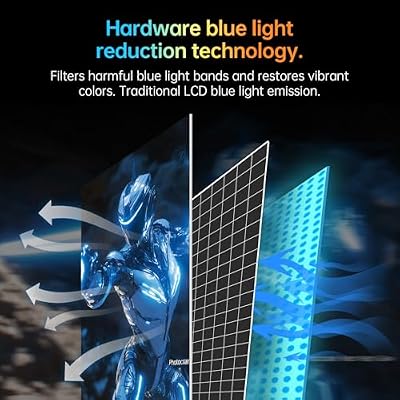
KTC 27 Inch 320Hz Gming Monitor 2K, 1440P Monitor 300Hz, Fast IPS, H27E6 | WQHD White Monitors 1ms, HDR 400, 144%sRGB, HDMI DispalyPort, Tilt Swivel Pivot Height Adjust, Low Blue Light, VESA Mount



As an Amazon Associate we earn from qualifying purchases. Product prices and availability are accurate as of the date/time indicated.
The KTC 27-inch White is the flagship pick for a high-performance all-white setup, and it earns top spot because it refuses to trade looks for capability. It is a genuinely white-chassis 27-inch monitor with a sharp WQHD (2560×1440) Fast IPS panel and a blistering 300Hz refresh rate. At around $280 it is the premium option here, delivering elite gaming specs in a finish built to anchor a color-matched build.
This is the monitor for the enthusiast who wants their white setup to be as fast as it is photogenic. The 1440p resolution adds real sharpness and desktop space over 1080p, the Fast IPS panel combines wide viewing angles with quick response, and the 300Hz refresh puts it firmly in competitive-gaming territory. Crucially the white chassis is the point — it ties seamlessly into a white case, keyboard and desk — but you are getting flagship-class performance, not a pretty shell hiding a weak panel. For a white build that does not compromise, it leads the list.
Pros: Genuine white chassis, sharp 1440p, fast IPS, elite 300Hz refresh, no compromise.
Cons: Highest price here; demands a strong GPU to exploit 300Hz at 1440p.
2. KTC 27 Inch White Gaming Monitor 300Hz/320Hz, QHD 1440P Fast IPS

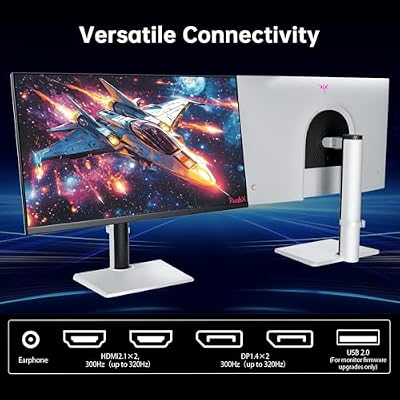
KTC 27 Inch QHD White Gaming Monitor 300Hz/320Hz H27E6 | 2K 1440P, Fast IPS, Adaptive FreeSync, HDR400, Height/Pivot/Swivel/Tilt Adjustable, DP&HDMI




As an Amazon Associate we earn from qualifying purchases. Product prices and availability are accurate as of the date/time indicated.
The KTC 27-inch White 300Hz/320Hz is the highest-refresh white QHD pick, a close sibling to the flagship that pushes speed even further. It is another true white-chassis 27-inch monitor with a QHD 1440P Fast IPS panel, but it tops out at an extreme 300Hz to 320Hz refresh rate. At around $270 it offers near-flagship looks and the fastest motion on the list for the white-build enthusiast who chases every frame.
This is the monitor for the competitive player whose all-white setup also has to be ruthlessly fast. The QHD resolution keeps the image crisp and spacious, the Fast IPS panel delivers quick pixel response with good color and angles, and the up-to-320Hz refresh is about as high as mainstream monitors go. As with its sibling, the white finish is a deliberate cosmetic match for a color-coordinated build, wrapped around a panel with serious esports credentials. If outright refresh rate is your priority in a white screen, this is the pick.
Pros: True white chassis, crisp QHD, Fast IPS, extreme up to 320Hz refresh.
Cons: Very high refresh needs a powerful GPU; premium price.
3. CRUA 34” White Gaming Monitor 165Hz/144Hz, 21:9 1500R Ultrawide Curved
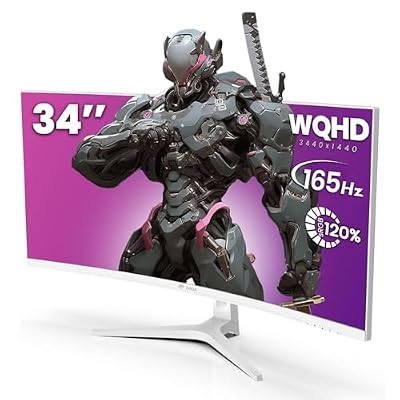
CRUA 34" UWQHD 165Hz White Curved Gaming Monitor, 21:9 Ultrawide, 1500R VA | 3440x1440, FreeSync, PIP/PBP, 120% sRGB, HDMI 2.0, DP 1.4, Blue Light, Tilt Stand, 75x75 Mount, Office, Editing, Racing


As an Amazon Associate we earn from qualifying purchases. Product prices and availability are accurate as of the date/time indicated.
The CRUA 34-inch White ultrawide is the centrepiece pick for a white battlestation. It is a 34-inch white-chassis curved monitor with a 21:9 ultrawide aspect ratio, a 1500R curve and a 144Hz to 165Hz refresh rate, giving you a sweeping, immersive screen that doubles as the bright focal point of an all-white desk. At around $200 it is a lot of distinctive, color-matched screen for the money.
This is the monitor for the gamer who wants their white setup dominated by one expansive, eye-catching display. The 21:9 ultrawide format delivers cinematic width for games and side-by-side multitasking, the 1500R curve wraps the image around you, and the 144 to 165Hz refresh keeps motion smooth. A white ultrawide this large is genuinely striking and comparatively rare, so it anchors a color-coordinated build with real presence — the performance is solid, and the white finish is what makes it special.
Pros: Distinctive white ultrawide, immersive 34-inch 1500R curve, smooth 144-165Hz.
Cons: Ultrawide needs a capable GPU; 165Hz trails 240Hz+ panels.
4. Acer EZ321Q wi 31.5″ Full HD IPS Monitor, White
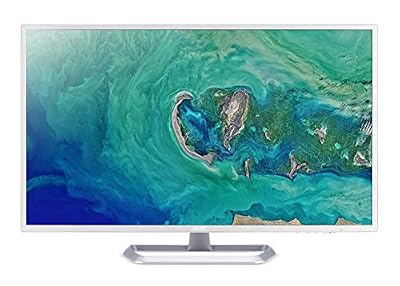
Acer 31.5in FHD 1920x1080 IPS 75Hz Office Monitor EZ321Q wi | 1ms, AdaptiveSync, HDMI, VGA, VESA Mountable, Bluelight Filter, Flickerless Technology


As an Amazon Associate we earn from qualifying purchases. Product prices and availability are accurate as of the date/time indicated.
The Acer EZ321Q wi is the large white office-screen pick. It is an explicitly white 31.5-inch Full HD IPS monitor with HDMI and VGA inputs and a clean, minimalist design from a well-known brand. At around $135 it brings a big, bright white panel to work-focused and lifestyle setups where a calm, color-matched aesthetic matters more than gaming speed.
This is the monitor for someone building a white office or study rather than a high-refresh gaming rig. The 31.5-inch IPS panel gives a large, comfortable canvas with wide viewing angles and accurate color for everyday work, the white chassis and slim styling suit a clean, modern desk, and the Acer name adds reassurance. It is a standard 60Hz-class office display rather than a gaming monitor, so set expectations there — but as a big, affordable, genuinely white screen for a coordinated workspace, it is an excellent fit.
Pros: Genuinely white 31.5-inch IPS, large comfortable canvas, clean styling, brand name.
Cons: Office-class refresh rate, not for high-refresh gaming.
5. CRUA 27″ Curved White Monitor FHD 1920×1080 VA 1800R 100Hz, 120% sRGB

CRUA 27 Inch FHD 100Hz White Curved Computer Monitor, 1800R VA, Frameless | 120% sRGB, Blue Light, Flicker-Free, HDMI 1.4, VGA, Tilt Stand, 100x100 Mount, Office, Study, Home PC, Movies, Casual Gaming


As an Amazon Associate we earn from qualifying purchases. Product prices and availability are accurate as of the date/time indicated.
The CRUA 27-inch Curved White is the value pick for a white build. It is a white-chassis 27-inch curved monitor with a Full HD VA panel, an 1800R curve, a 100Hz refresh rate and a wide 120% sRGB color gamut. At around $110 it is the most affordable curved white screen on the list and a smart way to get the all-white look without overspending.
This is the monitor for the budget-minded builder who still wants a curved, colorful, white-finished display. The VA panel delivers the deep contrast VA is known for, the 120% sRGB coverage makes colors rich and vivid, the 1800R curve adds gentle immersion, and the 100Hz refresh is a step up from standard 60Hz for smoother everyday motion and lighter gaming. As an affordable, genuinely white centrepiece that looks great in a coordinated setup, the CRUA 27-inch is hard to fault for the price.
Pros: Affordable white chassis, contrast-rich VA, wide 120% sRGB, gentle 1800R curve.
Cons: 100Hz and 1080p trail the faster, sharper QHD picks here.
6. KTC 24 Inch 240Hz Gaming Monitor, FHD 1080p Fast IPS

KTC 24 Inch 240Hz Gaming Monitor, FHD PC Computer Monitor, White, H24F7 | Fast IPS Panel, HDR400, 1ms Adaptive Sync 1080P, 116% sRGB, HDMI/DP/USB2.0 Port, Tilt Adjustment, VESA, Eye Care


As an Amazon Associate we earn from qualifying purchases. Product prices and availability are accurate as of the date/time indicated.
Rounding out the list is the KTC 24-inch 240Hz, the compact fast-esports pick for a white-themed setup. It is a 24-inch Full HD monitor with a Fast IPS panel and a quick 240Hz refresh rate, offering responsive competitive-gaming performance in a desk-friendly size. At around $110 it is an affordable, speed-focused complement to a white build.
An honesty note first: unlike the KTC and CRUA models above, this listing does not specify a white chassis in its title, so check the color option you select before buying if a matching white finish is essential. On performance it is a genuine bargain — the Fast IPS panel pairs quick response with good color and viewing angles, and the 240Hz refresh keeps fast shooters fluid in a compact 24-inch frame. If KTC offers it in white to match the rest of your setup, it is a fast, affordable choice; if not, treat it as a strong value gaming panel and confirm the colorway first.
Pros: Fast 240Hz refresh, responsive Fast IPS, compact 24-inch size, strong value.
Cons: Listing does not confirm a white chassis — verify the color option.
How to Build a White Monitor Setup
The most important thing to accept about white monitors is that the color is cosmetic. The panel inside a white chassis performs identically to the same panel in a black one, so you should choose first on display merit — refresh rate, resolution, panel type and size — and then enjoy the white finish as the aesthetic bonus it is. Every pick here was selected on its actual capabilities as a monitor, with the white shell as the reason it suits a color-matched build rather than as a substitute for performance.
Match the monitor’s specs to how you use it, exactly as you would with any screen. For competitive gaming, the high-refresh KTC panels — 300Hz, even up to 320Hz, on sharp 1440p Fast IPS — are the standouts. For immersion, the CRUA 34-inch white ultrawide gives a sweeping curved canvas. For a white office or lifestyle desk, the large Acer EZ321Q IPS is ideal, and the CRUA 27-inch curved VA is the affordable all-rounder. Decide whether speed, size, sharpness or value matters most before the color enters the equation.
Be a little careful about what ‘white’ actually means on a product page. Some monitors, like the CRUA and KTC white models here, are explicitly white-chassis designs; others are sold in several colors with white as one option — the KTC 24-inch 240Hz on this list does not state a white finish in its title, so you would confirm the colorway before buying. Shades of white also vary slightly between brands, so if an exact match to your case or desk matters, check images and pair pieces from the same range where you can.
Finally, build the whole setup as a coordinated whole and plan for upkeep. A white monitor looks best surrounded by a white case, keyboard, mouse, cables and desk, so think about the complete palette rather than one piece in isolation. The practical trade-off with any white gear is that marks and dust show more readily than on black, so it is worth the occasional wipe-down to keep the finish crisp. Choose the panel that performs for your needs, confirm it is the white you want, and surround it with matching gear for a clean, bright setup that looks as good as it runs.
Frequently Asked Questions
Do white monitors perform worse than black ones?
No. The color of the chassis is purely cosmetic and has no effect on the panel’s performance — a white monitor with a 300Hz Fast IPS panel, like the KTC models here, is exactly as fast and sharp as the same panel in black. Always choose a white monitor on its real specs (refresh rate, resolution, panel type) and enjoy the finish as an aesthetic bonus.
Are all the monitors on this list genuinely white?
Most are explicit white-chassis designs — the KTC 27-inch models, the CRUA 34-inch ultrawide and 27-inch curved, and the Acer EZ321Q are all white. The KTC 24-inch 240Hz, however, does not specify a white finish in its listing, so if a matching white chassis is essential, confirm the available color option before you buy rather than assuming it is white.
Do white monitors get dirty or discolour over time?
White gear shows dust, fingerprints and marks more readily than black, so a white monitor benefits from the occasional wipe-down to stay crisp. Quality modern plastics resist yellowing far better than older equipment, but keeping the screen out of harsh direct sunlight and cleaning it gently will help the finish stay bright and matched to the rest of your setup.
What else do I need for a complete white setup?
To get the full color-matched look, pair your white monitor with a white PC case, keyboard, mouse, mouse pad, cables and ideally a light or white desk. Buying pieces from the same range helps the shades of white line up, since tones vary slightly between brands. The monitor is usually the visual anchor, so choose it first, then build the surrounding palette around it.
Related Guides
- Best White Gaming Keyboards
- Best White PC Cases
- Best White Gaming Mouse
- Best Gaming Monitors
- Best Ultrawide Monitors
- Best Budget Gaming Setup
Affiliate Disclosure: As an Amazon Associate, we earn from qualifying purchases. If you click a link and make a purchase, we may earn a small commission at no extra cost to you. Prices and availability are accurate as of publication and may change.










