

- Top Pick: Seagate Storage Expansion Card for Xbox Series X|S 1 TB Solid State Drive – NVMe Expansion SSD for Xbox Series X|S (STJR1000400)
- Best Value: Seagate Storage Expansion Card for Xbox Series X|S, 1TB, SSD, NVMe Expansion SSD (STJR1000400)
- Premium Choice: Seagate Storage Expansion Card 2TB Solid State Drive – NVMe SSD for Xbox Series X|S, Quick Resume, Plug & Play, Licensed (STJR2000400) Black
The Seagate Storage Expansion Card 1TB is the official Microsoft-approved storage expansion for Xbox Series X|S. Unlike standard USB SSDs, it slots into the back of the console as an internal NVMe expansion and plays Xbox Series X|S games at the same speed as the console’s built-in SSD. With more than 30,400 buyer reviews behind it, the 1TB expansion card is the default storage upgrade for Series X|S owners. This Seagate Storage Expansion Card review covers the capacity and interface, performance, compatibility and value.
- Seagate Storage Expansion Card 1TB at a Glance
- Capacity and Interface
- Speed and Real-World Performance
- Durability, Form Factor and Portability
- Compatibility: PC, Mac, Console, Mobile
- Who Is the Seagate Storage Expansion Card 1TB For?
- Pros and Cons
- Is the Seagate Storage Expansion Card 1TB Worth It?
- Frequently Asked Questions
- More Portable SSD Reviews
- Related Articles
- Related Articles

Seagate Storage Expansion Card for Xbox Series X | Xbox Velocity Architecture with 2TB capacity and plug-and-play for gaming, loading and Quick Resume




As an Amazon Associate we earn from qualifying purchases. Product prices and availability are accurate as of the date/time indicated.
🛒 Best Price Today on Amazon
Prime members get fast, free shipping on everything above, plus member-only deals. New members get a 30-day free trial — cancel anytime.
As an Amazon Associate we earn from qualifying purchases.



Seagate Storage Expansion Card 1TB at a Glance
| Component | Specification |
|---|---|
| Capacity | 1TB |
| Interface | Microsoft Xbox Series X|S expansion port (NVMe) |
| Sequential read | Matches Xbox Series X|S internal SSD |
| Sequential write | Matches Xbox Series X|S internal SSD |
| Form factor | Custom Xbox expansion card, slots into rear of console |
| Durability rating | Internal expansion card, no user-handled enclosure |
| Compatible devices | Xbox Series X, Xbox Series S only (not PC, not Xbox One) |
| Price | Around $190 |
Capacity and Interface
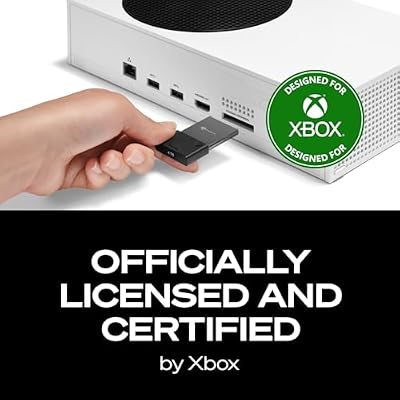
1TB on the Seagate Storage Expansion Card is the most popular tier — enough to roughly double the available game storage on a Series X and several times the playable storage on a Series S. The interface is the key difference versus a standard USB SSD: the card slots directly into the dedicated NVMe expansion port on the back of the Xbox Series X and Series S, which Microsoft designed to mirror the console’s internal SSD specification exactly. The card uses a proprietary NVMe interface — it is not a standard M.2 NVMe SSD and only works in this port.
Speed and Real-World Performance
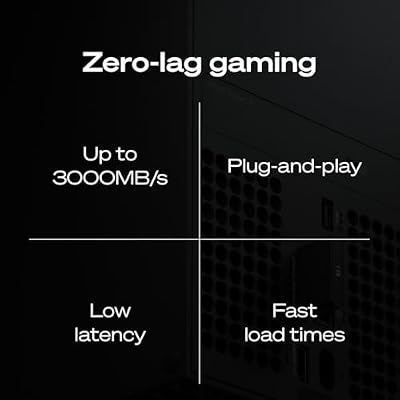
This is where the Storage Expansion Card stands apart from every USB SSD on the market: it plays Xbox Series X|S games at full speed. Games installed on the card load as quickly, run with the same fast-resume behaviour, and stream textures and assets as smoothly as games installed on the console’s built-in SSD. There is no compromise. A USB SSD, by contrast, can store Series X|S games but cannot play them — Series X|S games must be moved back to internal storage or to a Storage Expansion Card to play. The card is therefore the only path to play more Series X|S games without uninstalling existing ones.
Microsoft’s Velocity Architecture — the combination of NVMe SSD, custom decompression hardware and sampler-feedback streaming that defines the Series X|S generation — is mirrored exactly by the Storage Expansion Card. Game features that depend on the Velocity Architecture, including Quick Resume across multiple titles and instant texture streaming, all work as expected when games are installed on the card. That is a meaningful detail: the card is not merely ‘fast enough,’ it is engineered to be functionally identical to internal storage from the game’s perspective.
Durability, Form Factor and Portability
The Storage Expansion Card is an internal NVMe card and is not intended to be handled in normal use. Once installed in the console’s expansion port at the back of the machine, it is essentially invisible — there is no user-handled enclosure, no cable management, and no portability concerns. The card itself is robustly built but it is not designed for repeated unplugging or for use as a portable. For portable Xbox storage (for cold storage of Series X|S games and for direct play of Xbox One games), a standard USB SSD remains the right tool.
Compatibility: PC, Mac, Console, Mobile
Compatibility is exact: the Storage Expansion Card works only with the Xbox Series X and Series S. It is not a PC drive, not a Mac drive, not a PS5 drive (Sony uses an internal M.2 NVMe slot with a different spec) and not an Xbox One drive. This makes it a specialist product: if you own an Xbox Series X or S, it is essentially mandatory once your internal storage fills with Series X|S games; if you do not own one, the card is irrelevant to you. For PS5 owners looking at the equivalent path, see our best PS5 expansion SSD guide guide. For more on Xbox storage strategy, see our best Xbox Series X|S storage guide guide.
Who Is the Seagate Storage Expansion Card 1TB For?
The 1TB Storage Expansion Card is for the Xbox Series X or Series S owner who has filled their internal storage with Series X|S games and wants to install more without uninstalling. It is the only way to play more Series X|S games at full speed without removing existing ones. For Series S owners in particular — whose internal storage is small — the card is often a necessary purchase rather than an option. For owners who play mostly Xbox One games, a standard USB SSD is the cheaper option since Xbox One games run from USB SSDs directly. Many Xbox Series owners ultimately use both: a Storage Expansion Card for actively played Series X|S games, and a USB SSD as cheap cold storage for the larger library.
Pros and Cons
Pros: Plays Xbox Series X|S games at full internal-SSD speed; doubles a Series X’s game storage; many times Series S storage; tool-free install in the console’s rear expansion port; Microsoft-approved for guaranteed compatibility.
Cons: Works only with Xbox Series X|S — not PC, Mac, PS5 or Xbox One; price per gigabyte higher than a standard USB SSD; proprietary and cannot be repurposed if you change consoles.
Is the Seagate Storage Expansion Card 1TB Worth It?
At around $190 the Seagate Storage Expansion Card 1TB is the necessary upgrade for any Series X or Series S owner who has run out of Series X|S game storage. The price-per-gigabyte is higher than a USB SSD, but the card is the only path to play more Series X|S games at full speed. For storage of Xbox One games and as Series X|S cold storage, a standard USB SSD remains the cheaper and more flexible tool — they complement rather than replace each other. For more on the wider Xbox storage strategy, see our best Xbox Series X|S storage guide guide. The card is also worth considering ahead of the next generation of Xbox if you want to retain a no-compromise storage upgrade across multiple console upgrades within the Series family.
Frequently Asked Questions
Can a Seagate Storage Expansion Card play Xbox Series X|S games?
Yes — it is the only storage option besides the console’s built-in SSD that plays Series X|S games at full speed. A standard USB SSD can only store Series X|S games and play Xbox One games.
Does the Seagate Expansion Card work on PC or Xbox One?
No. It uses the proprietary Xbox Series X|S expansion port and only works with the Xbox Series X and Series S consoles.
How do I install the Seagate Storage Expansion Card?
It slots directly into the dedicated expansion port on the back of the Xbox Series X or Series S — no tools, no console disassembly, and no setup beyond the console recognising the new storage.
Should I get the Storage Expansion Card or a USB SSD for Xbox?
Both, if budget allows. The Storage Expansion Card is the only way to play Series X|S games beyond the internal SSD. A USB SSD is the cheaper way to store Series X|S games long-term and to play Xbox One games directly.
More Portable SSD Reviews
- SanDisk 1TB Extreme Portable SSD Review
- SanDisk 2TB Extreme Portable SSD Review
- SanDisk 1TB Extreme PRO Portable SSD Review
- Samsung T7 Portable SSD 1TB Review
- Samsung T7 Shield 2TB Portable SSD Review (Rugged)
- Samsung T9 Portable SSD 1TB Review
- Crucial X9 Portable SSD 1TB Review
- Crucial X10 Portable SSD 2TB Review
Affiliate Disclosure: As an Amazon Associate, we earn from qualifying purchases. If you click a link and make a purchase, we may earn a small commission at no extra cost to you. Prices and availability are accurate as of publication and may change.
Related Articles
Looking for more on this topic? Browse the hand-picked guides below — each one applies the same scoring rubric used in this review.










