

The Acer Nitro 27-inch WQHD 300Hz IPS Monitor takes the QHD-and-high-refresh formula and pushes the refresh rate into truly elite territory. It pairs a flat IPS panel with a QHD 2560×1440 resolution, a 300Hz refresh rate, AMD FreeSync Premium and HDR support, all for around $200. A 300Hz refresh on a sharp QHD IPS panel is the kind of specification that, until recently, would have commanded a far higher price. This Acer Nitro WQHD 300Hz review covers the panel, motion handling, gaming features and whether this is the new sweet spot for serious competitive gamers.
- Acer Nitro 27-inch WQHD 300Hz at a Glance
- Image Quality: Panel, Resolution and Colour
- Refresh Rate and Motion Performance
- Gaming Experience: Adaptive Sync and HDR
- Design, Connectivity and Ergonomics
- Who Is the Acer Nitro 27-inch WQHD 300Hz For?
- Pros and Cons
- Is the Acer Nitro 27-inch WQHD 300Hz Worth It?
- Frequently Asked Questions
- More Gaming Monitor Reviews
- Related Articles
- Related Articles
- Related Guides
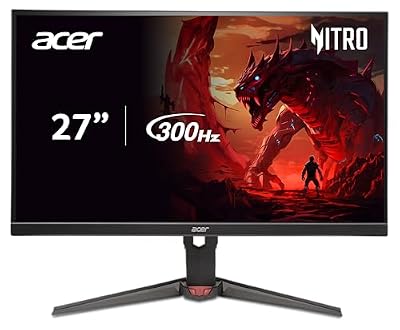
Acer Nitro 27in QHD 2560x1440 IPS 300Hz Gaming Monitor XV272U F3bmiiprx | 0.5ms, AMD FreeSync Premium, sRGB 99%, 2xHDMI 2.1, DisplayPort, VESA HDR400, Ergo Stand, Speaker, Bluelight Filter






As an Amazon Associate we earn from qualifying purchases. Product prices and availability are accurate as of the date/time indicated.
🛒 Best Price Today on Amazon
Prime members get fast, free shipping on everything above, plus member-only deals. New members get a 30-day free trial — cancel anytime.
As an Amazon Associate we earn from qualifying purchases.




Acer Nitro 27-inch WQHD 300Hz at a Glance
| Component | Specification |
|---|---|
| Screen size & type | 27″ flat IPS |
| Resolution | QHD 2560×1440 |
| Panel technology | IPS |
| Refresh rate | 300Hz |
| Response time | Gaming-grade fast IPS |
| Adaptive sync | AMD FreeSync Premium |
| HDR & brightness | HDR support |
| Ports | Standard Nitro gaming inputs |
| Price | Around $200 |
Image Quality: Panel, Resolution and Colour
The Acer Nitro WQHD 300Hz uses a flat IPS panel, and that is exactly the right technology for a competitive monitor that also has to look good in everyday use. IPS is prized for accurate colour and wide viewing angles — the image stays consistent whether viewed straight on or from the side, and tones look natural rather than shifted. For a monitor that doubles as a desktop display, that consistency is genuinely valuable, and it is the reason IPS dominates the modern QHD gaming category.
The QHD 2560×1440 resolution sits in the most popular sweet spot for 27-inch panels. It is notably sharper than Full HD on the same screen — text looks crisper for work, and fine detail in games is preserved — while remaining easier to drive at high frame rates than 4K. Pairing QHD with a 300Hz panel means the resolution will not bottleneck the refresh rate on a capable system, and the result is a sharp, fast, colour-accurate image that punches well above its price.
Refresh Rate and Motion Performance
The headline feature is the 300Hz refresh rate, and that is genuinely elite competitive territory — five times the motion updates of a standard 60Hz panel. The clarity gain over even a 240Hz monitor is real if subtler: fast camera movement is exceptionally smooth, on-screen action retains a tangible sense of immediacy, and motion feels effectively transparent. For dedicated competitive players who chase every clarity advantage, 300Hz at QHD on a recognised brand is a striking offering at this price.
Supporting that high refresh is a modern fast-IPS panel design with a gaming-grade response time. Response time measures how quickly a pixel can change colour, and on a 300Hz panel a fast response is essential — without it, pixel transitions would lag behind the refresh rate and undermine the clarity gain. Fast IPS panels are specifically engineered to combine the colour quality of IPS with the rapid response that very-high-refresh gaming demands, and this Nitro is a clear, well-priced example.
Gaming Experience: Adaptive Sync and HDR
The Nitro supports AMD FreeSync Premium, a capable tier of adaptive sync that matches the monitor’s refresh rate to the graphics card’s frame rate. This eliminates screen tearing — the horizontal split that appears when frame delivery and refreshes drift apart — and the Premium designation adds low-framerate compensation, so the experience stays smooth even when frame rates fall below the panel’s normal range. FreeSync also works with compatible NVIDIA cards, so the feature applies regardless of graphics-card brand.
HDR support is listed, which means the monitor accepts and displays HDR-encoded content. At this price the result is a useful boost in vivid colour highlights for compatible games rather than the dramatic, deep contrast that flagship HDR can deliver — genuine high-impact HDR needs brightness and local dimming a $200 monitor cannot include. For competitive players the core 300Hz, fast-IPS and FreeSync combination is the more meaningful set of features, and HDR acts as a sensible bonus where supported.
Design, Connectivity and Ergonomics
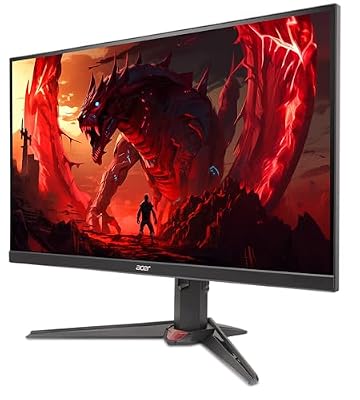
The Acer Nitro carries the brand’s recognisable gaming styling — a clearly enthusiast look without aggressive excess, suited to a gaming desk. Acer’s experience with the Nitro line shows in the considered design, with a slim-bezel appearance that helps the 27-inch panel feel modern and tidy and works well as part of a dual-monitor arrangement. The build quality is in keeping with the price and the brand’s gaming-monitor pedigree.
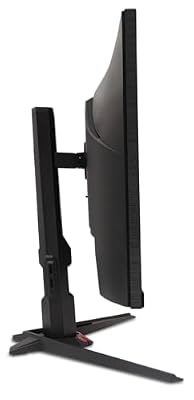
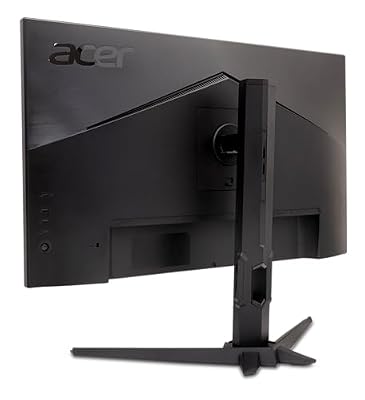
Connectivity covers the standard inputs needed to drive a QHD 300Hz signal from a gaming PC and to connect a second device. Ergonomically, Acer Nitro monitors typically include tilt and, on this tier, often more — but owners who want the fullest range of adjustment can attach the panel to a VESA-compatible monitor arm. For a 300Hz QHD monitor at this cost, the design choices are sensible and the package is well rounded.
Who Is the Acer Nitro 27-inch WQHD 300Hz For?
The Acer Nitro WQHD 300Hz is for the dedicated competitive gamer who wants the very highest refresh rate currently available at a sensible QHD price. If you play fast shooters or battle-royale titles and want a motion-clarity step beyond even 240Hz, while also valuing the sharper detail of QHD over Full HD and the accurate colour of an IPS panel, this monitor is built precisely for you. The combination at $200 from Acer is genuinely standout.
It is less suited to buyers who want a 4K experience, or to those whose graphics card cannot push QHD at very high frame rates. But for the player whose priority is the absolute clearest competitive motion on a sharp panel at the lowest sensible price, the Nitro WQHD 300Hz is exceptional value — it brings a feature long associated with much more expensive monitors within easy reach.
Pros and Cons
Pros: Elite 300Hz refresh rate at a remarkable price; sharp QHD 2560×1440 resolution; accurate IPS panel with wide viewing angles; AMD FreeSync Premium with low-framerate compensation; HDR support as a useful bonus; recognised Acer Nitro gaming brand; tidy slim-bezel design.
Cons: Driving QHD at 300Hz needs a powerful graphics card; typical IPS contrast lower than VA or OLED alternatives; HDR is supported but not a flagship HDR experience; tilt-only stand likely at this price; not a 4K option.
Is the Acer Nitro 27-inch WQHD 300Hz Worth It?
At around $200 the Acer Nitro 27-inch WQHD 300Hz IPS monitor is genuinely standout value. A 300Hz refresh rate on a sharp QHD IPS panel from a recognised brand is the kind of specification that, until recently, would have commanded a much higher price. FreeSync Premium and HDR add useful extras, and the panel’s combination of clarity, colour and elite refresh is unusually complete at the price. The compromises — modest IPS contrast and the need for a capable graphics card — are reasonable. For a dedicated competitive player wanting the clearest motion at a sensible price, this is one of the easiest recommendations available.
Frequently Asked Questions
Is 300Hz noticeably better than 240Hz?
The clarity gain is real but subtler than the jump from 60Hz to 144Hz. Dedicated competitive players will appreciate the smoother, more immediate motion that 300Hz delivers in fast-paced games.
Does the Acer Nitro work with NVIDIA graphics cards?
Yes. Its AMD FreeSync Premium support is also compatible with NVIDIA cards, so it eliminates screen tearing regardless of which brand of graphics card is fitted.
Do I need a powerful PC for the Acer Nitro 300Hz?
To approach the panel’s 300Hz refresh in modern games you will want a capable graphics card. For everyday content and slower games the monitor remains comfortable to drive.
Why choose QHD over Full HD at 27 inches?
QHD 2560×1440 is noticeably sharper than Full HD on the same 27-inch screen, with crisper text and finer in-game detail, while remaining easier to drive at high frame rates than 4K.
More Gaming Monitor Reviews
- Samsung 34-inch Odyssey G5 Ultra-Wide Gaming Monitor Review
- LG UltraGear 27GS93QE OLED Gaming Monitor Review
- ASUS TUF Gaming 34-inch Ultrawide Monitor Review (VG34WQML5A)
- Samsung 37-inch Odyssey G7 (G75F) 4K Gaming Monitor Review
- ASUS ROG Strix 32-inch 4K HDR Gaming Monitor Review (XG32UCG)
- LG UltraGear 45GX950A 5K2K OLED Curved Monitor Review
- Dell Plus 32-inch 4K QD-OLED Monitor Review
- Samsung 27-inch Odyssey OLED G5 (G50SF) Monitor Review
Affiliate Disclosure: As an Amazon Associate, we earn from qualifying purchases. If you click a link and make a purchase, we may earn a small commission at no extra cost to you. Prices and availability are accurate as of publication and may change.
Related Articles
Looking for more on this topic? Browse the hand-picked guides below — each one applies the same scoring rubric used in this review.










