

- Top Pick: Samsung 34' Odyssey G5 Ultra-Wide Gaming Monitor with 1000R Curved Screen
- Best Value: SAMSUNG 34" Odyssey G5 Series Ultra-Wide WQHD Gaming Monitor, 1000R Curved, 165Hz, 1ms Response Time, FreeSync Premium, Black, with MTC HDMI Cable
- Premium Choice: Samsung 32” Odyssey G5 (G50F) Series QHD Gaming Monitor
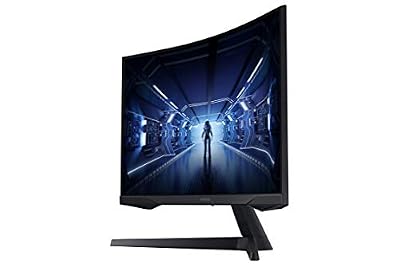
The Samsung 34-inch Odyssey G5 Ultra-Wide Gaming Monitor brings Samsung’s recognised Odyssey gaming brand into the ultrawide category at a price that is hard to ignore. It pairs a deeply curved 1000R VA panel with a WQHD ultrawide 3440×1440 (21:9) resolution, a 165Hz refresh rate, a 1ms response, AMD FreeSync Premium and HDR10 support, all for around $280. With more than 2,500 buyer reviews behind it, this is a well-proven product. This Samsung Odyssey G5 34-inch review covers the panel, motion handling, ultrawide experience and overall value.
- Samsung Odyssey G5 34-inch at a Glance
- Image Quality: Panel, Resolution and Colour
- Refresh Rate and Motion Performance
- Gaming Experience: Adaptive Sync and HDR
- Design, Connectivity and Ergonomics
- Who Is the Samsung Odyssey G5 34-inch For?
- Pros and Cons
- Is the Samsung Odyssey G5 34-inch Worth It?
- Frequently Asked Questions
- More Gaming Monitor Reviews
- Related Articles
- Related Articles
- Related Guides

Samsung 34' Odyssey G5 Ultra-Wide Gaming Monitor with 1000R Curved Screen | 165Hz, 1ms, FreeSync Premium, Large Display, Eye Comfort, Multiple Ports, WQHD (LC34G55TWWNXZA)




As an Amazon Associate we earn from qualifying purchases. Product prices and availability are accurate as of the date/time indicated.
🛒 Best Price Today on Amazon
Prime members get fast, free shipping on everything above, plus member-only deals. New members get a 30-day free trial — cancel anytime.
As an Amazon Associate we earn from qualifying purchases.






Samsung Odyssey G5 34-inch at a Glance
| Component | Specification |
|---|---|
| Screen size & type | 34″ curved (1000R) VA ultrawide |
| Resolution | WQHD ultrawide 3440×1440 (21:9) |
| Panel technology | VA |
| Refresh rate | 165Hz |
| Response time | 1ms |
| Adaptive sync | AMD FreeSync Premium |
| HDR & brightness | HDR10 |
| Ports | Samsung Odyssey gaming inputs |
| Price | Around $280 |
Image Quality: Panel, Resolution and Colour
The Samsung Odyssey G5 34-inch uses a VA panel, and on a large curved ultrawide that is a strong choice. VA technology is prized for strong native contrast — blacks look genuinely dark rather than the washed-out grey common on cheaper alternatives — and on an immersive ultrawide canvas that depth makes a real difference to cinematic content and atmospheric games. The 1000R curve is one of the most aggressive available in mainstream monitors, designed to roughly match the radius of human peripheral vision, and on a 34-inch ultrawide it has a noticeable immersive effect.
The WQHD ultrawide 3440×1440 resolution is well matched to the 34-inch screen size, producing a clean and reasonably sharp image with a generous horizontal canvas. That extra width is the defining feature of an ultrawide: games with proper 21:9 support fill the field of view much more completely than a standard 16:9 panel can, and on the desktop the extra space is genuinely useful for multitasking. The combination of size, resolution and curve gives the Odyssey G5 a real sense of presence.
Refresh Rate and Motion Performance
The Odyssey G5 runs at 165Hz, a refresh rate firmly in genuine high-refresh territory. Stepping up from a standard 60Hz display to 165Hz is a substantial improvement: motion looks markedly clearer, fast camera movement stays sharp, and the whole experience feels more responsive and fluid. On a curved ultrawide canvas that high refresh is doubly worthwhile, because the larger viewport makes any motion blur more visible at standard refresh rates.
Supporting that 165Hz refresh is a quoted 1ms response time. Response time measures how quickly a pixel can change colour, and a low figure limits the ghosting trails that can blur fast motion. As with any VA panel, very dark, fast-moving scenes can show a touch of smearing — a known trait of the technology — but in general motion handling is strong for an ultrawide at this price, and the Samsung quality assurance behind the Odyssey brand inspires confidence in long-term consistency.
Gaming Experience: Adaptive Sync and HDR
The Odyssey G5 supports AMD FreeSync Premium, a capable tier of adaptive sync that matches the monitor’s refresh rate to the graphics card’s frame rate. This eliminates screen tearing, and the Premium designation adds low-framerate compensation so the experience stays smooth even when frame rates dip below the panel’s normal range. FreeSync also works with compatible NVIDIA cards, so the feature applies across both brands of graphics hardware.
HDR10 support is listed, which means the monitor accepts and displays HDR-encoded content. At this price, HDR10 on a VA panel can give a useful boost to vivid highlights in supported games — the panel’s strong native contrast already lends itself to a punchier image. It is not the dramatic, reference-grade HDR of a flagship OLED, but it is a genuinely useful bonus that pairs well with the immersive curve and cinematic potential of an ultrawide canvas.
Design, Connectivity and Ergonomics
The Samsung Odyssey G5 carries the Odyssey gaming-brand styling — a recognisably enthusiast look that fits a gaming desk while still feeling distinctly Samsung. The 1000R curve gives the monitor a clear visual identity from the front and from the side, and the build quality benefits from Samsung’s long experience as a leading display manufacturer. As a piece of desk furniture, the Odyssey G5 has a confident, well-finished feel.
Connectivity covers the standard inputs needed to drive a WQHD ultrawide 165Hz signal from a gaming PC and to connect a console or laptop. Ergonomically, Samsung Odyssey monitors at this tier typically include tilt adjustment and, in some configurations, more — but owners who want the fullest range of height and rotation flexibility can use a VESA-compatible monitor arm. For a Samsung-brand curved ultrawide at this price, the design and build are sensibly judged.
Who Is the Samsung Odyssey G5 34-inch For?
The Odyssey G5 34-inch is for the buyer who wants the immersion of a curved ultrawide from a recognised premium brand without paying flagship prices. If you play single-player titles with ultrawide support, want a sharp WQHD ultrawide canvas with a genuine 165Hz refresh and the strong contrast of a VA panel, and prefer the reassurance of Samsung’s Odyssey gaming line, this monitor fits the brief well. It serves both immersion and competitive play, and the extra horizontal space is useful for productivity too.
It is less suited to buyers chasing the very highest competitive refresh rates, who should look at a fast 240Hz panel, or to those who want OLED-grade contrast and HDR. But as an accessible Samsung-brand curved ultrawide with the right blend of resolution, refresh and curve, the Odyssey G5 is one of the most compelling choices in its bracket.
Pros and Cons
Pros: Recognised Samsung Odyssey gaming brand; immersive 1000R curve on a generous 34-inch ultrawide canvas; sharp WQHD ultrawide 3440×1440 resolution; genuine 165Hz refresh rate; strong VA contrast for deep blacks; AMD FreeSync Premium with low-framerate compensation; HDR10 support as a useful bonus.
Cons: VA panels can show slight smearing in dark, fast motion; not as fast as a 240Hz competitive panel; HDR10 is supported but not a flagship HDR experience; the aggressive 1000R curve is more taste-dependent than gentler curves; modest ergonomic adjustment typical of the price.
Is the Samsung Odyssey G5 34-inch Worth It?
At around $280 the Samsung Odyssey G5 34-inch is a confident, well-rounded curved ultrawide. It delivers the immersion of an aggressive 1000R curve on a generous 34-inch canvas, a sharp WQHD ultrawide resolution, a genuine 165Hz refresh rate and the deep contrast of a VA panel, all from Samsung’s recognised Odyssey gaming brand. FreeSync Premium and HDR10 add useful extras, and the 2,500-plus buyer reviews are reassuring. The compromises — VA dark-scene smearing and HDR that is supported rather than flagship — are reasonable. For a buyer who wants Samsung quality in a curved ultrawide without overspending, the Odyssey G5 is one of the easiest recommendations in the category.
Frequently Asked Questions
Is a 1000R curve too aggressive for everyday work?
1000R is a deeper curve than older 1500R or 1800R designs, but on a 34-inch ultrawide it is intended to match peripheral vision. Most buyers adapt quickly, and many find it more immersive.
Does the Samsung Odyssey G5 work with NVIDIA graphics cards?
Yes. Its AMD FreeSync Premium support is also compatible with NVIDIA cards, so it eliminates screen tearing regardless of which brand of graphics card is fitted.
Is 165Hz fast enough for competitive gaming?
Yes for most players. A genuine 165Hz refresh delivers clear, fluid motion. Players chasing the very highest competitive refresh rates may prefer a fast 240Hz panel.
Is WQHD ultrawide sharp enough at 34 inches?
Yes. The 3440×1440 resolution suits the 34-inch ultrawide screen size well, producing a clean, reasonably sharp image while remaining easier to drive at high frame rates than a 4K ultrawide.
More Gaming Monitor Reviews
- LG UltraGear 27GS93QE OLED Gaming Monitor Review
- ASUS TUF Gaming 34-inch Ultrawide Monitor Review (VG34WQML5A)
- Samsung 37-inch Odyssey G7 (G75F) 4K Gaming Monitor Review
- ASUS ROG Strix 32-inch 4K HDR Gaming Monitor Review (XG32UCG)
- LG UltraGear 45GX950A 5K2K OLED Curved Monitor Review
- Dell Plus 32-inch 4K QD-OLED Monitor Review
- Samsung 27-inch Odyssey OLED G5 (G50SF) Monitor Review
- LG UltraGear 32G620B 32-inch QHD IPS Gaming Monitor Review
Affiliate Disclosure: As an Amazon Associate, we earn from qualifying purchases. If you click a link and make a purchase, we may earn a small commission at no extra cost to you. Prices and availability are accurate as of publication and may change.
Related Articles
Looking for more on this topic? Browse the hand-picked guides below — each one applies the same scoring rubric used in this review.










