

The HUION HS610 is HUION’s long-running mid-range workhorse — a 10×6.25-inch screenless drawing tablet with a battery-free stylus, full tilt support, and an unusually large shortcut-key layout. At around $69 it competes directly with the GAOMON M10K and the XPPen Deco 01 V3 for the same artist. This HUION HS610 review covers the pen, ExpressKeys, drivers and how it stacks against its rivals.
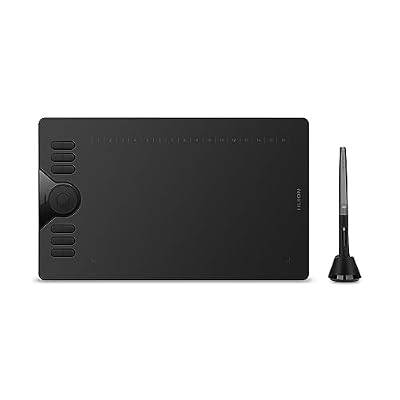
HUION HS610 10x6.25 inch Drawing Tablet 8192 Pen Pressure | Battery-Free Stylus, Tilt, 12 Express Keys, Touch Strip, Work with Windows/Mac/Android, Graphic Tablet for Animation, Design




As an Amazon Associate we earn from qualifying purchases. Product prices and availability are accurate as of the date/time indicated.
🛒 Best Price Today on Amazon
Prime members get fast, free shipping on everything above, plus member-only deals. New members get a 30-day free trial — cancel anytime.
As an Amazon Associate we earn from qualifying purchases.


HUION HS610 at a Glance
| Component | Specification |
|---|---|
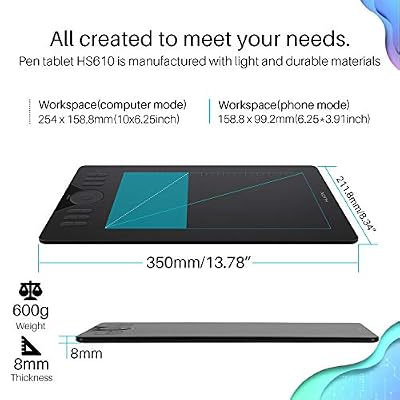
| Active area | 10 x 6.25 inches (254 x 158 mm) |
| Pressure levels | 8,192 |
| Stylus type | Battery-free passive pen (HUION PW100) |
| Resolution | 5,080 lpi |
| Report rate | 266 pps |
| Tilt support | Yes (60 degrees) |
| Express keys | 12 ExpressKeys + 16 soft keys |
| Connection | USB (wired) |
| Approx price | around $69 |
Pen Performance & Pressure
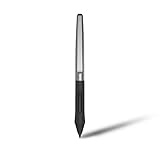
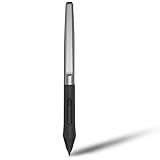
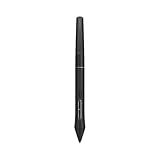
The HS610 ships with HUION’s PW100 battery-free pen, one of the most widely used styluses in HUION’s lineup. The pen is battery-free — power is drawn wirelessly from the tablet, so there is nothing to charge or replace — and delivers 8,192 levels of pressure sensitivity with full 60-degree tilt support. In practice the pen feels confident and well balanced; initial activation force is low, pressure ramps feel smooth, and tilt-aware brushes in Photoshop and Clip Studio Paint behave the way they should. The pen has two remappable side buttons and the standard HUION threaded grip. For its bracket, this is among the better battery-free pen experiences you can buy.
Tracking accuracy across the 10×6.25-inch active area is good after the standard four-point driver calibration, with the kind of mild edge-drift you find at every price tier under Wacom’s mid-range. Report rate of 266 pps over USB is plenty for jitter-free strokes and for the cursor-tracking response that fast lineart and lettering depend on. Pressure-curve adjustment in the HUION driver lets you tune the pen’s response to your touch — a feature long-time Wacom users will already be familiar with and which is increasingly standard on competitive tablets. The PW100 is a known quantity by now; HUION has been using and refining it for several years, and the long product cycle means driver support is excellent.
Build & Materials
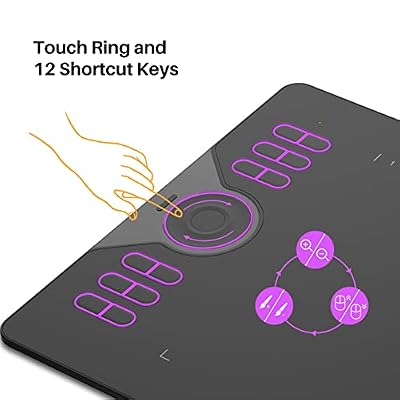
HUION’s industrial design on the HS610 is competent and clean. Twelve ExpressKeys run along the left edge — twice what most mid-range tablets offer — and above the active area there is a strip of 16 soft-touch shortcut keys, often used for app-specific shortcuts such as colour pickers, layer-blend toggles or specific brushes. The work surface is matte with a subtle texture that gives the pen tip a small but useful amount of resistance. The chassis is solid plastic, slim enough to live easily on a desk and rigid enough not to flex under hand pressure. The orientation can be flipped 180 degrees for left-handed users. The HS610’s industrial design is utilitarian rather than flashy — a sensible compromise that keeps the price down while making the tablet look at home in a working studio rather than a bedroom. Underneath, four small rubber feet keep the tablet stable on a desk during heavy hand-pressure work, and the slim chassis means the tablet sits flush with most keyboard layouts.
The shortcut layout is one of the genuine selling points of the HS610. Twelve ExpressKeys is more than most rivals offer at this price tier, and the 16 soft-touch keys above the active area add a second tier of programmable input — typically reserved for less frequently used actions such as colour-pickers, specific brush presets or app-specific menu commands. The keys can be remapped per-application in the driver utility, which means you can keep a baseline shortcut set across all your apps and then swap individual keys for app-specific behaviour where it helps. For artists who prefer to work glove-and-tablet without leaning on the keyboard, the HS610 is one of the closest budget tablets to a Wacom-style hand-only workflow.
Software Compatibility & Drivers
HUION’s drivers cover Windows, macOS, Linux and Android. They have improved significantly in recent years and are now roughly on par with XPPen and GAOMON; the gap to Wacom has narrowed considerably. Inside Photoshop, Clip Studio Paint, Krita, Affinity Photo, SAI, MediBang and other creative apps, pressure and tilt are recognised after install. The driver utility lets you remap every ExpressKey and soft key per-application, define pressure curves, calibrate the work area and choose between absolute and relative pen modes.
Use Cases — Art, 3D and Note Taking
The HS610 is the natural choice when you want a large active area and a lot of programmable input without paying mid-range Wacom money. For digital illustrators, the 12 ExpressKeys plus 16 soft keys can replace much of the keyboard, which speeds long sessions. For 3D artists, the large area and tilt support help with sculpting and texturing in ZBrush, Blender and Substance. For educators, the size makes whiteboard work readable and the shortcut keys map well to slide control and annotation. For OSU players, the HS610 is overkill — a smaller, cheaper tablet does the job better. The 16 soft-touch keys above the active area are arguably the secret weapon for serious workflow users: they can hold a secondary tier of less-frequently-used shortcuts that would otherwise clutter your keyboard or sit under awkward chord combinations, freeing up your primary ExpressKeys for the most common actions.
What’s in the Box
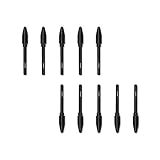
The HS610 box includes the tablet itself, the PW100 battery-free pen, a pen stand that doubles as nib storage, eight replacement nibs, a USB cable, an OTG adapter for Android use, a two-finger artist glove and a Quick Start guide. There is no Bluetooth — connection is USB-only — and no commercial software bundle, so factor in any creative apps you may want separately.
Verdict — Is the HUION HS610 Worth It?
At around $69 the HUION HS610 is one of the most easily recommended large screenless drawing tablets in the budget-to-mid bracket. The combination of a battery-free tilt-capable pen, a large active area and an unusually generous shortcut-key layout (12 ExpressKeys plus 16 soft keys) is hard to beat at the price. The compromises — wired only, no high-end software bundle — are minor for the target user. For artists who want a Wacom Intuos-like experience without paying Wacom money, the HS610 is a quietly excellent choice. HUION’s recent generations of driver software have been notably better than the company’s older products, and the HS610 benefits directly from that maturity. To build a strong PC to pair with it, see our best RTX 5070 gaming laptops guide.
Frequently Asked Questions
Does the HUION HS610 pen support tilt?
Yes. The PW100 battery-free pen supports up to 60 degrees of tilt, which is unusual at this price and important for naturalistic brushwork.
Does the HUION HS610 pen need charging?
No. The PW100 is battery-free — power is drawn wirelessly from the tablet, so the pen never needs charging or batteries.
How many ExpressKeys does the HUION HS610 have?
It has 12 ExpressKeys plus 16 soft-touch shortcut keys above the active area, all remappable per-application.
Is the HUION HS610 compatible with Android?
Yes, via the included OTG adapter. HUION’s Android support works with most modern Android phones and tablets.
More Drawing Tablet Reviews
- HUION Inspiroy 2 Large Review: 10×6 Scroll Wheel Drawing Tablet
- GAOMON PD1161 Review: 11.6″ FHD Pen Display for Hobbyists
- Wacom Intuos Small Bluetooth Review: Beginner-Friendly Drawing Tablet
- Wacom One by Wacom Medium Review: Larger Beginner Pen Tablet
- XPPen StarG640 Review: Ultra-Slim 6×4 Drawing Tablet for OSU and Sketching
- XPPen Deco 01 V3 Review: 10×6 Drawing Tablet with Tilt and Battery-Free Pen
- XP-PEN Artist 12 Review: 11.6″ FHD Pen Display for Beginners
- XPPen Artist 15.6 Pro V2 Review: 16K Pressure Pen Display
Affiliate Disclosure: As an Amazon Associate, we earn from qualifying purchases. If you click a link and make a purchase, we may earn a small commission at no extra cost to you. Prices and availability are accurate as of publication and may change.
Related Articles
Looking for more on this topic? Browse the hand-picked guides below — each one applies the same scoring rubric used in this review.










