

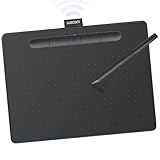
The Wacom One by Wacom Medium (CTL-672) is Wacom’s larger entry-level drawing tablet, designed as a stripped-back, no-frills alternative to the Intuos line. It keeps the things that make Wacom special — the battery-free EMR pen, the mature drivers, the dependable build — and trims the extras to land at an accessible price around $59. With a generous 8.5×5.3-inch active area, it is one of the cheapest ways to get a comfortable amount of drawing space from a Wacom-branded device. This Wacom One by Wacom Medium review covers the pen, build, software situation and who it is for.
- Wacom One by Wacom Medium at a Glance
- Pen Performance & Pressure
- Build & Materials
- Software Compatibility & Drivers
- Use Cases — Art, 3D and Note Taking
- What’s in the Box
- Verdict — Is the Wacom One by Wacom Medium Worth It?
- Frequently Asked Questions
- More Drawing Tablet Reviews
- Related Articles
- Related Articles
🛒 Best Price Today on Amazon
Prime members get fast, free shipping on everything above, plus member-only deals. New members get a 30-day free trial — cancel anytime.
As an Amazon Associate we earn from qualifying purchases.






Wacom One by Wacom Medium at a Glance
| Component | Specification |
|---|---|
| Active area | 8.5 x 5.3 inches (216 x 135 mm) |
| Pressure levels | 2,048 |
| Stylus type | Wacom EMR battery-free pen (CP-913) |
| Resolution | 2,540 lpi |
| Report rate | 133 pps |
| Tilt support | No |
| Express keys | None |
| Connection | USB (wired) |
| Approx price | around $59 |
Pen Performance & Pressure
The One by Wacom Medium ships with Wacom’s battery-free EMR stylus — the same core technology that powers every Wacom tablet, from beginner boards to flagship Cintiqs. EMR pens draw power wirelessly from the tablet surface, so there is no charging port, no battery to swap, and no sudden flat-pen moments mid-stroke. Pressure sensitivity is 2,048 levels, which is half of the Intuos Small’s 4,096 — that is the main concession Wacom makes at this price. In practice, 2,048 levels is still more than adequate for beginners, students and note-takers; the difference becomes harder to spot when sketching or writing, and only really shows in fine pressure ramps in detailed painting work. There is no tilt support, again as you would expect at this price. Report rate is the standard Wacom 133 pps over USB; in practice this is more than sufficient for line art, hand-lettering and notes — the limiting factor for line quality on this tablet is not the report rate but the lack of higher pressure resolution. Cursor accuracy and tracking across the active area are excellent for the bracket, with very low edge-drift or parallax — one of the quiet reasons Wacom remains the default recommendation even when the spec sheet looks modest.
Pen ergonomics are also worth a mention. The bundled CP-913 stylus is a clean, lightweight pen with a single side switch and a comfortable grip section. It does not have the multiple side switches or eraser end of the Wacom Pro Pen line, but for a beginner the simpler interface is arguably an advantage — fewer accidental button presses while learning. The pen tip uses standard Wacom-style nibs, and replacement nibs are inexpensive and widely available from third parties, so long-term running costs are minimal.
Build & Materials
The One by Wacom is slim, lightweight and unobtrusive. The matte work surface has a gentle texture that gives the pen tip a confident grip, and the chassis is the same minimalist design Wacom uses across its beginner range. There are no ExpressKeys on the tablet — a clear differentiator from the Intuos Small — so you will lean on keyboard shortcuts for undo, brush size and similar workflow actions, which means your keyboard layout becomes part of the working flow. Many users find this no inconvenience at all, particularly if they already use shortcut-heavy workflows in Photoshop or Clip Studio Paint, but it does limit the kind of glove-and-tablet-only operation that artists with shortcut-rich tablets can manage. The pen itself is a comfortable, balanced cylinder with a single side switch, and Wacom supplies three replacement nibs in the standard under-cap storage. It is a no-frills design that prioritises drawing area and reliability over features.
Software Compatibility & Drivers
Driver support is the single biggest reason to buy a Wacom tablet, and the One by Wacom is fully covered. The current Wacom drivers support Windows, macOS and ChromeOS, and the pen is also recognised by an unusually wide range of Chromebooks and Android devices, which is part of why this tablet is so popular with schools and educators. Inside major creative applications — Photoshop, Krita, Clip Studio Paint, Illustrator, OneNote, Microsoft Whiteboard — the One by Wacom is recognised on connection, and pressure sensitivity works out of the box. Note that the bundled creative-software offers are less generous than on the Intuos line; software bundles can change over time, so check the current Wacom promotion before you buy if that matters to you.
Use Cases — Art, 3D and Note Taking
The One by Wacom Medium is at its best as an everyday drawing surface where space, not features, is the priority. The 8.5×5.3-inch active area is large enough to draw whole-arm strokes comfortably and well matched to laptop and 24-27-inch desktop monitors. For students it is excellent: live-annotating PDFs, drawing diagrams on a virtual whiteboard or marking up assignments in OneNote feels natural. For artists, it is a perfectly reasonable first tablet, with the obvious limitation that you may want more pressure levels and ExpressKeys once you are serious. For 3D work, the larger area helps with sculpting input in ZBrush or Blender. It is best understood as a wired, fixed-on-the-desk workstation companion rather than a travel device.
What’s in the Box
The box contains the One by Wacom Medium tablet, the bundled EMR pen with three spare nibs stored under the end-cap, a USB cable and a Quick Start guide. There is no pen stand — the pen lays on the desk or you can use the small loop on the side of the tablet — and no Bluetooth, so this model is wired only. Driver download is online; once installed, the tablet calibrates itself in moments and is ready to use.
Verdict — Is the Wacom One by Wacom Medium Worth It?
At around $59 the Wacom One by Wacom Medium is one of the best-value drawing tablets you can buy if your priorities are a large active area, a reliable battery-free pen and Wacom’s industry-leading driver support. You give up some pressure levels, ExpressKeys, Bluetooth and a richer software bundle compared with the Intuos line — and if those matter to you, the Intuos Small is the right step up. For schools, students, educators and anyone wanting a no-fuss large drawing surface for cheap, the One by Wacom Medium is the easy recommendation. It is also one of the most easily resold tablets on the used market thanks to the Wacom name and the consistent global availability of compatible nibs and accessories. Pair it with a capable laptop from our best gaming laptops under $1,200 guide for the full experience.
Frequently Asked Questions
Does the Wacom One by Wacom pen need a battery?
No. The pen uses Wacom’s EMR (electromagnetic resonance) technology and is battery-free. It draws power wirelessly from the tablet.
How many pressure levels does the Wacom One by Wacom Medium have?
It supports 2,048 levels of pressure sensitivity. That is fewer than the Intuos Small’s 4,096 but still ample for beginners and students.
Is the Wacom One by Wacom Medium wireless?
No. This model is a wired (USB) tablet only. If you need Bluetooth, consider the Wacom Intuos Small Bluetooth instead.
Does the Wacom One by Wacom Medium have ExpressKeys?
No. There are no ExpressKeys on this model. You will use keyboard shortcuts for undo, brush size and similar workflow actions.
More Drawing Tablet Reviews
- XPPen StarG640 Review: Ultra-Slim 6×4 Drawing Tablet for OSU and Sketching
- XPPen Deco 01 V3 Review: 10×6 Drawing Tablet with Tilt and Battery-Free Pen
- XP-PEN Artist 12 Review: 11.6″ FHD Pen Display for Beginners
- XPPen Artist 15.6 Pro V2 Review: 16K Pressure Pen Display
- XPPen Deco 640 Review: 6×4 Drawing Tablet with 16K Pressure
- GAOMON M10K Review: 10×6 Drawing Tablet with Touch Ring
- GAOMON S620 Review: 6.5×4 Battery-Free Drawing Tablet
- HUION HS610 Review: Battery-Free Stylus, Tilt, and 8192 Pressure
Affiliate Disclosure: As an Amazon Associate, we earn from qualifying purchases. If you click a link and make a purchase, we may earn a small commission at no extra cost to you. Prices and availability are accurate as of publication and may change.
Related Articles
Looking for more on this topic? Browse the hand-picked guides below — each one applies the same scoring rubric used in this review.










