

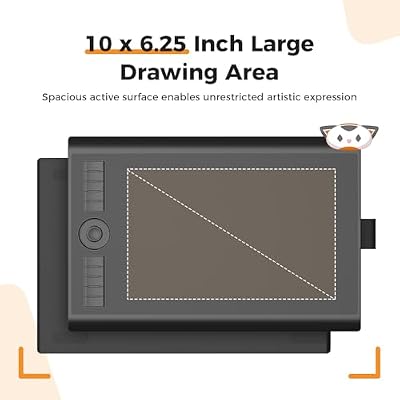
The GAOMON M10K is a long-standing mid-range drawing tablet that pairs a generous 10×6.25-inch active area with a battery-free pen, a touch ring and ten programmable shortcut keys — features usually associated with much pricier rivals. At around $69 it is one of the most feature-dense tablets you can find in the budget bracket. This GAOMON M10K review covers the pen, ExpressKeys, drivers and where it fits among XPPen and HUION alternatives.

GAOMON M10K Drawing Tablet, 10x6 with Touch Ring, 10 Keys & 8192 Pressure | Battery-Free Stylus, for Beginners/Students/Teachers, Ideal for Design, Writing & Editing, Works with Mac/Windows/Android



As an Amazon Associate we earn from qualifying purchases. Product prices and availability are accurate as of the date/time indicated.
🛒 Best Price Today on Amazon
Prime members get fast, free shipping on everything above, plus member-only deals. New members get a 30-day free trial — cancel anytime.
As an Amazon Associate we earn from qualifying purchases.





GAOMON M10K at a Glance
| Component | Specification |
|---|---|
| Active area | 10 x 6.25 inches (254 x 158 mm) |
| Pressure levels | 8,192 |
| Stylus type | Battery-free passive pen (GAOMON ArtPaint AP32) |
| Resolution | 5,080 lpi |
| Report rate | 266 pps |
| Tilt support | Yes (60 degrees) |
| Express keys | 10 ExpressKeys + 16 soft keys + touch ring |
| Connection | USB (wired) |
| Approx price | around $69 |
Pen Performance & Pressure
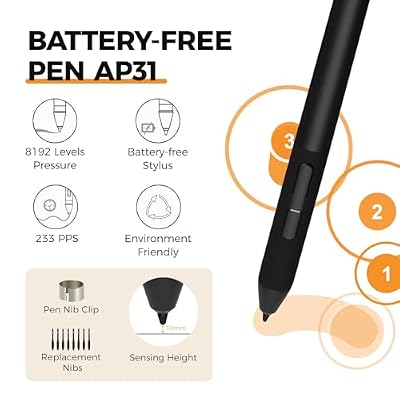
The M10K ships with GAOMON’s ArtPaint AP32 battery-free pen, which delivers 8,192 levels of pressure and 60-degree tilt support. The pen draws power wirelessly from the tablet surface, with no batteries to charge or replace, and weighs comfortably in the hand. Initial activation force is low, and pressure tracking is smooth and consistent in Photoshop, Krita, Clip Studio Paint and other creative applications. The pen has two side buttons that are remappable in the driver. For artists used to Wacom or XPPen styluses, the AP32 will feel familiar — it is a competent, no-drama mid-range stylus that holds its own at the price.
Tracking accuracy across the 10×6.25-inch active area is good after the four-point driver calibration, with the usual mild edge-drift you find at this price (less than on cheaper tablets, more than on Wacom mid-range). Report rate of 266 pps is plenty for smooth jitter-free strokes, and the pen-tip-to-cursor response feels tight in fast strokes as well as slow detail work. Pen ergonomics are conventional: a balanced cylinder with a rubberised grip, two side switches and the standard threaded nib-replacement design. The AP32 does not have an eraser end, which is the main feature concession against Wacom Pro Pens, but at this price most rivals make the same call. Replacement nibs are the standard plastic style and inexpensive to source from third parties if you wear through the bundled set.
Build & Materials
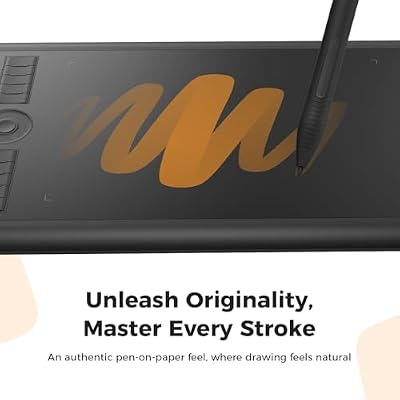
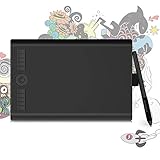
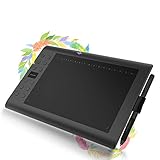
The M10K is one of the more shortcut-rich tablets at this size. Along the left edge there are 10 ExpressKeys plus a touch ring (used for zoom, brush size or scrolling) and a strip of 16 soft-touch shortcut keys above the active area. That is a lot of programmable input for the price, and although you may not use all of them, the option matters for muscle-memory-driven workflows. The work surface is matte with a subtle texture, the chassis is plasticky but solid, and the orientation can be flipped for left-handed users. There is no Bluetooth — the M10K is wired-only via USB. The chassis is solid, with no flex under hand pressure, and the matte work surface gives the pen tip a confident, paper-like resistance — somewhere between the smooth feel of cheaper tablets and the rougher texture some artists prefer. Underneath, four rubber feet keep the tablet stable on a desk. The pen sits in a multi-functional stand-and-nib-storage case that doubles as a small organiser, which is a nice touch for a desk that may also hold a sketchbook and reference monitor.
The shortcut-rich layout is what really sets the M10K apart from rivals at this price. Twelve ExpressKeys plus 16 soft-touch keys plus a touch ring is more programmable input than many full-price Wacom tablets, and although the soft-touch keys do not have the tactile feedback of physical buttons, they are clearly labelled and can be relabelled in software to match per-application shortcut sets. The touch ring is especially useful — it can be configured to brush-size in painting apps, zoom in editing apps and document-scroll in note-taking apps, with quick mode-switching via a centre button. For an artist who relies heavily on brush-size adjustment between strokes, the ring can shave seconds off every cycle of the workflow loop, which adds up over a multi-hour session.
Software Compatibility & Drivers
GAOMON’s drivers support Windows, macOS, Linux and Android. They are not as polished as Wacom’s, and they sit roughly on par with XPPen and HUION; occasional reinstalls may be needed after major OS updates. Inside Photoshop, Clip Studio Paint, Krita, Affinity Photo, MediBang and SAI, pressure and tilt are recognised after the driver install. The driver utility lets you remap every ExpressKey, soft key and touch-ring action per-application, set pressure curves and calibrate the working area.
Use Cases — Art, 3D and Note Taking
The M10K is at its best when you want a large active area and a lot of programmable input. For illustrators with heavy keyboard-shortcut workflows, the combination of 10 ExpressKeys, 16 soft keys and a touch ring can replace much of the keyboard altogether. For 3D artists in ZBrush or Blender, the large area and tilt help with sculpting and texture work. For educators and presenters, the shortcut-rich left edge maps well to slide controls and annotation tools. For note-takers and OSU players, the M10K is overkill — there are smaller tablets that do those jobs at half the price.
What’s in the Box
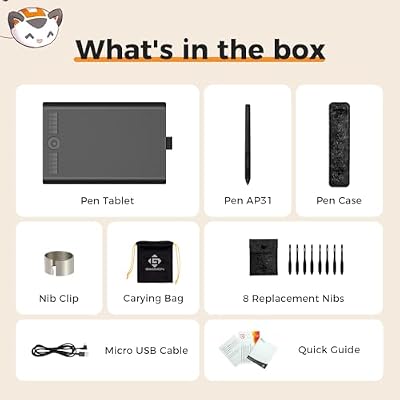
GAOMON includes the M10K tablet, the AP32 battery-free pen, a multi-functional pen stand that doubles as nib storage, eight replacement nibs (commonly), a USB cable, a two-finger artist glove and a Quick Start guide. There is no Bluetooth dongle and no software bundle of note, so plan for any commercial creative apps you may want separately.
Verdict — Is the GAOMON M10K Worth It?
At around $69 the GAOMON M10K is one of the most feature-rich large drawing tablets in the budget bracket. The combination of a 10×6.25-inch active area, tilt-enabled battery-free pen and a remarkable suite of 10 ExpressKeys, 16 soft keys and a touch ring is hard to match at the price. The compromises are the wired-only connection and somewhat less polished drivers compared to Wacom, but for artists who lean heavily on shortcut-driven workflows, the M10K is a quietly excellent choice. The long product cycle also means tutorials, custom driver presets and community troubleshooting threads are widely available online — useful when you are setting up the soft-touch key labels for the first time. For a strong drawing PC to pair with it, see our best RTX 5070 gaming laptops guide.
Frequently Asked Questions
Does the GAOMON M10K support tilt?
Yes. The AP32 battery-free pen supports up to 60 degrees of tilt, which helps tilt-aware brushes in Photoshop and Clip Studio Paint behave naturally.
Does the GAOMON M10K pen need charging?
No. The ArtPaint AP32 stylus is battery-free and draws power wirelessly from the tablet, so it never needs charging.
Is the GAOMON M10K wireless?
No. The M10K is a wired (USB) tablet only. If you need wireless, consider the Wacom Intuos Small Bluetooth or HUION Inspiroy 2.
How many ExpressKeys does the GAOMON M10K have?
It has 10 ExpressKeys plus 16 soft-touch shortcut keys and a touch ring, all customisable in the driver utility.
More Drawing Tablet Reviews
- GAOMON S620 Review: 6.5×4 Battery-Free Drawing Tablet
- HUION HS610 Review: Battery-Free Stylus, Tilt, and 8192 Pressure
- HUION Inspiroy 2 Large Review: 10×6 Scroll Wheel Drawing Tablet
- GAOMON PD1161 Review: 11.6″ FHD Pen Display for Hobbyists
- Wacom Intuos Small Bluetooth Review: Beginner-Friendly Drawing Tablet
- Wacom One by Wacom Medium Review: Larger Beginner Pen Tablet
- XPPen StarG640 Review: Ultra-Slim 6×4 Drawing Tablet for OSU and Sketching
- XPPen Deco 01 V3 Review: 10×6 Drawing Tablet with Tilt and Battery-Free Pen
Affiliate Disclosure: As an Amazon Associate, we earn from qualifying purchases. If you click a link and make a purchase, we may earn a small commission at no extra cost to you. Prices and availability are accurate as of publication and may change.
Related Articles
Looking for more on this topic? Browse the hand-picked guides below — each one applies the same scoring rubric used in this review.










