

- Top Pick: XPPen Deco 01 V3 10×6 Drawing Tablet, 16K Battery-Free Stylus, 8 Keys
- Best Value: XPPen Deco 01 V3 10×6 Drawing Tablet | 16K Pressure Pen | Battery-Free Stylus | 8 Hotkeys | for OSU Gaming & Teaching | PC/Mac/Android/ChromeOS Compatible | Green
- Premium Choice: XPPen Updated Deco 01 V3 Drawing Tablet, 16384 Pressure Sensitivity, 8 Custom Shortcuts, 220 Report Rate for OSU Drawing Pad, Remote Teaching & Animation, Compatible with Android, Windows, macOS
The XPPen Deco 01 V3 is XPPen’s mid-range workhorse, offering a generous 10×6.25-inch active area, a tilt-enabled battery-free pen and a set of customisable shortcut keys at a price that comfortably undercuts comparably sized Wacom tablets. At around $59 it is one of the best-value steps up from beginner boards. This XPPen Deco 01 V3 review covers the pen, ExpressKeys, drivers and use cases for digital illustrators, photo editors and educators alike.
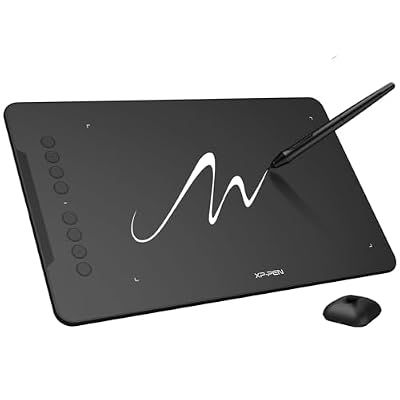
XPPen Deco 01 V3 10x6 Drawing Tablet, 16K Battery-Free Stylus, 8 Keys | Battery-Free Stylus, 8 Keys for Digital Art, Teaching, OSU, Mac, PC, Android, Chromebook, Designed for Beginners




As an Amazon Associate we earn from qualifying purchases. Product prices and availability are accurate as of the date/time indicated.
🛒 Best Price Today on Amazon
Prime members get fast, free shipping on everything above, plus member-only deals. New members get a 30-day free trial — cancel anytime.
As an Amazon Associate we earn from qualifying purchases.


XPPen Deco 01 V3 at a Glance
| Component | Specification |
|---|---|
| Active area | 10 x 6.25 inches (254 x 158 mm) |
| Pressure levels | 8,192 |
| Stylus type | Battery-free passive pen (XPPen X3 chip Smart Stylus) |
| Resolution | 5,080 lpi |
| Report rate | 220 pps |
| Tilt support | Yes (60 degrees) |
| Express keys | 8 customisable shortcut keys |
| Connection | USB-C (wired) |
| Approx price | around $59 |
Pen Performance & Pressure
The Deco 01 V3 ships with one of XPPen’s modern battery-free pens, built around the company’s X3 smart chip. It delivers 8,192 pressure levels and, crucially at this price, full 60-degree tilt support — which means brushes in Photoshop, Clip Studio Paint and Krita respond naturally to the angle of the stylus, just as a traditional pencil or marker would. Initial activation force is low; faint lines come out faint, and pressure ramps feel smooth and predictable. The pen is battery-free, drawing power wirelessly from the tablet, with two customisable side buttons and a comfortable rubberised grip. Compared with the StarG640, the Deco 01 V3 is in a different class for serious artwork, mostly thanks to tilt.
Report rate of around 220 pps over USB-C is more than sufficient for smooth, jitter-free line work, and tracking accuracy across the 10×6.25-inch active area is good — minimal edge-drift and parallax, which is where lesser tablets fall short. The X3 chip’s improvements over older XPPen pens are real: lower IAF makes faint pencil-style strokes possible in a way previous-generation styluses struggled with, and the pen tip-to-cursor mapping is now tight enough that careful precision work in Photoshop or Clip Studio Paint feels natural. Drivers expose a useful pressure-curve editor that lets you tune the response to your preferred touch — a feature missing on many budget tablets and welcomed by artists transitioning from Wacom hardware.
Build & Materials
The Deco 01 V3 has a clean, slim design with a matte work surface that gives the pen tip pleasant resistance — similar in feel to a piece of card. The 8 ExpressKeys run vertically along the left edge of the tablet (the orientation can be flipped 180 degrees for left-handed users in software), and they have a clear tactile click. USB-C connection is a welcome modernisation over the older microUSB many tablets at this price still use, and the cable is detachable so a damaged cable does not mean a dead tablet. Overall build feels noticeably more premium than budget options, without straying into the price territory of Wacom’s mid-range. The work surface texture deserves mention — XPPen has tuned it so the pen tip has a definite paper-like resistance but does not aggressively wear nibs; expect a single nib to last a month or more of daily heavy use before you notice a change in tip shape, and the bundled 8 replacement nibs comfortably cover a year or more for hobbyist users. Underneath, four rubber feet keep the tablet stable on a desk, and the chassis edges are slightly bevelled, which is comfortable when your wrist rests near the work-area boundary during long sessions.
Software Compatibility & Drivers
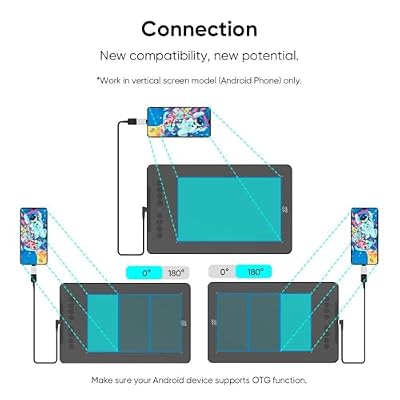
The Deco 01 V3 is supported on Windows, macOS, ChromeOS, Linux and — increasingly importantly — Android. XPPen’s driver utility lets you remap the 8 ExpressKeys per-application, set pressure curves, calibrate the work area and (on Android) define the active area for use with a tablet or phone. Inside Photoshop, Clip Studio Paint, Krita, Affinity Photo, Procreate-style Android apps and a long list of others, pressure sensitivity and tilt are recognised after the driver install. The driver is now polished enough that real day-to-day issues are rare; XPPen also publishes meaningful driver updates several times a year.
Use Cases — Art, 3D and Note Taking
This is XPPen’s general-purpose mid-range tablet, and it lives up to that. For digital illustration, the combination of 10×6.25 inches of working area, tilt support and 8 ExpressKeys is genuinely productive — the only thing you really sacrifice against pricier Wacom Intuos Pros is some driver polish and the ring/touch controls. For 3D artists using ZBrush, Blender or Substance, the large area and tilt help with sculpting and texture painting. For educators and presenters, the ExpressKeys can be mapped to slide controls or annotation tools, and the large surface makes whiteboarding readable. Android support also makes it useful as a mobile illustration setup paired with a phone or tablet. The 8 ExpressKeys can be remapped per-application, which means the keys can serve a primary set of shortcuts in Photoshop, a different set in Krita, another set in Blender and so on — a productivity multiplier on a tablet at this price tier.
What’s in the Box
The box includes the Deco 01 V3 tablet, the X3 Smart Stylus, a pen stand that doubles as nib storage, a set of 8 replacement nibs, a USB-C-to-USB-A cable, a USB-C-to-USB-C cable, an OTG adapter for Android use, an artist glove and a Quick Start guide. The OTG adapter and second cable for mobile use are unusually thoughtful inclusions at this price, and the artist glove is welcome for long sessions where wrist friction on the matte surface can otherwise become tiring.
Verdict — Is the XPPen Deco 01 V3 Worth It?
At around $59 the XPPen Deco 01 V3 is one of the best mid-range drawing tablet values on the market. The combination of a 10-inch active area, tilt support, 8 ExpressKeys, a modern battery-free pen and broad OS compatibility (including Android) is hard to beat at the price. The compromises are minor — driver polish lags Wacom slightly, and there is no Bluetooth — but for the asking price they are easy to accept. For anyone outgrowing a small beginner tablet but not ready for the cost of a Wacom Intuos Pro, the Deco 01 V3 is the obvious step. XPPen’s continuous driver development and competitive pricing have made the Deco line one of the most consistently improving products in the budget-to-mid bracket. Build a strong drawing PC for it with our best RTX 5070 gaming laptops guide.
Frequently Asked Questions
Does the XPPen Deco 01 V3 support tilt?
Yes. It supports up to 60 degrees of tilt sensitivity, which is unusual at this price and important for naturalistic brushwork.
Does the XPPen Deco 01 V3 pen need charging?
No. The X3 Smart Stylus is battery-free and draws power wirelessly from the tablet — no batteries, no charging cable.
Is the XPPen Deco 01 V3 compatible with Android?
Yes. XPPen includes an OTG adapter in the box and the driver supports Android use, making the Deco 01 V3 viable as a mobile illustration setup.
How many ExpressKeys does the XPPen Deco 01 V3 have?
It has 8 fully customisable ExpressKeys, which can be remapped per-application in the driver utility.
More Drawing Tablet Reviews
- XP-PEN Artist 12 Review: 11.6″ FHD Pen Display for Beginners
- XPPen Artist 15.6 Pro V2 Review: 16K Pressure Pen Display
- XPPen Deco 640 Review: 6×4 Drawing Tablet with 16K Pressure
- GAOMON M10K Review: 10×6 Drawing Tablet with Touch Ring
- GAOMON S620 Review: 6.5×4 Battery-Free Drawing Tablet
- HUION HS610 Review: Battery-Free Stylus, Tilt, and 8192 Pressure
- HUION Inspiroy 2 Large Review: 10×6 Scroll Wheel Drawing Tablet
- GAOMON PD1161 Review: 11.6″ FHD Pen Display for Hobbyists
Affiliate Disclosure: As an Amazon Associate, we earn from qualifying purchases. If you click a link and make a purchase, we may earn a small commission at no extra cost to you. Prices and availability are accurate as of publication and may change.
Related Articles
Looking for more on this topic? Browse the hand-picked guides below — each one applies the same scoring rubric used in this review.










