

Most GPU guides talk about frame rates, but multitasking asks something different of a graphics card: can it hold a wall of browser tabs, a couple of creative apps, several monitors, and a game or stream all open at once without running out of memory or display outputs? Two specs decide that — video memory (VRAM), which is the buffer that holds everything on screen and in your creative apps, and the number and type of display outputs, which sets how many monitors you can drive. This guide rounds up the best multitasking GPUs in 2026 with those priorities front and centre, spanning value 16GB-class cards, high-VRAM gaming cards, and a dedicated workstation GPU built for exactly this kind of many-app, many-screen workload.
- Best Multitasking GPUs at a Glance
- 1. MSI Gaming GeForce RTX 3060 12GB GDDR6 192-Bit
- 2. GIGABYTE Radeon RX 9060 XT Gaming OC 16G, PCIe 5.0
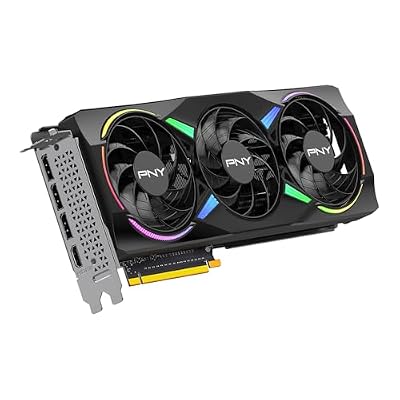
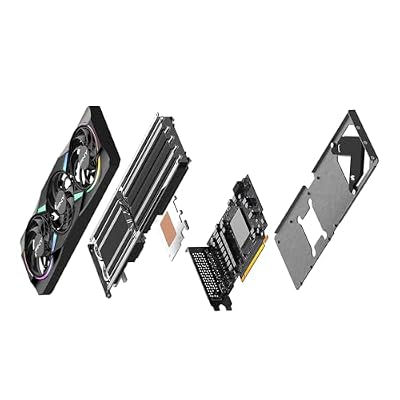
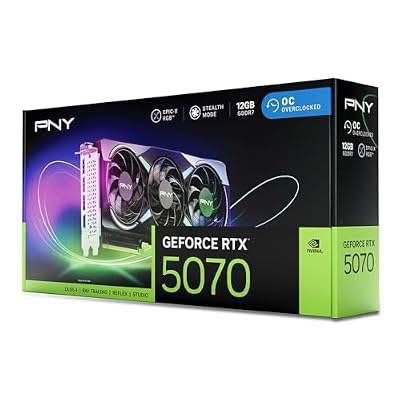
- 3. PNY NVIDIA GeForce RTX 5070 Epic-X ARGB OC Triple Fan, 12GB GDDR7
- 4. ASUS Prime GeForce RTX 5080 OC Edition Triple Fan, 16GB GDDR7
- 5. NVIDIA RTX PRO 4000 SFF Blackwell 24GB GDDR7 ECC, 4X mDP 2.1b
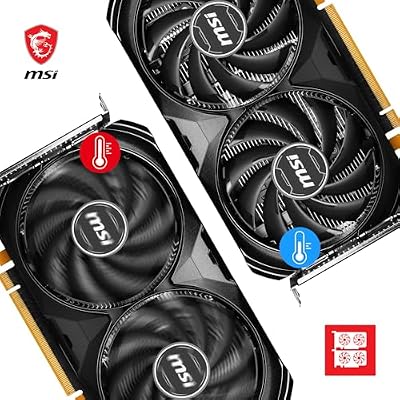
- 6. msi Gaming GeForce RTX 4060 8GB GDDR6 128-Bit
- How to Choose a GPU for Multitasking
- Frequently Asked Questions
- Related Guides
- Related Articles
Our picks were chosen on what genuinely keeps a heavy-multitasking system smooth: VRAM capacity for many simultaneous apps and high-resolution windows, the count and flexibility of display outputs for multi-monitor setups, memory bandwidth and generation, and value. We have avoided quoting invented benchmark numbers — instead we explain where each card fits and who it is for, with prices from around $371 up to around $2,047. We are also honest about category: one card here is a professional workstation GPU rather than a gaming card, and we say so plainly. Below is an at-a-glance comparison of all six, then a closer look at each and a buyer’s guide built around VRAM, display outputs and bandwidth — the criteria that actually matter for multitasking.
As an Amazon Associate we earn from qualifying purchases at no extra cost to you.




🛒 Best Price Today on Amazon
Prime members get fast, free shipping on everything above, plus member-only deals. New members get a 30-day free trial — cancel anytime.
Best Multitasking GPUs at a Glance
| Graphics Card | Best For | Standout Spec | Approx Price |
|---|---|---|---|
| MSI GeForce RTX 3060 12GB | Value 12GB multitasking | 12GB VRAM, proven all-rounder | around $399 |
| GIGABYTE Radeon RX 9060 XT 16GB | 16GB value workhorse | 16GB GDDR6, current-gen | around $460 |
| PNY GeForce RTX 5070 12GB ARGB | Modern multi-app + game | 12GB GDDR7, triple fan | around $633 |
| ASUS Prime RTX 5080 16GB OC | High-end create + multitask | 16GB GDDR7, top-tier output | around $1,500 |
| NVIDIA RTX PRO 4000 SFF 24GB | Workstation many-monitor pro | 24GB ECC, 4x mDP 2.1b, SFF | around $2,047 |
| MSI GeForce RTX 4060 8GB | Entry multitasking budget | 8GB VRAM, compact, efficient | around $371 |
1. MSI Gaming GeForce RTX 3060 12GB GDDR6 192-Bit

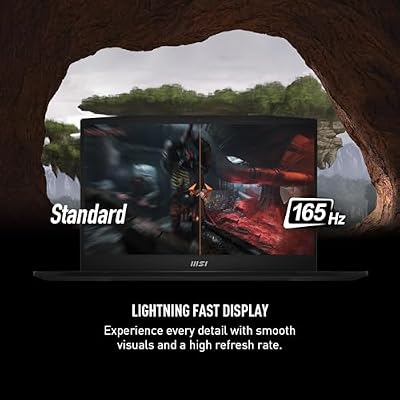
msi Katana 15 15.6” 165Hz QHD Gaming Laptop: Intel Core i7-13620H, NVIDIA Geforce RTX 4070, 16GB DDR5, 1TB NVMe SSD, Cooler Boost 5, Win 11: Black B13VGK-2000US



As an Amazon Associate we earn from qualifying purchases. Product prices and availability are accurate as of the date/time indicated.
The MSI GeForce RTX 3060 12GB is the value multitasking pick, and we lead with it because its standout trait is exactly what multitaskers want: a generous 12GB of VRAM at a sensible price. That 12GB buffer is more than many newer mid-range cards offer, and it gives you real headroom to keep many browser tabs, creative apps and high-resolution windows open at once. At around $399 it remains one of the most sensible cards for a do-everything system.
This is the card for the user who juggles work and play and wants memory headroom without overspending. The 12GB of VRAM means you are far less likely to hit a memory wall with a heavy tab load, a photo editor and a game running together, the Twin-Fan MSI cooler keeps it quiet under sustained load, and the standard HDMI and DisplayPort outputs drive a typical multi-monitor desk. As a proven, widely supported all-rounder with more VRAM than its price suggests, the RTX 3060 12GB is a smart foundation for a multitasking build.
Pros: Generous 12GB VRAM for the price, proven all-rounder, quiet twin-fan cooler.
Cons: Previous-generation architecture; bandwidth trails newer cards.
2. GIGABYTE Radeon RX 9060 XT Gaming OC 16G, PCIe 5.0

GIGABYTE Radeon RX 9060 XT Gaming OC 16G Graphics Card, PCIe 5.0, 16GB GDDR6, GV-R9060XTGAMING OC-16GD Video Card




As an Amazon Associate we earn from qualifying purchases. Product prices and availability are accurate as of the date/time indicated.
The GIGABYTE Radeon RX 9060 XT 16G is the 16GB value workhorse. It pairs a current-generation AMD GPU with a full 16GB of GDDR6 on a PCIe 5.0 interface, giving you a large memory buffer for multitasking at a mid-range price. At around $460 it offers more VRAM than several pricier NVIDIA options, which is precisely the trait that helps a system stay smooth with many things open.
This is the card for the multitasker who wants plenty of memory headroom and current-generation efficiency without paying flagship money. The 16GB of GDDR6 comfortably holds a heavy spread of apps, tabs and high-resolution content, the Gaming OC cooler keeps temperatures and noise in check, and the modern PCIe 5.0 interface keeps it future-friendly. AMD’s display outputs handle a multi-monitor setup well. For a high-VRAM, current-generation card that balances multitasking headroom against cost, the RX 9060 XT 16G is a compelling value pick.
Pros: Full 16GB GDDR6, current-generation, PCIe 5.0, strong VRAM-per-dollar.
Cons: Driver ecosystem differs from NVIDIA; check app/CUDA needs first.
3. PNY NVIDIA GeForce RTX 5070 Epic-X ARGB OC Triple Fan, 12GB GDDR7

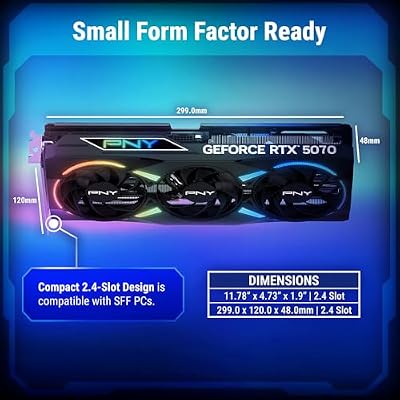
PNY NVIDIA GeForce RTX™ 5070 EPIC-X RGB® OC Triple-Fan Graphics Card | 12GB GDDR7, 192-bit, Boost: 2685 MHz, SFF-Ready, PCIe® 5.0, HDMI®/DP 2.1, 2.4-Slot, NVIDIA Blackwell Architecture, DLSS 5






As an Amazon Associate we earn from qualifying purchases. Product prices and availability are accurate as of the date/time indicated.
The PNY GeForce RTX 5070 12GB is the modern multi-app-and-game pick. It brings the latest-generation architecture and fast 12GB GDDR7 memory in a triple-fan, ARGB-lit design, pairing current-gen speed with a healthy memory buffer. At around $633 it is a step up in both performance and price, aimed at the user who wants a contemporary card that handles demanding multitasking and modern gaming alike.
This is the card for someone who multitasks hard but also wants a current-generation GPU for the latest games and creative workloads. The 12GB of fast GDDR7 provides a quick, capable memory pool for many open applications and high-resolution windows, the newer architecture improves efficiency over older cards, and the robust triple-fan cooler keeps it composed under load. The modern DisplayPort and HDMI outputs drive a multi-monitor productivity setup comfortably. For a balanced, current-generation card that does serious multitasking and gaming, the RTX 5070 is a strong middle-high choice.
Pros: Current-gen architecture, fast 12GB GDDR7, capable triple-fan cooler, modern outputs.
Cons: 12GB is solid but not the largest buffer here; premium price.
4. ASUS Prime GeForce RTX 5080 OC Edition Triple Fan, 16GB GDDR7

The ASUS Prime RTX 5080 16GB is the high-end create-and-multitask pick. It combines a top-tier current-generation GPU with 16GB of fast GDDR7 and a robust triple-fan Prime cooler, delivering both the raw power for demanding creative work and the memory headroom for heavy multitasking. At around $1,500 it is a serious investment, suited to power users and creators who run intensive apps alongside many windows.
This is the card for the professional or enthusiast who needs both performance and capacity. The 16GB of GDDR7 gives ample room for large projects, many open applications and high-resolution multi-monitor work, the high-end GPU accelerates demanding creative and compute tasks, and the substantial cooler sustains performance quietly. Its modern, plentiful display outputs are well-suited to a multi-monitor command centre. For a powerful, high-VRAM card that handles serious creation and aggressive multitasking on the same machine, the RTX 5080 is the top gaming-class choice here.
Pros: Top-tier current-gen power, 16GB GDDR7, strong triple-fan cooler, plentiful modern outputs.
Cons: Expensive; overkill if you only multitask without heavy GPU workloads.
5. NVIDIA RTX PRO 4000 SFF Blackwell 24GB GDDR7 ECC, 4X mDP 2.1b

NVIDIA RTX PRO 4000 SFF Blackwell 24GB GDDR7 ECC - PCIe 5.0x8, 4X mDP 2.1b, Low-Profile Dual-Slot AI Workstation GPU Retail


As an Amazon Associate we earn from qualifying purchases. Product prices and availability are accurate as of the date/time indicated.
The NVIDIA RTX PRO 4000 SFF is the dedicated workstation pick, and it is the one card here that is genuinely engineered for many-monitor, many-app professional multitasking — so we are clear up front that this is a professional workstation GPU, not a gaming card. Its standout specs read like a multitasking checklist: 24GB of ECC GDDR7 memory and four Mini DisplayPort 2.1b outputs, all in a low-profile, small-form-factor design. At around $2,047 it is the most expensive option and aimed squarely at professionals.
This is the card for the workstation user who drives a wall of high-resolution monitors and runs memory-hungry professional applications all day. The huge 24GB of ECC memory holds enormous datasets and many simultaneous apps with error-correction for reliability, the four native Mini DisplayPort 2.1b outputs drive a four-monitor array directly without adapters, and the SFF form factor fits compact and rackable workstations. It is not the card for gaming value — you would pay far less for equivalent frame rates from a gaming GPU — but for pure many-screen, many-app professional multitasking with maximum VRAM and native multi-monitor output, nothing else here matches it.
Pros: Huge 24GB ECC VRAM, four native mDP 2.1b outputs, low-profile SFF, built for pro multitasking.
Cons: Workstation card, not a gaming GPU; by far the highest price for gaming value.
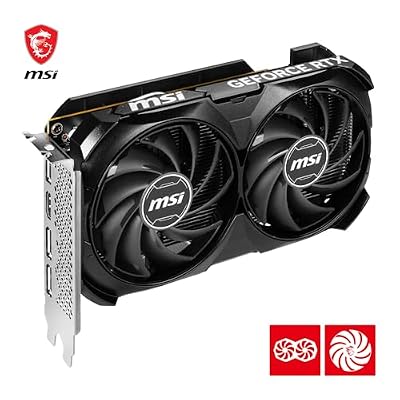
6. msi Gaming GeForce RTX 4060 8GB GDDR6 128-Bit

MSI GeForce RTX 4060 Ventus 2X Black 8G OC Gaming Graphics Card - 8GB GDDR6X, PCI Express Gen 4, 128-bit, 3X DP v 1.4a, HDMI 2.1a (Supports 4K & 8K HDR)



As an Amazon Associate we earn from qualifying purchases. Product prices and availability are accurate as of the date/time indicated.
Rounding out the list is the MSI GeForce RTX 4060 8GB, the entry-level multitasking pick. It offers a current-ish generation GPU with 8GB of VRAM in a compact, efficient package, and at around $371 it is the most affordable card here. With the smallest memory buffer on the list, it is best for lighter multitasking and mainstream use rather than the heaviest many-app workloads.
This is the card for the budget-conscious user with a more moderate multitasking load — a reasonable number of tabs and apps, everyday productivity, and mainstream gaming. The 8GB of VRAM is adequate for typical multi-monitor productivity and 1080p gaming, the compact design fits smaller cases easily, and the efficient power draw keeps the system cool and quiet. Be honest with yourself about your workload, though: if you routinely run dozens of tabs, creative apps and a game together, the higher-VRAM cards above will serve you better. For lighter multitasking on a budget, the RTX 4060 is a sensible, low-cost entry point.
Pros: Most affordable here, compact and efficient, adequate 8GB for lighter multitasking.
Cons: Smallest VRAM on the list; 8GB limits heavy many-app workloads.
How to Choose a GPU for Multitasking
For multitasking, VRAM is the single most important spec — far more than headline gaming performance. Video memory is the buffer that holds everything currently on your screens and in your open applications, so the more you have, the more browser tabs, creative apps and high-resolution windows you can keep open before the system starts swapping and stuttering. That is why a 12GB card like the RTX 3060, a 16GB card like the RX 9060 XT or RTX 5080, or the 24GB workstation RTX PRO 4000 all earn their place: capacity, not just speed, keeps a heavy workload smooth. Buy as much VRAM as your workload and budget allow.
Display outputs are the second multitasking priority, because they decide how many monitors you can run. Count the physical connectors and check the standards: the RTX PRO 4000’s four Mini DisplayPort 2.1b outputs, for instance, drive a four-monitor array natively without adapters, which is exactly what a many-screen command centre needs. Most gaming cards here offer a mix of DisplayPort and HDMI that comfortably handles two or three monitors. Before you buy, tally how many displays you run and confirm the card has enough outputs of the right type to drive them all at your desired resolution and refresh.
Memory bandwidth and generation matter once VRAM and outputs are sorted. Newer architectures with faster memory — the GDDR7 on the RTX 5070 and 5080, or the ECC GDDR7 on the workstation card — move data more quickly and efficiently than older GDDR6 designs, which helps when you are pushing many high-resolution windows and switching between demanding apps. A current-generation card also tends to be more power-efficient and better supported going forward. Weigh the generation against price: an older but high-VRAM card can still be the smarter multitasking buy than a newer card with less memory.
Finally, be honest about category and ecosystem so you do not overpay or under-buy. If you only multitask and game, a gaming card with ample VRAM is the right tool — the workstation RTX PRO 4000 is superb for many-monitor professional work but poor value if you just want frames. Check whether your professional apps prefer NVIDIA’s CUDA or run fine on AMD, confirm the card physically fits your case, and match the power supply to its draw. Prioritise VRAM, count your display outputs, weigh bandwidth and generation, and pick the GPU on this list that matches how many apps and screens you actually run.
Frequently Asked Questions
How much VRAM do I need for heavy multitasking?
More than you would for gaming alone, because every open app, browser tab and high-resolution window consumes video memory. For light-to-moderate multitasking, 8GB like the RTX 4060 can cope, but for a heavy load of tabs, creative apps and multiple monitors, 12GB to 16GB cards such as the RTX 3060 12GB, RX 9060 XT or RTX 5080 give real headroom — and the 24GB workstation RTX PRO 4000 is built for the most demanding professional workloads of all.
How many monitors can these GPUs drive at once?
It depends on the card’s physical outputs. Most gaming cards here provide a mix of DisplayPort and HDMI that comfortably runs two or three monitors. The standout for many-monitor setups is the NVIDIA RTX PRO 4000 SFF, which has four native Mini DisplayPort 2.1b outputs to drive a four-screen array directly without adapters. Always count the connectors and confirm the standards match your monitors before buying.
Is the NVIDIA RTX PRO 4000 worth it over a gaming card?
Only for the right user. It is a professional workstation GPU, not a gaming card, and at around $2,047 it is poor value if all you want is frame rates — a much cheaper gaming card would match or beat it in games. But for many-monitor, memory-hungry professional multitasking, its 24GB of ECC VRAM, four native DisplayPort outputs and compact SFF form factor are exactly what the job needs. Match the card to the workload.
Should I pick more VRAM or a newer GPU generation for multitasking?
For multitasking specifically, lean toward VRAM. A card with more video memory lets you keep more apps and windows open before the system slows, which is the core multitasking bottleneck. A newer generation brings faster memory and better efficiency, which helps too, but if you must choose, an older high-VRAM card like the RTX 3060 12GB often handles a heavy app load better than a newer card with a smaller buffer.
Related Guides
- Best GPUs for Your Build
- Best Budget GPUs
- Best Workstation GPUs
- Best Monitors for Multi-Display Setups
- Best RAM for Gaming and Multitasking
- Best Power Supplies
Affiliate Disclosure: As an Amazon Associate, we earn from qualifying purchases. If you click a link and make a purchase, we may earn a small commission at no extra cost to you. Prices and availability are accurate as of publication and may change.










