

Graphic design is a memory-intensive craft. Large, high-resolution Photoshop files, multi-layer Illustrator artwork, big InDesign documents and the habit of keeping several creative applications open at once all consume RAM voraciously — and when memory runs short, creative apps stutter, scratch-disk to storage and break your flow. For design work, capacity is the spec that transforms the experience, which is why this guide leads with 32GB kits as the recommended starting point for serious designers. This guide rounds up the best RAM for graphic design in 2026, prioritising the 32GB capacity large files demand while keeping sensible 16GB options for lighter or laptop setups.
- Best RAM for Graphic Design at a Glance
- 1. Corsair Vengeance RGB Pro 32GB (2x16GB) DDR4 3200 (PC4-25600) C16
- 2. CORSAIR Vengeance LPX DDR4 32GB (2x16GB) up to 3200MHz CL16
- 3. Crucial 32GB DDR4 RAM Kit (2x16GB) 3200MHz Laptop Memory, SODIMM
- 4. CORSAIR Vengeance LPX DDR4 16GB (2x8GB) 3600MHz CL18
- 5. Corsair Vengeance LPX DDR4 16GB (2x8GB) 3200MHz CL16
- 6. CORSAIR Vengeance LPX DDR4 16GB (2x8GB) 3000MHz CL15
- How to Choose RAM for Graphic Design
- Frequently Asked Questions
- Related Guides
- Related Articles
- Related Guides
Every kit here is DDR4, the standard in the vast majority of design machines in service today, and we flag the one laptop (SODIMM) kit clearly so you match the right form factor to your hardware. Our picks were chosen on what matters for creative work: capacity above all, then dual-channel bandwidth, sensible timings, broad compatibility and value, with prices from around $115 up to around $245. We do not quote invented benchmark numbers — we explain where each kit fits and who it is for. Below is an at-a-glance comparison of all six, then a closer look at each and a buyer’s guide built around capacity, dual-channel kits and form factor for graphic design.
As an Amazon Associate we earn from qualifying purchases at no extra cost to you.




🛒 Best Price Today on Amazon
Prime members get fast, free shipping on everything above, plus member-only deals. New members get a 30-day free trial — cancel anytime.
Best RAM for Graphic Design at a Glance
| Memory Kit | Best For | Standout Spec | Approx Price |
|---|---|---|---|
| Corsair Vengeance RGB Pro 32GB 3200 C16 | Large files, big creative apps | 2x16GB, C16, RGB | around $145 |
| Corsair Vengeance LPX 32GB 3200 CL16 | Plain 32GB design workhorse | 2x16GB, CL16, low profile | around $243 |
| Crucial 32GB DDR4 3200 (Laptop SODIMM) | Design laptop / mini-PC | 2x16GB SODIMM, CL22 | around $245 |
| Corsair Vengeance LPX 16GB 3600 CL18 | Higher-speed 16GB starter | 2x8GB, 3600MHz, low profile | around $130 |
| Corsair Vengeance LPX 16GB 3200 CL16 | Entry 16GB design value | 2x8GB, CL16, low profile | around $119 |
| Corsair Vengeance LPX 16GB 3000 CL15 | Tight-timing 16GB entry | 2x8GB, CL15, 3000MHz | around $115 |
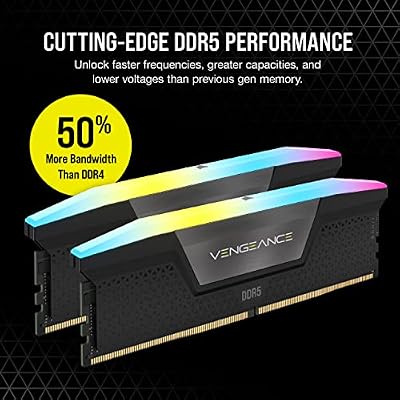
1. Corsair Vengeance RGB Pro 32GB (2x16GB) DDR4 3200 (PC4-25600) C16

CORSAIR Vengeance RGB DDR5 RAM 32GB (2x16GB) Up to 6000MHz CL30-36-36-76 1.40V AMD EXPO Intel XMP Desktop Computer Memory - Gray (CMH32GX5M2B6000Z30K)


As an Amazon Associate we earn from qualifying purchases. Product prices and availability are accurate as of the date/time indicated.
The Corsair Vengeance RGB Pro 32GB kit is the graphic designer’s pick, and it leads this list because capacity is what creative work demands. It delivers 32GB across two 16GB modules at 3200MHz with a C16 timing in a dual-channel configuration, with Corsair’s RGB lighting for those who want it. At around $145 it is excellent value for the headroom it gives a design workstation, and the recommended starting capacity for serious work.
This is the kit to choose for a real design workflow: 32GB lets you open large, high-resolution Photoshop files with many layers, multiple Illustrator and InDesign documents, and a browser of references all at once, without the app stuttering or scratch-disking to storage. The C16 timing keeps things responsive when you scrub through history states or apply heavy filters, the dual-channel layout feeds the system well, and 32GB is the capacity that makes the difference. For most designers building or upgrading a desktop, this kit is the sensible default and the best value here.
Pros: Generous 32GB at C16 3200MHz for large creative files, dual-channel, great value.
Cons: RGB modules sit taller; some compact design boxes prefer low-profile sticks.
2. CORSAIR Vengeance LPX DDR4 32GB (2x16GB) up to 3200MHz CL16

CORSAIR Vengeance LPX DDR4 RAM 32GB (2x16GB) Up to 3200MHz CL16-20-20-38 1.35V Intel XMP AMD EXPO Computer Memory – Black (CMK32GX4M2E3200C16)


As an Amazon Associate we earn from qualifying purchases. Product prices and availability are accurate as of the date/time indicated.
The Corsair Vengeance LPX 32GB kit is the plain-styled design workhorse. It offers the same desirable 32GB at up to 3200MHz CL16 dual-channel configuration as the RGB Pro, but in Corsair’s understated low-profile LPX heat spreaders rather than lit modules. At around $243 it is the no-nonsense large-capacity choice for designers who value clearance and a clean, distraction-free build.
This is the pick for the designer who wants the headroom of 32GB without lighting, perhaps in a workstation with a tall air cooler or a compact case. The low-profile LPX design clears coolers and tight builds where RGB modules will not, the CL16 timing keeps creative apps responsive under load, and the 32GB capacity comfortably absorbs large files and several open applications. For a businesslike 32GB DDR4 kit that disappears into the build and lets you focus on the work, the LPX is a dependable, well-proven choice for a design machine.
Pros: Generous 32GB at CL16 3200MHz, low-profile cooler clearance, plain workstation styling.
Cons: Costs more than the RGB Pro 32GB kit; no lighting if you want it.
3. Crucial 32GB DDR4 RAM Kit (2x16GB) 3200MHz Laptop Memory, SODIMM

As an Amazon Associate we earn from qualifying purchases. Product prices and availability are accurate as of the date/time indicated.
The Crucial 32GB DDR4-3200 kit is the pick for designers who work on a laptop or a mini-PC. This is a 2x16GB SODIMM kit — the smaller laptop form factor — rated at 3200MHz (PC4-25600) with a CL22 timing, designed to upgrade notebooks and small-form-factor machines rather than desktops. At around $245 it brings the 32GB capacity creative work needs to a portable design setup.
This is the kit to choose if your design work lives on a laptop and 16GB has started to choke on large files and multiple creative apps. It is crucial to confirm your machine takes SODIMM memory and has accessible, upgradable slots before buying — this is laptop memory, not desktop DIMMs, and many thin laptops solder their RAM. Once fitted, 32GB lets a notebook handle high-resolution files and several open applications that would previously stutter, and Crucial’s reputation means broad compatibility. For a serious mobile design upgrade, it is the standout choice.
Pros: 32GB capacity for design laptops/mini-PCs, SODIMM form factor, reliable Crucial compatibility.
Cons: SODIMM only — not for desktops; looser CL22 timing and the highest price here.
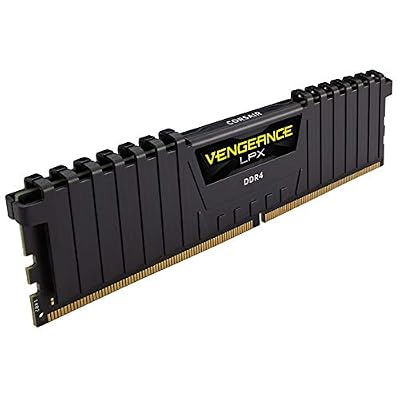
4. CORSAIR Vengeance LPX DDR4 16GB (2x8GB) 3600MHz CL18

CORSAIR VENGEANCE LPX DDR4 RAM 16GB (2x8GB) 3600MHz CL18-22-22-42 1.35V Intel AMD Desktop Computer Memory - Black (CMK16GX4M2D3600C18)

As an Amazon Associate we earn from qualifying purchases. Product prices and availability are accurate as of the date/time indicated.
The Corsair Vengeance LPX 3600MHz kit is the higher-speed 16GB starter for designers who do not yet need 32GB. It runs at a brisk 3600MHz with a CL18 timing across two 8GB modules, trading a slightly looser CAS number for more bandwidth, in the low-profile LPX design. At around $130 it is a quick, affordable 16GB kit for a lighter design workload or an entry workstation.
This is the kit to choose if your design work is more web graphics, logos, social assets and lighter layouts than enormous print-resolution files, and 16GB still fits. The higher 3600MHz frequency feeds the system well and the CL18 timing stays responsive at that speed, while the low-profile heat spreaders clear coolers easily. Be honest, though: heavy photo editing and large multi-layer files will want 32GB, so this is best as a fast 16GB starting point with an upgrade path. Remember to enable XMP for the rated speed.
Pros: Brisk 3600MHz speed, responsive CL18, dual-channel 16GB, low-profile, affordable starter.
Cons: 16GB suits lighter design only; large files want 32GB; XMP needed for full speed.
5. Corsair Vengeance LPX DDR4 16GB (2x8GB) 3200MHz CL16

CORSAIR Vengeance DDR5 32GB (2 x 16GB) Up to 6000MHz AMD Intel RAM | Desktop Gaming Memory, AMD EXPO & Intel XMP 3.0 Compatible, CL30, Grey, CMK32GX5M2B6000Z30


As an Amazon Associate we earn from qualifying purchases. Product prices and availability are accurate as of the date/time indicated.
The Corsair Vengeance LPX 16GB 3200 CL16 kit is the entry-level value pick for design. It pairs a 3200MHz data rate with a tight CL16 timing across two 8GB modules in a dual-channel layout, in the trusted low-profile LPX design. At around $119 it is the most affordable way to get dependable, responsive 16GB memory into a design machine on a tight budget.
This is the kit to choose for a starter design setup, a student machine, or lighter creative work — web graphics, vector logos, social media assets — where 16GB is sufficient and value is the priority. The CL16 latency at 3200MHz hits the DDR4 sweet spot for responsiveness, the dual-channel layout keeps things smooth, and the low-profile design fits any build. Be aware that large, high-resolution files and heavy multi-app work will benefit from 32GB, but this kit delivers reliable 16GB cheaply and leaves an easy upgrade path if you add a matching pair later.
Pros: Affordable 16GB at CL16 3200MHz, dual-channel, low-profile, dependable entry value.
Cons: 16GB is tight for large files and heavy multitasking; serious work wants 32GB.
6. CORSAIR Vengeance LPX DDR4 16GB (2x8GB) 3000MHz CL15

CORSAIR Vengeance RGB DDR5 RAM 32GB (2x16GB) 6400MHz CL36-48-48-104 1.35V AMD EXPO Intel XMP 3.0 Desktop Computer Memory – Gray (CMH32GX5M2B6400Z36)


As an Amazon Associate we earn from qualifying purchases. Product prices and availability are accurate as of the date/time indicated.
Rounding out the list is the Corsair Vengeance LPX 3000MHz CL15 kit, a tight-timing 16GB entry option for designers. It runs slightly slower at 3000MHz than the 3200 kits but pairs it with an even tighter CL15 latency, across two 8GB modules in dual channel. At around $115 it is another dependable, affordable Corsair choice in the same low-profile LPX design.
This is the kit to choose if you find it cheaper than its 3200MHz sibling and 16GB meets your current design needs. For creative work the gap between 3000MHz and 3200MHz is negligible, so this kit delivers essentially the same responsive experience for lighter layouts, vector work and web graphics. The CL15 timing keeps it quick, the low-profile heat spreaders clear coolers, and the value is strong. As with the other 16GB kits, large files and heavy multitasking will eventually want 32GB — but for a budget 16GB design entry where capacity is the limiting factor, it is a solid, sensible option.
Pros: Tight CL15 latency, dependable 16GB dual-channel, low-profile, strong entry value.
Cons: 16GB ceiling and 3000MHz speed; large creative files still want 32GB.
How to Choose RAM for Graphic Design
For graphic design, capacity is the spec that transforms the experience — far more than frequency. Large, high-resolution Photoshop files with many layers, multi-layer Illustrator artwork, big InDesign documents, and the habit of keeping several creative apps open together all consume RAM quickly. When memory runs short, apps stutter and scratch-disk to storage, breaking your flow. That is why this guide leads with 32GB kits like the Vengeance RGB Pro and LPX 32GB: for serious design work, 32GB is the recommended starting point.
Decide honestly whether 16GB or 32GB fits your work, and lean toward more. If you regularly handle large print-resolution files, heavy photo compositing, or many open documents and applications, go straight to 32GB — the headroom keeps everything smooth and prevents constant scratch-disking. If your work is lighter — web graphics, logos, social assets, simple layouts — a 16GB kit such as the LPX 3200 CL16 or 3600 CL18 can be sufficient as a starting point, with an easy upgrade path. For a dedicated design machine, capacity is the safer investment than a faster but smaller kit.
Get the form factor and channel configuration right. Desktops use full-size DIMM modules — five of the six kits here — while design laptops and mini-PCs use the smaller SODIMM modules like the Crucial 32GB kit; the two are not interchangeable, so confirm what your machine accepts, and note that many thin laptops solder their RAM and cannot be upgraded. Always buy a matched dual-channel kit (two modules) where you can, because dual-channel bandwidth feeds the system better and helps creative apps stay responsive under load.
Finally, confirm platform compatibility and treat speed as secondary to capacity. Every kit here is DDR4, the standard in the great majority of design machines in service — but verify your motherboard or laptop uses DDR4 rather than the older DDR3 or newer DDR5, which are physically incompatible. For creative work the difference between 3000MHz, 3200MHz and 3600MHz is minor next to having enough RAM, so prioritise capacity, the right form factor and a trusted brand, then enable XMP for the rated speed. Size your capacity to your files, match the module type, confirm DDR4, and pick the kit on this list that fits your workflow.
Frequently Asked Questions
How much RAM do I need for graphic design in 2026?
For serious design work with large Photoshop files, multi-layer Illustrator artwork and several creative apps open at once, 32GB is the recommended starting point — which is why the Vengeance RGB Pro and LPX 32GB kits lead this list. They give the headroom to keep big files and multiple documents open without stuttering. Lighter web-graphics and logo work can start on 16GB, but design generally rewards more capacity.
Is 16GB enough for Photoshop and Illustrator?
It can be for lighter work — web graphics, vector logos, social assets and simpler layouts run acceptably in 16GB, and a kit like the Corsair Vengeance LPX 3200 CL16 covers that affordably. But large, high-resolution files with many layers, heavy photo compositing, or several creative apps open together will fill 16GB and start scratch-disking, so serious design work benefits significantly from stepping up to 32GB.
Does RAM speed or capacity matter more for design work?
Capacity matters far more. The difference between 3000MHz, 3200MHz and 3600MHz kits is minor for creative work compared with simply having enough memory to keep large files and multiple apps open without scratch-disking to storage. Buy the capacity your files demand first — 32GB for serious work — choose a dual-channel kit for better bandwidth, and treat frequency as a secondary consideration.
Can I upgrade the RAM in my design laptop?
Sometimes — if it uses replaceable SODIMM modules and has accessible slots. The Crucial 32GB kit here is SODIMM laptop memory designed for exactly this, and 32GB makes a real difference for handling large creative files on the move. Many modern thin laptops solder their RAM and cannot be upgraded, though, so check your specific model’s specifications or manual first to confirm the memory is replaceable DDR4 SODIMM before buying.
Related Guides
- Best RAM for Gaming
- Best RAM for Developers
- Best RAM for Home Office
- Best NVMe SSDs
- Best Monitors for Content Creation
- Best PC Builds for Creative Work
Affiliate Disclosure: As an Amazon Associate, we earn from qualifying purchases. If you click a link and make a purchase, we may earn a small commission at no extra cost to you. Prices and availability are accurate as of publication and may change.










