

- Top Pick: XBOX Wireless Gaming Controller | Shock Blue | Consoles, PCs, TVs, mobile, and more | Textured Grip | Wireless, Bluetooth, USB-C Connectivity
- Best Value: Xbox Wireless Controller Shock Blue – Wireless – Bluetooth – USB Series X, Series S, One, PC, Android, iOS, Tablet – Shock Blue
- Premium Choice: Xbox Wireless Controller – Shock Blue – Bluetooth – USB – Xbox Series X, S, One, PC, Android, iOS, Tablet – 19 Buttons – 90 Days Warranty
The Microsoft Xbox Wireless Controller in Shock Blue is the controller most PC and Xbox gamers will compare every other pad against. It is the modern Xbox standard, built around Bluetooth, Xbox Wireless Direct and AA batteries, and it is the default pad for Xbox Series X|S, PC, Android and iOS. At around $45 it is one of the most familiar gamepads in the industry. This Xbox Wireless Controller review covers the design, joysticks and triggers, wireless performance, customisation, the buyer it suits, the pros and cons, and whether it is worth it.
- Xbox Wireless Controller at a Glance
- Design and Build Quality
- Joysticks, Triggers and Drift Resistance
- Wireless Performance and Latency
- Customisation, Software and Back Buttons
- Who Is the Xbox Wireless Controller For?
- Pros and Cons
- Is the Xbox Wireless Controller Worth It?
- Frequently Asked Questions
- More Controller Reviews
- Related Articles
- Related Articles
- Related Guides
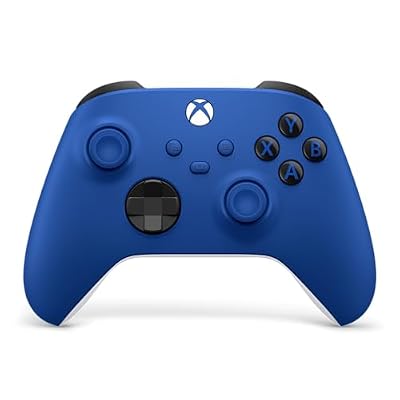
XBOX Wireless Gaming Controller | Shock Blue | Textured triggers and bumpers, Hybrid D-pad, XBOX Wireless, Bluetooth, USB-C, Play across Console & PC & Cloud Devices




As an Amazon Associate we earn from qualifying purchases. Product prices and availability are accurate as of the date/time indicated.
🛒 Best Price Today on Amazon
Prime members get fast, free shipping on everything above, plus member-only deals. New members get a 30-day free trial — cancel anytime.
As an Amazon Associate we earn from qualifying purchases.



Xbox Wireless Controller at a Glance
| Component | Specification |
|---|---|
| Connection | Bluetooth + Xbox Wireless Direct Connect (proprietary) |
| Platforms | Xbox Series X|S, Xbox One, Windows PC, Android, iOS, cloud gaming |
| Joysticks | Standard potentiometer analogue sticks (no Hall-effect) |
| Triggers | Standard analogue triggers with rumble motors |
| Polling rate | Standard wireless (125Hz typical over Bluetooth / Xbox Wireless) |
| Battery / Power | 2x AA batteries (Play & Charge Kit sold separately) |
| Back paddles | None |
| Special features | Hybrid D-pad, Share button, textured grip, 3.5mm headset jack |
| Price | Around $45 |
Design and Build Quality
The Xbox Wireless Controller has had years of refinement, and it shows. The Shock Blue colourway is one of the more striking finishes Microsoft offers — bright, saturated and easy to spot in a cluttered setup. The chassis is the familiar contoured Xbox shape with subtly textured grips on the rear handles and triggers, which improves purchase during long sessions. The face buttons have a crisp, light action, and the hybrid D-pad in the middle of the controller is one of the better D-pads on a mainstream pad. The Share button added with the Series X|S generation sits between the View and Menu buttons and is useful for captures on console and PC alike. Build feels solid and reassuringly familiar; this is a controller designed to disappear into your hands. For comparable pads, see our best Xbox controllers for PC guide.
Joysticks, Triggers and Drift Resistance
The honest caveat with the standard Xbox Wireless Controller is the joysticks. They are conventional potentiometer-based analogue sticks, the same technology used in mainstream gamepads for two decades. They feel good out of the box — well tensioned and accurate — but they are the same kind of sticks that, on any controller from any maker, can develop drift over a long enough timeframe. Buyers who want true drift immunity should be looking at Hall-effect or TMR controllers instead (covered in our best Hall-effect controllers guide). The triggers are the standard Xbox design with a long, smooth pull, rumble motors built in, and a tactile feel that suits both shooters and racing games. The D-pad is excellent for fighters and platformers.
It is worth understanding the practical scale of the drift concern. The standard Xbox pad does not drift on day one, week one or month one for the vast majority of buyers; the issue, when it occurs, is a slow-developing one that may emerge anywhere from a year onwards under heavy daily play, and many casual users never see it at all. For the buyer who replaces controllers every couple of generations anyway, conventional sticks are not a meaningful problem. For the buyer who plays many hours per day and expects a controller to last a long time, the Hall-effect alternatives in this batch are the better long-term value.
Wireless Performance and Latency
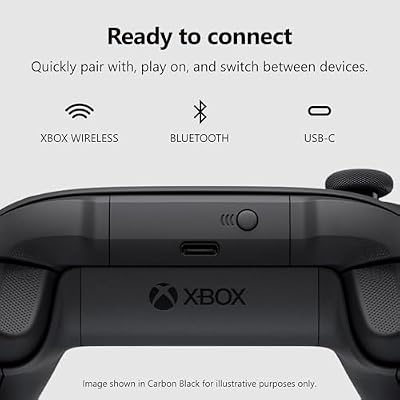
The Xbox Wireless Controller offers two wireless modes: standard Bluetooth, which works with virtually everything, and Xbox Wireless Direct Connect, a Microsoft proprietary protocol that pairs with Xbox consoles and PCs equipped with an Xbox Wireless adapter. Xbox Wireless Direct is lower latency than Bluetooth and feels noticeably more responsive in competitive games. Polling is standard for a console-class wireless pad, not the 8000Hz polling found on premium esports controllers, but for the vast majority of single-player and casual multiplayer games the latency is well within the range that feels immediate. Range is reliable in a normal living-room or desk setup.
Customisation, Software and Back Buttons
Customisation on the standard Xbox Wireless Controller is intentionally light. There are no back paddles, no swappable thumbsticks and no trigger locks; this is the baseline pad, and pro features are reserved for the Elite Series 2. What you do get is the Xbox Accessories app on Xbox and Windows, which lets you remap buttons, adjust stick and trigger sensitivities, invert axes and create alternative profiles. It is straightforward, well integrated, and covers what most players need. Firmware updates arrive automatically. The 3.5mm headset jack on the underside is a small convenience that makes wired headsets simple.
Who Is the Xbox Wireless Controller For?
The standard Xbox Wireless Controller is for the buyer who wants a great mainstream gamepad without the price of a pro controller. It is the default pad for an Xbox console, an excellent PC controller, and it is well supported on Android and iOS for cloud gaming. The Shock Blue finish makes it more interesting than the black variant without changing anything functional. It is well judged for casual and serious players alike, with the caveat that it does not have Hall-effect sticks; buyers who specifically want stick-drift immunity should consider pads in our best Hall-effect controllers guide. If you mainly play on a budget on PC, the wider range in our best budget controllers guide is also worth a look.
Pros and Cons
Pros: Familiar, well-refined Xbox shape; excellent hybrid D-pad; Bluetooth plus Xbox Wireless Direct for low latency on Xbox and PC; broad platform support (Xbox, PC, mobile, cloud); striking Shock Blue finish; replaceable AA batteries for indefinite uptime.
Cons: Standard potentiometer sticks can drift over time; no back paddles; no rechargeable battery in the box (Play & Charge Kit sold separately); polling rate is standard, not premium 8K.
Is the Xbox Wireless Controller Worth It?
At around $45 the Microsoft Xbox Wireless Controller (Shock Blue) is excellent value as the default Xbox-and-PC pad. You are paying for years of refinement, broad compatibility, and the Xbox Wireless Direct protocol that gives it a real latency advantage over generic Bluetooth pads. The trade-off is that you do not get Hall-effect sticks or paddles at this price; those belong in the pro tier. For most players who want a great-feeling, reliable, widely-supported wireless controller, this is the safe and well-judged choice. Buyers who want drift-proof sticks should step up to a Hall-effect option in our best Hall-effect controllers guide; buyers who want pro features should look at the best pro controllers guide.
Frequently Asked Questions
Does the Xbox Wireless Controller have Hall-effect sticks?
No. It uses standard potentiometer analogue sticks, which feel great but can develop drift over time as with any conventional pad. Buyers who want drift-immune sticks should consider Hall-effect or TMR controllers.
Does the Xbox Wireless Controller work on PC?
Yes. It connects via Bluetooth on any modern PC, or via Xbox Wireless Direct Connect with a Microsoft wireless adapter for lower latency. It is one of the best-supported pads in PC gaming.
Does the Xbox Wireless Controller come with a rechargeable battery?
No. It uses 2x AA batteries out of the box. Microsoft sells a Play & Charge Kit separately, which adds a rechargeable battery pack and a USB-C cable.
Can the Xbox Wireless Controller be used on PS5?
No. It is designed for Xbox, PC, Android and iOS. For PS5 you need a DualSense or a PlayStation-licensed pad; see our PS5 controllers guide.
More Controller Reviews
- Microsoft Xbox Elite Series 2 Controller Review
- Sony PS5 DualSense Wireless Controller Review (Chroma Pearl)
- Sony PS5 DualSense Edge Wireless Controller Review
- 8BitDo Ultimate 2 Wireless Controller Review
- 8BitDo Ultimate 2C Wireless Controller Review
- GameSir G7 Pro Wireless Controller Review (Xbox-licensed)
- GameSir G7 SE Wired Controller Review (Xbox-licensed)
- NACON Revolution 5 Pro PS5 Controller Review
Affiliate Disclosure: As an Amazon Associate, we earn from qualifying purchases. If you click a link and make a purchase, we may earn a small commission at no extra cost to you. Prices and availability are accurate as of publication and may change.
Related Articles
Looking for more on this topic? Browse the hand-picked guides below — each one applies the same scoring rubric used in this review.










