

Development work is one of the most memory-hungry things you can ask a PC to do. A modern workflow often means a heavyweight IDE, a local database, several Docker containers, a virtual machine or two, a browser full of documentation tabs and a build process all running simultaneously — and each one wants its share of RAM. Where a typical office machine is comfortable on 16GB, developers feel the pressure quickly, and capacity becomes the single most important spec. This guide rounds up the best RAM for developers in 2026, leading with the 32GB kits that give real headroom for VMs and containers, while keeping sensible 16GB options for lighter or laptop-based setups.
- Best RAM for Developers at a Glance
- 1. Corsair Vengeance RGB Pro 32GB (2x16GB) DDR4 3200 (PC4-25600) C16
- 2. CORSAIR Vengeance LPX DDR4 32GB (2x16GB) up to 3200MHz CL16
- 3. Crucial 32GB DDR4 RAM Kit (2x16GB) 3200MHz Laptop Memory, SODIMM
- 4. CORSAIR Vengeance LPX DDR4 16GB (2x8GB) 3600MHz CL18
- 5. Corsair Vengeance LPX DDR4 16GB (2x8GB) 3200MHz CL16
- 6. CORSAIR Vengeance LPX DDR4 16GB (2x8GB) 3000MHz CL15
- How to Choose RAM for Development Work
- Frequently Asked Questions
- Related Guides
- Related Articles
Every kit here is DDR4, the standard in the vast majority of development machines in service today, and we flag the one laptop (SODIMM) kit clearly so you match the right form factor to your hardware. Our picks were chosen on what matters for coding under load: total capacity first, then dual-channel bandwidth, sensible timings, broad compatibility and value, with prices from around $119 up to around $245. We do not quote invented benchmark numbers — we explain where each kit fits and who it is for. Below is an at-a-glance comparison of all six, then a closer look at each and a buyer’s guide built around capacity, dual-channel kits and form factor for development work.
As an Amazon Associate we earn from qualifying purchases at no extra cost to you.



🛒 Best Price Today on Amazon
Prime members get fast, free shipping on everything above, plus member-only deals. New members get a 30-day free trial — cancel anytime.
Best RAM for Developers at a Glance
| Memory Kit | Best For | Standout Spec | Approx Price |
|---|---|---|---|
| Corsair Vengeance RGB Pro 32GB 3200 C16 | VMs, containers, big IDE | 2x16GB, C16, RGB | around $145 |
| Corsair Vengeance LPX 32GB 3200 CL16 | Plain 32GB dev workhorse | 2x16GB, CL16, low profile | around $243 |
| Crucial 32GB DDR4 3200 (Laptop SODIMM) | Dev laptop / mini-PC | 2x16GB SODIMM, CL22 | around $245 |
| Corsair Vengeance LPX 16GB 3600 CL18 | Higher-speed 16GB starter | 2x8GB, 3600MHz, low profile | around $130 |
| Corsair Vengeance LPX 16GB 3200 CL16 | Value 16GB dev box | 2x8GB, CL16, low profile | around $119 |
| Corsair Vengeance LPX 16GB 3000 CL15 | Tight-timing 16GB | 2x8GB, CL15, 3000MHz | around $115 |
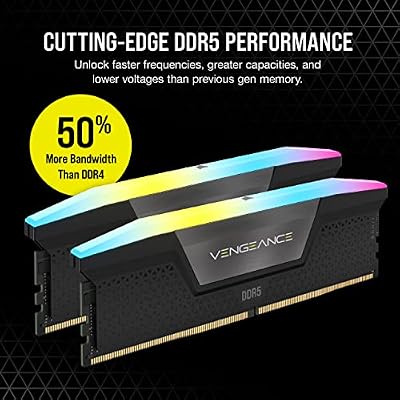
1. Corsair Vengeance RGB Pro 32GB (2x16GB) DDR4 3200 (PC4-25600) C16

CORSAIR Vengeance RGB DDR5 RAM 32GB (2x16GB) Up to 6000MHz CL30-36-36-76 1.40V AMD EXPO Intel XMP Desktop Computer Memory - Gray (CMH32GX5M2B6000Z30K)


As an Amazon Associate we earn from qualifying purchases. Product prices and availability are accurate as of the date/time indicated.
The Corsair Vengeance RGB Pro 32GB kit is the developer’s pick, and it leads this list because capacity is what coding under load demands. It delivers 32GB across two 16GB modules at 3200MHz with a C16 timing in a dual-channel configuration, with Corsair’s RGB lighting for those who want it. At around $145 it is excellent value for the amount of headroom it gives a development machine.
This is the kit to choose for a serious development workflow: 32GB is enough to run a heavyweight IDE, a couple of virtual machines, several Docker containers, a local database and a browser full of docs without your system swapping to disk and grinding to a halt. The C16 timing keeps things responsive, the dual-channel layout feeds the CPU well during builds, and the capacity is the real prize. For most developers building or upgrading a desktop, this 32GB kit is the sensible default and the best value on the list.
Pros: Generous 32GB at C16 3200MHz for VMs and containers, dual-channel, great value.
Cons: RGB modules sit taller; some compact dev boxes prefer low-profile sticks.
2. CORSAIR Vengeance LPX DDR4 32GB (2x16GB) up to 3200MHz CL16

CORSAIR Vengeance LPX DDR4 RAM 32GB (2x16GB) Up to 3200MHz CL16-20-20-38 1.35V Intel XMP AMD EXPO Computer Memory – Black (CMK32GX4M2E3200C16)


As an Amazon Associate we earn from qualifying purchases. Product prices and availability are accurate as of the date/time indicated.
The Corsair Vengeance LPX 32GB kit is the plain-styled developer workhorse. It offers the same desirable 32GB at up to 3200MHz CL16 dual-channel configuration as the RGB Pro, but in Corsair’s understated low-profile LPX heat spreaders rather than lit modules. At around $243 it is the no-nonsense large-capacity choice for developers who value clearance and simplicity.
This is the pick for the developer who wants the headroom of 32GB without any lighting, and who runs a tall air cooler or a compact case. The low-profile LPX design clears coolers and tight builds where RGB modules will not, the CL16 timing keeps the machine quick during compiles and context-switching, and the 32GB capacity comfortably absorbs VMs, containers and a busy IDE. For a businesslike 32GB DDR4 kit that disappears into the build and gets on with the work, the LPX is a dependable, well-proven choice for a dev machine.
Pros: Generous 32GB at CL16 3200MHz, low-profile cooler clearance, plain dev-focused styling.
Cons: Costs more than the RGB Pro 32GB kit; no lighting if you want it.
3. Crucial 32GB DDR4 RAM Kit (2x16GB) 3200MHz Laptop Memory, SODIMM

As an Amazon Associate we earn from qualifying purchases. Product prices and availability are accurate as of the date/time indicated.
The Crucial 32GB DDR4-3200 kit is the pick for developers who code on a laptop or a mini-PC. This is a 2x16GB SODIMM kit — the smaller laptop form factor — rated at 3200MHz (PC4-25600) with a CL22 timing, designed to upgrade notebooks and small-form-factor machines rather than desktops. At around $245 it brings desktop-class capacity to a portable development setup.
This is the kit to choose if your dev environment lives on a laptop and 16GB has started to feel tight under containers and a busy IDE. It is crucial to confirm your machine takes SODIMM memory and has accessible, upgradable slots before buying — this is laptop memory, not desktop DIMMs. Once fitted, 32GB lets a notebook run virtual machines and containers that simply would not fit before, and Crucial’s reputation means broad compatibility. For a serious mobile development upgrade, it is the standout choice.
Pros: Desktop-class 32GB for dev laptops/mini-PCs, SODIMM form factor, reliable Crucial compatibility.
Cons: SODIMM only — not for desktops; looser CL22 timing and the highest price here.
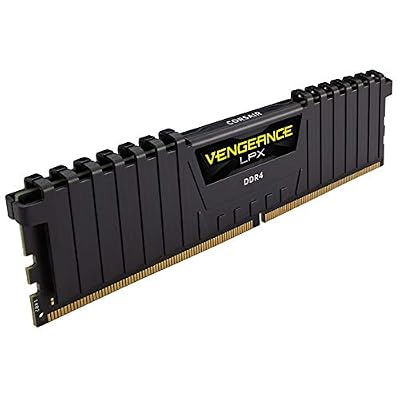
4. CORSAIR Vengeance LPX DDR4 16GB (2x8GB) 3600MHz CL18

CORSAIR VENGEANCE LPX DDR4 RAM 16GB (2x8GB) 3600MHz CL18-22-22-42 1.35V Intel AMD Desktop Computer Memory - Black (CMK16GX4M2D3600C18)

As an Amazon Associate we earn from qualifying purchases. Product prices and availability are accurate as of the date/time indicated.
The Corsair Vengeance LPX 3600MHz kit is the higher-speed 16GB starter for developers who do not yet need 32GB. It runs at a brisk 3600MHz with a CL18 timing across two 8GB modules, trading a slightly looser CAS number for more bandwidth, all in the low-profile LPX design. At around $130 it is a quick, affordable 16GB kit for a lighter development workload.
This is the kit to choose if your work is more front-end, scripting or single service development than heavy multi-VM virtualization, and 16GB still fits your needs. The higher 3600MHz frequency can suit certain platforms and feed the CPU well during builds, the CL18 timing stays responsive at that speed, and the low-profile heat spreaders clear coolers easily. For a developer who wants a fast, value 16GB kit now and may add a second pair later, this LPX 3600MHz option is a sensible pick — just remember to enable XMP for the rated speed.
Pros: Brisk 3600MHz speed, responsive CL18, dual-channel 16GB, low-profile, affordable.
Cons: 16GB suits lighter dev work only; XMP needed in BIOS for full speed.
5. Corsair Vengeance LPX DDR4 16GB (2x8GB) 3200MHz CL16

CORSAIR Vengeance DDR5 32GB (2 x 16GB) Up to 6000MHz AMD Intel RAM | Desktop Gaming Memory, AMD EXPO & Intel XMP 3.0 Compatible, CL30, Grey, CMK32GX5M2B6000Z30


As an Amazon Associate we earn from qualifying purchases. Product prices and availability are accurate as of the date/time indicated.
The Corsair Vengeance LPX 16GB 3200 CL16 kit is the value 16GB pick for a dev box. It pairs a 3200MHz data rate with a tight CL16 timing across two 8GB modules in a dual-channel layout, in the trusted low-profile LPX design. At around $119 it is the most affordable way to get dependable, responsive 16GB memory for a development machine on a budget.
This is the kit to choose for a starter dev setup, a build server, or a secondary machine where 16GB is sufficient and value is the priority. The CL16 latency at 3200MHz hits the DDR4 sweet spot for responsiveness, the dual-channel layout feeds the CPU well, and the low-profile design fits any build. While serious virtualization wants 32GB, plenty of development tasks run comfortably in 16GB, and this LPX kit delivers that reliably and cheaply. It also leaves an easy upgrade path if you add a matching pair later.
Pros: Affordable 16GB at CL16 3200MHz, dual-channel, low-profile, dependable value.
Cons: 16GB is tight for heavy virtualization; consider 32GB for many VMs/containers.
6. CORSAIR Vengeance LPX DDR4 16GB (2x8GB) 3000MHz CL15

CORSAIR Vengeance RGB DDR5 RAM 32GB (2x16GB) 6400MHz CL36-48-48-104 1.35V AMD EXPO Intel XMP 3.0 Desktop Computer Memory – Gray (CMH32GX5M2B6400Z36)


As an Amazon Associate we earn from qualifying purchases. Product prices and availability are accurate as of the date/time indicated.
Rounding out the list is the Corsair Vengeance LPX 3000MHz CL15 kit, a tight-timing 16GB option for developers. It runs slightly slower at 3000MHz than the 3200 kits but pairs it with an even tighter CL15 latency, across two 8GB modules in dual channel. At around $115 it is another dependable, affordable Corsair choice in the same low-profile LPX design.
This is the kit to choose if you find it cheaper than its 3200MHz sibling and 16GB meets your development needs. For coding work the gap between 3000MHz and 3200MHz is negligible, so this kit delivers essentially the same responsive experience: comfortable for an IDE, a couple of services and documentation tabs. The CL15 timing keeps it quick, the low-profile heat spreaders clear coolers, and the value is strong. For a budget 16GB dev kit where capacity rather than frequency is the limiting factor, it is a solid, sensible option.
Pros: Tight CL15 latency, dependable 16GB dual-channel, low-profile, strong value.
Cons: 16GB ceiling and 3000MHz speed; heavy virtualization still wants 32GB.
How to Choose RAM for Development Work
For development, capacity is king — it matters more than any other spec. A modern workflow with a heavyweight IDE, several Docker containers, one or two virtual machines, a local database and a browser full of docs can exhaust 16GB quickly, forcing the system to swap to disk and slowing everything down. That is why this guide leads with 32GB kits like the Vengeance RGB Pro and LPX 32GB: for serious virtualization and containerised work, 32GB is the comfortable target and the upgrade most developers feel immediately.
Decide honestly whether 16GB or 32GB fits your work. If you run multiple VMs, many containers, large datasets or memory-hungry build tools, go straight to 32GB — the headroom prevents the constant swapping that kills productivity. If your work is more front-end, scripting, or single-service development, a 16GB kit such as the LPX 3200 CL16 or 3600 CL18 is sufficient and leaves budget elsewhere. When in doubt for a dedicated dev machine, more capacity is the safer investment than a faster but smaller kit.
Get the form factor and channel configuration right. Desktops use full-size DIMM modules — five of the six kits here — while dev laptops and mini-PCs use the smaller SODIMM modules like the Crucial 32GB kit; the two are not interchangeable, so confirm what your machine accepts. Always buy a matched dual-channel kit (two modules) rather than a single stick where you can, because dual-channel bandwidth feeds the CPU better during compiles and helps the whole system stay responsive under load.
Finally, confirm platform compatibility and treat speed as secondary to capacity. Every kit here is DDR4, the standard in the great majority of development machines in service — but verify your motherboard or laptop uses DDR4 rather than the older DDR3 or newer DDR5, which are physically incompatible. For coding, the difference between 3000MHz, 3200MHz and 3600MHz is minor next to having enough RAM, so prioritise capacity, the right form factor and a trusted brand, then enable XMP for the rated speed. Size your capacity to your workload, match the module type, confirm DDR4, and pick the kit on this list that fits your setup.
Frequently Asked Questions
How much RAM do developers need in 2026?
For serious development with virtual machines, multiple containers and a heavyweight IDE, 32GB is the comfortable target — which is why the Vengeance RGB Pro and LPX 32GB kits lead this list. They give the headroom to run a VM or two, several containers and a local database without swapping to disk. Lighter front-end or scripting work runs fine in 16GB, so size your capacity to how heavy your workflow actually is.
Is 16GB enough for programming?
It can be, depending on your work. For front-end development, scripting, or running a single service alongside an IDE and browser, a 16GB kit like the Corsair Vengeance LPX 3200 CL16 is sufficient. But if you run multiple virtual machines, many Docker containers, or large datasets, 16GB fills up fast and you will benefit significantly from stepping up to a 32GB kit.
Does RAM speed matter for compiling and development?
Capacity matters far more than speed for development. The difference between 3000MHz, 3200MHz and 3600MHz kits is minor for most coding and compiling work compared with simply having enough memory to avoid swapping to disk. Buy the capacity your workflow needs first, choose a dual-channel kit for better bandwidth, and treat frequency as a secondary consideration.
Can I upgrade my development laptop’s RAM?
Often, yes — if it uses replaceable SODIMM modules and has accessible slots. The Crucial 32GB kit here is SODIMM laptop memory designed exactly for this. Many modern thin laptops solder their RAM and cannot be upgraded, though, so check your specific model’s specifications or manual first to confirm the memory is replaceable and whether it uses DDR4 SODIMM before buying.
Related Guides
- Best RAM for Gaming
- Best RAM for Home Office
- Best RAM for Graphic Design
- Best NVMe SSDs
- Best CPUs for Performance
- Best Gaming PC Builds
Affiliate Disclosure: As an Amazon Associate, we earn from qualifying purchases. If you click a link and make a purchase, we may earn a small commission at no extra cost to you. Prices and availability are accurate as of publication and may change.










