

The HUION Inspiroy 2 Large is HUION’s modern mid-range drawing tablet, designed as a direct rival to the Wacom Intuos Pro Medium. It combines a generous 10.5×6.5-inch active area, a battery-free tilt-capable stylus, a tactile scroll wheel and a row of ExpressKeys at a price comfortably below Wacom’s. At around $99 it is one of the strongest values in the modern mid-range. This HUION Inspiroy 2 Large review walks through the pen, the scroll wheel, drivers and use cases.

HUION Inspiroy 2 Large Drawing Tablet with 3-Group 8 Customized ExpressKeys | 10.5x6.56" Art Tablet with Scroll Wheel, Battery-Free Stylus, Graphics Tablet for Drawing, Design, Work with Mac, PC & Mobile





As an Amazon Associate we earn from qualifying purchases. Product prices and availability are accurate as of the date/time indicated.
🛒 Best Price Today on Amazon
Prime members get fast, free shipping on everything above, plus member-only deals. New members get a 30-day free trial — cancel anytime.
As an Amazon Associate we earn from qualifying purchases.



HUION Inspiroy 2 Large at a Glance
| Component | Specification |
|---|---|
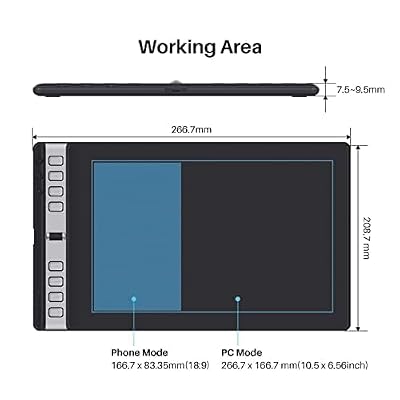
| Active area | 10.5 x 6.5 inches (266 x 167 mm) |
| Pressure levels | 8,192 |
| Stylus type | Battery-free passive pen (PenTech 3.0) |
| Resolution | 5,080 lpi |
| Report rate | 300 pps |
| Tilt support | Yes (60 degrees) |
| Express keys | 8 ExpressKeys + scroll wheel + dial keys |
| Connection | USB-C (wired) |
| Approx price | around $99 |
Pen Performance & Pressure
The Inspiroy 2 Large is built around HUION’s PenTech 3.0 battery-free stylus, the company’s current-generation pen technology. It is battery-free — power is drawn wirelessly from the tablet, with nothing to charge or replace — and delivers 8,192 pressure levels with full 60-degree tilt support and very low initial activation force. In practice the pen is light, well-balanced and responsive; pressure ramps feel smooth and tilt is recognised consistently. HUION has narrowed the gap to Wacom’s Pro Pen significantly with PenTech 3.0, and on a tablet at this price the pen feels markedly more refined than older HUION styluses.
Tracking accuracy across the 10.5×6.5-inch active area is excellent — edge-drift is minimal after the standard driver calibration, and the pen-tip-to-cursor offset is tight enough for confident precision work in detail-heavy illustrations. Report rate of 300 pps is among the highest in the bracket, and in practice this shows as exceptionally smooth, jitter-free lines in fast strokes. Pressure-curve adjustment in the HUION driver lets you tune the response to your touch, and per-application key mapping covers both the ExpressKeys and the scroll wheel separately. The two side switches on the pen are remappable in the driver as well, and the pen’s overall weight balance is comfortable for multi-hour sessions.
Build & Materials
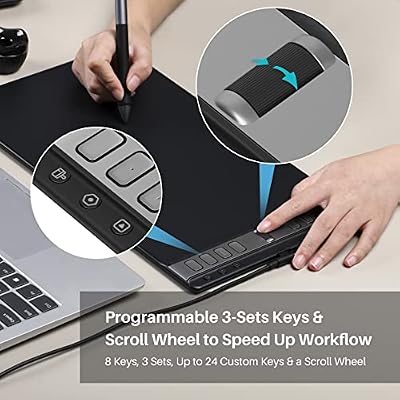
The Inspiroy 2 Large’s headline design feature is the scroll wheel. Mounted at the top of the ExpressKey strip, the wheel is tactile and infinitely rotatable, and it can be mapped to brush-size, zoom, canvas-rotation or scrubbing in a video editor. Around it are 8 ExpressKeys plus several dial keys — fewer than the HS610 but cleaner-looking and arguably more usable. The work surface is matte with a paper-like texture, the chassis is slim, and USB-C is a welcome modernisation. The orientation can be flipped for left-handed users in the driver. The active-area boundary is engraved cleanly on the work surface, and four rubber feet underneath keep the tablet stable on a desk. The chassis edges are bevelled, which is comfortable when your wrist rests near the work-area boundary. Build quality is a clear step up from older HUION tablets and from the budget bracket generally — the Inspiroy 2 Large looks and feels like a working tool, not a budget product.
The scroll wheel deserves a further mention. It is mechanically tactile — you can feel each click as you rotate it — and infinitely rotatable, so you can keep scrolling through brush sizes or canvas zoom without lifting your finger. In practical use, scroll-wheel actions integrate beautifully into a Photoshop or Clip Studio Paint workflow: spin to enlarge a brush, draw, spin back to shrink. It is a feature that, once you have used it, you miss on tablets that lack it. HUION’s driver also lets you assign different scroll-wheel functions to different applications, so the wheel can be brush-size in a paint app and timeline-scrub in a video editor. For users coming from a Wacom Intuos Pro with a touch ring, the Inspiroy 2 Large’s tactile wheel is arguably the better implementation.
Software Compatibility & Drivers
HUION supports Windows, macOS, Linux, ChromeOS and Android. The driver utility is mature, allows per-application key mapping and pressure-curve adjustment, and the scroll wheel is configurable per-application as well. Inside Photoshop, Clip Studio Paint, Krita, Affinity Photo, MediBang, SAI and many others, pressure and tilt are recognised after driver install. HUION publishes driver updates regularly, which helps keep major-OS-update issues short-lived.
Use Cases — Art, 3D and Note Taking
The Inspiroy 2 Large is squarely a working tablet for serious hobbyists and freelance illustrators. The large active area, tilt-capable PenTech 3.0 pen and scroll wheel make it one of the most productive tablets at the price; the scroll wheel especially feels excellent for brush-size and canvas-zoom work. For 3D artists, the area and tilt make sculpting in ZBrush or Blender comfortable, and the scroll wheel is useful for view manipulation. For educators and presenters, the scroll wheel maps well to slide navigation. For OSU players, the Inspiroy 2 Large is too big and feature-rich for the use case. The active area is large enough that whole-arm strokes are comfortable, which matters more for digital painting and concept work than for the wrist-and-finger movement of detail work — different illustrators have different preferences here, but the Inspiroy 2 Large does both well.
What’s in the Box
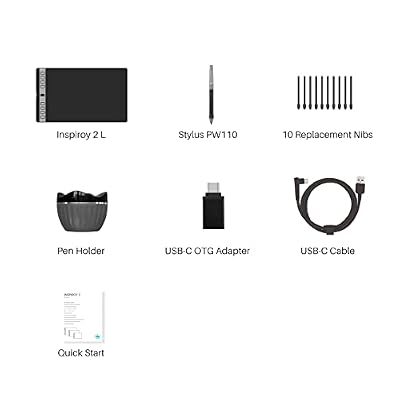
HUION includes the Inspiroy 2 Large tablet, the PenTech 3.0 battery-free pen, a smart pen stand with nib storage, ten replacement nibs, a USB-C-to-USB-A cable and a USB-C-to-USB-C cable, an OTG adapter for Android use, an artist glove and a Quick Start guide. There is no Bluetooth, but the dual-cable bundle covers virtually all modern host machines.
Verdict — Is the HUION Inspiroy 2 Large Worth It?
At around $99 the HUION Inspiroy 2 Large is one of the strongest mid-range screenless drawing tablets you can buy. The combination of a large active area, PenTech 3.0 pen, scroll wheel and broad OS support is a meaningful step up from budget tablets, and it costs noticeably less than the comparable Wacom Intuos Pro Medium. For working artists, freelance illustrators and serious hobbyists, the Inspiroy 2 Large earns a strong recommendation. The scroll wheel alone is a workflow improvement that is hard to give up once you have used it, and the PenTech 3.0 stylus is one of the best non-Wacom pens on the market. To pair it with a capable creative PC, see our best RTX 5080 gaming laptops guide for headroom.
Frequently Asked Questions
Does the HUION Inspiroy 2 Large have a scroll wheel?
Yes. The tactile, infinitely rotatable scroll wheel is one of the tablet’s headline features and can be mapped to brush size, zoom and other actions.
Does the HUION Inspiroy 2 Large pen support tilt?
Yes. The PenTech 3.0 stylus supports up to 60 degrees of tilt and is battery-free.
How many pressure levels does the HUION Inspiroy 2 Large have?
It supports 8,192 levels of pressure sensitivity, paired with very low initial activation force.
Is the HUION Inspiroy 2 Large wireless?
No. The Inspiroy 2 Large is wired-only over USB-C. HUION’s other Inspiroy 2 models include Bluetooth-equipped variants.
More Drawing Tablet Reviews
- GAOMON PD1161 Review: 11.6″ FHD Pen Display for Hobbyists
- Wacom Intuos Small Bluetooth Review: Beginner-Friendly Drawing Tablet
- Wacom One by Wacom Medium Review: Larger Beginner Pen Tablet
- XPPen StarG640 Review: Ultra-Slim 6×4 Drawing Tablet for OSU and Sketching
- XPPen Deco 01 V3 Review: 10×6 Drawing Tablet with Tilt and Battery-Free Pen
- XP-PEN Artist 12 Review: 11.6″ FHD Pen Display for Beginners
- XPPen Artist 15.6 Pro V2 Review: 16K Pressure Pen Display
- XPPen Deco 640 Review: 6×4 Drawing Tablet with 16K Pressure
Affiliate Disclosure: As an Amazon Associate, we earn from qualifying purchases. If you click a link and make a purchase, we may earn a small commission at no extra cost to you. Prices and availability are accurate as of publication and may change.
Related Articles
Looking for more on this topic? Browse the hand-picked guides below — each one applies the same scoring rubric used in this review.










