

The 75% layout has become the favourite compact form factor for good reason: it strips away the number pad and the dead space of a full-size board but keeps the function row, arrow keys and essential navigation cluster, all packed tightly together. The result is a keyboard that frees up desk space and brings your mouse closer for comfier aim, without sacrificing the keys you actually use. This guide rounds up the best 75% keyboards in 2026, from wallet-friendly mechanical boards to a premium gasket-mounted hot-swappable model, plus a couple of compact alternatives for context.
- Best 75% Keyboards at a Glance
- 1. MageGee 75% Mechanical Gaming Keyboard, Blue Switch, 87 Keys
- 2. MageGee 75% Mechanical Gaming Keyboard, Red Switch, 87 Keys
- 3. EPOMAKER x Aula F75 Gasket Mechanical Keyboard, 75% Wireless Hot-Swappable
- 4. Redragon K552 Mechanical Gaming Keyboard, 87-Key Compact
- 5. MageGee MK-Box 60% Mechanical Gaming Keyboard, 68 Keys
- 6. Logitech G PRO Tenkeyless Mechanical Gaming Keyboard
- How to Choose a 75% Keyboard
- Frequently Asked Questions
- Related Guides
- Related Articles
- Related Guides
Our picks were chosen on what genuinely defines a great 75% keyboard: the layout and key selection, switch type and feel, build quality and features like gasket mounting and hot-swap sockets, connectivity, and value. We have included a deliberate price spread — from around $27 up to around $86 — because the best 75% board is the one that matches your typing feel, your games and your budget. Whether you want an affordable blue- or red-switch mechanical board, a premium wireless hot-swap enthusiast keyboard, or a compact tenkeyless alternative for comparison, there is an option here. Below you will find an at-a-glance comparison, then a closer look at each keyboard and a buyer’s guide covering what really matters in the 75% category.
🛒 Best Price Today on Amazon
Prime members get fast, free shipping on everything above, plus member-only deals. New members get a 30-day free trial — cancel anytime.
Best 75% Keyboards at a Glance
| Keyboard | Best For | Standout Spec | Approx Price |
|---|---|---|---|
| MageGee 75% Blue Switch (87 keys) | Tactile, clicky budget pick | Blue switches, 75% 87 keys | around $28 |
| MageGee 75% Red Switch (87 keys) | Smooth linear budget gaming | Red switches, 75% 87 keys | around $28 |
| EPOMAKER x Aula F75 Gasket Wireless | Premium gasket hot-swap | Gasket mount, hot-swap, wireless | around $62 |
| Redragon K552 Mechanical (87 keys) | Compact TKL alternative | TKL 87 keys, durable build | around $37 |
| MageGee MK-Box 60% (68 keys) | Smaller 60% alternative | 60% layout, 68 keys | around $27 |
| Logitech G PRO TKL Mechanical | Premium TKL esports | Tenkeyless, detachable cable | around $86 |
1. MageGee 75% Mechanical Gaming Keyboard, Blue Switch, 87 Keys

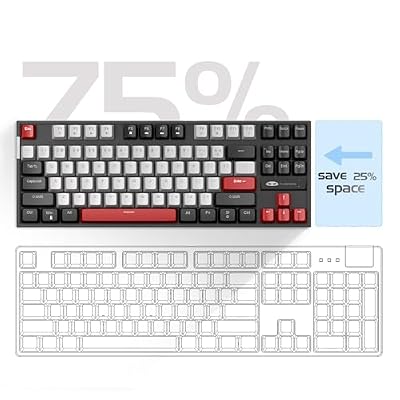
MageGee 75% Mechanical Gaming Keyboard, Blue Switch, LED Backlit, 87 Keys Compact TKL Wired Computer Keyboards for Windows Laptop PC Gamer - Grey/Black



As an Amazon Associate we earn from qualifying purchases. Product prices and availability are accurate as of the date/time indicated.
The MageGee 75% with blue switches is the tactile, clicky budget pick and a perfect introduction to the layout. It packs 87 keys into a true 75% form factor — function row and arrows intact, number pad gone — with clicky blue mechanical switches and RGB backlighting. At around $28 it is one of the most affordable ways to get a genuine mechanical 75% board.
This is the keyboard for someone who loves a loud, satisfying, tactile click and wants the space-saving 75% layout without spending much. The blue switches give a crisp bump and an audible click on every keypress, which many typists and gamers find addictive, while the compact footprint frees desk space for wide mouse sweeps. The RGB lighting adds some flair, and the build is solid for the price. For a clicky, budget-friendly entry into 75% mechanical keyboards, the blue-switch MageGee is an easy starting point.
Pros: True 75% layout, clicky tactile blue switches, RGB, very affordable.
Cons: Blue switches are loud for shared rooms; budget construction.
2. MageGee 75% Mechanical Gaming Keyboard, Red Switch, 87 Keys

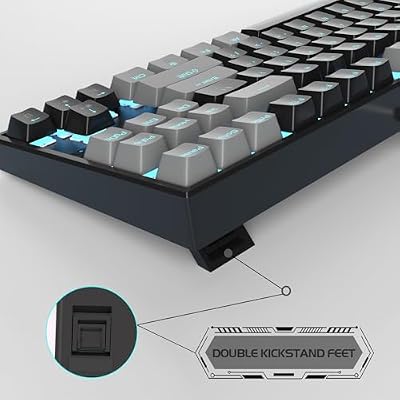
MageGee 75% Mechanical Gaming Keyboard, Red Switch, LED Blue Backlit, 87 Keys Compact TKL Wired Computer Keyboards for Windows Laptop PC Gamer - Black/Grey




As an Amazon Associate we earn from qualifying purchases. Product prices and availability are accurate as of the date/time indicated.
The MageGee 75% with red switches is the smooth, linear budget pick — the same compact 87-key 75% board as its blue-switch sibling, but with quieter linear red switches better suited to gaming. It keeps the function row, arrows and RGB backlighting in a tidy footprint. At around $28 it is an outstanding-value way into the layout for gamers.
This is the keyboard to choose if you prefer a smooth, uninterrupted keypress without the tactile bump or click — red linear switches travel straight down, which many gamers favour for fast, repeated actuations and rapid double-taps. It is also noticeably quieter than the blue version, making it friendlier in a shared room. With the same space-saving 75% layout and RGB lighting at the same low price, the red-switch MageGee is the better pick for gaming-focused buyers who want linear feel on a budget.
Pros: Smooth linear red switches, compact 75% layout, RGB, quieter than blue, great value.
Cons: Linear switches lack tactile feedback; budget build quality.
3. EPOMAKER x Aula F75 Gasket Mechanical Keyboard, 75% Wireless Hot-Swappable

EPOMAKER x Aula F75 Gasket Mechanical Keyboard, 75% Wireless Hot Swappable Gaming Keyboard with Five-Layer Padding&Knob, BT/2.4GHz/USB-C, RGB (Black Gradient, LEOBOG Reaper Switch)


As an Amazon Associate we earn from qualifying purchases. Product prices and availability are accurate as of the date/time indicated.
The EPOMAKER x Aula F75 is the premium enthusiast pick and the standout 75% board here. It combines a gasket-mounted design for a softer, cushioned typing feel, hot-swappable sockets so you can change switches without soldering, and flexible wireless plus wired connectivity. At around $62 it brings genuine enthusiast features to a mainstream price.
This is the keyboard for someone who wants the modern 75% experience the hobbyist community raves about. The gasket mount cushions each keystroke for a softer, more comfortable and better-sounding typing feel than a rigid budget board, the hot-swap sockets let you experiment with different switches over time, and the wireless option keeps your desk tidy and portable. Pre-lubed switches and sound-dampening foam often round out the package. For a premium, customisable and great-feeling 75% keyboard without flagship cost, the F75 is the clear pick.
Pros: Cushioned gasket mount, hot-swap sockets, wireless and wired, enthusiast-grade feel.
Cons: Pricier than budget boards; wireless features add a learning curve.
4. Redragon K552 Mechanical Gaming Keyboard, 87-Key Compact
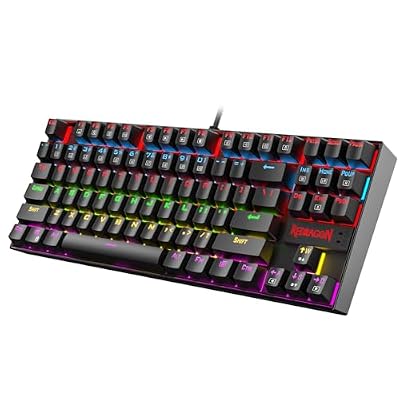
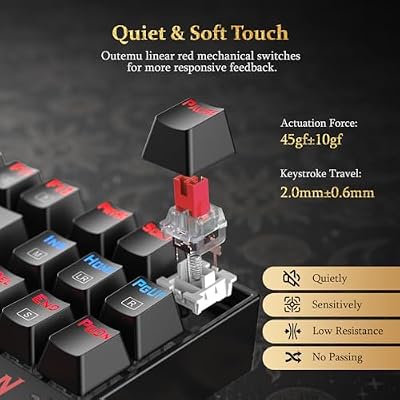
Redragon K552 Mechanical Keyboard, LED Gaming Keyboard with Red Switches | 87-Key TKL Compact, Anti-Ghosting, Metal Frame for PC Gaming & Typing, Beginner-Friendly, Redragon Classic Gaming Keyboard




As an Amazon Associate we earn from qualifying purchases. Product prices and availability are accurate as of the date/time indicated.
The Redragon K552 is a compact alternative for context — a hugely popular tenkeyless (TKL) board rather than a strict 75%. It packs 87 keys into a durable metal-plate frame with mechanical switches and RGB backlighting, and at around $37 it is a long-standing budget favourite known for taking abuse.
This is the keyboard to consider if you like the compact, number-pad-free idea but are open to a tenkeyless layout, which spaces the function row and navigation cluster a little more than a tightly packed 75%. The K552’s solid metal build is its calling card — it feels far sturdier than its price suggests — and the mechanical switches and RGB cover the essentials for gaming. It is listed here as a closely related compact alternative rather than a true 75% board, but for durability-focused buyers it remains a dependable, well-proven choice.
Pros: Very durable metal build, compact 87-key TKL layout, mechanical switches, RGB, low price.
Cons: TKL rather than a strict 75% layout; older design.
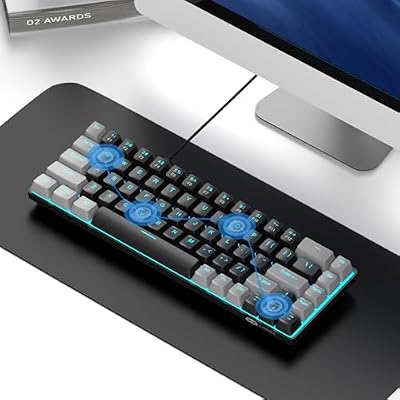
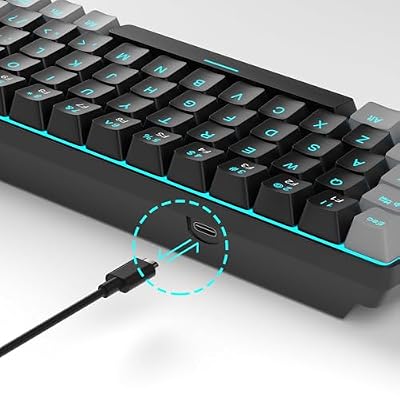
5. MageGee MK-Box 60% Mechanical Gaming Keyboard, 68 Keys

MageGee Portable 60% Mechanical Gaming Keyboard, MK-Box LED Backlit Compact 68 Keys Mini Wired Office Keyboard with Red Switch for Windows Laptop PC Mac - Black/Grey



As an Amazon Associate we earn from qualifying purchases. Product prices and availability are accurate as of the date/time indicated.
The MageGee MK-Box is a smaller 60%-style alternative for buyers weighing an even more compact board. With 68 keys it goes more aggressive than a 75% layout, dropping the dedicated function row to save further space while keeping arrow keys, and it pairs mechanical switches with RGB lighting. At around $27 it is the cheapest option here.
This is the keyboard to consider if maximum desk space and portability matter more to you than a dedicated function row — a 60%-class board like this is even smaller than a 75% and leaves the most room for mouse movement. You access the function keys via a layer shortcut rather than a dedicated row, which is the main trade-off versus the 75% MageGee boards. It is included as a more compact alternative for comparison; if a 75% feels too big, the tiny, affordable MK-Box shows what the next step down looks like.
Pros: Ultra-compact 60%-style layout, mechanical switches, RGB, lowest price here.
Cons: Drops the dedicated function row; smaller than a true 75% board.
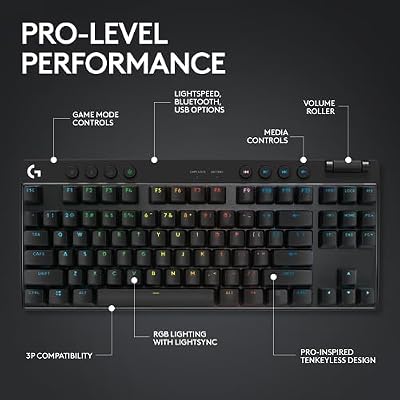
6. Logitech G PRO Tenkeyless Mechanical Gaming Keyboard

Logitech G PRO Mechanical TKL Tenkeyless Gaming Keyboard (Clicky) - Black | Ultra portable, detachable Micro USB cable, 16.8 million color Lightsync backlit keys




As an Amazon Associate we earn from qualifying purchases. Product prices and availability are accurate as of the date/time indicated.
Rounding out the list is the Logitech G PRO Tenkeyless, the premium compact pick aimed at competitive players. It is a tenkeyless (TKL) board built for esports, with reliable mechanical switches, per-key RGB and a detachable cable for easy transport to tournaments. At around $86 it is the most expensive board here and a step up in brand and build.
This is the keyboard for the competitive gamer who wants a proven, tournament-ready compact board from a trusted brand and is open to a tenkeyless layout rather than a strict 75%. The G PRO’s mechanical switches are crisp and consistent, the detachable cable makes it genuinely portable for LAN events, and Logitech’s software allows per-key lighting and remapping. It is a TKL rather than a true 75%, so it is positioned here as a premium compact alternative, but for esports-minded buyers wanting top-tier reliability, the G PRO TKL is a polished, dependable option.
Pros: Premium esports build, reliable mechanical switches, detachable cable, per-key RGB.
Cons: Most expensive here; TKL layout rather than a strict 75%.
How to Choose a 75% Keyboard
Start with what the 75% layout actually is, because it is the whole point. A 75% board, like the two MageGee 75% keyboards here, keeps the function row, arrow keys and a small navigation cluster but drops the number pad and most of the empty space, squeezing roughly 84 to 87 keys into a tight footprint. That saves desk space and brings your mouse closer for more comfortable aim, while still giving you the F-keys and arrows that smaller 60% boards like the MK-Box sacrifice. If you want compact without losing the function row, 75% is the sweet spot.
Switch type is the next and most personal decision, because it defines how the board feels and sounds. Clicky switches like the blue ones in the first MageGee give a tactile bump and an audible click that many typists love but that can be loud in shared spaces. Linear switches like red — in the second MageGee — travel smoothly straight down with no bump, which many gamers prefer for fast, repeated presses and quieter operation. Tactile switches sit in between. There is no objectively best switch; choose the feel and noise level that suits how you type and where you work.
Build quality and enthusiast features separate a basic board from a great one. A gasket-mounted design, as on the EPOMAKER x Aula F75, cushions each keystroke for a softer, more comfortable and better-sounding typing experience than a rigid budget board. Hot-swappable sockets let you change switches without soldering, so you can fine-tune the feel over time, and details like pre-lubed switches and sound-dampening foam add to the premium experience. If typing feel and customisation matter to you, prioritise a gasket-mount, hot-swap board.
Finally, weigh connectivity, layout purity and budget together. Decide whether you want wireless freedom and portability — as the F75 offers — or a simple wired connection, and consider a detachable cable for travel. Be honest about layout too: a couple of picks here are tenkeyless or 60% alternatives rather than strict 75% boards, so confirm you are getting the exact form factor you want. Set your budget, choose your switch feel, decide how much you value gasket mounting and hot-swap, and pick the 75% keyboard on this list that matches how you type and play.
Frequently Asked Questions
What does a 75% keyboard actually keep and drop?
A 75% keyboard keeps the function row (F1 to F12), the arrow keys and a small navigation cluster, while dropping the dedicated number pad and most of the empty spacing of a full-size board. That packs roughly 84 to 87 keys into a compact footprint, as on the MageGee 75% boards here. It is more complete than a 60% board, which sacrifices the function row, but smaller than a full-size or even a tenkeyless layout.
Should I choose blue or red switches for a 75% keyboard?
It depends on feel and noise. Blue switches, like in the first MageGee, are clicky and tactile with an audible click — satisfying for typing but loud in shared rooms. Red switches, in the second MageGee, are smooth linear switches with no bump or click, which many gamers prefer for fast, repeated presses and quieter operation. Neither is objectively better; pick the one that matches your typing feel and how much noise is acceptable in your space.
What is a gasket mount and is it worth it?
A gasket mount suspends the keyboard’s plate between layers of soft gasket material rather than screwing it down rigidly, which cushions each keystroke for a softer, more comfortable feel and a deeper, more pleasant typing sound. The EPOMAKER x Aula F75 here uses one. It is a clear upgrade in typing experience over a rigid budget board, so if feel and sound matter to you, a gasket-mounted board is well worth the extra cost.
What does hot-swappable mean on a keyboard?
Hot-swappable means the switches sit in sockets you can pull out and replace by hand, with no soldering required, as on the EPOMAKER x Aula F75. This lets you try different switch types or replace a faulty switch easily, tailoring the board’s feel over time. If you are curious about experimenting with switches or want long-term flexibility, a hot-swap board is a great choice; if you are happy with one switch type, it is a nice bonus rather than essential.
Related Guides
- Best Mechanical Keyboards
- Best Gaming Keyboards
- Best 60% Keyboards
- Best TKL Keyboards
- Best Wireless Keyboards
- Best Budget Gaming Setup
Affiliate Disclosure: As an Amazon Associate, we earn from qualifying purchases. If you click a link and make a purchase, we may earn a small commission at no extra cost to you. Prices and availability are accurate as of publication and may change.










