

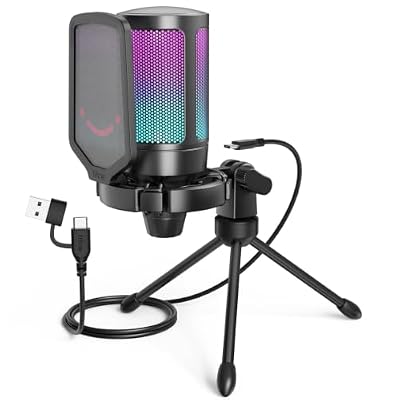
The FIFINE AmpliGame A6 is FIFINE’s RGB-focused budget USB microphone, designed for gamers and streamers who want visible lighting without a flagship price tag. It is a USB condenser with a cardioid pickup pattern, an RGB indicator, a quick-mute control and triple stand options, priced around $33. With more than 14,300 buyer reviews on Amazon it is well established. This FIFINE AmpliGame A6 review covers the type and polar pattern, sound quality, connection and value.
- FIFINE AmpliGame A6 at a Glance
- Microphone Type and Polar Pattern
- Sound Quality and Voice Capture
- Connection and Compatibility (USB / XLR)
- Build, Mute, Monitoring and Software
- Who Is the FIFINE AmpliGame A6 For?
- Pros and Cons
- Is the FIFINE AmpliGame A6 Worth It?
- Frequently Asked Questions
- More Microphone Reviews
- Related Articles
- Related Articles
FIFINE AmpliGame A6V USB Gaming Microphone, Condenser RGB Mic for Streaming | Quick Mute, RGB, Gain Control, Tripod Stand, Pop Filter, Shock Mount, for PC/PS5 Discord Twitch Podcasts Videos YouTube




As an Amazon Associate we earn from qualifying purchases. Product prices and availability are accurate as of the date/time indicated.
🛒 Best Price Today on Amazon
Prime members get fast, free shipping on everything above, plus member-only deals. New members get a 30-day free trial — cancel anytime.
As an Amazon Associate we earn from qualifying purchases.




FIFINE AmpliGame A6 at a Glance
| Feature | Specification |
|---|---|
| Type | USB condenser |
| Connection | USB |
| Polar pattern | Cardioid |
| Sample rate | 16-bit / 48kHz |
| Headphone monitoring | No |
| Mute button | Yes — quick-mute |
| Boom arm / stand | Triple stand options (desktop, mic stand, boom arm thread) |
| Price | Around $33 |
Microphone Type and Polar Pattern
Before getting into the specifics of this microphone it is worth a brief refresher on the two technical decisions that shape every microphone review: connection (USB or XLR) and capsule type (condenser or dynamic). A USB microphone plugs straight into a PC, Mac or recent console with a single cable and is recognised as an input — no audio interface, no phantom power supply, no mixer — which is why USB has become the default for streamers, podcasters and home callers. XLR is the studio standard: the microphone sends its signal down an XLR cable into an audio interface or mixer, which provides the preamp, the phantom power (for condensers) and the conversion to USB for the computer. Hybrid USB/XLR microphones, such as the FIFINE K688 and Samson Q2U covered in this guide, do both — useful if you want to start on USB now and step up to XLR later without changing microphone.
Capsule type matters just as much. A condenser capsule is sensitive and detail-rich, capturing nuance in voice and instruments well — the studio default for vocal recording in a treated or quiet room. The trade-off is that condensers also pick up more of the room: keyboards, fans, traffic and ambient noise sit nearer the front of the recording. A dynamic capsule is less sensitive and rejects background noise far better, which is why dynamics are the broadcast standard and the natural choice for streamers and podcasters in untreated rooms. Polar pattern is the third decision: cardioid picks up from the front and rejects the sides and rear (the default for solo streaming), omnidirectional picks up from all directions, bidirectional picks up front and rear for two-person interviews, and stereo uses two capsules for a left-and-right image. Keep those three choices in mind — they decide more about how a microphone sounds in your room than the brand name on the body does.
Two practical points round out the refresher. First, your room matters more than most buyers expect. A treated or simply quiet room flatters a sensitive condenser; an untreated bedroom or office with a mechanical keyboard, a desk fan and a window onto a busy street will sound noticeably better through a dynamic, regardless of price. Second, the accessories around the microphone — a stable stand or boom arm, a pop filter to handle plosives and a shock mount to keep desk knocks out of recordings — make a real difference to perceived sound. Some microphones in this guide bundle those accessories (the FIFINE T669 kit and the QuadCast 2 line are good examples), others expect you to source them separately. Either way, factor the accessory budget into the buying decision and treat the microphone as one part of a small system rather than a single magic component.
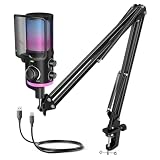
The AmpliGame A6 is a USB condenser — sensitive and detail-rich, well suited to voice work in a quiet room. It is cardioid-only, picking up from the front and rejecting the sides and rear, which is the pattern most streamers and gamers use. The single-pattern design keeps the price down and the interface simple, while the RGB lighting and the quick-mute add the gamer-focused features that distinguish the A6 from a plain budget condenser. For more streaming USB options, see our best streaming microphones guide.
Sound Quality and Voice Capture
The A6’s sound is clearly a step above a laptop or headset microphone — clear cardioid voice capture suitable for streaming, gaming voice chat, podcasts and YouTube. The RGB does not change the audio, but the audio it delivers is well judged for the price. As a condenser it is sensitive to room noise, so a quiet room sounds best; in a noisy environment a dynamic option will reject background better, as covered in our best dynamic microphones roundup.
Connection and Compatibility (USB / XLR)
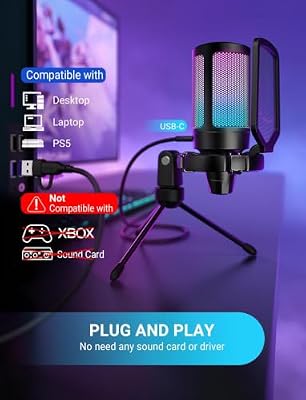
The A6 is USB-only — a single cable to a PC or Mac and it is ready to use. No audio interface, no phantom power, no learning curve. That simplicity is the practical reason RGB USB condensers like the A6 have become popular as gaming-desk upgrades. Buyers who later outgrow USB can apply what they have learnt to our best XLR microphones picks.
Build, Mute, Monitoring and Software
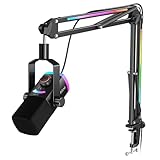
The defining hardware features are the RGB lighting, the quick-mute and the triple stand options. The mute control silences the microphone instantly without diving into software, which is practical mid-game; the RGB lighting cycles through colours for the gamer-desk look; and the triple stand options mean the A6 can be used on its included desktop stand, mounted on a microphone stand or fitted to a boom arm without buying any extra hardware. There is no on-mic headphone jack for monitoring. It is a sensibly equipped microphone at the price.
Who Is the FIFINE AmpliGame A6 For?
The AmpliGame A6 is for the gamer or streamer who wants visible RGB lighting and a quick-mute button on a tight budget. If you stream or record on camera, value the gaming-desk look, want a quick-mute that does not require alt-tabbing out of a game, and want the option to mount the microphone in different ways without buying accessories, it is squarely your microphone. It is less suited to off-camera podcasters, who can save by choosing a non-RGB mic, and to those who need headphone monitoring or multiple polar patterns.
Pros and Cons
Pros: RGB lighting; quick-mute control; triple stand options for flexible mounting; clear cardioid voice capture; accessible price; plug-and-play USB.
Cons: No headphone monitoring; single polar pattern; condenser capsule picks up room noise; RGB is not relevant to off-camera creators.
Is the FIFINE AmpliGame A6 Worth It?
Around $33 the FIFINE AmpliGame A6 is a well-judged budget gaming microphone. The RGB lighting and quick-mute deliver visible, practical features at a price that does not require flagship spend, the triple stand options add genuine flexibility and the clear cardioid voice capture covers gaming voice chat and streaming. The missing headphone monitoring is an honest omission. For RGB-loving gamers and streamers on a budget it is easy to recommend. Off-camera podcasters should compare with our best USB microphones roundup.
Frequently Asked Questions
Does the FIFINE AmpliGame A6 have RGB lighting?
Yes. The A6’s RGB indicator cycles through colours, designed for streamers and gamers who want their microphone to match the RGB look of their desk.
Does the A6 have a mute button?
Yes. A quick-mute control silences the microphone instantly without diving into software, which is practical during a game or stream.
What stand options does the A6 support?
Three. The A6 can be used on its included desktop stand, mounted on a standard microphone stand or fitted to a boom arm — no extra accessories needed for any of these.
Is the A6 USB or XLR?
It is USB-only. A single cable connects it to a PC or Mac — no audio interface, mixer or XLR cables are required.
More Microphone Reviews
- FIFINE K688 USB/XLR Dynamic Microphone Review
- Elgato Wave:3 USB Condenser Microphone Review
- Audio-Technica AT2020 XLR Condenser Microphone Review
- Shure SM58 Dynamic Vocal Microphone Review
- Shure SM7B Dynamic Broadcast Microphone Review
- RØDE PodMic Dynamic Microphone Review
- Samson Q2U USB/XLR Dynamic Microphone Pack Review
- Logitech Blue Yeti USB Microphone Review
Affiliate Disclosure: As an Amazon Associate, we earn from qualifying purchases. If you click a link and make a purchase, we may earn a small commission at no extra cost to you. Prices and availability are accurate as of publication and may change.
Related Articles
Looking for more on this topic? Browse the hand-picked guides below — each one applies the same scoring rubric used in this review.










