

- Top Pick: ASRock B850M-X WiFi R2.0 AM5 Micro-ATX Motherboard: Supports AMD Ryzen 9000/8000/7000 CPUs, DDR5 8200+ (OC), PCIe 5.0, Wi-Fi 6E, 2.5G LAN, USB-C, BIOS Flashback
- Best Value: GIGABYTE B650 AORUS Elite AX AMD AM5 ATX Motherboard, Support Ryzen 9000/8000/7000 Series, DDR5, 14+2+1 Power Phase, PCIe 5.0 M.2, USB-C 3.2 Gen 2, WIFI6E, 2.5GbE, EZ-Latch, Q-Flash, RGB Fusion
- Premium Choice: MSI MAG B850 Tomahawk MAX WiFi Motherboard, ATX – Supports AMD Ryzen 9000/8000 / 7000 Processors, AM5-80A SPS VRM, DDR5 Memory Boost 8400+ MT/s (OC), PCIe 5.0 x16, M.2 Gen5, Wi-Fi 7, 5G LAN
🛒 Best Price Today on Amazon
Prime members get fast, free shipping on everything above, plus member-only deals. New members get a 30-day free trial — cancel anytime.
- Top Motherboards Pcie Picks for 2026
- Best PCIe 5.0 Motherboards at a Glance
- 1. ASUS ROG Strix X870-A Gaming WiFi AMD AM5 X870 ATX Motherboard
- 2. MSI MAG X870 Tomahawk WiFi Gaming Motherboard AMD AM5
- 3. GIGABYTE Z790 AORUS Elite AX LGA 1700 ATX Motherboard
- 4. MSI B760 Gaming Plus WiFi Gaming Motherboard (12th/13th/14th Gen Intel)
- 5. GIGABYTE B650 Eagle AX AM5 AMD B650 ATX Motherboard, DDR5
- 6. GIGABYTE B650M AORUS Elite AX AMD AM5 mATX Motherboard
- How to Choose a PCIe 5.0 Motherboard
- Frequently Asked Questions
- Related Guides
- Related Articles
Top Motherboards Pcie Picks for 2026
Here are our current top motherboards pcie picks, compared on real Amazon owner reviews, price, and features. Live prices update below.
As an Amazon Associate we earn from qualifying purchases at no extra cost to you.


PCIe 5.0 doubles the bandwidth of a single Gen4 lane, and a board that exposes it gives you headroom for the fastest graphics cards and the quickest Gen5 NVMe SSDs as they arrive. The catch is that not every modern motherboard actually delivers it: many mainstream chipsets still wire their primary slots to PCIe 4.0, so the chipset name on the box does not guarantee a Gen5 graphics or storage slot. This guide rounds up the best motherboards for a PCIe 5.0 build in 2026 and is explicit about which boards give you genuine Gen5 connectivity and which are PCIe 4.0 designs you should buy for other reasons.
Our picks were chosen on what matters for future-proof connectivity: whether the primary x16 graphics slot runs at PCIe 5.0, whether at least one M.2 slot is Gen5, plus VRM quality, DDR5 support and overall value. We have included a deliberate spread across AMD AM5 and Intel LGA 1700, with prices from around $139 up to around $259, and we lead with the boards that offer the strongest Gen5 story. Where a board is PCIe 4.0 only we say so plainly rather than imply a Gen5 spec it does not have. Below you will find an at-a-glance comparison, then a closer look at each board and a buyer’s guide focused on getting real PCIe 5.0 out of your next platform.
Best PCIe 5.0 Motherboards at a Glance
| Motherboard | Best For | Standout Spec | Approx Price |
|---|---|---|---|
| ASUS ROG Strix X870-A Gaming WiFi | Premium AM5 Gen5 build | PCIe 5.0 GPU + Gen5 M.2, strong VRM | around $259 |
| MSI MAG X870 Tomahawk WiFi | AM5 value Gen5 enthusiast | PCIe 5.0 ready, USB4, robust power | around $223 |
| GIGABYTE Z790 AORUS Elite AX | Intel LGA 1700 Gen5 build | PCIe 5.0 x16 slot, DDR5, 14th Gen | around $189 |
| MSI B760 Gaming Plus WiFi | Budget Intel (PCIe 4.0) | 12th-14th Gen, DDR5 — Gen4 slots | around $159 |
| GIGABYTE B650 Eagle AX | Budget AM5 (PCIe 4.0) | AM5, DDR5, triple M.2 — Gen4 x16 | around $139 |
| GIGABYTE B650M AORUS Elite AX | Compact AM5 mATX (PCIe 4.0) | mATX AM5, DDR5 — Gen4 graphics slot | around $139 |
1. ASUS ROG Strix X870-A Gaming WiFi AMD AM5 X870 ATX Motherboard

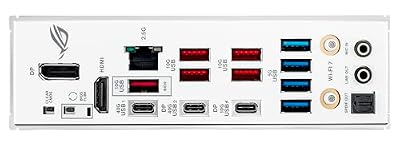
ASUS ROG Strix X870-A Gaming WiFi AMD AM5 X870 ATX Motherboard 16+2+2 Power Stages, Dynamic OC Switcher, Core Flex, DDR5 AEMP, WiFi 7, 4X M.2, PCIe® 5.0, Q-Release Slim, USB4®, AI OCing & Networking


As an Amazon Associate we earn from qualifying purchases. Product prices and availability are accurate as of the date/time indicated.
The ASUS ROG Strix X870-A is the premium pick for a true PCIe 5.0 build. As an X870 board on AMD’s AM5 platform, it is part of the chipset generation designed around Gen5 connectivity, pairing a PCIe 5.0 primary graphics slot with a Gen5 M.2 slot so both your fastest graphics card and the quickest NVMe SSDs have full bandwidth. A 16+2+2 power stage backs it for high-end Ryzen chips. At around $259 it is the most expensive board here, and the Gen5-everywhere story is the reason.
This is the board to choose if PCIe 5.0 is the whole point of your build and you want headroom for years. The X870 platform mandates modern connectivity, so you get USB4 alongside the Gen5 GPU and storage slots, the strong VRM handles flagship Ryzen 9000 parts under load, and DDR5 support keeps memory current. If you want a no-compromise AM5 foundation that exposes PCIe 5.0 for both graphics and the fastest SSDs, the ROG Strix X870-A is the standout.
Pros: Genuine PCIe 5.0 GPU and Gen5 M.2, USB4, robust 16+2+2 VRM for high-end Ryzen.
Cons: Highest price here; overkill if you do not need flagship Gen5 connectivity.
2. MSI MAG X870 Tomahawk WiFi Gaming Motherboard AMD AM5
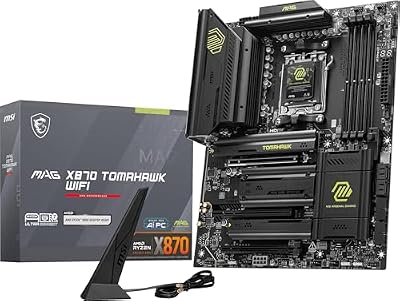
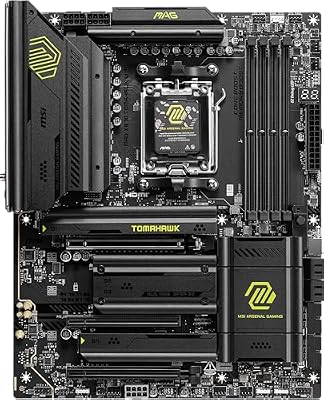
MSI MAG X870 Tomahawk WiFi Gaming Motherboard (AMD Ryzen 9000/8000/7000 Series Processors, AM5, DDR5, PCIe 5.0, M.2 Gen5, SATA 6Gb/s, USB 40Gbps, HDMI/DP, Wi-Fi 7, Bluetooth 5.4, 5Gbps LAN, ATX)


As an Amazon Associate we earn from qualifying purchases. Product prices and availability are accurate as of the date/time indicated.
The MSI MAG X870 Tomahawk is the value enthusiast pick for PCIe 5.0 on AM5. Like the ASUS X870-A it sits on the X870 chipset, which is built around Gen5, so it delivers a PCIe 5.0 graphics slot and Gen5 M.2 support together with modern USB4 connectivity. It supports Ryzen 9000, 8000 and 7000 series chips on a sturdy power delivery, and at around $223 it undercuts the premium ASUS board while keeping the core Gen5 capabilities.
This is the board for the enthusiast who wants real PCIe 5.0 connectivity without paying flagship money. The Tomahawk line is known for solid VRMs and no-nonsense feature sets, so you get the Gen5 graphics slot and fast NVMe support that justify the platform, broad Ryzen compatibility, and a clean DDR5 layout. If you are building a future-minded AM5 system and want the X870 Gen5 feature set at a more sensible price, the X870 Tomahawk is the smart middle ground.
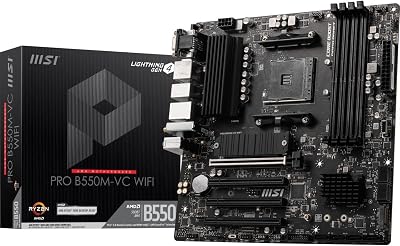
Pros: PCIe 5.0 ready X870 platform, Gen5 M.2, USB4, robust VRM, broad Ryzen support.
Cons: Fewer premium extras than top-tier boards; still a higher-tier price.
3. GIGABYTE Z790 AORUS Elite AX LGA 1700 ATX Motherboard
The GIGABYTE Z790 AORUS Elite AX is the pick for a PCIe 5.0 build on Intel’s LGA 1700 platform. The Z790 chipset pairs a PCIe 5.0 x16 graphics slot with DDR5 support and compatibility for Intel 12th, 13th and 14th Gen Core processors, giving the Intel crowd a genuine Gen5 graphics slot for the fastest cards. At around $189 it is a well-equipped Z790 board with solid power delivery and Wi-Fi.
This is the board to choose if you are committed to Intel and want PCIe 5.0 for your graphics card. The Z790 platform exposes a Gen5 x16 slot, so a high-bandwidth GPU runs with full lanes, the AORUS Elite’s VRM and cooling support 14th Gen chips comfortably, and DDR5 keeps the memory side current. If your CPU choice is LGA 1700 rather than AM5, this is the strongest, best-value PCIe 5.0 option on the list.
Pros: PCIe 5.0 x16 graphics slot on Z790, DDR5, 12th-14th Gen support, solid VRM and Wi-Fi.
Cons: LGA 1700 is a mature platform; confirm Gen5 M.2 needs against your model.
4. MSI B760 Gaming Plus WiFi Gaming Motherboard (12th/13th/14th Gen Intel)
The MSI B760 Gaming Plus WiFi is an excellent mainstream Intel board, but in the context of PCIe 5.0 it is important to be honest: B760 is a Gen4-class chipset, and boards like this typically run their primary graphics slot at PCIe 4.0 rather than 5.0. It supports 12th, 13th and 14th Gen Intel CPUs with DDR5 and Wi-Fi, and at around $159 it is a strong value pick — just not a true Gen5 graphics platform.
This is the board to choose if you want a dependable, affordable LGA 1700 foundation and do not specifically need a PCIe 5.0 graphics slot. Current and near-future graphics cards run effectively on PCIe 4.0, so for most gamers the Gen4 x16 slot here is no real bottleneck. We include it for buyers comparing options, with the clear caveat that if guaranteed PCIe 5.0 connectivity is your priority you should step up to the Z790 AORUS or an X870 board above.

Pros: Great-value LGA 1700 board, DDR5, Wi-Fi, broad Intel CPU support.
Cons: PCIe 4.0 class — not a true PCIe 5.0 graphics platform; choose Z790/X870 for Gen5.
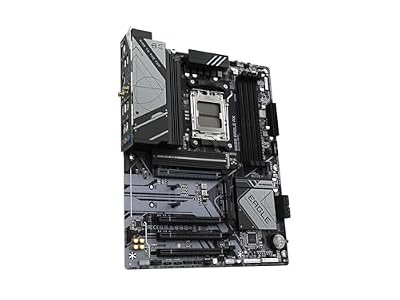
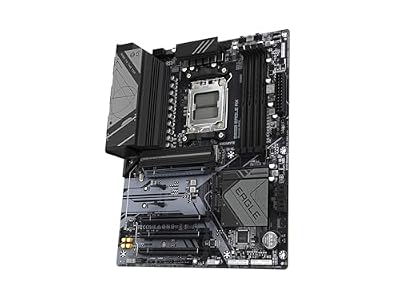
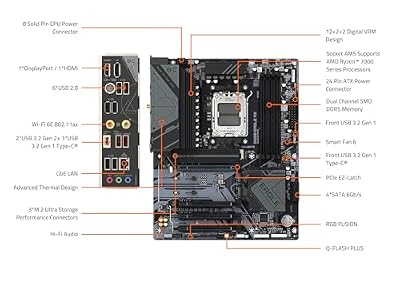
5. GIGABYTE B650 Eagle AX AM5 AMD B650 ATX Motherboard, DDR5

GIGABYTE B650 Eagle AX AM5 LGA 1718 ATX Motherboard, DDR5, Triple M.2 Slots (1x PCIe 5.0, 2X PCIe 4.0), USB 3.2 Gen2x2 Type-C, WiFi 6E, Realtek GbE LAN



As an Amazon Associate we earn from qualifying purchases. Product prices and availability are accurate as of the date/time indicated.
The GIGABYTE B650 Eagle AX is a popular budget AM5 board, and here too honesty matters for a PCIe 5.0 guide: B650 boards commonly wire the primary graphics slot at PCIe 4.0, reserving Gen5 (where present) for an M.2 slot rather than the GPU. The Eagle AX offers AM5 support, DDR5 and a generous triple-M.2 layout with Wi-Fi, and at around $139 it is one of the best-value entry points to the AM5 ecosystem.
This is the board to choose for an affordable Ryzen build where storage expansion and value matter more than a Gen5 graphics slot. The triple M.2 support is genuinely useful for adding NVMe drives, AM5 keeps you on a current socket with an upgrade path, and DDR5 is standard. For a PCIe 5.0 graphics slot specifically, though, look to the X870 boards above — we list the Eagle AX as a strong budget AM5 option, not as a Gen5 GPU platform.
Pros: Affordable AM5 entry, DDR5, triple M.2 storage, Wi-Fi, solid value.
Cons: Primary graphics slot is PCIe 4.0 class — not a Gen5 GPU board; X870 for that.
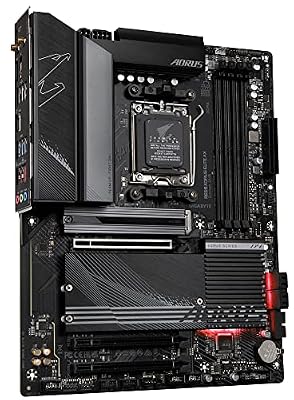
6. GIGABYTE B650M AORUS Elite AX AMD AM5 mATX Motherboard

GIGABYTE B650 AORUS Elite AX AMD AM5 ATX Motherboard, Support Ryzen 9000/8000/7000 Series, DDR5, 14+2+1 Power Phase, PCIe 5.0 M.2, USB-C 3.2 Gen 2, WIFI6E, 2.5GbE, EZ-Latch, Q-Flash, RGB Fusion



As an Amazon Associate we earn from qualifying purchases. Product prices and availability are accurate as of the date/time indicated.
Rounding out the list is the GIGABYTE B650M AORUS Elite AX, a well-regarded compact AM5 board in the micro-ATX form factor. As with the other B650 entry, the PCIe 5.0 caveat applies: B650M boards generally run the graphics slot at PCIe 4.0, so this is not a Gen5 GPU platform even though it supports modern Ryzen 9000, 8000 and 7000 chips with DDR5. At around $139 it is a strong-value small-form-factor option with Wi-Fi.
This is the board to choose if you are building a compact mATX Ryzen system and value the smaller footprint and AORUS build quality. The micro-ATX size suits smaller cases, AM5 keeps you on a current socket, and DDR5 support is standard. We include it for buyers weighing form factors, but with the same clear caveat as the other B650 board: if a PCIe 5.0 graphics slot is essential, an X870 board is the right choice rather than a B650M.

Pros: Compact mATX AM5 board, DDR5, AORUS build quality, broad Ryzen support, Wi-Fi.
Cons: PCIe 4.0 class graphics slot — not a Gen5 GPU board; pick X870 for that.
How to Choose a PCIe 5.0 Motherboard
The single most important thing to verify is exactly where PCIe 5.0 actually appears on the board, because not all Gen5 is equal. Some boards put PCIe 5.0 on the primary x16 graphics slot, some put it only on an M.2 storage slot, and many mainstream boards have no Gen5 at all. On this list the X870 boards (ASUS X870-A and MSI X870 Tomahawk) and the Z790 AORUS deliver Gen5 graphics connectivity, while the B650 and B760 boards are PCIe 4.0 class for the GPU. Read the slot specification, not just the chipset name.
Match the chipset to the connectivity you genuinely need. On AMD’s AM5 platform, X870 and X870E are the chipsets built around Gen5 graphics and USB4, whereas B650 typically reserves any Gen5 for an M.2 slot and runs the GPU slot at PCIe 4.0. On Intel’s LGA 1700, Z790 boards expose a PCIe 5.0 x16 slot while B760 stays Gen4. If a Gen5 GPU slot is the goal, choose X870 or Z790; if you only want Gen5 storage or simply a current platform, the value boards still make sense.
Do not overlook whether you actually benefit from PCIe 5.0 today. Current graphics cards run with no meaningful penalty on a PCIe 4.0 x16 slot, so for many gamers the Gen5 graphics slot is about future headroom rather than present-day speed. Gen5 NVMe SSDs are where the bandwidth shows most clearly, and even there the difference is workload-dependent. Decide whether you are buying for the next card and drive you will own, or for the hardware you have now, and let that set how much you spend chasing Gen5.
Finally, weigh VRM quality, memory and the rest of the package, because a board is more than one slot. All six boards here support DDR5, but power delivery varies — the ROG Strix X870-A’s 16+2+2 stage and the X870 Tomahawk’s robust VRM suit high-end chips, while the value boards target mainstream parts. Confirm CPU socket and supported processors (AM5 versus LGA 1700), check M.2 and connectivity, set your budget, and pick the board on this list that gives you the right balance of genuine PCIe 5.0 and everything else your build needs.
Frequently Asked Questions
Do all modern motherboards have PCIe 5.0?
No — and this trips up a lot of buyers. Many mainstream boards run their primary graphics slot at PCIe 4.0 even on recent platforms. On this list the X870 boards and the Z790 AORUS deliver Gen5 graphics connectivity, while the B650 and B760 boards are PCIe 4.0 class for the GPU. Always check the slot specification rather than assuming the chipset name guarantees Gen5.
Which boards here actually give a PCIe 5.0 graphics slot?
The ASUS ROG Strix X870-A, the MSI MAG X870 Tomahawk and the GIGABYTE Z790 AORUS Elite AX expose a PCIe 5.0 x16 graphics slot. The MSI B760 Gaming Plus and both GIGABYTE B650 boards are PCIe 4.0 class for the GPU — they are good value boards, but not true Gen5 graphics platforms, so we flag them clearly.
Will my graphics card run slower on PCIe 4.0 instead of 5.0?
For current cards, the difference is negligible — a modern GPU runs with no meaningful penalty on a PCIe 4.0 x16 slot. PCIe 5.0 graphics connectivity is mainly about future headroom for cards that may eventually use the extra bandwidth. If you want guaranteed Gen5 for the long term, choose an X870 or Z790 board; if you are building for today’s hardware, a Gen4 board is fine.
AM5 or LGA 1700 for a PCIe 5.0 build?
Both can deliver PCIe 5.0 graphics with the right chipset. On AMD AM5, choose X870 (as on the ASUS and MSI boards here) for Gen5 plus USB4 and a long socket life. On Intel LGA 1700, a Z790 board like the GIGABYTE AORUS exposes a Gen5 x16 slot. Pick the platform that matches your preferred CPU, then confirm the specific board lists a PCIe 5.0 graphics slot.
Related Guides
- Best Gaming PC Builds
- Best NVMe SSDs
- Best DDR5 RAM
- Best CPUs for Gaming
- Best GPUs for Your Build
- Best Power Supplies
Affiliate Disclosure: As an Amazon Associate, we earn from qualifying purchases. If you click a link and make a purchase, we may earn a small commission at no extra cost to you. Prices and availability are accurate as of publication and may change.










